Omnibus Directive - price tracking
La Directiva Omnibus (EU 2019/2161) está en vigor en Polonia desde el 1 de enero de 2023. Con cada reducción de precio debes mostrar el precio más bajo de los últimos 30 días. El plugin realiza automáticamente el seguimiento del historial de precios y muestra esta información junto a las promociones.
Cómo funciona el seguimiento de precios
Sección titulada «Cómo funciona el seguimiento de precios»El plugin registra cada cambio de precio de un producto (incluidas las variaciones) en la base de datos. Cuando un producto está “en oferta”, el plugin calcula el precio más bajo de los últimos 30 días y lo muestra a los clientes.
El seguimiento comienza tras activar el módulo. Si un producto aún no tiene historial de precios, se muestra un mensaje de marcador de posición.
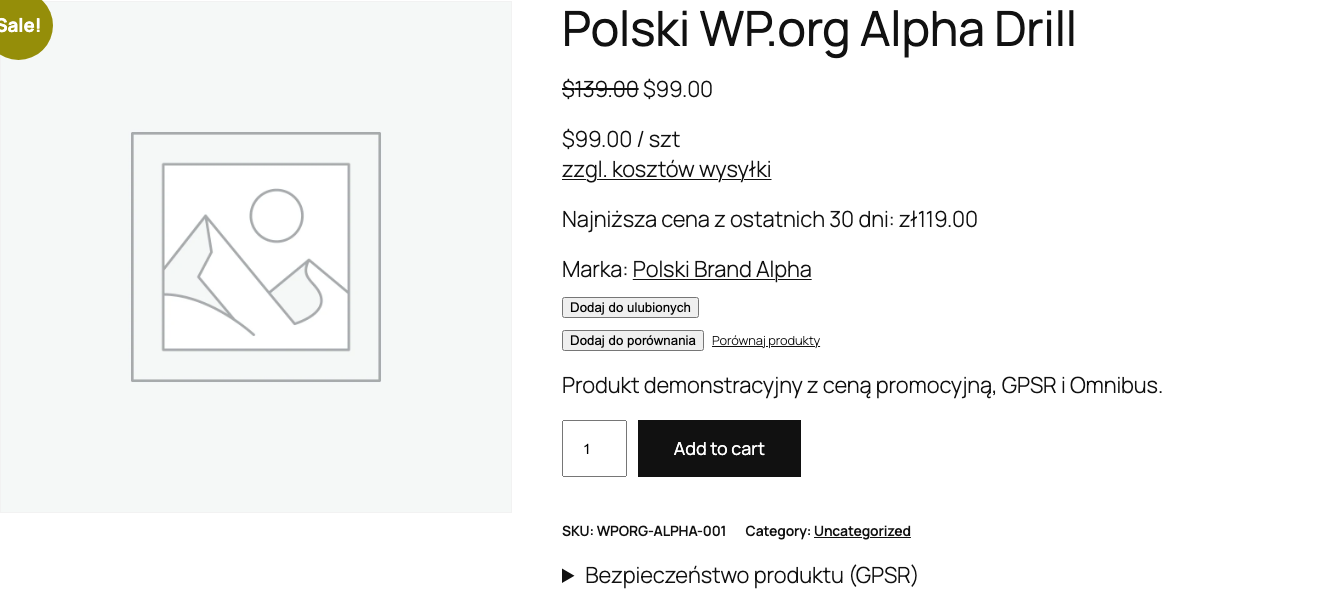
Configuración
Sección titulada «Configuración»Ve a Polski > Ajustes > Impuestos y precios y configura las opciones disponibles.
Periodo de seguimiento
Sección titulada «Periodo de seguimiento»| Opción | Descripción | Valor predeterminado |
|---|---|---|
days |
Número de días hacia atrás para calcular el precio más bajo | 30 |
prune_after_days |
Tras cuántos días eliminar las entradas antiguas del historial | 90 |
prune_after_days controla el tamaño de la tabla de la base de datos. Un valor de 90 significa que los datos con más de 90 días de antigüedad se eliminan automáticamente.
Impuestos
Sección titulada «Impuestos»No hay una opción de impuestos propia. El precio Omnibus se muestra con o sin IVA exactamente como WooCommerce muestra el precio a su lado (WooCommerce > Ajustes > Impuestos, visualización en la tienda y en el carrito).
Ubicaciones de visualización
Sección titulada «Ubicaciones de visualización»| Opción | Descripción | Valor predeterminado |
|---|---|---|
display_on_sale_only |
Mostrar solo en productos en oferta | true |
show_on_single |
Página de producto individual | true |
show_on_loop |
Lista de productos (categoría, tienda) | false |
show_on_related |
Productos relacionados | false |
show_on_cart |
Carrito | false |
Actívalo al menos en la página del producto (show_on_single). En la lista de productos (show_on_loop) ocupa más espacio, pero algunas interpretaciones de la normativa lo exigen.
Precio regular
Sección titulada «Precio regular»| Opción | Descripción | Valor predeterminado |
|---|---|---|
show_regular_price |
Mostrar también el precio regular junto al precio Omnibus | false |
Plantilla de texto
Sección titulada «Plantilla de texto»| Opción | Descripción | Valor predeterminado |
|---|---|---|
display_text |
Plantilla del mensaje mostrado | Precio más bajo de los últimos {days} días antes de la rebaja: {price} |
no_history_text |
Texto cuando no hay historial de precios | No hay datos disponibles del precio anterior |
Variables disponibles en la plantilla display_text:
{price}- precio más bajo del periodo indicado{days}- número de días (por defecto 30){date}- fecha del precio más bajo{regular_price}- precio regular del producto (antes de la promoción)
Ejemplos de plantillas
Sección titulada «Ejemplos de plantillas»Precio más bajo de los últimos {days} días antes de la rebaja: {price}Precio más bajo de los últimos {days} días: {price} (precio regular: {regular_price})Omnibus: {price} (del {date})Método de cálculo del precio
Sección titulada «Método de cálculo del precio»| Opción | Descripción | Valor predeterminado |
|---|---|---|
price_count_from |
Desde cuándo contar los 30 días | sale_start |
Valores disponibles:
sale_start- desde la fecha de inicio de la oferta (recomendado por UOKiK)current_date- desde la fecha actual
Productos variables
Sección titulada «Productos variables»| Opción | Descripción | Valor predeterminado |
|---|---|---|
variable_tracking |
Método de seguimiento de variantes | per_variation |
Valores disponibles:
per_variation- seguimiento separado para cada variante (recomendado)parent_only- seguimiento solo del precio del producto padre
per_variation ofrece datos más precisos, ya que cada variante puede tener un precio y un historial de rebajas distintos.
Shortcode
Sección titulada «Shortcode»Usa el shortcode [polski_omnibus_price] para mostrar la información del precio más bajo en cualquier lugar del sitio.
Uso básico
Sección titulada «Uso básico»[polski_omnibus_price]Muestra el precio Omnibus del producto actual.
Con parámetros
Sección titulada «Con parámetros»[polski_omnibus_price product_id="456" days="30"]Parámetros del shortcode
Sección titulada «Parámetros del shortcode»| Parámetro | Descripción | Valor predeterminado |
|---|---|---|
product_id |
ID del producto | Producto actual |
days |
Número de días | Valor de los ajustes |
Ejemplo de uso en una plantilla PHP
Sección titulada «Ejemplo de uso en una plantilla PHP»echo do_shortcode('[polski_omnibus_price product_id="' . $product_id . '"]');Limpieza automática del historial
Sección titulada «Limpieza automática del historial»WP-Cron elimina a diario las entradas del historial de precios con más antigüedad que prune_after_days. La tabla de la base de datos no crece sin límite.
Para forzar la limpieza manualmente, puedes usar WP-CLI:
wp cron event run polski_omnibus_pruneCumplimiento de las directrices de UOKiK
Sección titulada «Cumplimiento de las directrices de UOKiK»Directrices de UOKiK:
- La información del precio más bajo debe mostrarse en cada anuncio de rebaja
- El periodo de referencia son 30 días antes de aplicar la rebaja
- Para productos vendidos durante menos de 30 días - indica el precio más bajo desde la fecha de introducción a la venta
- Para productos perecederos - el periodo puede acortarse
El plugin aplica estas directrices de forma predeterminada. La opción price_count_from en sale_start cuenta desde la fecha de inicio de la oferta, conforme a las recomendaciones de UOKiK.
Solución de problemas
Sección titulada «Solución de problemas»El precio Omnibus no se muestra
Comprueba que el producto tenga un precio de oferta configurado en WooCommerce. Con la opción display_on_sale_only activada, el mensaje aparece solo durante una promoción activa.
Se muestra un mensaje de falta de historial El seguimiento de precios comienza tras activar el módulo. Espera a un cambio de precio o guarda de nuevo el producto para añadir la primera entrada al historial.
El precio Omnibus es igual que el precio de oferta Este es el comportamiento correcto si el producto no ha tenido un precio más bajo en los últimos 30 días.
Próximos pasos
Sección titulada «Próximos pasos»- Notificar problemas: GitHub Issues
- Debates y preguntas: GitHub Discussions