WooCommerce tiered pricing: quantity and bulk discounts
By Mariusz Szatkowski · Updated: 2026-09-11
Selling more units per order is one of the cleanest ways to raise average order value, and quantity discounts are how most stores do it. WooCommerce, on its own, sells everything at a single price per product. There is no concept of “buy more, pay less” anywhere in the core: the price you set on the product is the price every customer pays, whether they buy one unit or a hundred. To reward larger orders you need tiered pricing. This guide explains how tiered, quantity and volume pricing works, when it actually helps, what a good implementation needs, and how the free Tiers plugin adds the whole mechanism to WooCommerce without slowing the product page down.
What tiered pricing is
Tiered pricing sets the per-unit price by quantity. Instead of one fixed price, a product has a small ladder of quantity bands, each with its own price:
- 1 to 4 units at the standard price
- 5 to 9 units at a lower price
- 10 or more at a lower price still
The terms tiered, quantity and volume pricing all describe this same mechanism. The thresholds are the breakpoints, the lower prices are the tiers, and the goal is simple: make a bigger order the obviously better deal, so the shopper rounds up rather than buying the bare minimum.
One detail matters more than it first appears: what happens when a quantity could fall into more than one band. If you have a 5+ tier and a 10+ tier, and a customer carts 12 units, which price do they get? The sensible answer is the deepest one they qualify for, the 10+ price, because that is the band they have genuinely reached. A tool that applies the shallower discount instead quietly underpays the customer and trains them to distrust the table.
Note: When a cart quantity matches more than one band, the deepest qualifying tier wins, so 12 units takes the 10+ price rather than the 5+ price. That is the band the customer has genuinely reached.
Why it raises average order value
A single price asks the customer one question: yes or no. A tiered price reframes the decision around how many. When the saving from the next band is visible, a meaningful share of shoppers move up to reach it, which lifts the units per order without any extra traffic and without discounting small orders at all. You only give the discount to people who buy enough to earn it.
It is most effective for consumables, supplies, components, ingredients, and anything bought in repeat quantities, the kinds of products where the customer was always going to need more eventually and just needs a reason to stock up now. It works less well for one-off, considered purchases, where nobody buys ten of the same item regardless of the price. Knowing which side of that line your catalogue sits on is the difference between a discount that funds growth and one that just gives margin away.
Show the bands on the product page
The discount only works if the shopper sees it before the cart. A price table on the product page, listing each quantity band and its discount, does that job. It removes the guesswork: the customer can read exactly what ten units cost versus five, and decide on the spot rather than carting one unit, noticing a discount later, and going back. The whole point of volume pricing is to influence the quantity decision, and that decision happens on the product page.
Tip: Show the price table on the product page, not just in the cart. A shopper who can read what ten units cost versus five decides on the spot rather than carting one unit and noticing the discount too late.
A table rendered on the server keeps this fast and honest. There is no script to download and run before the table appears, and because the markup is present in the initial HTML, the table reserves its own space and does not shove the rest of the page around as it loads. That matters for both the shopper’s experience and for Core Web Vitals, where late-arriving content is a common cause of layout shift. Tiers for WooCommerce renders its quantity table server-side as a plain HTML table, with no jQuery and no client-side rendering step, for exactly this reason.
What a good tiered-pricing tool needs
Whether you build, buy or install, a volume-pricing tool for WooCommerce should cover a handful of fundamentals. Use this as a checklist:
- Flexible breakpoints. You set the quantities and the discounts, not a fixed two-tier template. Real catalogues need different ladders for different price points.
- Correct tier selection. When a cart quantity matches several bands, the deepest qualifying band must win, so the customer always gets the price the table promises.
- Automatic application in the cart. The discount should apply the moment the quantity qualifies, with no coupon to type and nothing for the customer to remember.
- A clear price table on the product page. Shoppers need to see the ladder before they choose a quantity.
- No performance penalty. The table should be server-rendered and free of render-blocking scripts, so it adds no measurable weight and causes no layout shift.
- Plays nicely with coupons and tax. Tiered pricing should sit underneath WooCommerce’s own coupon and tax logic, not fight it.
- Never raises a price. A product already on sale should keep its lower price; a “discount” tool that accidentally increases a price is worse than none.
- Clean uninstall. Settings stored simply, no orphaned custom tables left behind.
Notice what is deliberately modest about that list. Volume pricing does not need to be a sprawling rules engine to be useful. The common case, the same quantity ladder applied across the store, covers most of the value, and the more elaborate per-product and per-role rules are a separate layer you add only when you actually need them.
How Tiers handles it
Tiers is a free, open-source plugin that adds the whole mechanism above. You set the breakpoints, the discount applies automatically in the cart, and the same breakpoints are shown as a table on the product page so people can see the price they would pay before they add to cart.
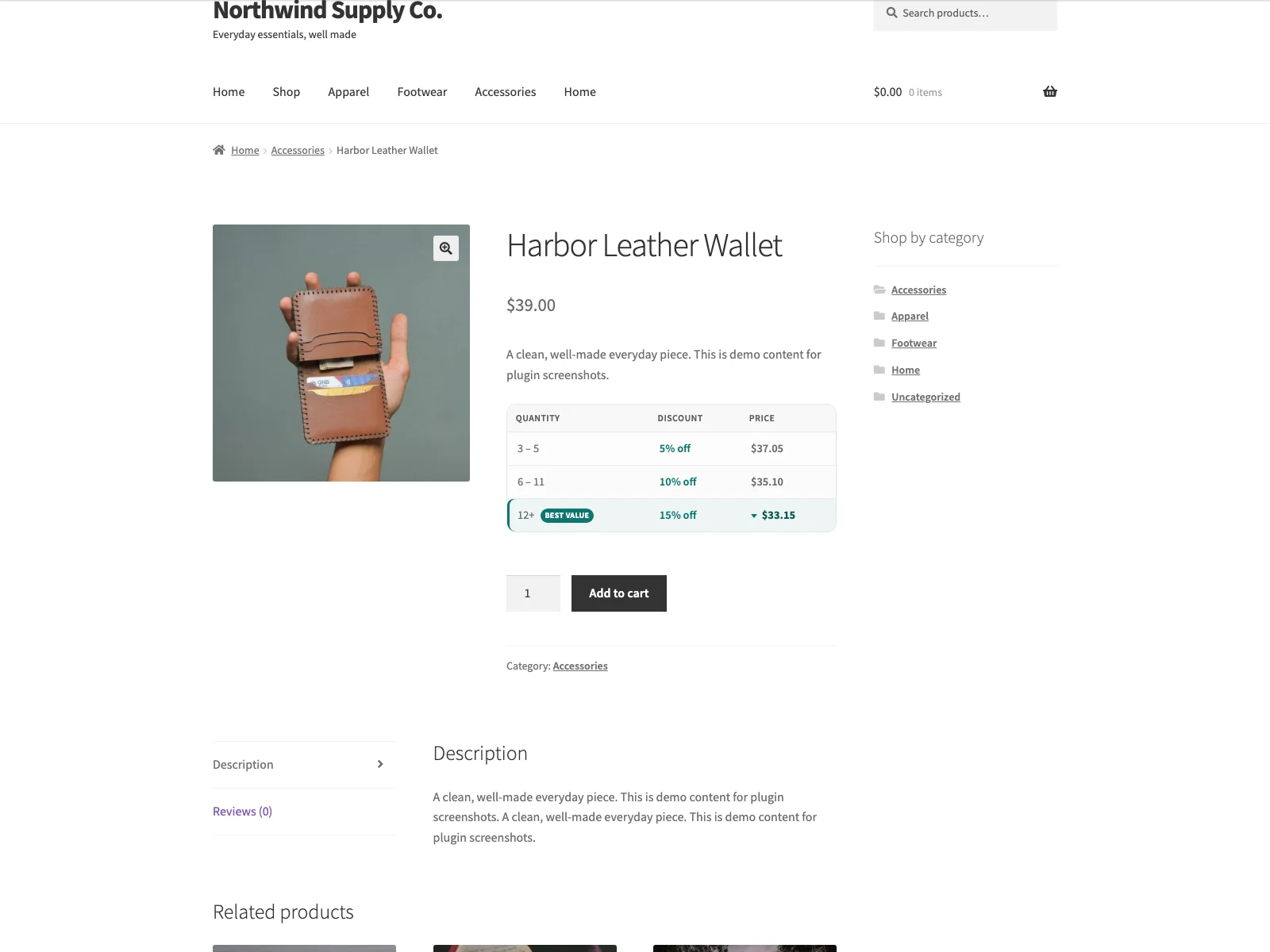 Tiers shows every quantity band and its discount on the product page, before the shopper adds to cart.
How the discount is calculated
Tiers calculates the discount in PHP on the woocommerce_before_calculate_totals hook, so the pricing logic ships no front-end JavaScript at all. When a quantity matches more than one tier, the deepest qualifying tier wins: 12 units in the cart takes the “10+” price, not the “5+” price, because the tiers are evaluated from lowest to highest minimum quantity and the last match is the one applied. Tiers never raises a price either, so a product that is already on sale keeps its lower price rather than being bumped up to a tier figure.
Because the change happens before WooCommerce works out totals, the rest of the store behaves normally on top of it. Standard WooCommerce coupons still apply to the already-discounted line, and WooCommerce’s tax logic runs on the discounted price rather than the original, so the numbers reconcile the way you would expect.
Note: Because the tier price is applied before WooCommerce works out totals, standard coupons still apply on top of the discounted line and WooCommerce’s tax logic runs on the discounted price.
The pricing table on the product page
The product-page table is a plain HTML <table> printed server-side, with <th scope> headers and a <caption>, so it reads correctly to screen readers and does not shift the layout as the page loads. You control where it appears: in the product summary, before or after the add-to-cart form, in the product meta area, or nowhere automatically if you would rather place it yourself.
For manual placement, Tiers ships a [tiers_table] shortcode and a “Volume pricing table” block, so you can drop the table into a description, a tab, or a block layout exactly where it reads best. You can add an optional heading above the table and an optional “You save” column that spells out the saving at each band, and you can switch on an optional “You save” note under each discounted line in the cart, so the discount is reinforced at the moment of purchase as well as before it.
Setting it up
Getting tiered pricing live takes a few minutes:
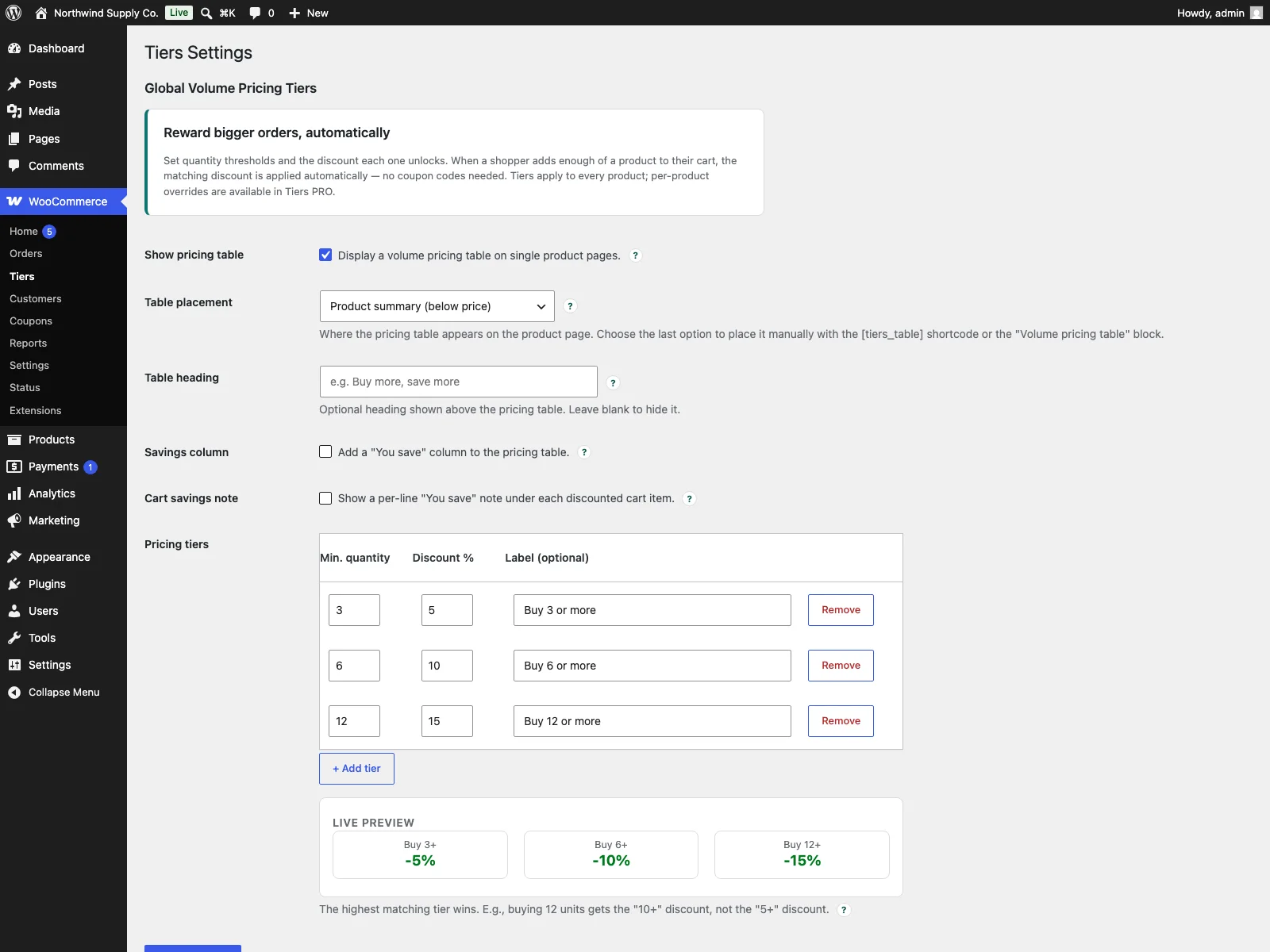 The tier builder sets a minimum quantity, a discount and an optional label for each row.
- Install and activate WooCommerce (8.0 or later); Tiers is a WooCommerce extension and needs it.
- Upload the
tiersfolder to/wp-content/plugins/, or install it from the Plugins screen, and activate it. - Go to WooCommerce > Tiers and add at least one pricing tier, for example 5 units for 5% off, 10 units for 10% off.
- The pricing table appears automatically on product pages, and the discounts apply in the cart.
The admin tier builder adds and removes rows in place, with a live preview of how each tier reads, so you can see the ladder taking shape as you type rather than saving and checking the front end each time. Each tier is a minimum quantity, a discount percentage, and an optional label.
What it stores, and what it leaves behind
Tiers stores everything in a single tiers_settings row in your WordPress options table and creates no custom tables. Nothing leaves your site: there are no remote requests, no external services, and the discount is calculated on your own server. When you deactivate the plugin, discounts stop and the table disappears but your settings are kept; when you delete it, the uninstall routine removes that one option row, so the database is left as it was. Tiers also declares compatibility with WooCommerce HPOS and the Cart and Checkout blocks, and ships a Polish translation plus a bundled POT file for translating into other languages.
Practical tips for setting your tiers
A plugin gives you the mechanism; the pricing strategy is yours. A few pointers that tend to hold across stores:
- Keep the ladder short. Two or three bands are easier to read and easier to act on than six. The goal is a clear “buy more, save more,” not a spreadsheet.
- Make the first jump worth reaching. If the saving at the first tier is trivial, nobody changes their order to get it. The first band should feel like a genuine reason to round up.
- Set breakpoints at natural pack sizes. Tie your bands to how the product is actually used or shipped, a box, a case, a month’s supply, so the larger quantity matches a real need rather than an arbitrary number.
- Protect your margin at the deepest tier. The 10+ or 50+ price is the one a determined buyer will chase, so make sure it still pays. The deepest-tier-wins logic means that is exactly the price big orders receive.
- Show the table where the quantity decision happens. Near the add-to-cart form is usually best. Turn on the “You save” column so the benefit is stated in money, not just percent.
- State it in writing too. A one-line note such as “bulk pricing applies automatically at checkout” reassures shoppers that the discount is real and that they do not need a coupon code.
Tiers versus default WooCommerce
Core WooCommerce sells each product at one price, with no quantity breaks. Here is the difference for tiered pricing specifically:
| Capability | Default WooCommerce | Tiers |
|---|---|---|
| Price by quantity | One fixed price per product | Any number of quantity tiers |
| Which tier applies | n/a | Deepest qualifying tier wins |
| Discount applied automatically | Manual sale price only | Off the regular price, in the cart |
| Price table on product page | None | Server-rendered HTML table |
| Table placement | n/a | Summary, around add-to-cart, meta, or shortcode/block |
| Coupons and tax | n/a | Coupons apply on top; tax on discounted price |
| Never raises a price | n/a | Yes, sale prices are preserved |
| Performance | n/a | No jQuery, no AJAX, no layout shift |
| Per-product / role tiers | No | Yes (PRO) |
| Cost | Free (core, no tiers) | Free (GPL); PRO adds per-product and role tiers |
Free versus PRO
The free edition is a complete volume-pricing flow, not a teaser. Any number of global tiers, automatic cart discounting with the deepest tier winning, the server-rendered product-page table with flexible placement, the shortcode and block, the optional “You save” column and cart note, and the live admin tier builder are all included, and they apply to every product in the store.
In the free version tiers are global, the same ladder for the whole catalogue. Tiers PRO is for when pricing needs to get more specific. It adds per-product tier overrides from the product edit screen and role-based tiers, both delivered through the tiers_product_tiers filter that the free plugin already exposes. PRO extends the free plugin rather than replacing it, so the free table and discounting keep working underneath, and the per-product or per-role rules layer on top only where you define them.
The short version
Tiered pricing turns a yes-or-no purchase into a how-many purchase, and it is one of the most reliable ways to lift average order value in WooCommerce, which sells everything at a single price on its own. A good implementation needs flexible breakpoints, the deepest qualifying tier winning, automatic cart discounting that respects coupons and tax, and a clear, fast price table on the product page that never causes layout shift. The free Tiers plugin covers all of that with global quantity tiers and a server-rendered table; PRO adds per-product and role-based tiers once your pricing gets more specific.