WooCommerce request a quote: B2B and made-to-order requests
By Mariusz Szatkowski · Updated: 2026-09-11
Some sales never have a fixed price. In B2B, wholesale and made-to-order, the price is negotiated by quantity or specification, so a normal add-to-cart checkout does not fit. The shopper needs a way to ask before they buy, and the store needs that enquiry to land somewhere it will not get lost. WooCommerce, out of the box, has no answer for this: it assumes every product has a price and every shopper wants to pay it now. So the enquiry arrives however the customer can reach you, by email, by contact form, by phone, and each one is a thread you have to match back to a product and remember to act on. A request-a-quote flow solves both halves of the problem at once. This guide explains what such a flow is, why it matters, what to look for, and how the free Estimate plugin adds one to WooCommerce.
What request-a-quote actually means
A request-a-quote flow replaces “buy now” with “ask first.” Instead of pricing a product and pushing the shopper straight to checkout, you let them collect the items they are interested in, send you their details, and wait for you to reply with a price. The quote is the conversation that produces that price, and the request is the structured enquiry that starts it.
It helps to separate two things that get blurred together. The quote list is what the shopper builds, the equivalent of a cart but with no prices attached and no checkout at the end. The quote request is the record that lands with you when they submit, tying their contact details to the exact products and quantities they want. A good flow gives the shopper an easy way to build the first and gives you a clean, captured version of the second.
This matters because WooCommerce is built around a fixed price and an immediate purchase. That works perfectly for retail, but not for stores where the price is a conversation rather than a label.
Why it matters
Two kinds of store live and die by quotes, and neither fits the default cart.
B2B and wholesale. Here the price depends on volume, account terms or a negotiated contract. Showing a fixed retail price is misleading at best, and at worst it costs you the order, because a buyer who sees the wrong number assumes you are not set up for their kind of purchase. These buyers expect to ask for a rate, not to read one off the page.
Made-to-order and bespoke. Here the product does not have a price until it is specified. The shopper needs to describe what they want before any number exists, so a buy-now button is simply premature. The first step is a description, not a payment.
In both cases, forcing add-to-cart pushes the buyer to abandon or to call. When they call, the enquiry lives in your memory and a sticky note. When they abandon, it does not live anywhere. A request-a-quote flow captures the enquiry the moment it happens, in a structured form and a saved record, so it stops being a lead you might follow up and becomes one you definitely will.
Note: A quote request captures the enquiry the moment it happens, in a structured form and a saved record, so a lead you might follow up becomes one you definitely will.
There is a second, quieter benefit. A quote request arrives structured: instead of a free-text email asking what a hundred of something would cost, you get a record tied to specific products, with quantities and a message attached. Every request lands in the same place, in the same shape, so you can work through a morning’s enquiries in one pass.
What to look for in a quote flow
A quote flow is only useful if it fits how your store actually sells. Use this as a checklist whether you build, buy or install:
- Selective control. You may want quotes on a few products, or across the whole catalogue. The mode should be switchable, not all-or-nothing.
- Price control. When pricing is negotiated, showing a fixed price is misleading, so hiding it should be an option you can turn on per the products that need it.
- Guest support. Many B2B and made-to-order enquiries come from people who will not create an account before they have even spoken to you. The flow has to work for logged-out visitors.
- A short request form. Every extra field is a reason to abandon. Name, contact details and a message are usually enough to start the conversation.
- A captured record. A request that arrives only as an email is easy to miss. It should also be saved in the admin, where it can be found, filtered and referred back to.
- Resilience. The flow should not break if JavaScript fails to load, and it should be readable on a phone, because B2B buyers browse on phones too.
Notice what is not on that list: an automatic price. The whole point of a quote is that you set the number deliberately, after seeing the request. A flow that tries to price things for you defeats the purpose.
How Estimate adds a quote path
Estimate for WooCommerce turns products into quote requests rather than direct purchases. It is free and open source under GPL, works for logged-out guests with no account, and keeps everything on your own site: it does not connect to or send data to any external service. The free edition covers the full flow.
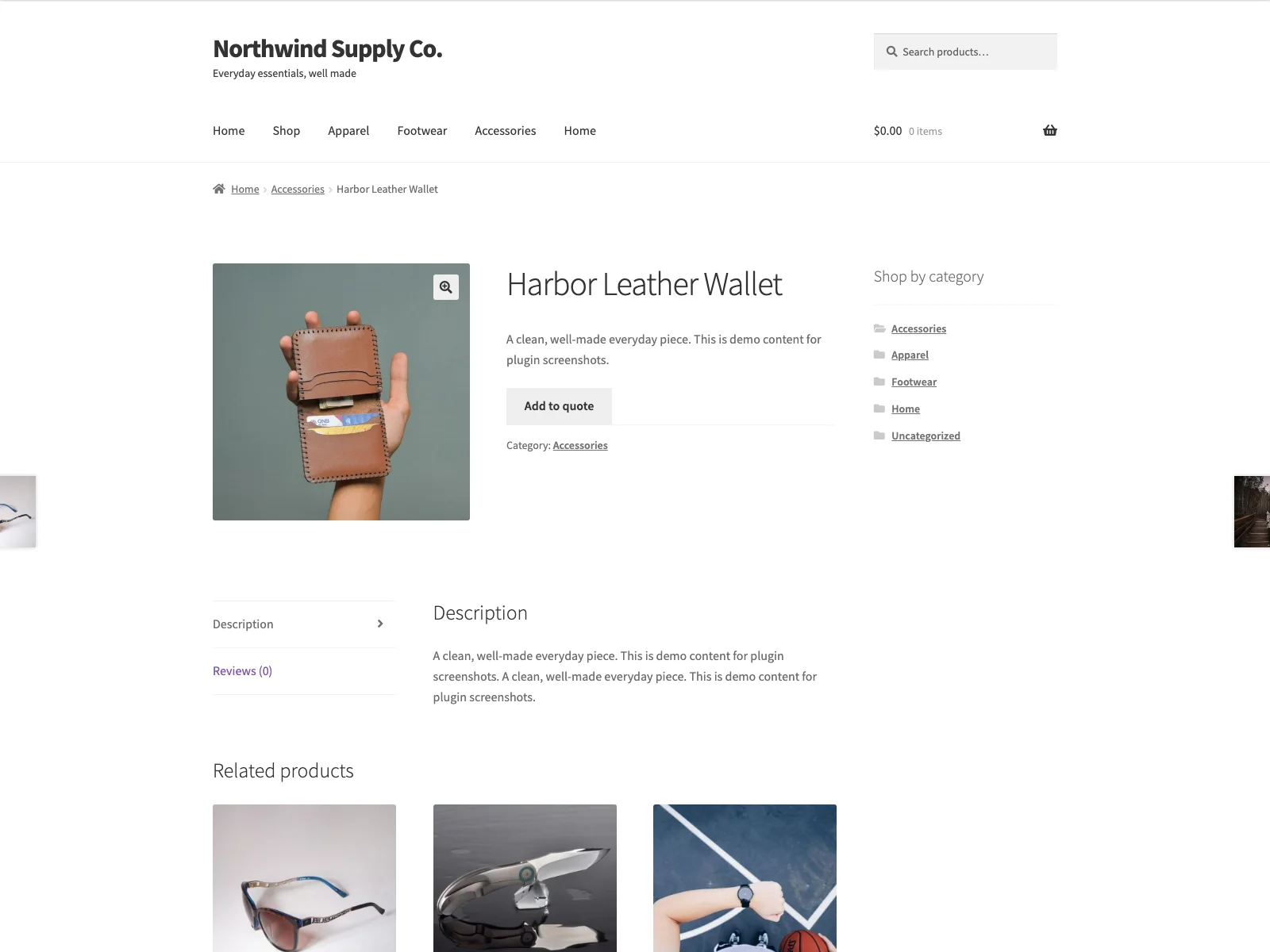 The storefront swaps Add to cart for an Add to quote button on quote-enabled products.
Two quote modes. Enable quotes for selected products only, or for all products store-wide. The default is selected only, so nothing on your storefront changes until you choose products. All-products mode is the natural fit for a wholesale or trade-only catalogue; selected mode suits a store that sells most things at a fixed price but quotes a few bespoke lines.
Per-product toggle. In selected mode, tick Enable quote requests in the Product data box on each product you want quoted. The rest of your catalogue keeps its normal Add to cart button.
Add to quote button. On quote-enabled products, Estimate swaps the add-to-cart button for an Add to quote button, on both product pages and listings. The button text is configurable, so you can match your store’s voice. Shoppers collect the products they want into a quote list as they browse.
Price hiding. Optionally hide the price on quote-enabled products, so the catalogue figure is not shown and the price comes back only in your reply. With the option off, the list price stays visible next to the Add to quote button, which suits cases where you want the shopper to see a starting point.
Tip: Hide the price for genuinely negotiated B2B pricing to avoid anchoring the buyer to a number you do not intend to honour; leave it visible for made-to-order goods with a known starting price.
Guest quote list. The list is stored in a first-party, per-visitor cookie on your own domain, so logged-out shoppers can collect products with no account and nothing is sent to a third-party server. Shoppers can edit quantities and remove items on the quote page before they send.
Request form via shortcode. Create a page, for example “Request a Quote,” and drop in the [estimate_quote] shortcode. The page renders the current quote list and a short request form with name, email, company and message. When the list is empty it shows a brief message with a link back to the shop instead of an empty form.
Email and a private record. On submit, Estimate emails the recipient you configure (or the site admin email by default) through WordPress’s own wp_mail(), and saves the request as a private Quote Request record under the WooCommerce menu in wp-admin. The record holds the name, email, company, chosen items and message, so even if you miss the email the enquiry is waiting for you in the admin. If the shopper was logged in, their user ID is stored on the request as well.
Note: The add-to-quote flow works without JavaScript, so shoppers on slow connections or restrictive browsers can still build a quote list and submit a request.
It is built to sit cleanly on a modern WooCommerce install. The add-to-quote flow works without JavaScript, the markup uses labels and ARIA attributes and reflows on small screens, and the plugin declares HPOS and cart/checkout blocks compatibility. It ships with a POT file plus a Polish translation, and on delete it removes its own options while keeping saved quote requests, so a reinstall does not lose your enquiry history.
Setting it up
Getting the flow live takes a few minutes:
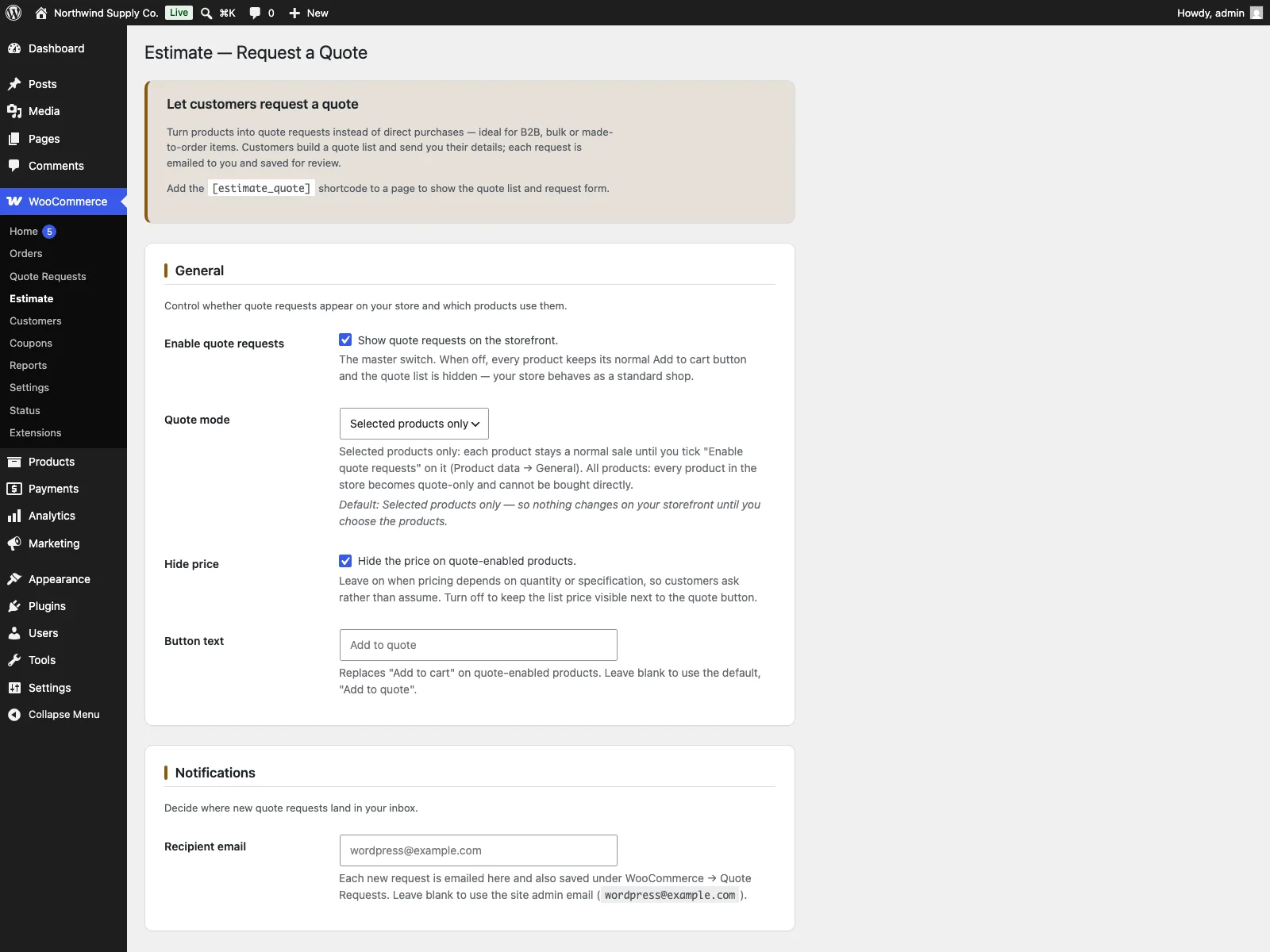 The Estimate settings screen in wp-admin, where you pick the quote mode, recipient email and button text.
- Upload the plugin to
/wp-content/plugins/plogins-estimate, or install it from Plugins > Add New. WooCommerce must be installed and active. - Activate it.
- Go to WooCommerce > Estimate and choose your quote mode (selected or all products), set the recipient email and button text, and decide whether to hide prices.
- Create a page and add the
[estimate_quote]shortcode to host the quote list and request form. Link to it from your menu. - In selected mode, edit each product you want quoted and tick Enable quote requests in the Product data box.
That is the whole setup. Quote-enabled products now show Add to quote, shoppers build a list and submit through the shortcode page, and every request reaches you by email and as a saved record.
Practical tips for a quote flow that converts
The plugin gives you the mechanism; how you use it decides whether enquiries turn into orders.
- Keep the request form short. The form already asks only for name, contact details and a message. Resist the urge to bolt extra friction onto the surrounding page. The goal is to capture the lead, not to qualify it before you have even replied.
- Decide deliberately whether to hide prices. For genuinely negotiated B2B pricing, hiding the price avoids anchoring the buyer to a number you do not intend to honour. For made-to-order goods with a known starting price, leaving it visible sets expectations. Match the choice to the product, not to a blanket rule.
- Reply fast. A quote request is a warm lead with a question. The faster you answer, the more likely it converts, so route the notification email somewhere it gets seen and treat the saved record as a queue to work, not an archive.
- Make the quote page easy to find. A shopper who has filled a quote list needs an obvious path to the request form. Link the
[estimate_quote]page from your main menu, the same way a normal store links to the cart. - Set expectations in writing. A short line on quote-enabled products, telling buyers that the price comes back by reply and roughly how soon, turns the Add to quote button into the obvious next step rather than a dead end.
Estimate versus default WooCommerce
WooCommerce has no built-in request-a-quote path. Here is the difference for quote requests specifically:
| Capability | Default WooCommerce | Estimate |
|---|---|---|
| Quote path instead of buy-now | None built in | Add to quote button |
| Scope of quotes | n/a | Selected products or all products |
| Hide price on quote products | No | Optional price hiding |
| Guest quote list, no account | No | Per-visitor first-party cookie list |
| Request form | No | [estimate_quote] shortcode |
| Captured request | n/a | Email plus private record in wp-admin |
| Works without JavaScript | n/a | Yes, accessible and responsive markup |
| Cost | Free (no quote path) | Free; PRO adds CSV, PDF, quote-to-order, accounts |
Free versus PRO
The free edition is a complete flow, not a teaser: two quote modes, the Add to quote button, price hiding, the guest quote list, the [estimate_quote] request form, and the merchant email plus a private saved record are all included. Estimate Pro is a separate paid add-on that requires the free plugin and boots only after it loads. It builds on top for stores that want to do more with the requests they collect: CSV export of quote requests, per-quote PDF downloads, one-click quote-to-order conversion, and customer quote accounts in My Account where logged-in shoppers see past requests and re-order from a quote. Custom quote fields are planned, not yet shipped. Estimate Pro is sold and delivered through Freemius and is not in the WordPress.org directory.
The short version
When the price is negotiated rather than fixed, a request-a-quote flow fits better than a cart. Look for switchable quote scope, optional price hiding, guest support, a short request form and a captured record, and keep the price a deliberate reply rather than an automatic number. Estimate adds all of this to WooCommerce in a free, open-source plugin: an Add to quote button, a guest quote list in a first-party cookie, an [estimate_quote] form, and a merchant email plus a private record for every enquiry. PRO adds CSV export, PDF quotes, quote-to-order conversion and customer accounts when you are ready to do more with the requests you collect.