WooCommerce wholesale order form: B2B quick ordering
By Mariusz Szatkowski · Updated: 2026-09-11
For a wholesale or B2B buyer, the normal WooCommerce shop is the slow path. They already know the products, they already know the SKUs, and what they need is a way to enter quantities and submit, not a catalogue to browse. Asking a trade buyer to click through forty product pages to reorder the same forty items they buy every month is asking them to do your data entry one page reload at a time. A wholesale order form, sometimes called a quick order form, collects the whole order on one page instead. This guide explains what such a form is, why it matters for reorders, what a good one needs, and how the free Rapid plugin handles it on WooCommerce.
What a wholesale order form is and why it matters
Default WooCommerce is built for discovery. The whole storefront is arranged around one product per page: a large image, a description, related products, an add-to-cart button, then a reload and back to the catalogue for the next item. That layout is exactly right for a shopper who is still deciding what to buy. It is exactly wrong for a buyer who decided weeks ago and just wants to place the order.
A wholesale order form flips the model. Instead of one product per page, it puts a searchable product table on a single page. The buyer sets a quantity against each product they want, and a single action adds everything to the cart at once. For B2B, trade, supply and reorder workflows, that turns a long, repetitive task into a few moments of typing. The difference is not cosmetic. Every page reload is a place where a buyer can be interrupted, lose their place, or simply give up and call you to read an order down the phone. Collapsing the order into one page removes most of those interruptions, which means faster orders, fewer abandoned baskets and fewer phone orders landing on your team.
Note: Every page reload is a place where a buyer can be interrupted, lose their place or give up and phone the order in. Collapsing the order onto one page removes most of those interruptions.
It also matches how trade buyers actually think. A retail shopper browses by category and image. A wholesale buyer works from a list, often a printed or spreadsheet order sheet, and reads by code. A form that lets them search by SKU and type quantities into a table is simply the digital version of the order sheet they already use. The closer the tool sits to that existing habit, the less training anyone needs and the faster the form gets adopted.
Why reorders are the real prize
Most of the value of a quick order form shows up in the second order, not the first. The first time someone buys from you, they probably do browse, because they are still learning your range. By the third or fourth order they know precisely what they want, and that is where the normal shop becomes friction. A buyer placing the same recurring order should not have to rediscover each product through search and category pages every single time.
This is why reorder speed is worth optimising specifically. A wholesale relationship is built on repeat purchases, and the cumulative cost of a slow reorder flow is paid over and over by your best customers, the ones who order most often. Shaving a fifteen-minute reorder down to two minutes is not a one-off saving. It is a saving that compounds across every order that customer places for as long as they stay with you. It also lowers the chance they shop around: a fast, familiar order form is a small but real switching cost that keeps a buyer ordering from you rather than testing a competitor.
Tip: Optimise reorder speed specifically. Shaving a fifteen-minute reorder to two minutes compounds across every order your best customers place, for as long as they stay with you.
What to look for in a quick order form
Not every quick-order form is equal. A few properties matter most, and they make a good checklist whether you build, buy or install:
- Search by name and SKU. Repeat buyers order by code, not by browsing. Search has to match SKUs, not just product titles, and it should not force a page reload for each lookup. Live, type-ahead search is what makes the form feel like a tool rather than a catalogue.
- Quantities in a table, one submit. The entire point is to enter many quantities and add them together, with a single clear result rather than one notice per product. If the form still adds items one at a time behind the scenes, it has not solved the actual problem.
- Control over what appears. You should be able to scope the form to your whole catalogue or only certain categories, so buyers see exactly what you intend to offer. A wholesale-only range, for example, should not have to live on the same form as consumer products.
- Sensible columns. A buyer ordering by code needs SKU and price visible at a glance, and often stock. Being able to choose which columns appear keeps the table dense and readable rather than cluttered.
- Works without JavaScript. The form should still place an order if scripts fail or are blocked, with live search treated as an enhancement rather than a hard requirement. A form that shows a blank page when a script fails to load is a form that loses orders silently.
- No store bloat. A form that uses WooCommerce’s own cart and creates no extra database tables is safer to add, easier to support and cleaner to remove if you ever change your mind.
How Rapid does it
Rapid for WooCommerce is a free, open-source quick-order form built for exactly these B2B, wholesale, trade and reorder workflows. You add it with the [rapid_order] shortcode, which renders a searchable product table on any page you choose. Here is what it actually does, all of it verified against the plugin itself:
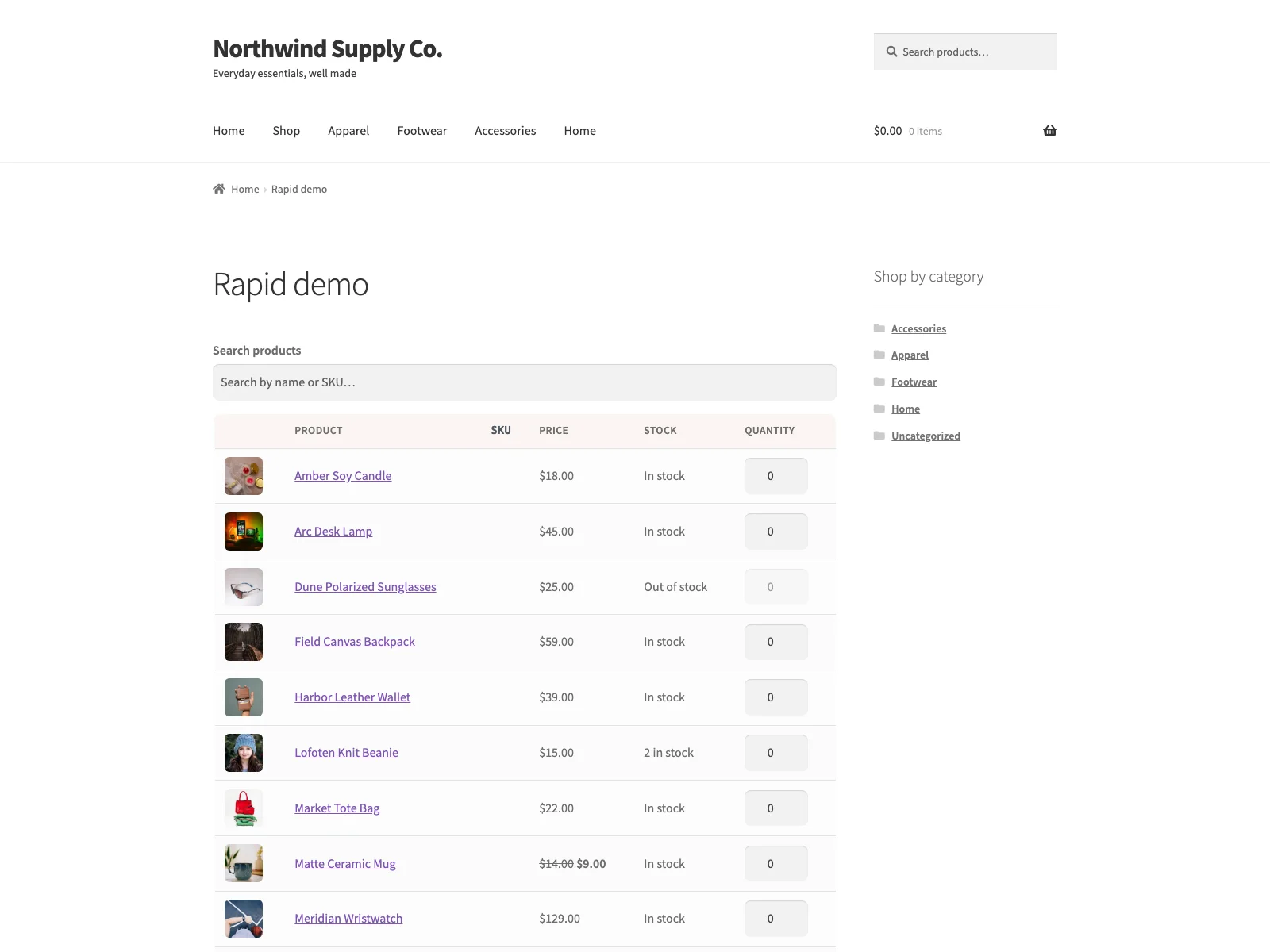 The storefront quick order form: search by name or SKU, type quantities in the table, and add every line to the cart at once.
- AJAX search by name or SKU. Buyers find products by typing a name or a SKU, with the search debounced and run with no page reload. The search queries your own existing WooCommerce products, so there is nothing extra to index or maintain.
- Product scope you control. Under WooCommerce, then Rapid, you choose all products or selected categories only. Pick categories and tick the ones you want, and the storefront form offers exactly that set and nothing else.
- Batched add-to-cart. Buyers set quantities on many products and add them all in a single submit. Every product with a quantity above zero goes into the cart at once, and Rapid shows one notice summarising how many products were added and how many, if any, could not be. A single submit handles up to 200 line items, which comfortably covers a large recurring trade order.
- Selectable columns and results per page. Choose whether to show image, SKU, price and stock, and set how many results appear per page. The per-page value is clamped to a safe range so the table stays fast and readable.
- Works for guests and logged-in customers. The form does not impose its own login rule. It works for guests and account holders alike, and cart behaviour simply follows your normal WooCommerce guest-checkout settings.
- Works without JavaScript. Without scripts, the form renders the first page of in-scope products as a plain table, and the submit button still adds the entered quantities to the cart on the server. The live search and category filter are progressive enhancements layered on top, not load-bearing requirements.
Note: Without JavaScript the form still renders in-scope products as a plain table and submits the entered quantities on the server. The live search is a progressive enhancement, not a load-bearing requirement.
On the technical side, Rapid uses WooCommerce’s own cart and creates no custom database tables. It stores only two options, rapid_settings and rapid_db_version, and removes its data cleanly on uninstall. It connects to no external services: the live search posts to your own site’s admin-ajax.php and queries your own products. It declares compatibility with HPOS (High-Performance Order Storage) and the WooCommerce cart and checkout blocks, ships accessible markup with visible focus states and screen-reader labels, and collapses the table to a card layout on small screens. It is translation-ready with a bundled POT file.
Setting it up
Getting the form live takes only a few minutes:
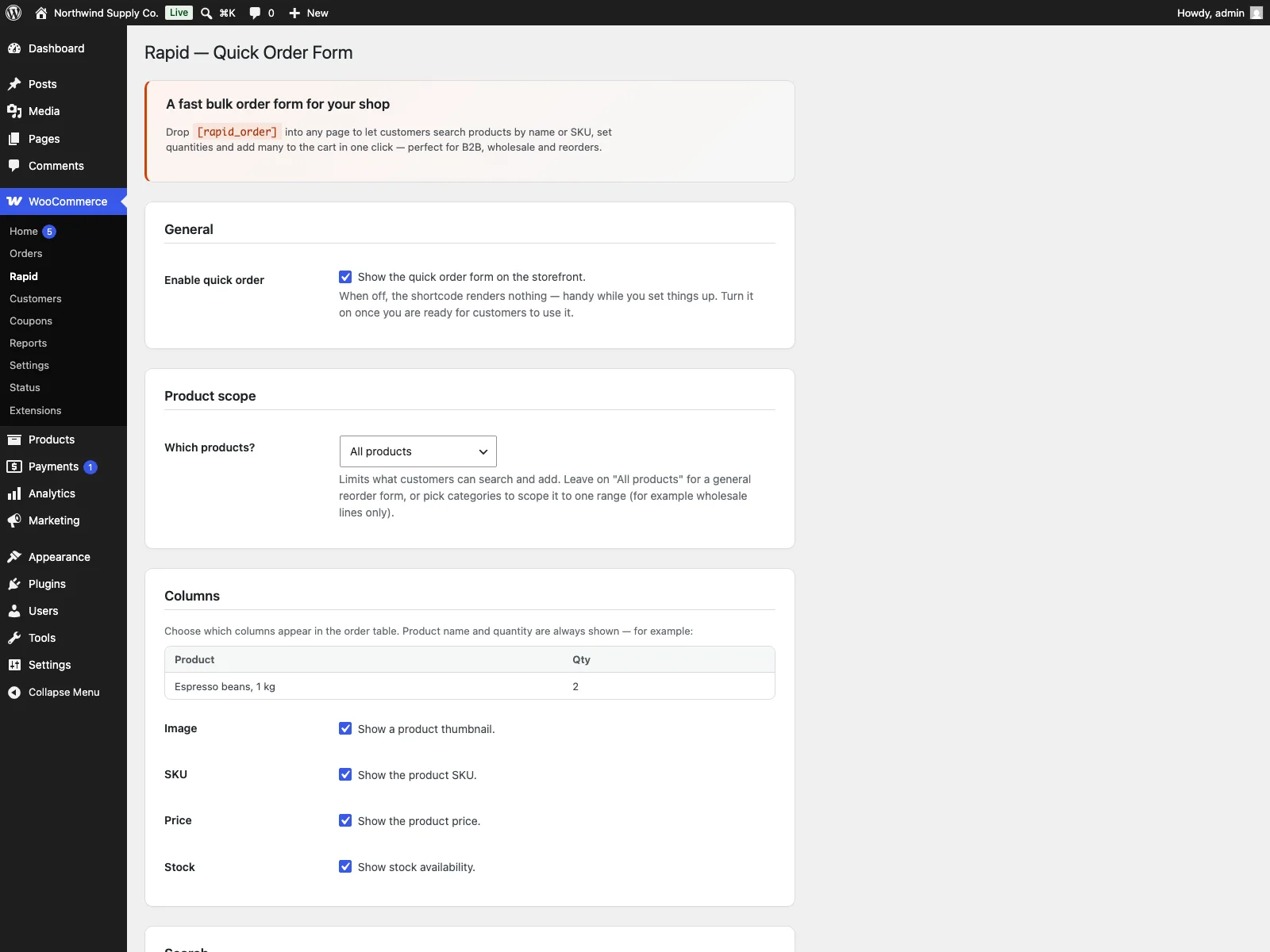 The Rapid settings screen in wp-admin, where you set the product scope, choose which columns show and set the results per page.
- Install Rapid from Plugins, then Add New, or upload it to
/wp-content/plugins/plogins-rapid. WooCommerce must be installed and active. - Activate it.
- Go to WooCommerce, then Rapid. Choose your product scope (all products, or selected categories only and tick the categories you want), pick which columns to show, and set the results per page.
- Create a page, for example one called “Quick Order”, and add the
[rapid_order]shortcode to it. That page is now your wholesale order form.
That is the whole setup. From there, link the Quick Order page somewhere your trade buyers will find it, such as the main menu or the My Account area, so the fast path is the obvious one.
Practical tips for a fast order form
A plugin gives you the mechanism; a few choices make it genuinely fast in practice:
- Get your SKUs clean first. Search by code only helps if the codes are right. Make sure every product a wholesale buyer might order has a correct, unique SKU before you point them at the form, because a missing or duplicated SKU is exactly the product they will phone you about.
- Scope the form to what you sell wholesale. If your trade range is a subset of your catalogue, set the scope to those categories. A shorter, relevant table is faster to scan than the whole shop, and it avoids offering retail-only lines to trade accounts.
- Show the columns that matter to buyers. For a code-driven order, SKU and price earn their place; stock is worth showing if availability changes often. Hiding columns nobody uses keeps each row compact so more of the order fits on screen.
- Link the form prominently. The quick order form only saves time if buyers reach it before they start clicking through the normal shop. Put it in the main navigation and in My Account so it is the default route for anyone who already knows what they want.
Rapid versus default WooCommerce
WooCommerce has no built-in wholesale or quick order form at all. Here is the difference for ordering specifically:
| Capability | Default WooCommerce | Rapid |
|---|---|---|
| Order many products on one page | No, one product per page | Yes, searchable table with quantities |
| Search by SKU | Not in the shop loop | Yes, AJAX search by name or SKU |
| Add many items at once | One at a time, reload each | Batched submit, up to 200 line items |
| Limit form to certain categories | n/a | Yes, product scope in settings |
| Choose which columns show | n/a | Yes, image, SKU, price, stock |
| Works without JavaScript | n/a | Yes, plain table fallback |
| Custom database tables | n/a | None, uses WooCommerce’s own cart |
| Cost | Free (no such form exists) | Free; PRO adds SKU paste, saved lists, customer pricing, per-role forms |
Free versus PRO
The free edition is a complete quick-order form, not a teaser: the [rapid_order] shortcode, AJAX name and SKU search, category scope, batched add-to-cart up to 200 lines, selectable columns and results per page, and the no-JavaScript fallback are all included. Rapid Pro is a paid add-on that builds on top for stores that want more from their B2B flow. It adds bulk SKU paste through the [rapid_bulk_paste] shortcode for buyers who order from a spreadsheet, saved order lists for recurring orders, customer-specific pricing via the rapid/product_price_html filter, and per-role order forms. Those four features are PRO-only; the free plugin covers the full quick-order form on its own.
The short version
A wholesale order form puts the whole order on one page: search by name or SKU, quantities in a table, and a single submit that adds everything at once. That is what turns a slow, repetitive reorder into a quick one, and the saving compounds across every order your best customers place. WooCommerce ships no such form, so the work otherwise lands on your team as phone and email orders. Rapid delivers the form for free, uses WooCommerce’s own cart, scopes to the categories you choose, handles up to 200 lines per submit, works without JavaScript, and leaves bulk SKU paste, saved lists, customer pricing and per-role forms to the PRO add-on.