WooCommerce minimum order amount and quantity rules
By Mariusz Szatkowski · Updated: 2026-09-11
Two things decide whether a WooCommerce store actually holds its order rules: whether the minimum order amount is enforced at checkout, and whether quantity rules survive past a polite hint on the product page. A line of text that reads “sold in packs of 6” does not stop a shopper from ordering 7, and a note that says “100 minimum order” does not stop a 40 order from landing in your fulfilment queue. The gap between stating a rule and enforcing it is where below-minimum orders, broken pack quantities and avoidable support tickets come from. This guide explains what minimum order amount and quantity rules are, why they matter, what a real enforcement tool needs, and how Minimum for WooCommerce holds the line at the cart and checkout.
What it is and why it matters
A minimum order amount is the smallest cart subtotal a customer must reach before checkout is allowed. It is the floor that keeps an order worth fulfilling: a wholesale account that has to spend at least a set figure, a store that loses money shipping tiny orders, or a brand that simply does not want to process single-unit purchases.
Quantity rules govern how many units of a single product can be bought. There are three independent constraints in common use:
- A minimum quantity, the floor for one product, for example “at least 3 of this item.”
- A maximum quantity, the ceiling, for example to ration scarce stock or limit a promotional price.
- A step quantity, which forces purchases in multiples, for products that only ship in fixed pack sizes.
These rules matter because WooCommerce has no built-in setting for any of them. Out of the box you can describe a rule in the product description and hope the shopper reads it, but nothing in the cart or checkout will stop them from ignoring it. The cost of that gap is quiet but real. Below-minimum orders reach fulfilment and have to be cancelled, refunded, or topped up by a back-and-forth email. Pack-sold goods get bought as odd quantities that you cannot actually pick. Loss-leader items priced for bulk get cleared out one discounted unit at a time. None of these are dramatic on their own, but each one converts a sale into manual work, and they recur for as long as the rule is only a suggestion.
Why a product-page hint is not enough
The instinct is to put the rule where the shopper is choosing the quantity: a note under the add-to-cart button. The problem is that the quantity decision and the commitment decision happen at different moments. A shopper adds an item, keeps browsing, comes back, edits quantities in the cart, applies a coupon, and only then commits at checkout. A hint shown once on the product page has no say over any of the steps that follow.
There is also the matter of accumulation. A maximum of “at most 5” is trivially defeated if a customer can add 5, then add 5 more in a second action. A rule that only looks at the quantity being added, and not at what is already in the cart, is not really a maximum at all. Real enforcement has to look at the whole cart, at the moment that matters, and refuse to let an invalid order proceed. Anything softer is documentation, not a control.
Warning: A maximum that only checks the quantity being added is trivially defeated by adding the same item twice. A real maximum has to weigh what is already in the cart before it decides.
What a good solution needs
A rule is only useful if it cannot be bypassed. When choosing how to add order rules to WooCommerce, look for:
- Hard validation, not a hint. The rule must block checkout, not merely display a suggestion the shopper can scroll past.
- Enforcement at every step. Validation should run on add-to-cart, in the cart, and again at checkout, so a bad cart cannot slip through any single gap.
- Cart-aware quantity checks. A maximum or step rule has to weigh what is already in the cart, not just the units being added in one click.
- Block and classic support. Rules should apply equally to the classic cart and checkout pages and to the Cart and Checkout blocks.
- Clear messages. The customer should see exactly what is wrong and what to change, with the relevant numbers filled in.
- Predictable precedence. When a global rule, a category rule and a product rule could all apply, it must be obvious which one wins, and for which value.
- Clean data handling. The plugin should not scatter custom tables across your database or phone home to an external service to evaluate a cart.
How Minimum does it
Minimum for WooCommerce is a free, open-source plugin that enforces order rules where they actually bite: on add-to-cart, in the cart, and at checkout. It is the full rules engine, not a teaser that nags you toward an upgrade.
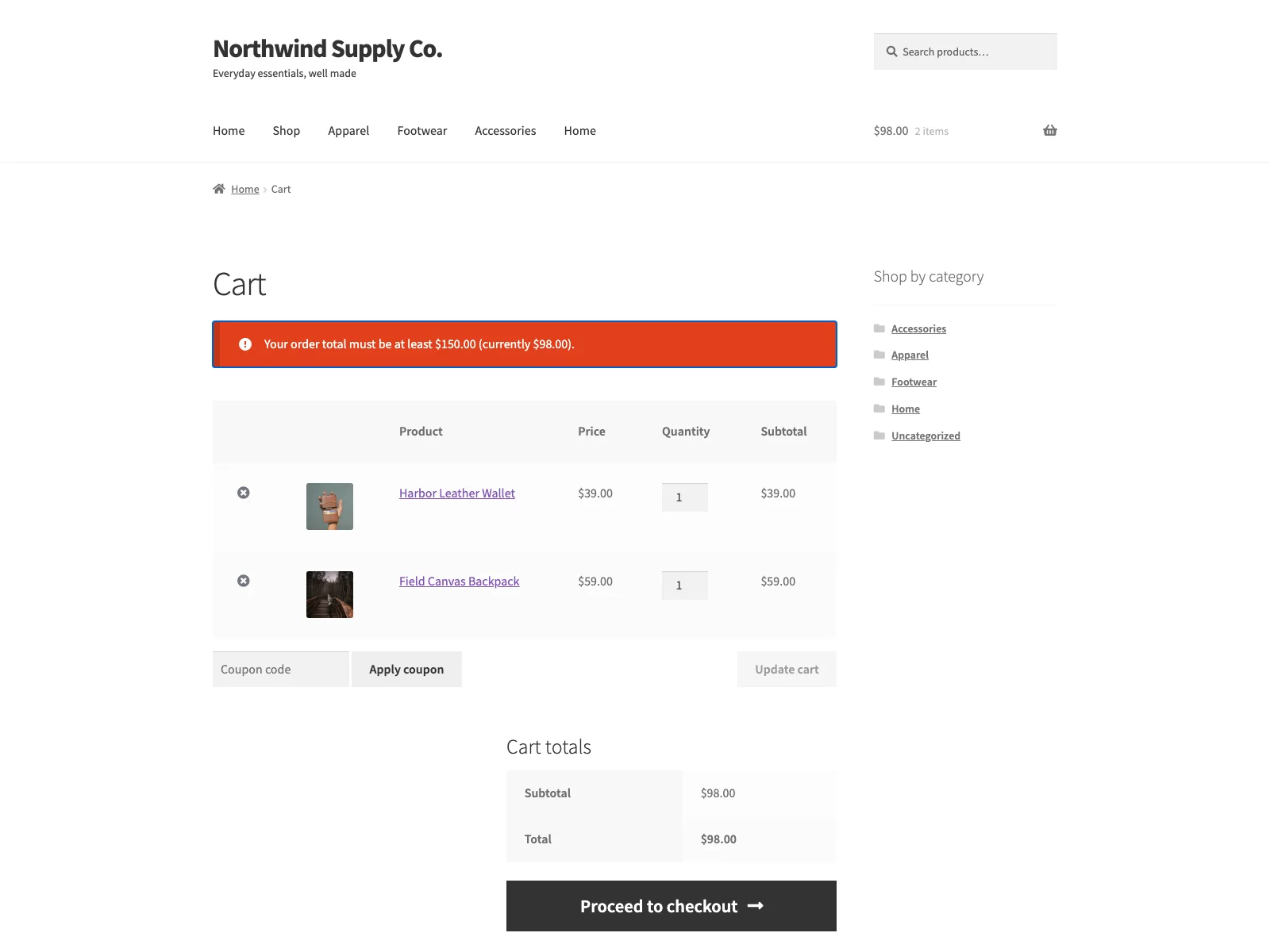 The storefront notice that tells the shopper the cart has not yet met the minimum order rule.
The free edition lets you set up:
- Minimum quantity. Require at least N units of a product before checkout is allowed.
- Maximum quantity. Cap how many units a customer can buy.
- Step quantity. Force purchases in multiples, for example items sold in packs of 6.
- Minimum order total. Require a minimum cart subtotal before checkout proceeds.
- Rule precedence. A product rule overrides a category rule, which overrides the global rule, resolved separately for each of min, max and step. A field left at 0 means that constraint is simply not enforced.
- Custom messages. Edit the notice shown for each unmet rule, using the tokens
{min},{max},{step},{product}and{total}.
Rules can be scoped globally, per category, or per product by numeric ID. Because Minimum checks against the cart contents rather than a specific page template, the same rules cover the classic pages and the Cart and Checkout blocks, and the plugin declares compatibility with HPOS (custom order tables). The quantity checks are genuinely cart-aware: when a customer adds more of a product, Minimum sums the new quantity with whatever is already in the cart for that product before testing the rule, so a maximum cannot be defeated by adding the same item twice.
Three enforcement points
It is worth being precise about where the plugin enforces, because that is what separates a real control from a hint. Minimum hooks WooCommerce at three moments. On add-to-cart, it stops an invalid quantity from entering the cart in the first place. In the cart, it re-checks every line and the order total, surfacing notices and blocking the path to checkout. At checkout, it runs a final hard validation so nothing slips through. The order-total rule is evaluated against the live cart subtotal, and every quantity rule is evaluated against the actual cart contents, which is why both classic and block layouts are covered without any per-template work.
Note: Because Minimum checks against the cart contents rather than a specific template, the same rules cover both the classic pages and the Cart and Checkout blocks with no per-template work.
Setting it up
Getting rules live takes a few minutes:
- Install and activate WooCommerce 8.0 or later, then install Minimum from Plugins > Add New > Upload Plugin, or upload the
minimumfolder to/wp-content/plugins/. - Activate the plugin through the Plugins screen.
- Go to WooCommerce > Minimum. To require a spend floor, enter a figure in Minimum order total.
- To add a quantity rule, use + Add rule, choose a scope (global, product or category), and for a product or category rule paste its numeric ID. The settings screen explains where to read that ID from the editor URL, so you are not guessing.
- Fill in Min, Max and Step as needed. Leave any value at 0 to skip that constraint. Save.
The Enforcement switch at the top lets you turn all rules off without deleting them, which is handy for a temporary promotion or while you test a configuration. Every field on the screen carries an inline tooltip, the page follows the standard WordPress admin styling and respects the dark colour scheme, and the settings screen loads no jQuery.
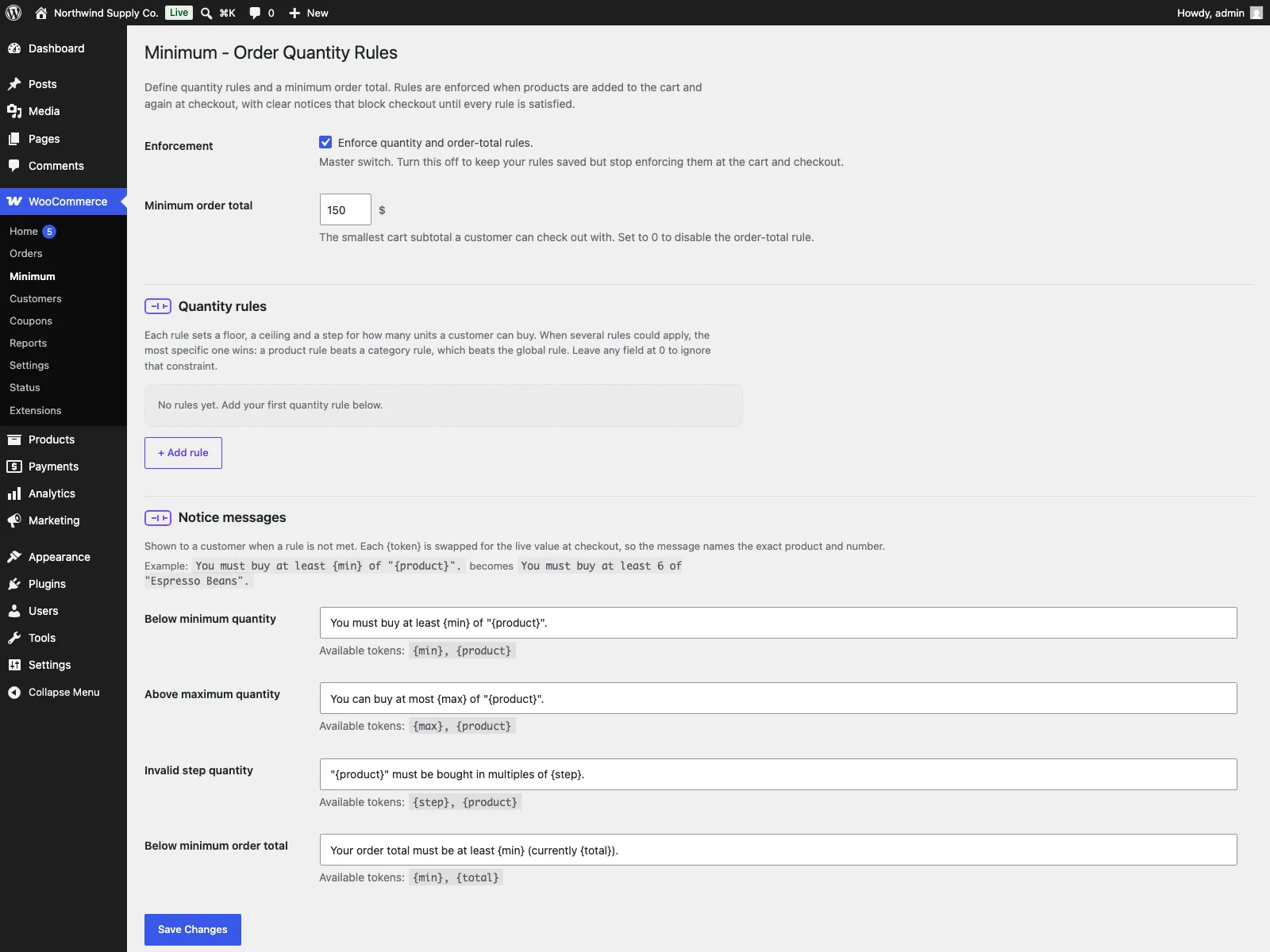 The Minimum settings screen, where you set the order total, quantity rules and messages.
Tip: Use the Enforcement switch to suspend all rules at once during a promotion or while testing, instead of deleting and rebuilding your configuration.
Practical tips
A plugin gives you the mechanism; the policy is yours. A few pointers that tend to save trouble:
- Set the global rule first, then carve out exceptions. A single global minimum order total or step rule covers most of the store. Add product and category rules only where the exception is real. Because precedence is resolved per value, a category rule that raises the minimum quantity will not accidentally clear a step rule set elsewhere.
- Use step for packs, not minimum. If something genuinely ships in sixes, a step of 6 is the correct constraint, not a minimum of 6. A minimum of 6 would happily allow 7; a step of 6 only allows 6, 12, 18 and so on.
Tip: For pack-sold goods use a step rule, not a minimum. A minimum of 6 would still allow 7, whereas a step of 6 permits only 6, 12, 18 and so on.
- Write the message in the customer’s terms. The default notices are clear, but the token system lets you match your own voice. A message like “Wholesale orders start at {min}; your cart is {total}” tells the shopper exactly what to do next, which is the whole point of blocking checkout.
- Mirror the rule in your copy. Enforcement stops bad orders, but a one-line note on the product or cart page (“Minimum order 100”) stops the frustration of hitting a wall at checkout. Use both: the hint sets expectations, the rule holds the line.
- Sanity-check inverted bounds. If you set a maximum below a minimum on the same scope, Minimum drops the contradictory maximum so the minimum wins, rather than locking the product out entirely. Still worth avoiding by reading your own numbers back.
Minimum versus default WooCommerce
WooCommerce has no built-in order amount or quantity rules at all. Here is the difference for this topic specifically:
| Capability | Default WooCommerce | Minimum |
|---|---|---|
| Minimum order amount | None built in | Minimum cart subtotal required to check out |
| Minimum / maximum quantity | None | Per product, category or globally |
| Step (multiples) quantity | None | Force purchases in multiples |
| Where rules are enforced | n/a | Add-to-cart, cart and checkout |
| Cart-aware quantity totals | n/a | Sums existing cart quantity before checking |
| Block cart and checkout | n/a | Yes, checked against cart contents |
| Rule precedence | n/a | Product over category over global, per constraint |
| Customer messages | n/a | Editable notices with {min}, {max}, {step}, {product}, {total} |
| Database footprint | n/a | Two options, no custom tables, clean uninstall |
| Cost | Free (core has none) | Free; PRO adds per-product/per-variation, per-role, scheduled, CSV and conditional rules |
Free versus PRO
The free edition is the complete core, not a teaser: global, per-category and per-product (by ID) quantity rules, a minimum order total, the three-point enforcement, precedence resolved per value, and fully editable notices are all included. For most stores that is the whole job.
Minimum Pro extends the same engine through documented filters rather than replacing it, for stores that outgrow ID-based rules. It adds per-product Minimum, Maximum and Step fields edited directly in the product data Inventory tab, so you set rules on the product itself with no ID lookup, and those overrides are variation aware. It also adds per-role rules (including a Guest row), scheduled rules that activate or relax constraints over a date range, CSV bulk import of per-product overrides matched by SKU or product ID, and cart-conditional rules that apply only when the cart matches a subtotal, item-count, product-ID or category-ID condition. Minimum Pro requires the free plugin to be installed and active; it is an add-on, not a standalone product.
The short version
A WooCommerce minimum order amount and quantity rules only work if they are enforced as hard validation at the cart and checkout, not shown as a hint on the product page that shoppers can ignore. A real solution validates on add-to-cart, in the cart and again at checkout, counts what is already in the cart, covers both block and classic layouts, and explains the rule clearly to the shopper. Minimum for WooCommerce does all of that for free, with minimum, maximum and step quantities plus a minimum order total and customisable notices, and Minimum Pro layers per-product, per-role, scheduled, CSV and cart-conditional rules on top when you need them.