WooCommerce free shipping bar: show progress to free delivery
By Mariusz Szatkowski · Updated: 2026-09-11
A shopper who knows exactly how much more to add for free shipping behaves differently from one who does not. The first has a target and a reason to keep shopping; the second has, at best, a vague memory of a rule somewhere in the terms. Free shipping is one of the strongest reasons people add another item to a cart, but it only works as a motivator when the goal is visible at the moment the shopper is deciding. A free shipping progress bar turns a static rule into a live, countable target shown right on the cart and at checkout. This guide explains what such a bar does, why it moves carts, what separates a useful one from a liability, and how Nudge handles it.
What a free shipping bar is and why it matters
A free shipping bar is a small progress indicator that tells shoppers how much more they need to spend to unlock free shipping. As items go in and out of the cart, the bar fills and the remaining amount counts down. When the threshold is reached, it switches from a “how much is left” message to a success message confirming the goal is met.
The reason it matters is behavioural, not cosmetic. “Free shipping over $50” buried in your shipping policy does nothing for a shopper sitting at $42 in the cart, because they do not have the number in front of them and they are not going to go and look it up. Surface that same rule as “Add $8.00 more to get free shipping” right above the cart totals, and you have given a concrete, achievable target at the exact moment a person is weighing whether to add one more thing. The gap between “almost there” and “qualified” is precisely the kind of nudge that lifts average order value without discounting anything.
There is a flip side worth being honest about: a progress bar only helps if the number on it is true. A bar that shows the wrong threshold, lags behind the cart, or sits there permanently complete is worse than no bar at all, because it teaches shoppers to ignore it. That is why the implementation details below matter as much as the idea.
Warning: A bar that shows the wrong threshold, lags behind the cart, or sits permanently complete is worse than no bar at all, because it teaches shoppers to ignore it.
What to look for
Not every free shipping bar helps. A few properties separate one that earns its place from one that quietly hurts the page:
- An accurate threshold. The amount on the bar must match the real free shipping rule. The safest way to guarantee that is to read it from the WooCommerce shipping method itself, so the figure on the bar and the figure that actually grants free shipping can never drift apart after a price change or a rule edit.
- Live updates. The bar should re-render as the cart changes, not display a stale number captured at page load. If a shopper adds an item and the remaining amount does not move, the bar has lost the shopper’s trust.
- No layout shift. A bar that pops in after the page paints pushes content down and damages Core Web Vitals. The track should reserve its height before paint so nothing jumps.
- A light front end. A progress bar does not need a heavy JavaScript library. Plain JavaScript keeps the store fast and avoids piling another dependency onto the cart page.
- Accessibility. A real progress bar role with ARIA values, not just a coloured strip, so screen readers convey the same goal that sighted shoppers see.
- A sensible empty state. When there is no goal configured, the cart is empty, or the feature is off, the bar should hide itself rather than render something broken or always finished.
- Easy theming. Colours and sizing should be adjustable from CSS without editing markup, so the bar matches your brand and respects dark mode.
How Nudge does it
Nudge for WooCommerce is a free, open source plugin focused on exactly this problem, and the free edition is a complete free shipping bar rather than a trimmed demo. Every capability below is part of the free plugin.
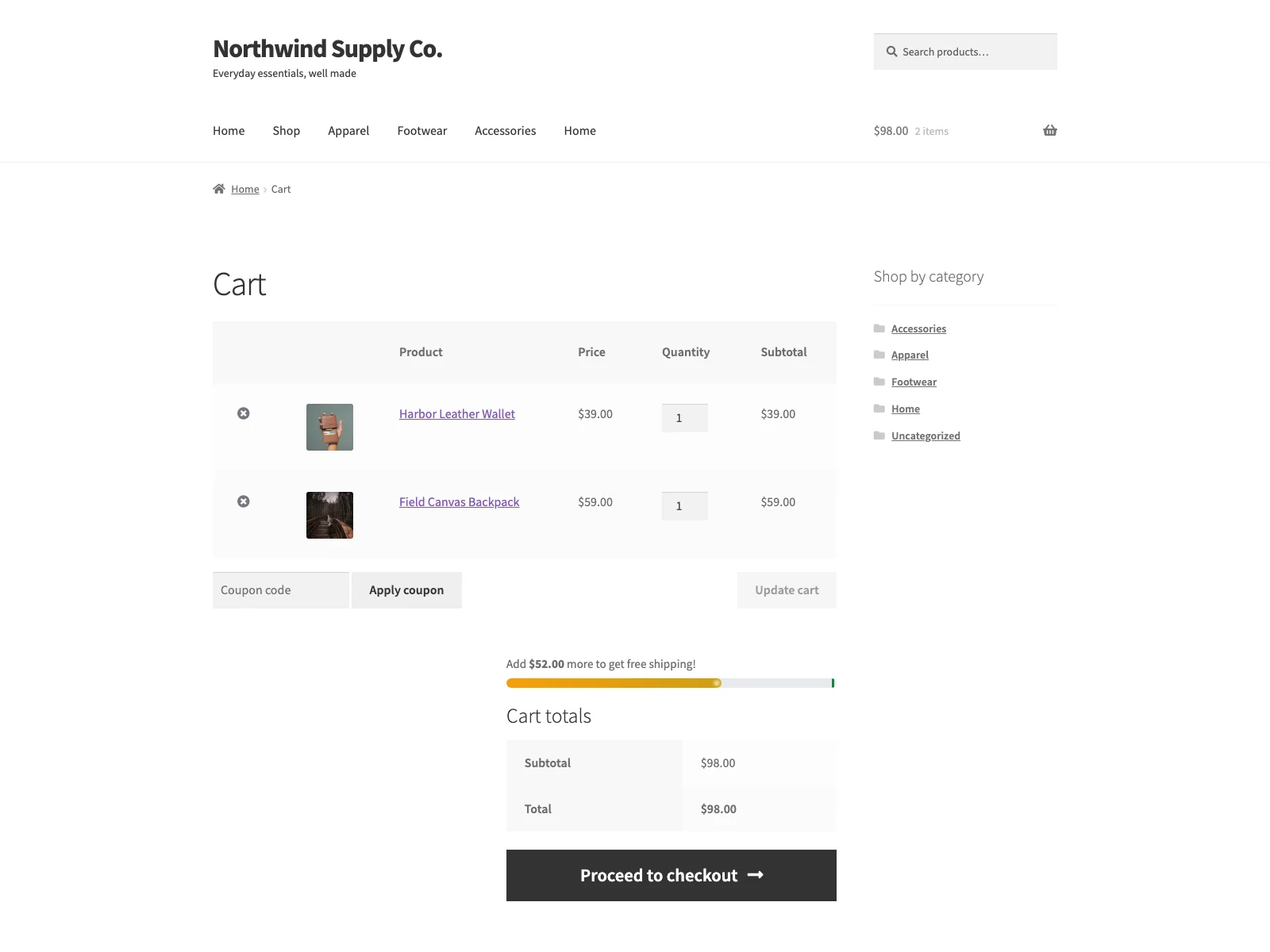 The free shipping progress bar on the cart, showing the shopper how much more to add to unlock free delivery.
- Automatic threshold from WooCommerce. In its default Automatic mode, Nudge reads the minimum order amount from your enabled free shipping methods and uses the smallest one across your shipping zones, so you do not maintain the figure in two places. If you would rather pin a number, Manual mode lets you type a fixed amount, and that same amount also serves as the fallback when Automatic mode finds no qualifying method.
Tip: Prefer Automatic mode so the bar reads the threshold straight from your WooCommerce free shipping method. Hard-coding a number creates a second place to update, and the day the two disagree is the day the bar starts lying to shoppers.
- Live updates with a tiny script. The bar re-renders with the cart and animates the width smoothly between states, using a small script that ships no jQuery of its own. Movement is suppressed for shoppers who set prefers-reduced-motion.
- Cart and checkout, classic and Blocks. Nudge renders on the classic Cart and Checkout templates and on the WooCommerce Cart and Checkout blocks. You enable each placement independently in the settings, so you can show it on the cart, at checkout, or both.
- Accessible by default. It exposes a real role=progressbar with aria-valuenow, aria-valuemin and aria-valuemax, plus a readable text message, so the progress is announced rather than left as a silent coloured strip.
- Zero layout shift. The track reserves its height before paint, so adding the bar contributes no CLS to the page.
- Themeable and dark-mode aware. Colours and sizing are exposed as
--nudge-*CSS custom properties, and the bar adapts to dark colour schemes, so your theme can recolour it without touching the markup. - Editable messages with a token. You write the progress and success messages yourself. The progress message takes an
{amount}token that is replaced with the remaining total formatted in your store currency, so “Add {amount} more to get free shipping!” becomes “Add $8.00 more to get free shipping!” on the front end. - Quiet when there is nothing to show. When the bar is disabled, the cart is empty, or no threshold can be resolved, Nudge renders nothing at all, and with the feature off its styles and scripts never load on the front end.
- Self-contained and tidy. Nudge makes no external HTTP requests: no analytics, no remote fonts, no licence calls. It stores only two options in your own database, ships a POT file for translation, removes its options on uninstall, and declares HPOS and Cart/Checkout Blocks compatibility.
When no free shipping goal is configured, Nudge hides the bar instead of showing a broken or always-complete one, which keeps you on the right side of the “a wrong bar is worse than no bar” rule.
Note: With the feature off, or when no threshold can be resolved, Nudge renders nothing and its styles and scripts never load on the front end, so a missing goal costs you no page weight.
Setting it up
Getting a working bar live takes a couple of minutes:
- Install the plugin from Plugins > Add New, or upload it to
/wp-content/plugins/plogins-nudge. WooCommerce must be installed and active. - Activate it. Nudge ships enabled, with both cart and checkout placements on by default.
- Go to WooCommerce > Nudge. Confirm the bar is enabled and choose where it shows: cart, checkout, or both. Showing it on both keeps the goal in front of the shopper through the whole purchase.
- Leave the threshold source on Automatic if you have a WooCommerce free shipping method, so the bar tracks your real rule. Switch to Manual and enter a fixed amount if you would rather set the number by hand; that amount also acts as the Automatic fallback.
- Optionally edit the progress and success messages. The settings screen shows a live preview of each so you can see what shoppers will read.
The settings page carries inline help under every field and a preview of the messages, so you are not cross-referencing documentation while you configure it.
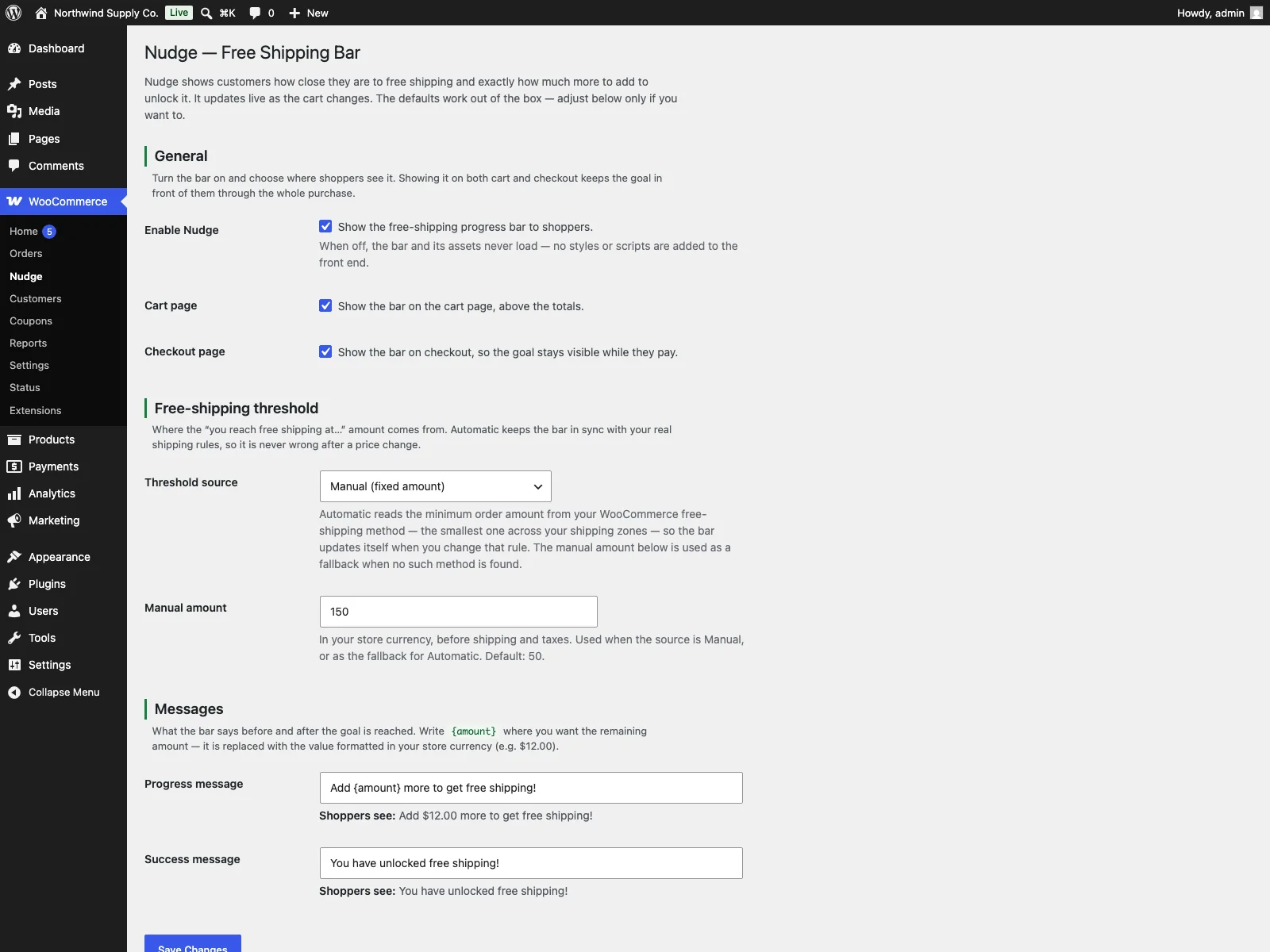 The Nudge settings screen, where you pick placements, the threshold source and the progress and success messages.
Practical tips
A bar gives you the mechanism; how you use it decides whether it actually lifts carts.
- Prefer Automatic mode. Reading the threshold from your shipping method is the single best way to keep the bar honest. The moment you hard-code a number, you have created a second place to update every time the free shipping rule changes, and the day they disagree is the day the bar starts lying to shoppers.
- Set a threshold people can actually reach. A free shipping goal that sits far above your average order value frustrates more than it motivates. Aim a little above your typical cart so the “one more item” feels attainable, not like a second purchase.
Tip: Aim the threshold a little above your typical cart value so the “one more item” feels attainable rather than like a second purchase.
- Show it on the cart at minimum. The cart is where the add-one-more decision happens. Checkout is a useful reinforcement, but the cart is where the bar earns its keep.
- Write a message that names the reward. “Add {amount} more to get free shipping!” is clearer than a bare number, and the success message is a small moment of payoff worth getting right.
- Let the bar match your brand. Because the colours are CSS custom properties, a few lines of CSS make the bar look native rather than bolted on, in both light and dark themes.
Nudge versus default WooCommerce
WooCommerce can offer free shipping over a threshold, but it does nothing to tell the shopper how close they are. Here is the difference for the progress bar specifically:
| Capability | Default WooCommerce | Nudge (free) |
|---|---|---|
| Free shipping over a threshold | Yes, as a shipping method | Uses that same method |
| Shows how much is left | No | Yes, live remaining amount |
| Threshold kept in sync | n/a | Read automatically from the method |
| Updates as the cart changes | No | Yes, live |
| Cart and checkout placement | n/a | Both, classic and Blocks |
| Layout shift (CLS) | n/a | Zero, track reserves height |
| jQuery required | n/a | No, tiny plain-JS script |
| Reduced-motion respected | n/a | Yes |
| Accessible progress bar | n/a | Yes, role=progressbar with ARIA |
| Editable messages | n/a | Yes, with an {amount} token |
| Empty state when no goal | n/a | Bar hides itself, assets do not load |
| Cost | Free (core has no bar) | Free; PRO adds floating bar, per-zone goals, tiered rewards, analytics |
Free versus PRO
The free edition is a complete free shipping bar: automatic or manual threshold, live updates, cart and checkout placement, accessible markup, editable messages, theming and a clean empty state are all included.
Nudge PRO is a separate paid add-on that requires the free plugin to be installed and active; it extends the free plugin rather than replacing it, and is distributed through Freemius. PRO adds a floating mini-cart bar shown on every storefront page (not just cart and checkout), so the goal follows shoppers as they browse, with top or bottom placement and its own message and colours. It adds per-zone thresholds, so Automatic mode can use the free shipping minimum from the customer’s matching shipping zone instead of the smallest amount across all zones. It adds tiered rewards, chaining up to three cart-total milestones with their own messages and markers across the cart, checkout and floating bars. And it adds conversion analytics that aggregate bar views and threshold hits per placement under WooCommerce > Nudge Analytics. Those are PRO-only; the free edition covers a single free shipping threshold on the cart and at checkout.
The short version
A free shipping bar works when it shows the real remaining amount, updates live, stays accessible, and adds no layout shift. The cleanest setup reads the threshold straight from your WooCommerce shipping method so the number never drifts, and hides the bar when there is no real goal to show. Nudge does all of this for free on the cart and at checkout, and PRO adds a floating bar, per-zone goals, tiered rewards and analytics when you need to push further.