WooCommerce abandoned cart recovery with restore links
By Mariusz Szatkowski · Updated: 2026-11-03
Most abandoned carts are not lost sales, they are interrupted ones. A shopper fills a cart, gets distracted by a phone call, a meeting, a crying child, a better price they want to double-check, and simply never comes back to a tab they have already closed. The intent was real. What broke was the return trip. Abandoned cart recovery exists to rebuild that return trip: save what the shopper had, wait long enough to be sure they have actually left, then hand them a single link that drops them back exactly where they were. This guide explains what a recovery flow actually is, why it matters more than most store owners assume, what a good solution needs, and how the free Recover plugin adds the whole flow to WooCommerce without sending a byte of customer data to anyone else.
What “abandoned cart recovery” actually means
Two terms get mixed up here, so it helps to separate them. Cart abandonment is the event: a cart exists, it has items in it, and checkout never completed. Cart recovery is the deliberate follow-up: detecting that abandonment and giving the shopper an easy, trusted way to finish. Recovery is not a sales gimmick layered on top of the cart, it is the missing second half of the checkout funnel that WooCommerce, on its own, simply does not have.
A recovery flow has a small number of moving parts, and each one has to work or the whole thing fails. You need to capture the cart as a snapshot you can rebuild later. You need to capture an email address, because a cart you cannot contact is a cart you cannot recover. You need a definition of “abandoned”, a time window after which inactivity counts as leaving rather than pausing. You need a send mechanism that delivers a message once and only once. And you need a restore link that rebuilds the exact cart, plus a way to stop chasing the moment the order is actually placed. Miss any one of those and you either fail to recover anything or, worse, you keep emailing customers who already bought.
Why recovery matters
The reason cart recovery earns its place is that it works on shoppers who have already done the hard part. They have found your store, chosen products, and signalled real buying intent by reaching the cart. Compared with finding a brand-new visitor, nudging an existing one back to a cart they built themselves is cheap and high-converting. The sale is not being created from nothing, it is being rescued.
There is also a quieter, structural benefit. Without recovery, every abandoned cart is invisible. You cannot see how many shoppers leave at the cart, you cannot see how many come back, and you have no number to improve. A recovery flow that records carts and tracks how many convert gives you a recovery rate, and a recovery rate is something you can actually move with better timing, a clearer email, or an incentive. You go from guessing to measuring.
In go-to-market engineering practice, cart recovery acts as a high-leverage revenue protection layer. Rather than continuously pouring budget into top-of-funnel acquisition, sales infrastructure systematically plugs bottom-of-funnel leaks, dramatically improving capital efficiency and sales velocity.
The risk to manage is trust. A recovery email lands in a real person’s inbox, often someone who never explicitly signed up for marketing. So the bar is higher than for an ordinary newsletter: the email has to be obviously about their cart, the link has to be safe, consent has to be respected, and the data behind it all has to stay under your control rather than being shipped off to a third-party platform. A recovery flow that gets this wrong does not just underperform, it damages the relationship.
Warning: A recovery email often lands with someone who never explicitly signed up for marketing, so the bar is higher than for a newsletter. Mishandle the consent, the link, or the data and the flow damages the relationship rather than rescuing the sale.
What a good recovery solution needs
Use this as a checklist whether you build, buy, or install:
- Early, reliable email capture. Grab the address as soon as you legitimately can, automatically for logged-in customers and, with consent, for guests typing into the checkout email field. A cart with no email cannot be recovered.
- Automatic cart snapshots. The cart should be saved whenever it changes, so the version you restore is the version the shopper actually had.
- A configurable abandonment window. “Abandoned” is a judgement call. You should set how long inactivity lasts before a cart counts as left, and how long to wait after that before emailing.
- A secure restore link. The link must rebuild the cart without exposing anything personal in the URL and without letting a stranger guess their way into someone else’s cart.
- Send-once discipline. The worker that sends recovery emails must be idempotent, so a re-run never sends a second copy for the same cart. Inbox spam is the fastest way to lose trust.
- A stop condition. The moment the order is placed, the cart must be marked recovered so no further chasing happens.
- Consent and a clean data path. Guest capture gated behind consent, editable wording, and a one-click way to erase all stored data for a given email.
- Local data, no SaaS lock-in. Cart data in your own database, emails through your own mailer, nothing leaving the store.
Notice what is not on that list: a complicated multi-channel campaign. The single biggest win in recovery is one good, well-timed email with a working link. Everything beyond that is optimisation, not foundation.
Tip: Start with one well-timed email and a working restore link. Coupons, sequences and multi-channel campaigns are optimisation, not the foundation of a recovery flow.
How Recover handles it
Recover for WooCommerce is a free, open-source plugin that adds exactly this flow, and it does the whole thing on your own server. No third-party service, no account, no data leaving your store. The flow runs in five steps.
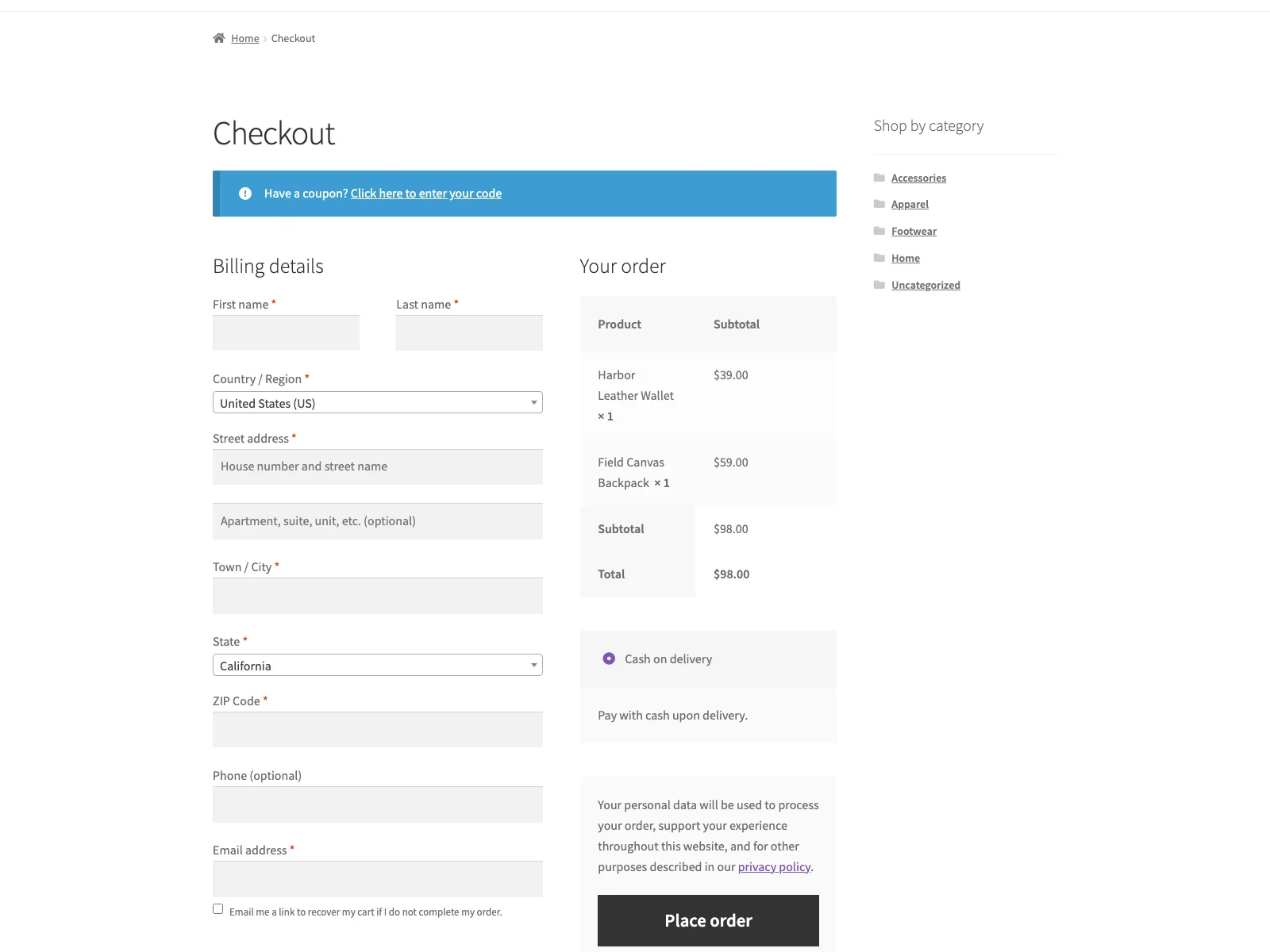 Recover captures the shopper email at checkout so an abandoned cart can be emailed back with a restore link.
First, the cart is snapshotted. As soon as a shopper has items, Recover saves a private snapshot, and it re-snapshots whenever the cart changes, so the restored cart matches what they really had.
Second, the email is captured early. For logged-in customers the address is taken automatically. For guests, a small vanilla-JavaScript snippet (no jQuery) watches the checkout email field and records the address through a nonce-checked AJAX call, but only after the shopper ticks a consent checkbox. If consent is required and not given, the email is simply not stored, with no nagging.
Third, inactive carts become abandoned. Recovery runs on a WordPress cron schedule, hourly by default. Each run flags any pending cart that has been inactive past your window as abandoned.
Fourth, the recovery email goes out. On a later run, once the email delay has passed, Recover emails the shopper through your own site mailer (wp_mail). The worker is idempotent, so a given cart receives a single recovery email and a re-run never double-sends.
Fifth, one click restores the cart. The email’s button carries a secure, tokenised restore link. Clicking it repopulates the cart and returns the shopper to checkout. The instant an order is placed, the matching cart is marked recovered, so chasing stops automatically.
Security and privacy, specifically
The restore link is the sensitive part, and Recover treats it that way. Each cart has a 64-character cryptographically random token, and the link contains only that token: no customer id, no email, nothing personal in the URL. Without the exact token a cart cannot be restored, which closes off enumeration and IDOR attacks. On the data side, cart data lives in a single custom table ({prefix}_recover_carts) in your own database, guest capture is consent-gated with editable wording, and the carts screen lets you wipe every stored cart for one email address in a single click. Deleting the plugin drops its table, removes its two options, and clears the scheduled task. All output is escaped, all input sanitised, every admin form and AJAX request is nonce-checked, and the admin pages require the manage_woocommerce capability.
Setting it up
Getting the flow live takes a few minutes:
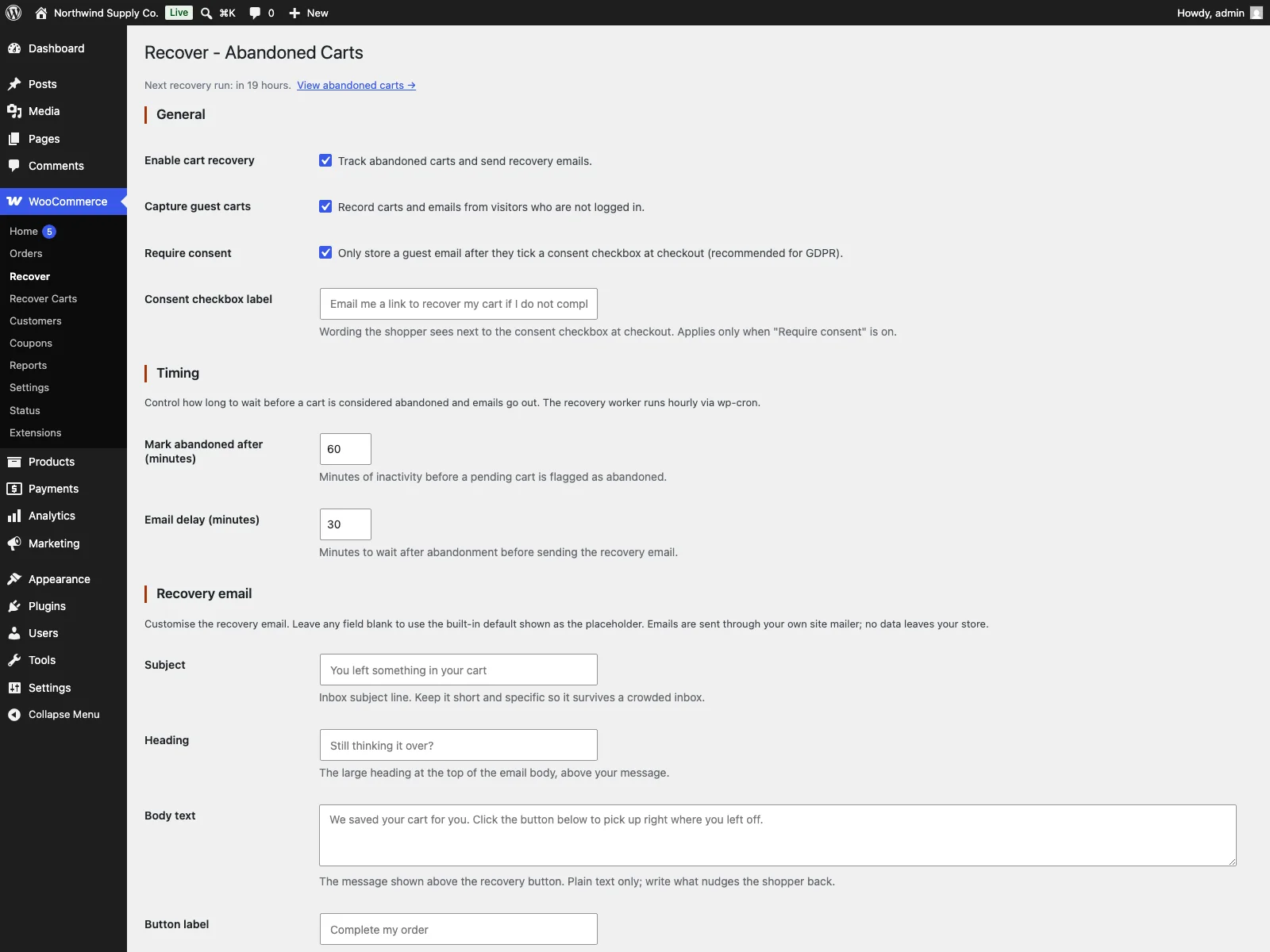 The Recover admin screen: timing, consent options and the live recovery rate.
- Install and activate WooCommerce (8.0 or later), then install Recover from the plugin directory or upload the
plogins-recoverfolder to/wp-content/plugins/. - Activate it through the Plugins screen.
- Go to WooCommerce > Recover. The defaults work out of the box, so you only adjust what you want to change.
- Under Timing, set “Mark abandoned after” (60 minutes by default, minimum 5) and “Email delay” (30 minutes by default). Under General, decide whether to capture guests and require consent, and edit the consent label. Under Recovery email, customise the subject, heading, body and button label, or leave any field blank to use the built-in default shown as the placeholder.
- Watch WooCommerce > Recover Carts for pending, abandoned and recovered counts plus a live recovery rate. Each row shows the email, item count, cart value, status, number of emails sent, last activity, and an Erase action for that email.
The settings page shows when the next recovery run is due, and it is HPOS-compatible and works with the Cart and Checkout Blocks, so it sits cleanly on a modern WooCommerce install.
Practical tips for a recovery flow that converts
The plugin gives you the mechanism; these choices decide how well it performs.
- Time the window to your buying cycle. A 60-minute abandonment window with a 30-minute delay catches a genuinely distracted shopper without pouncing on someone who is still deciding. Considered or high-ticket purchases often deserve a longer pause; impulse categories can be tighter. Adjust both numbers and watch the recovery rate, not your gut.
- Make the subject obviously personal. The recovery email succeeds or fails in the inbox preview. The default, “You left something in your cart,” reads as a reminder, not a pitch. Keep it short, specific, and clearly about their cart.
- Keep the body honest and short. One nudge and one button outperform a wall of persuasion. The shopper already wanted the items; your job is to remove the friction of getting back, not to re-sell them.
- Respect consent properly. Leave consent required for guests unless you have a clear legal basis not to, and write a consent label that plainly says what will happen. Trust earned here is what makes the email welcome instead of creepy.
- Use the recovery rate as your dashboard. It is the one number that tells you whether changes helped. Move one variable at a time, the window, the subject, or the delay, and let the rate tell you what worked.
Recover versus default WooCommerce
WooCommerce can take an order, but it has no concept of an abandoned cart or a recovery email at all. Here is the difference for recovery specifically:
| Capability | Default WooCommerce | Recover |
|---|---|---|
| Detects an abandoned cart | None built in | Cart snapshot, then abandoned after your window |
| Captures the shopper’s email early | No | Logged-in automatically, guests with consent |
| Sends a recovery email | No | Once per cart, via your own wp_mail on cron |
| Secure one-click restore link | No | 64-char token, restores the exact cart |
| Stops after the order is placed | n/a | Cart marked recovered automatically |
| Recovery rate reporting | No | Pending / abandoned / recovered counts plus rate |
| Consent and data erasure | n/a | Consent-gated guest capture, one-click per-email wipe |
| Data location | n/a | Your own database; nothing sent to a third party |
| Cost | Free (no recovery at all) | Free; Pro adds coupons, sequences and analytics |
Free versus Pro
The free edition is a complete recovery flow, not a teaser: early email capture, automatic snapshots, the configurable window, the secure restore link, single-send cron delivery, the recovery-rate report, consent handling and one-click data erasure are all included. Recover Pro is a separate premium add-on that requires the free plugin and boots on top of it without modifying any free files. It is for stores that want to push the recovery rate further. It adds automatic single-use recovery coupons, locked to the recipient’s email and set to expire, that are injected into the recovery email; multi-step recovery sequences with per-step delays, copy overrides and optional per-step coupons; and conversion analytics showing recovered revenue and per-step recovery rates. Reach for it once a single email is no longer enough, not before.
The short version
WooCommerce has no recovery flow at all: an abandoned cart is simply invisible. A good flow needs early email capture, a saved cart, a sensible abandonment window, a single secure restore email, and a hard stop once the order lands, all while respecting consent and keeping data under your control. The free Recover plugin delivers exactly that, entirely on your own site, and gives you a recovery rate to improve. Start with one well-timed email and a working link; add coupons, sequences and analytics with Recover Pro only when one email stops being enough.