GDPR newsletter opt-in at WooCommerce checkout
By Mariusz Szatkowski · Updated: 2026-09-11
Collecting newsletter subscribers at checkout is one of the easiest ways to grow a store’s marketing list, because the customer is already engaged and has just typed their email into the order form anyway. The catch is that, under the GDPR, you cannot simply add buyers to a mailing list because they bought something. You need their clear, separate consent. This guide explains what a GDPR-minded opt-in checkbox is, why the defaults matter so much, what a consent record should hold, and how to set up an opt-in in WooCommerce that collects only people who genuinely agreed and keeps their addresses on your own site.
What a GDPR newsletter opt-in checkbox is
A newsletter opt-in checkbox at checkout is a single, optional field that lets a customer choose to join your mailing list while they place an order.
The key word is optional. Placing an order and joining a newsletter are two different decisions, and the GDPR treats them that way. The checkbox separates the marketing consent from the purchase, so a customer can buy without subscribing and subscribe without feeling forced into it. It is a small piece of UI, but it is the exact point where most stores either build a clean, defensible list or quietly build a liability.
A compliant opt-in shares a few traits:
- It is unticked by default, so the customer makes an active choice.
- Its wording is plain and specific about what the person is signing up for.
- Ticking it is not a condition of completing the order.
- It produces a record of consent you can refer back to later.
Miss any one of these and the checkbox stops being evidence of consent and becomes a question you cannot answer later. A pre-ticked box, a vague label, or a list with no signup dates all leave you in the same place: a pile of email addresses you cannot prove anyone agreed to.
Why consent-first opt-in matters
The GDPR sets a high bar for what counts as consent, and a checkbox is where most stores either meet it or fail it without noticing.
Consent under the GDPR must be freely given, specific, informed and unambiguous. A pre-ticked box does not meet that standard, because the customer has not actively agreed. They have simply failed to opt out, and failing to opt out is not the same as choosing to opt in. Regulators have been explicit on this point, and a default-ticked checkbox is the single most common mistake at checkout.
Warning: A pre-ticked box is not valid consent under the GDPR. Failing to opt out is not the same as choosing to opt in, so start the checkbox unticked.
Getting it right pays off in more than compliance:
- A cleaner list. Everyone on it chose to be there, so open rates, click rates and deliverability all tend to be better. A list of people who actively wanted your email is worth far more than a larger list of people who never noticed they joined.
- Lower risk. A documented, affirmative opt-in is far easier to defend than a list of unknown origin. If a complaint ever lands, the difference between “here is the date and source of their consent” and “I am not sure how they got on there” is the whole case.
- More trust. Customers who were never sneaked onto a list are less likely to mark your mail as spam, which protects your sender reputation for everyone else on the list too.
What a good checkout opt-in needs
A newsletter opt-in tool for WooCommerce should cover a handful of fundamentals. Use this as a checklist whether you build it yourself, buy it or install a plugin:
- A separate, optional field. The opt-in must be its own decision, never bundled into a required checkout field or the terms checkbox.
- The right default. Unticked out of the box, so consent is an action the customer takes rather than one they have to undo.
- Editable, specific wording. You should be able to word the label for your store and your audience, not be stuck with someone else’s phrasing.
- A complete consent record. The email, a flag that they actively agreed, where the opt-in happened, and the date it happened.
- Data that stays put. The address should land in your own database, not get fired off to a third-party platform the instant the box is ticked.
- A way to get the list out. When you are ready to email, a clean export so you are never locked into one tool.
Notice what is not on that list: sending the newsletter. Collecting consent and running an email programme are two separate jobs. A tool that does the collection well, stores a clean record, and hands you the list on your terms is doing exactly what the checkout stage should do. What you send and how you send it is a later, deliberate decision.
How Subscribe handles it
Subscribe - Newsletter Opt-In for WooCommerce is a free, open-source plugin built to do one job well: put a consent-first opt-in checkbox on your WooCommerce checkout and record who agreed. It does not try to be an email platform. It is the clean front door to your list.
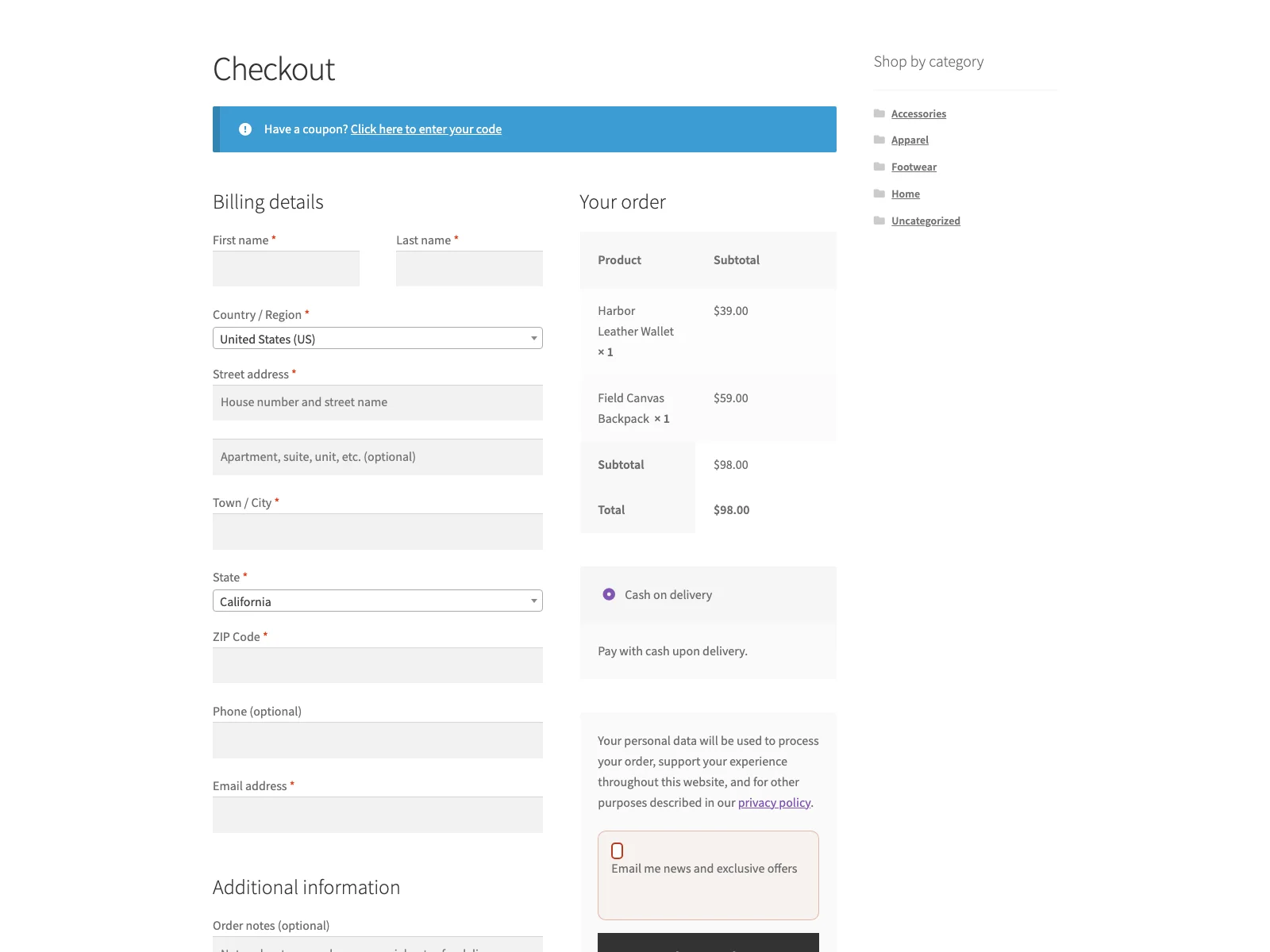 The consent-first opt-in checkbox on the storefront checkout, unticked by default.
When a customer ticks the box and places the order, Subscribe saves their email on your own site along with the consent flag, the source the opt-in came from, and the date. The checkbox is unticked by default, which is what most GDPR setups need, and the label text is editable so you can word it for your store. Nothing is ever sent to an outside service, so the addresses stay in your database and nowhere else.
The subscriber record
Every opt-in is stored as a private Subscriber record, held as a subscribe_subscriber custom post type in your WordPress database. Each record holds four things: the email address the customer entered, a consent flag confirming they actively ticked the box, the source so you know the opt-in came from checkout, and the signup date that timestamps when consent was given. Those four fields are exactly the audit trail described above. If a subscriber ever asks why they are receiving your email, or a regulator asks how an address reached your list, you can answer with a date and a source rather than a shrug.
Note: Each subscriber record holds four things: the email, a consent flag, the source, and the signup date. That is the audit trail that lets you show who agreed and when.
Subscribe also skips duplicates, so the same email is never recorded twice no matter how many times that customer checks out. You review everyone who opted in under WooCommerce > Subscribers, and export the whole list to a CSV file with one click when you want to use it. The export is CSV-injection safe, so opening it in a spreadsheet does not turn a crafted address into a formula. The plugin keeps everything in your own database, ships a translation template, declares HPOS compatibility, and removes its data cleanly on uninstall.
One honest limit worth stating plainly: the opt-in checkbox renders on the classic (shortcode) checkout. The plugin declares compatibility with the cart and checkout blocks so it does not trigger a warning, but the checkbox itself currently appears on the classic checkout. If your store runs the block checkout, plan around that.
Warning: The opt-in checkbox currently appears on the classic (shortcode) checkout. If your store runs the block-based checkout, the checkbox will not render there, so plan around it.
Setting it up
Getting the opt-in live takes a few minutes:
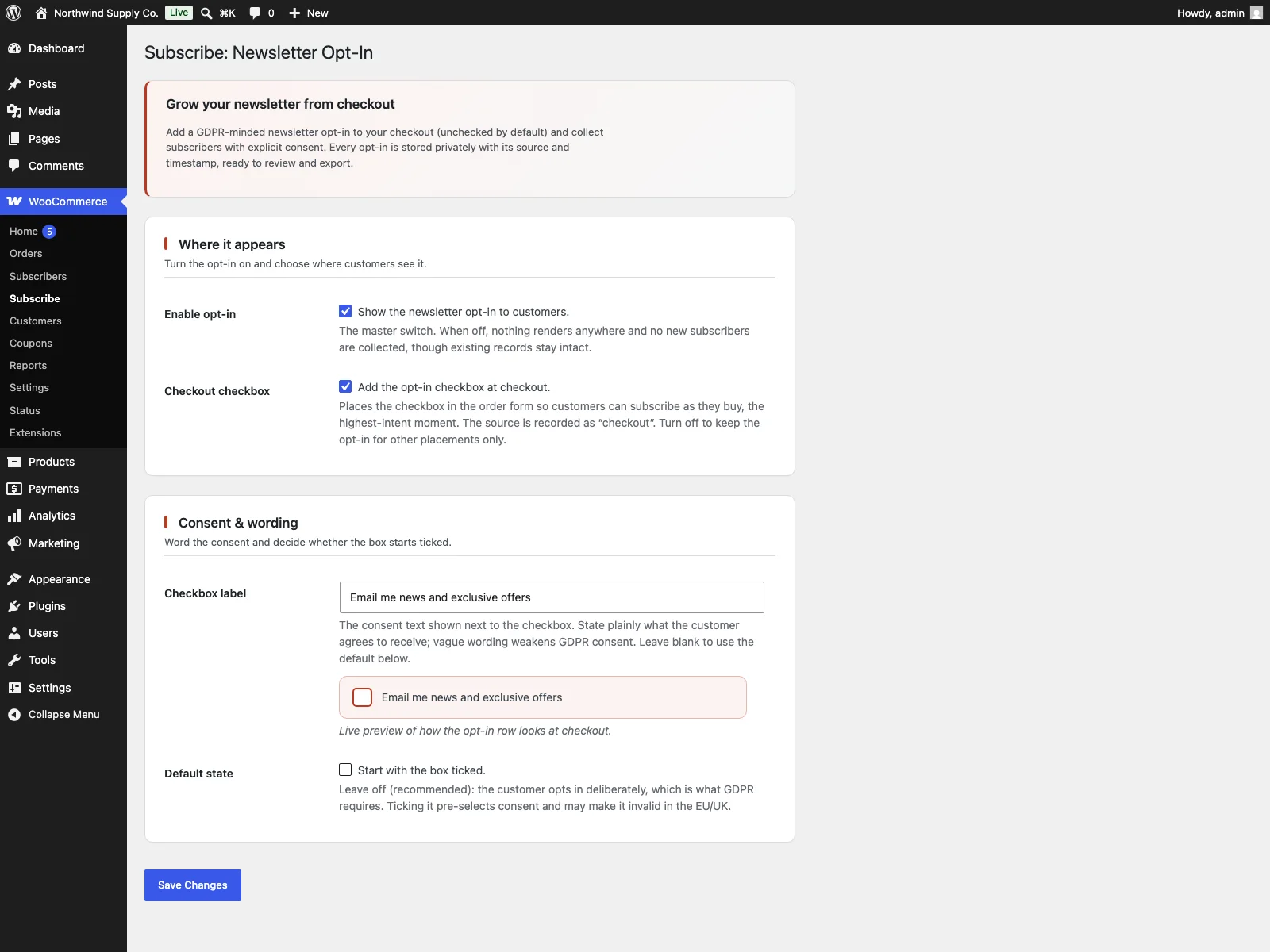 The opt-in settings in wp-admin, where you set the checkbox label and default state.
- Install the plugin from Plugins > Add New, or upload it to
/wp-content/plugins/plogins-subscribe. WooCommerce must be installed and active first, otherwise the plugin shows a notice and does nothing. - Activate it.
- Go to WooCommerce > Subscribe to turn the opt-in on, set the checkbox label, and choose whether it starts ticked. Leaving it unticked is the right default for most stores.
- As orders come in, find the people who opted in under WooCommerce > Subscribers, and use the Export to CSV button there to download the list whenever you need it.
That is the whole flow. The setting to pre-tick the box exists for the narrow cases where local rules clearly permit it, but it is off out of the box, which is the safe default.
Practical tips for a clean list
The plugin gives you the mechanism. A few habits make the list it builds genuinely useful:
- Write the label like a human. “Email me occasional news and offers” tells the customer exactly what they are agreeing to. Avoid vague phrasing like “keep in touch” that does not say what will land in their inbox.
- Keep the opt-in off to the side of the order. It should read as an extra you can take or leave, never as a step that looks required. The order must complete whether or not the box is ticked.
- Do not pre-tick it. Even where local rules might allow it, an unticked box gives you the strongest consent record and the most engaged list. The handful of extra subscribers a pre-ticked box catches are rarely the ones who open your email.
- Export on your schedule, not at signup. Keeping addresses in your own database until you choose to move them is data minimisation in practice. Personal data does not travel to an external platform until you decide it should.
- Mind retention. A clean record makes deletion and access requests easy, but you still need to decide how long you keep subscribers and honour requests to leave.
Subscribe versus default WooCommerce
WooCommerce collects an email for the order, but it has no newsletter opt-in and no concept of marketing consent at all. Here is the difference for newsletter signups specifically:
| Capability | Default WooCommerce | Subscribe |
|---|---|---|
| Newsletter opt-in at checkout | None built in | Optional checkbox on the classic checkout |
| Unticked by default | n/a | Yes, with an editable label |
| Separate from the order decision | n/a | Yes, ticking is never required to buy |
| Consent record | None | Email, consent flag, source and signup date |
| Duplicate handling | n/a | Skips emails already recorded |
| Where data lives | Order data only | Private subscriber records in your own database |
| Export the list | Manual order export | One-click CSV (injection safe) |
| Sends to an email service | No | No in free (Pro adds Mailchimp, Brevo, Klaviyo sync) |
| Cost | Free (no opt-in) | Free; Pro adds welcome email, double opt-in and ESP sync |
Free versus Pro
The free edition is a complete collection flow, not a teaser: the consent-first checkbox, the editable label, the private subscriber records with consent, source and date, duplicate handling and one-click CSV export are all included, and nothing leaves your database.
Subscribe Pro is a separate add-on that requires the free plugin and builds on top for stores ready to run an email programme. It adds an automatic welcome email sent once per subscriber, optional double opt-in with a signed confirmation link that expires after seven days, extra custom checkout fields and source tags stored on the subscriber record and included in the export, and automatic sync to Mailchimp, Brevo or Klaviyo after opt-in, with checkout opt-ins routed to a dedicated list. Pro is distributed through Freemius rather than the WordPress.org directory. If all you need is a clean, compliant way to gather consent and keep the list on your own site, the free plugin is the whole job.
The short version
Under the GDPR you cannot add buyers to a newsletter just because they bought something. Consent has to be freely given, specific, informed and unambiguous, which in practice means an unticked checkbox, plain wording, no pressure to tick it, and a record showing who agreed and when. Default WooCommerce offers none of that. The free Subscribe plugin adds a consent-first opt-in to the classic checkout, stores each subscriber as a private record holding the email, consent flag, source and date, skips duplicates, and exports the list to CSV with one click, all kept in your own database and never sent anywhere. Subscribe Pro layers on welcome emails, double opt-in and sync to Mailchimp, Brevo or Klaviyo when you are ready to start sending. Either way, the privacy policy, lawful basis and how you email people stay yours to confirm.