WooCommerce post-purchase emails: thank customers and request reviews
By Mariusz Szatkowski · Updated: 2026-11-03
The order is paid, the parcel is on its way, and for most WooCommerce stores that is where the conversation stops. The receipt email goes out, the status flips to Completed, and the customer disappears until they happen to need something again. Post-purchase emails are the messages that fill that silence: a thank-you that confirms the relationship, and a review request that asks for feedback at the moment the customer actually has an opinion. They are some of the highest-value email a store can send, because they reach a person who has already paid, already trusts you enough to buy, and is more likely to open a message from a shop they just ordered from than from one they have never used. This guide explains what post-purchase emails are, why timing is the whole game, what a good follow-up tool needs, and how the free Sekvo plugin adds a timed follow-up layer to WooCommerce.
What post-purchase emails actually are
It helps to separate two kinds of email a store sends. Transactional emails are the receipts: order confirmation, processing, completed, refunded. They are triggered the instant a status changes, they carry information the customer needs right now, and WooCommerce sends them out of the box. Post-purchase emails, sometimes called lifecycle or follow-up emails, are different. They are not tied to the moment of a status change. They are deliberately delayed, sent some days after an order reaches a status, and their job is relationship rather than receipt.
The two that nearly every store wants are simple. A thank-you goes out shortly after the order is fulfilled, while the purchase is still fresh, to acknowledge the customer as a person rather than a transaction. A review request goes out later, once the customer has had enough time to receive the parcel, open it, and form an opinion, and it asks them to leave feedback. The difference between the two is mostly timing, and timing is exactly what core WooCommerce has no way to express.
Why post-purchase emails matter
Three things make these emails worth setting up. First, they reach an audience that is already warm. Acquiring a new customer costs far more than keeping an existing one, and a buyer who just completed an order is the easiest person you will ever have to re-engage. A short, well-timed message keeps your store in their inbox at the one moment they are most receptive to it.
Second, review requests are the engine of social proof. Most happy customers never think to leave a review unless asked, and most reviews on a product page come from a request rather than a spontaneous urge. If you do not ask, the only people who tend to write reviews unprompted are the unhappy ones, which skews your ratings downward. A polite, automatic ask sent at the right time is the single most reliable way to grow the number and quality of reviews on your catalogue.
Third, timing protects the experience. A review request that arrives before the parcel does is worse than no request at all, because it tells the customer you are not paying attention. The value of a follow-up tool is not just that it sends email; it is that it sends the right email after the right delay, automatically, for every order, without you watching a calendar.
In a go-to-market engineering architecture, the sales journey does not end at checkout. Revenue operations (RevOps) and customer success tie post-purchase workflows into automated feedback loops: systematic review collection fuels social proof for incoming pipeline traffic, while timely buyer communication boosts customer retention and lifetime value (CLV).
Warning: A review request that lands before the parcel does is worse than no request at all. Set the review delay to clear your real delivery time so the ask always arrives after the product.
What a good follow-up tool needs
Whether you build, buy or install, a post-purchase email tool for WooCommerce should cover a handful of fundamentals. Use this as a checklist:
- Status-based triggers. Each follow-up should fire from an order status you choose, such as Processing or Completed, so it only reaches customers at the right stage.
- A configurable delay. A number of days to wait after the status is reached, so a thank-you can go out soon and a review request can wait until the product has arrived.
- Per-type control. Thank-you and review request are different jobs and need separate enable switches, triggers, delays and templates.
- Editable templates. Subject and body you can edit, with placeholders for the customer name, order number and site name so each message reads as personal.
- Idempotency. A guarantee that the same follow-up is never sent twice for the same order, even if the scheduler runs more than once.
- Your own mail path. Emails should go through the site’s existing mail setup, not a third-party service that needs an account and an API key for a basic thank-you.
- A clean, automatic schedule. A background job that finds due orders and sends, so you set it once and forget it.
Notice what is not on that list: a marketing automation suite. A reliable thank-you and a well-timed review request cover the great majority of the value, and adding sequences, branching and tracking before the basics work is effort spent in the wrong place.
How Sekvo handles it
Sekvo for WooCommerce is a free plugin that adds exactly this timed follow-up layer. It ships with the two email types most stores want, ready to use: a thank-you and a review request. For each type you control four things independently: whether it is enabled, which order status triggers it, how many days to wait after that status, and the subject and body of the message.
The templates
Subjects and bodies are plain editable text, and they support three placeholders so each email reads as if you wrote it for that customer: {customer} for the first name, {order} for the order number, and {site} for your site name. The same placeholders work in both the subject line and the body, so you can open with “Thanks for order {order}, {customer}” without any code. The templates come pre-filled, so the plugin sends sensible copy from the moment you enable a type, and you edit from there rather than starting from a blank box.
How and when it sends
A daily wp-cron event does the work. Once a day it checks for orders that have been in a follow-up’s configured status for at least the configured number of days and have not already had that follow-up, and it sends them. Emails go out through wp_mail() using your WooCommerce store sender, which means they travel by whatever mail setup your site already uses, your SMTP plugin or transactional service included. There is nothing new to authenticate and no external service in the path: Sekvo has no API keys, sends no data off-site, and loads nothing from a remote URL.
No duplicates, ever
Each follow-up is recorded against the order as soon as it sends, stored as _followup_sent_{type} order meta. That record is what makes the system safe to run on a schedule: the same follow-up is never sent twice for the same order, even if two cron runs overlap or the daily event fires more than once. You do not have to worry about a customer getting five thank-you notes because something retried.
Built for developers
Sekvo is also extensible for anyone who wants to go further in code. A followup/sequence_steps filter lets add-ons append their own follow-up steps, each with its own trigger status, delay, subject and body, while reusing Sekvo’s idempotent scheduler so the duplicate protection still applies. Further hooks expose points in the send process: followup/should_send runs before a follow-up claims an order, followup/email_sent fires after wp_mail accepts a message, and followup/email_links exposes the URLs found in a final body. These are the seams that the paid edition builds on, and they are open to your own code too.
Setting it up
Getting follow-ups live takes a few minutes:
- Upload the plugin to
/wp-content/plugins/sekvo, or install it from Plugins > Add New. WooCommerce must be installed and active. - Activate it.
- Go to WooCommerce > Follow-ups. For each email type, switch it on, choose the trigger status, set the delay in days, and edit the subject and body if you want to.
- That is it. The daily cron event will start picking up due orders and sending the enabled follow-ups.
A sensible starting point is a thank-you triggered by Completed with a short delay of a day or two, and a review request triggered by Completed with a longer delay that comfortably clears your delivery time, often a week or two. Adjust the review delay to your real shipping speed: the goal is for the ask to land after the parcel, never before.
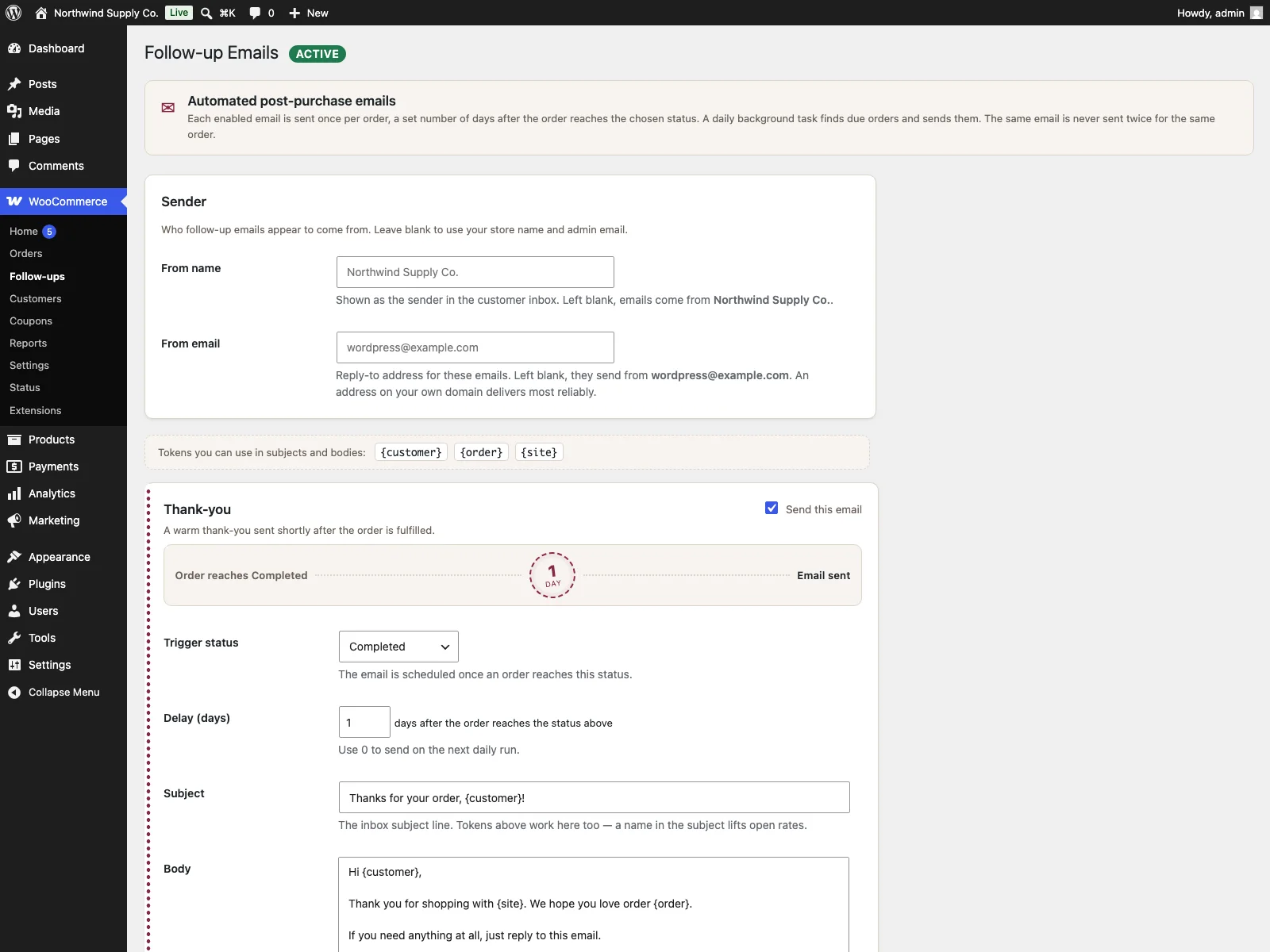 The WooCommerce Follow-ups screen in wp-admin, where you enable each email type and set its trigger status, delay, subject and body.
Practical tips for follow-ups that work
The plugin gives you the mechanism; the copy and timing are yours. A few practical pointers:
- Match the review delay to delivery, not to the order. The clock that matters is when the customer has the product in hand. If your average delivery is five days, a review request at two days after Completed will annoy people. Pad it.
- Keep the thank-you short and human. It is an acknowledgement, not a sales pitch. One or two warm lines using
{customer}and{order}outperforms a long promotional block. - Ask for the review, do not demand it. Make the request easy and optional. A single clear link and a friendly tone get more responses than guilt or urgency.
- Use the right trigger status. Completed is usually correct for both emails, because it means the order is fulfilled. Processing can work for a thank-you if you fulfil fast, but it is rarely right for a review request, since the goods may not have shipped.
- Send a test order through. Place a real order, move it to the trigger status, and confirm the email arrives and renders the way you expect before you rely on it for live customers.
- Mind your deliverability. Because Sekvo uses
wp_mail(), the email lands wherever your site’s mail already lands. If your transactional email is reliable, your follow-ups will be too; if it is not, fix that first with an SMTP or transactional-email setup.
Tip: Sekvo rides your site’s existing
wp_mail()path, so if your transactional email already lands reliably your follow-ups will too. Fix mail deliverability first before relying on the follow-up layer.
Sekvo versus default WooCommerce
WooCommerce sends transactional email when a status changes, but it has no concept of a timed follow-up. Here is the difference for post-purchase email specifically:
| Capability | Default WooCommerce | Sekvo |
|---|---|---|
| Email when a status changes | Yes (order, processing, completed, refunded) | n/a, that stays core WooCommerce |
| Scheduled thank-you after fulfilment | None | Yes, status trigger plus a delay in days |
| Review-request email | None | Yes, separate type with its own delay |
| Wait N days after a status | Not possible | Configurable per email type |
| Editable subject and body | Per the core templates | Yes, with {customer}, {order}, {site} placeholders |
| Duplicate protection | n/a | Recorded per order, never sent twice |
| Mail path | Site’s wp_mail() | Site’s wp_mail(), no external service |
| Automatic schedule | n/a | Daily wp-cron picks up due orders |
| Cost | Free (no follow-up layer) | Free; Pro adds HTML, sequences, coupons, tracking |
Free versus Pro
The free edition is a complete, useful follow-up layer: two ready email types, per-type trigger, delay and templates, placeholder personalisation, the idempotent daily sender and the developer filters. It is enough to run a thank-you and a review request properly. Sekvo Pro builds on the same hooks for stores that want more: branded HTML emails, custom multi-step sequences, coupon blocks via a {coupon} placeholder, send-time scheduling so messages go out at a chosen hour or weekday, send reporting, and open and click tracking. The free version covers the core post-purchase job; Pro is for when you want to turn that foundation into richer, measured campaigns.
The short version
WooCommerce emails customers when an order status changes, but it has no way to send a thank-you or a review request a set number of days later, so the conversation goes quiet after checkout. A good follow-up tool needs status-based triggers, a configurable delay, per-type templates with personalisation, and a guarantee against duplicate sends, all running on your own mail path. The free Sekvo plugin covers exactly that: enable a thank-you and a review request, choose the trigger and delay for each, and let the daily scheduler reach every eligible order once and only once. Start with one thank-you and one review request, get the timing right against your real delivery speed, and add sequences and tracking with Pro only once the basics are already pulling their weight.