WooCommerce returns and RMA: self-service return flow
By Mariusz Szatkowski · Updated: 2026-09-11
Returns are part of running any store. Sizes do not fit, the wrong variation gets picked, a gift is not quite right, and a parcel of returns is simply the cost of selling online. What turns a normal return into a painful one is not the refund itself but the process around it. WooCommerce, out of the box, gives the shopper no way to ask for a return at all, so the request arrives however the customer can reach you: an email, a contact form, a phone call, a social message. Each one is a thread you have to find again, match to an order, and remember to act on. This guide explains what a proper return and RMA flow needs, how a self-service process keeps every request in one place, and how the free Returns plugin adds that flow to WooCommerce.
What “returns” and “RMA” actually mean
It is worth separating two terms that often get used interchangeably. A return is the physical event: the shopper sends an item back to you. An RMA, or return merchandise authorization, is the record and workflow around that event: who asked, for which items, in what quantity, why, and what state the request is currently in. The RMA is the paperwork that turns “a customer wants to send something back” into a tracked, auditable process.
A good flow gives the customer a way to open the request themselves, and gives you a single place to manage every request from start to finish. Without it, three predictable problems appear. There is no self-service way to request a return, so the work of starting a return lands on you. Requests pile up across different inboxes and channels, so they are easy to lose and hard to report on. And the customer never knows where their request stands, so they email again to ask, which adds yet more support load on top of the return itself.
Note: A return is the physical event of sending an item back; an RMA is the record and workflow around it, tracking who asked, for which items, why, and what state the request is in.
Why self-service returns matter
Self-service is not only a convenience for the shopper; it is the single biggest lever on the support cost of returns. When a customer can open a return from their account, three things change at once.
First, the request arrives structured. Instead of a free-text email that says “I want to send back the blue one,” you get a record tied to a specific order, with the exact items, quantities and a reason already attached. You are not playing detective to work out what they bought.
Second, the request arrives once, in one place. Every return lives in the same admin screen, in the same format, so you can triage a morning’s worth of returns in a single pass rather than hunting through email.
Third, the customer can check the status themselves. The most common follow-up question on any return is simply “where is it?” If the answer is visible in their account, that question never becomes a support ticket. Self-service returns quietly remove an entire category of “just checking in” messages.
What a good returns flow needs
A returns tool for WooCommerce should cover a handful of fundamentals. Use this as a checklist whether you build, buy or install:
- Self-service requests. The shopper opens a return from their account, not by writing to you.
- Item-level detail. A picker for which items, how many, why, and an optional note for context.
- Ownership checks. Only the genuine owner of an order can open a return for it, so the form cannot be abused with someone else’s order number.
- Eligibility rules. Control over which order statuses qualify, and a time window so returns cannot be opened on year-old orders.
- A status workflow. One screen where you move each request through clear, named states.
- Customer visibility. The shopper can see the current status without asking you.
- A clean record. Each request stored as a durable record you can find, filter and refer back to.
Notice what is not on that list: automatic refunds. Moving money is a separate, deliberate decision, and a returns flow that quietly issues refunds the moment a shopper clicks a button is a flow that will cost you. The job of the RMA is to capture and track the request; the refund stays a decision you make.
Warning: The free plugin records and tracks the request but does not move money. A returns flow that issues refunds automatically the moment a shopper clicks is a flow that will cost you; keep the refund a deliberate decision you make on the order screen.
How Returns handles it
Returns for WooCommerce is a free, open-source plugin that adds exactly this self-service flow. The whole thing is built around two surfaces: the customer’s My Account area and your wp-admin.
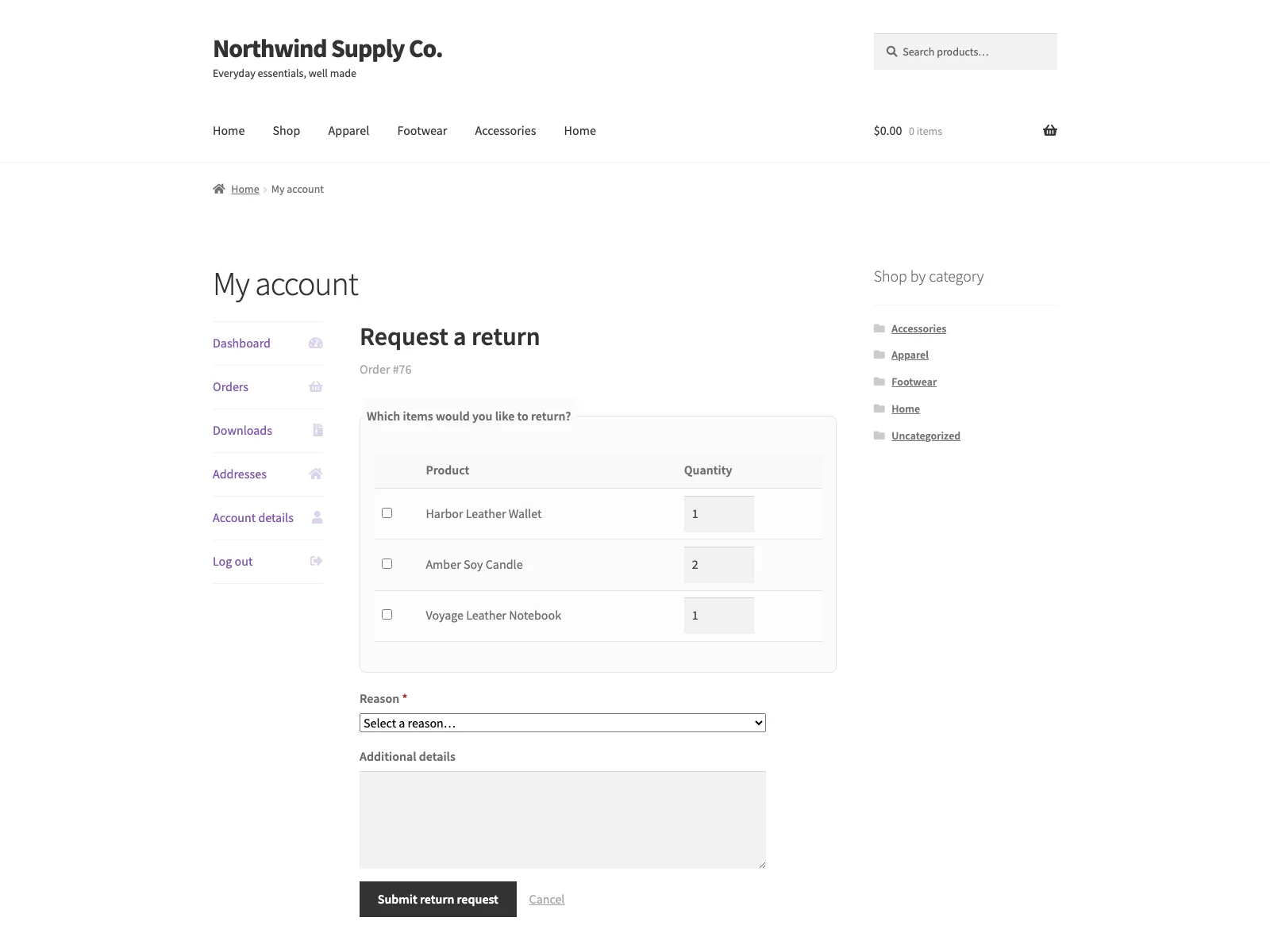 The self-service return request form a shopper opens from My Account, with the item picker, quantity fields and reason dropdown.
The customer journey
From My Account > Orders, a “Request a return” action appears on every eligible order, both in the orders list and on the single-order view. The customer opens it and sees an item picker: a list of the products on that order, each with a quantity field so they can return one of three, or all of them. They choose a reason from a dropdown, add an optional note for anything the dropdown does not cover, and submit. That is the entire shopper-facing flow, and it is deliberately short, because every extra field is a reason to abandon and email you instead.
Two guard rails sit around that form. The request is ownership-checked, so only the logged-in owner of an order can open a return for it. And there is one request per order: once a return exists for an order, the action is hidden and a notice is shown in its place, so a customer cannot submit the same return five times while they wait to hear back.
The admin workflow
Every submission is saved as a private Return Request record and emailed to the store admin at the site’s admin_email address, so a new return reaches you even if you are not logged in. You manage them all in wp-admin under WooCommerce > Return Requests, where each request moves through a clear status workflow: requested, approved, rejected, completed. Whatever status you set is the status the customer sees in their account, so updating the record is updating the customer. There is no separate “now tell the shopper” step to forget.
Tip: Whatever status you set on the request is the status the customer sees in My Account, so updating the record is updating the customer. There is no separate “now tell the shopper” step to forget.
The settings that control eligibility
Under WooCommerce > Returns you decide what can be returned and for how long. Two settings do the heavy lifting:
- Eligible order statuses. Only orders in the statuses you tick can have a return opened. The defaults are Completed and Processing, which together cover “the customer has the goods, or is about to.” You might add or remove statuses depending on how you fulfil.
- Return window (in days). Counted from the order date. After the window passes, the “Request a return” action no longer appears on that order. The default is 30 days, and the settings screen shows a worked example of the resulting deadline so there is no guesswork. Set the window to 0 to accept returns with no time limit.
The settings page carries inline help under every field, so you are not cross-referencing documentation while you configure it.
The honest limit
The free plugin records and tracks the request, but it does not move money. You process any refund on the standard WooCommerce order screen, and the return record simply stays in sync with the status you set. That is by design: refunds, return shipping labels, automatic store credit, return-reason analytics and refund actions taken directly from the RMA screen are part of the PRO edition. The free version covers the complete request-and-status flow end to end.
Setting it up
Getting the flow live takes a few minutes:
- Install the plugin from Plugins > Add New, or upload it to
/wp-content/plugins/plogins-returns. WooCommerce must be installed and active. - Activate it.
- Go to WooCommerce > Returns and choose your eligible order statuses and return window. The defaults (Completed and Processing, 30 days) are a sensible starting point for most stores.
- That is it. Customers can now open a return from My Account > Orders on any eligible order, and new requests will appear under WooCommerce > Return Requests.
Because it is HPOS-compatible and works with the cart and checkout blocks, it sits cleanly on a modern WooCommerce install. The markup is accessible and responsive, and the storefront styles inherit your theme’s colours, so the return form looks at home in a light or dark theme without extra work. The plugin is translation-ready with a bundled POT file and removes its data cleanly on uninstall.
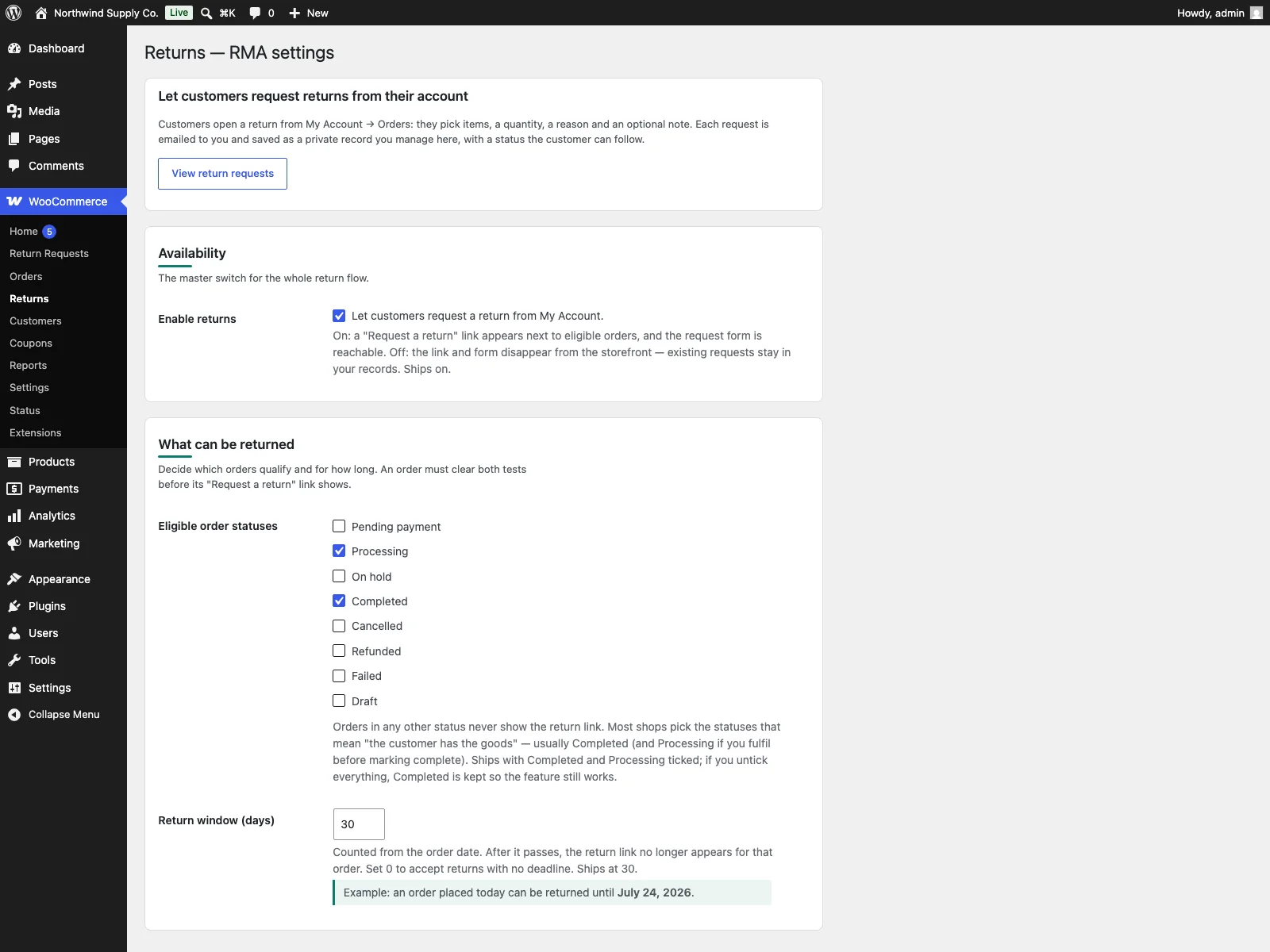 The wp-admin settings screen where you pick eligible order statuses and the return window, and manage each incoming return request.
Choosing a sensible return policy
A plugin gives you the mechanism; the policy is yours. A few practical pointers:
- Match the window to your category. Thirty days is the common default and works for most general merchandise. Fashion and gifting often run longer windows over the holidays; perishable or made-to-order goods run shorter, or exclude returns entirely. Use the return-window setting rather than relying on customers to read the small print.
- Be deliberate about eligible statuses. Returns only make sense once the customer has, or is about to have, the goods. Completed and Processing cover that. Avoid opening returns on Pending or Failed orders, where no money or goods have changed hands.
Note: The return window is counted from the order date, and setting it to 0 accepts returns with no time limit. The defaults, Completed and Processing statuses with a 30-day window, suit most general merchandise.
- Keep reasons tidy. A short, meaningful reason dropdown is more useful than a long one. Over time, the reasons your customers pick tell you which products are sized oddly, photographed misleadingly, or arriving damaged, which is information worth acting on.
- Set expectations in writing. A one-line return policy on the product and checkout pages, pointing customers to My Account to start a return, turns the self-service flow into the obvious first step rather than the email.
Returns versus default WooCommerce
WooCommerce can refund an order, but it has no customer-facing return flow at all. Here is the difference for returns and RMA specifically:
| Capability | Default WooCommerce | Returns |
|---|---|---|
| Customer requests a return | None built in | Self-service from My Account |
| Item picker with quantity and reason | None | Yes, with an optional note |
| Order ownership check | n/a | Yes, only the owner can request |
| Eligibility rules | n/a | Order statuses and a return window in days |
| RMA record | None | Private custom post type per request |
| Status workflow | None | Requested, approved, rejected, completed |
| Customer sees the status | No | Yes, a status list in My Account |
| Refunds | Manual on order screen | Manual on order screen (PRO adds refund actions from the RMA screen) |
| Cost | Free (no return flow) | Free; PRO adds status emails, labels, store credit and analytics |
Free versus PRO
The free edition is a complete flow, not a teaser: self-service requests, item-level detail, ownership and eligibility checks, the admin status workflow and customer-facing status tracking are all included. Returns PRO builds on top for stores that want to automate more of the back half of the process: status-change emails to the customer (with refund amount and store-credit lines), return shipping labels, automatic store credit on completion, return-reason analytics, and WooCommerce refund actions taken directly from the RMA screen.
The short version
WooCommerce can refund an order but gives the shopper no way to request a return, so requests scatter across your inboxes and the customer is left in the dark. A proper RMA flow needs self-service requests, item-level detail, ownership and eligibility checks, a status workflow and customer visibility, while keeping the refund a deliberate decision rather than an automatic one. The free Returns plugin covers all of that, keeping every request in one tracked place that the customer can follow themselves; PRO adds status emails, labels, automatic store credit, analytics and refund actions from the RMA screen when you are ready to automate further.