One-click reorder in WooCommerce: let customers order again
By Mariusz Szatkowski · Updated: 2026-07-05
A returning customer who already knows what they want is the easiest sale a store will ever make. The decision is done. The only thing standing between that customer and a finished order is the work of rebuilding the basket: finding each product again, picking the same size and colour, adding items one at a time. Every one of those steps is a place where a busy person gives up and closes the tab. A one-click reorder action removes the whole chore. The shopper opens a past order, clicks once, and the items are back in the cart. This guide explains what the feature is, why it moves repeat sales, what a good order-again flow needs, and how the free Reorder plugin adds it to WooCommerce.
What one-click reorder is
One-click reorder is a store feature that re-adds the contents of a previous order to the cart in a single action.
Instead of asking a returning customer to find each product, choose the same options, and add items one by one, the order-again button does the whole thing at once. The customer opens My Account, Orders, clicks the button next to a past order, and the still-available items land in the cart ready for checkout. There is no search, no scrolling through the catalogue, no trying to remember exactly which variation they bought last time.
It is built for repeat buying. Consumables, refills, office supplies, pet food, coffee, filters, and spare parts are all things people buy the same way again and again. For those products the catalogue is not a place to browse, it is an obstacle between a known need and a known answer. Reorder turns that repeat purchase from a multi-minute task into a few seconds of work.
Why it helps a store
The order-again action reduces friction at exactly the moment a customer has already decided to buy. That makes it one of the highest-leverage convenience features a shop can add, because it works on demand that already exists rather than trying to create new demand.
- Fewer steps to a repeat sale. A returning customer skips search, product pages, and option pickers. Those are precisely the screens where people get distracted, second-guess, or drift away. Removing them removes the drop-off.
- Higher repeat-purchase rate. Making it trivial to buy again nudges customers to come back to you rather than rebuild a basket from scratch, or worse, rebuild it somewhere else.
- A better experience for regulars. Customers who reorder the same items value speed above all. A one-click path respects their time and signals that the store is built for people who already trust it.
- Larger effective baskets. A whole order’s worth of items returns at once, instead of a customer remembering only two of the five things they meant to repurchase. The full basket comes back because the order remembered it for them.
Note: None of this requires a discount, a popup, or an email campaign. It works on demand that already exists rather than trying to create new demand.
None of this requires a discount, a popup, or an email campaign. It is structural: the store simply asks less of the customer at the point of repurchase.
How the order-again flow works
A good reorder flow is predictable above everything else. The customer should always know what went into the cart and what did not, with no silent substitutions and no half-broken basket to untangle.
A typical one-click reorder works like this:
- The customer signs in and opens My Account, Orders.
- Next to a qualifying past order, an Order again button appears.
- Clicking it re-adds every still-purchasable item from that order to the cart.
- The original variation of each item, for example the size and colour, is preserved, so the right version comes back rather than a generic default.
- Items that are gone, whether deleted, hidden, or out of stock, are skipped, and the customer sees a notice naming what could not be added.
- The customer lands on the cart or the checkout, depending on how the store is configured.
The result is a cart that mirrors the old order as closely as current stock allows. There is no guesswork about what changed since last time, and no moment where the customer wonders whether the reorder “worked.” If something could not be added, the notice says so by name.
Note: Items that are deleted, hidden, or out of stock are skipped rather than jammed into the cart, and the customer sees a notice naming exactly what could not be re-added.
What a good reorder tool needs
Whether you build it, buy it, or install it, an order-again feature for WooCommerce should cover a short list of fundamentals. Use this as a checklist:
- A button where customers already look. The action belongs on the orders list in My Account, not buried on a separate screen. Repeat buyers go to their order history; the button should be waiting there.
- Ownership and security checks. Only the genuine owner of an order should be able to reorder it, and the action should verify a nonce before touching the cart. A reorder link that anyone could trigger is a security problem, not a feature.
- Variation fidelity. If the customer bought a specific variation, that exact variation must come back. Re-adding a parent product and making the shopper re-pick options defeats the entire purpose.
- Graceful handling of unavailable items. Stock changes, products get retired. The flow must skip what is gone and tell the customer clearly, rather than failing silently or jamming an unpurchasable line into the cart.
- Control over which orders qualify. A store should decide by order status which orders get the button, so the action only appears where a repeat purchase makes sense.
- A choice of where the customer lands. Some stores want the shopper to review the cart first; others want the fastest possible path to checkout. The tool should let you pick.
- A light footprint. A convenience feature should not slow the account page, add layout-shifting markup, or load scripts the page does not need.
Plain WooCommerce does not include a one-click order-again button on the orders list, so this is usually added with a focused plugin rather than custom code.
How Reorder adds it
For this exact job, Reorder, Quick Reorder for WooCommerce is a free, GPL-licensed plugin that adds an Order again button to each past order in My Account, Orders. One click re-adds the still-purchasable items to the cart and sends the customer to the cart page or the checkout, whichever you choose in the settings.
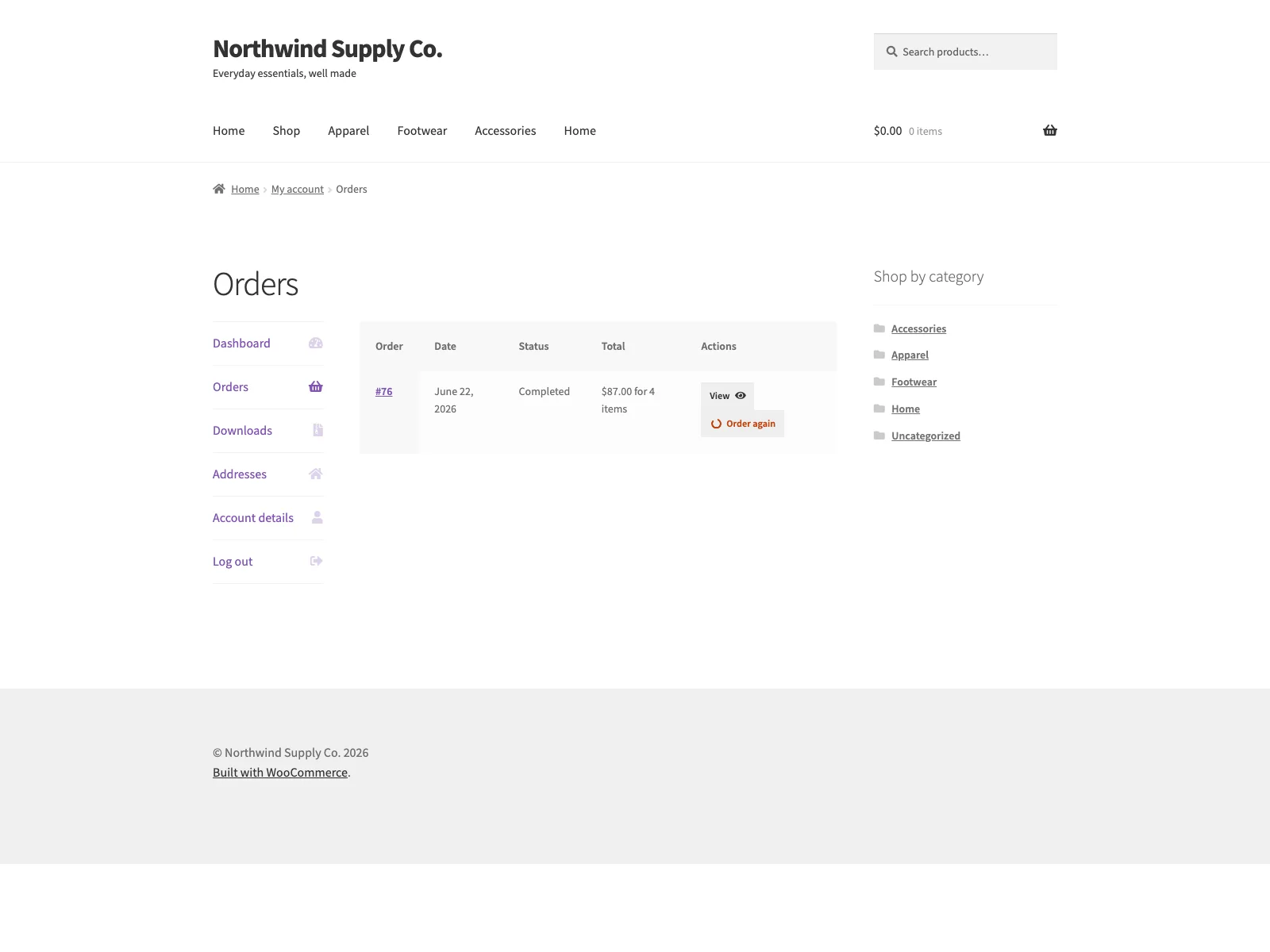 The Order again button sits next to each past order on the storefront My Account orders list.
It is deliberately narrow. Reorder does the order-again job and nothing else, which keeps it predictable and easy to reason about.
What happens on a click
When a customer clicks Order again, every still-purchasable item from that order goes back into the cart at once. Reorder preserves the original variation, so if the customer bought the medium in blue, the medium in blue is what returns, not a parent product waiting for the options to be picked again. Items that are gone, whether deleted, hidden, or out of stock, are left out, and the customer sees a notice naming what could not be added. That notice matters: it is the difference between a cart the customer trusts and a cart they have to double-check.
Two guard rails sit around every reorder action. Reorder checks the nonce on each reorder link and confirms that the logged-in customer actually owns the order before anything touches the cart. Together those checks mean one customer can never reorder another customer’s order, and a stray or forged link cannot quietly add items on someone’s behalf.
Note: Every reorder action checks a nonce and confirms the logged-in customer owns the order before anything touches the cart, so one customer can never reorder another’s order.
A light front end
Reorder adds no front-end JavaScript and no extra markup. The button is a normal WooCommerce order action styled by a small, themeable stylesheet that loads only on the orders page. It stands out without shifting your account-page layout, and because there is no added script, the rest of your account area behaves exactly as it did before. The convenience is on the customer’s side; the cost on your page weight is close to nothing.
Setting it up
Getting the flow live takes a couple of minutes:
- Install and activate WooCommerce 8.0 or later. Reorder is a WooCommerce extension and shows an admin notice and stays inactive if WooCommerce is missing or out of date.
- Install Reorder from the WordPress plugin directory, or upload the
reorderfolder to/wp-content/plugins/. - Activate the plugin through the Plugins screen.
- Optionally visit WooCommerce, Reorder to adjust the settings. Sensible defaults work out of the box.
- An Order again button now appears on qualifying past orders in My Account, Orders.
The settings under WooCommerce, Reorder are short and do three things: set the button label, so you can use wording like “Order again” or “Buy these again” that fits your store; pick which order statuses get the button, choosing from Completed, Processing, and On hold; and decide whether reordering lands on the cart or the checkout. By default the button appears on completed orders and sends the customer to the cart.
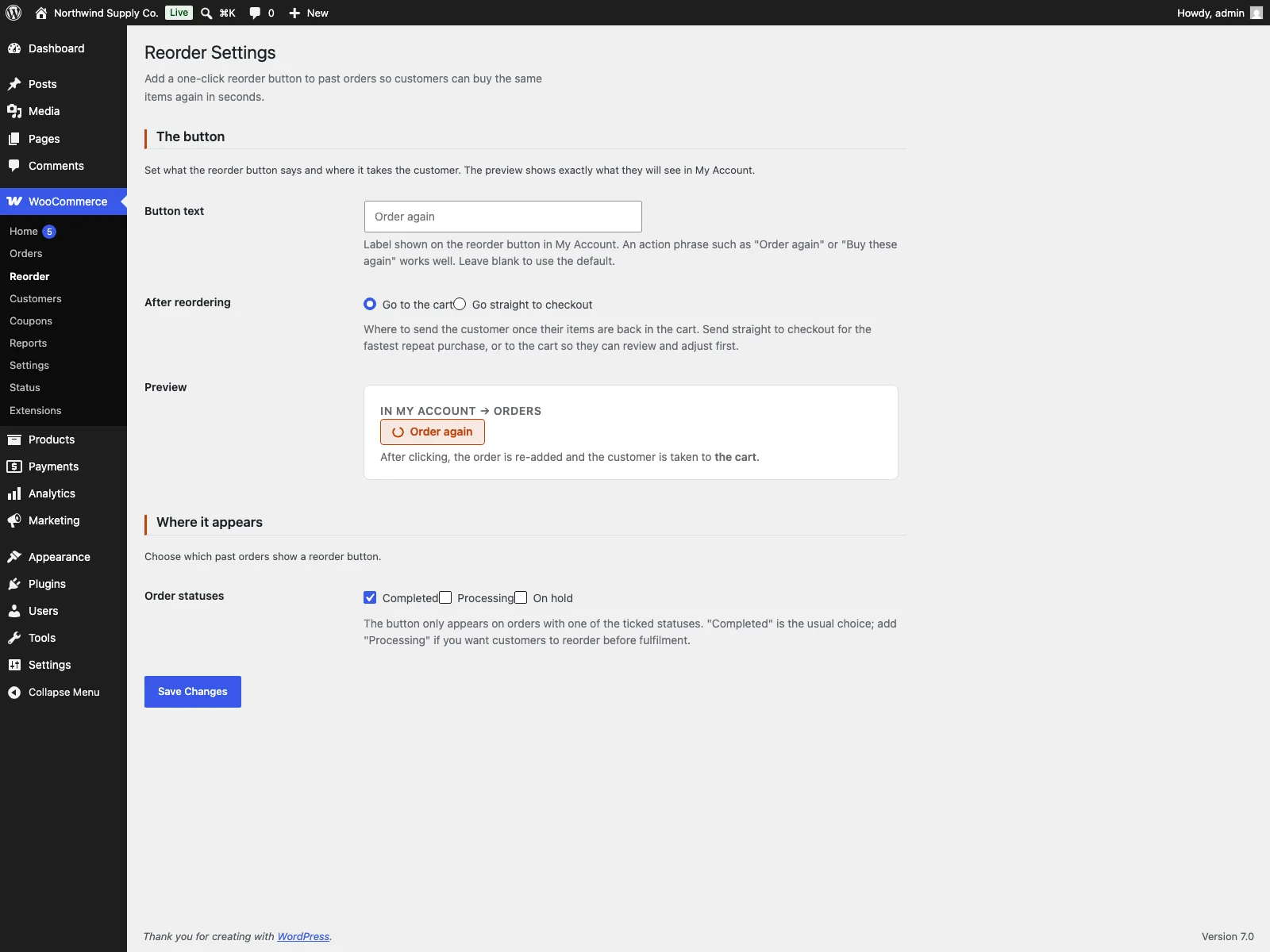 The WooCommerce Reorder settings screen in wp-admin controls the button label, eligible statuses, and where the customer lands.
Clean by default
Reorder connects to no external services. It only re-adds items to the standard WooCommerce cart on your own site, so no customer data leaves your store. It also cleans up after itself: deleting the plugin from the Plugins screen runs the uninstall routine, which removes the reorder_settings and reorder_db_version options. Reorder stores no custom tables, so removing it leaves no residue in your database.
Practical tips for getting the most from it
The plugin gives you the mechanism. A few choices on top make it pull its weight:
- Match the eligible statuses to your fulfilment. Completed orders are the safe default, since they represent finished purchases worth repeating. If you run a workflow where Processing or On hold orders are effectively complete from the customer’s point of view, enable those too so the button appears sooner.
- Choose the landing point on purpose. Send customers to the cart when your store has upsells, shipping choices, or quantity tweaks worth a second look. Send them straight to checkout when speed is the whole point, as it often is for consumables and refills.
- Word the button for your audience. “Order again” is clear and neutral. “Buy these again” can read as warmer. Pick the phrasing that matches the rest of your account copy.
- Test the unavailable-item case before you rely on it. Place a test order, retire or unstock one of its items, then reorder and confirm the notice names what was skipped. Seeing the skip message once gives you confidence in what your customers will see.
Tip: Send customers to the cart when your store has upsells, shipping choices, or quantity tweaks worth a second look; send them straight to checkout when speed is the whole point, as it often is for consumables and refills.
- Point regulars at their order history. A short line in post-purchase emails or on the account page, telling repeat buyers they can reorder in one click from My Account, turns a feature they might never notice into one they use every time.
Reorder versus default WooCommerce
WooCommerce keeps a full order history, but it gives the shopper no way to repeat an order in one step. Here is the difference for the order-again job specifically:
| Capability | Default WooCommerce | Reorder |
|---|---|---|
| One-click order-again button | None built in | Yes, on the My Account orders list |
| Re-adds a whole order’s items at once | No, item by item | Yes, in a single click |
| Preserves the original variation | n/a | Yes, exact size, colour, and options |
| Skips unavailable items with a notice | n/a | Yes, names what could not be added |
| Ownership and nonce checks | n/a | Yes, on every reorder action |
| Choose which order statuses qualify | n/a | Completed, Processing, On hold |
| Choose cart or checkout landing | n/a | Yes, in settings |
| Front-end footprint | n/a | No added JavaScript, small stylesheet on the orders page only |
| Cost | Free (no reorder action) | Free, GPL-licensed |
The short version
A customer who wants to buy the same thing again has already made the decision; every step you ask of them after that is a chance to lose the sale. WooCommerce keeps the order history but gives shoppers no way to repeat an order in a single action, so they have to rebuild the basket by hand. A good reorder feature needs a button where customers already look, ownership and security checks, faithful variation handling, graceful skipping of unavailable items, control over which orders qualify, and a light footprint on the page. The free Reorder plugin covers all of that: a one-click Order again button on past orders, the original variations preserved, a clear notice for anything that could not be re-added, nonce and ownership checks on every action, and a quick settings screen for the label, statuses, and where the customer lands, with no added scripts weighing down your account page.