WooCommerce catalog mode: hide prices and add to cart
By Mariusz Szatkowski · Updated: 2026-09-11
Not every WooCommerce store wants every visitor to buy on the spot. A wholesaler shows prices only to approved trade accounts. A manufacturer lists its full range but takes orders by quote, not by card. A showroom puts its catalogue online so people can browse before they visit, without turning the site into a shop. In all of these cases the goal is the same: keep the products visible and the catalogue useful, while removing the price, the checkout, or both for the people who should not see them. That is what “catalog mode” means in WooCommerce, and this guide explains what it is, when to reach for it, what a sound implementation has to get right, and how the free Catalog plugin adds it.
What catalog mode actually is
Catalog mode is a way to run WooCommerce as a browsable catalogue rather than a transactional shop. Instead of every product offering a price and an add-to-cart button to everyone, you decide what each visitor can see and do. Three controls cover almost every real scenario: hide the price, hide the add-to-cart button, or hide both.
Hiding the price turns the store into a “prices on request” catalogue. Products, descriptions, images and categories are all still there, but the number is gone, replaced if you like by a short notice. This is the classic B2B pattern, where pricing depends on volume, contract or relationship and is not something you publish to the open web.
Hiding add-to-cart turns the store into a display catalogue. People can see exactly what you sell and what it costs, but they cannot order it online. They contact you, request a quote, or visit in person instead. This suits made-to-order goods, regulated products, or anything where you want a human in the loop before money changes hands.
Hiding both is the full showroom: a clean catalogue with no prices and no checkout, used to present a range without operating as a shop at all. The important point is that catalog mode is not “switch the store off.” The catalogue keeps working. You are removing the commercial controls, selectively, for the visitors you choose.
When to use it, and for whom
The reason catalog mode is so common is that the decision is rarely all-or-nothing. The most valuable version of it is selective: different visitors get different experiences from the same store.
A wholesale or B2B store is the textbook case. Guests and retail browsers see products without prices, while a logged-in wholesale role sees prices and can check out normally. The public catalogue doubles as marketing, the trade catalogue doubles as an ordering tool, and you never publish your trade pricing to competitors. A request-a-quote workflow is a close relative: every visitor sees the range, nobody buys directly, and enquiries arrive through a form or a contact link instead of the cart. Members-only pricing follows the same shape, with prices reserved for a paying tier. And a pure showroom site simply switches off commerce entirely while keeping the catalogue online.
What ties these together is that the product should be seen but not bought, at least by some people, some of the time. That is precisely the gap that core WooCommerce leaves open.
Why doing it properly matters
The naive way to build catalog mode is to hide the price and the button with a bit of CSS or a theme tweak. It looks right, and it is quietly broken. CSS only hides what is on the page. It does nothing to the underlying product, which WooCommerce still treats as fully purchasable.
That gap has real consequences. WooCommerce accepts a product into the cart through a direct URL of the form ?add-to-cart=123, with no button required. The Store API and the classic AJAX endpoints can do the same. So a product you have “hidden” with styling can still be added to a cart and carried through to checkout by anyone who guesses the URL, has an old link, or pokes at the API. For a showroom that is embarrassing; for a B2B store that publishes no public prices, it can mean orders placed at a price you never intended to expose.
Warning: CSS-only hiding is quietly broken. It removes the price and button from view but leaves the product fully purchasable through a direct
?add-to-cart=123URL or the Store API, so hidden products can still reach checkout.
A correct catalog mode therefore works on two layers at once. It hides the visible controls, the price and the button, so the storefront reads as a catalogue. And it marks the affected products genuinely non-purchasable on the server, so the rule holds even when there is no button to click. The visible change is for the shopper; the enforcement is for everyone else.
What a good catalog-mode tool needs
If you are choosing or building a catalog-mode solution, this is a useful checklist:
- Independent controls for price and add-to-cart. Some stores hide only the price, some only the button, some both. The tool should let you pick.
- Visitor targeting by role. The whole value of B2B catalog mode is that wholesale customers keep prices and checkout while everyone else does not. Hiding for everyone is the easy case; hiding for the right people is the useful one.
- Real non-purchasability. Hidden products must be blocked server-side, not just visually, so direct cart URLs and the API cannot bypass the rule.
- Coverage everywhere prices and buttons appear. Single product pages, shop, category and tag listings, and related-product blocks should all respect the rule, not just one of them.
- An optional price notice. A short message in place of the price (“Contact us for pricing”) turns a blank gap into a clear call to action.
- Clean, conventional configuration. A settings screen that follows WordPress conventions, ships translation-ready, and removes its data on uninstall, rather than a sprawling page bolted onto your theme.
Keep one thing off the list: catalog mode should not hide products from the catalogue. The point is to display them. Whether a product appears in listings is a visibility decision; catalog mode is about price and purchasability.
Note: Catalog mode does not remove products from your shop, category or tag listings. It controls price visibility and whether a product can be bought, not whether it appears at all.
How Catalog handles it
Catalog for WooCommerce is a free, open-source plugin that implements exactly this. It is built around a single idea: decide what to hide, decide who it applies to, and enforce the rule on the server so it cannot be worked around.
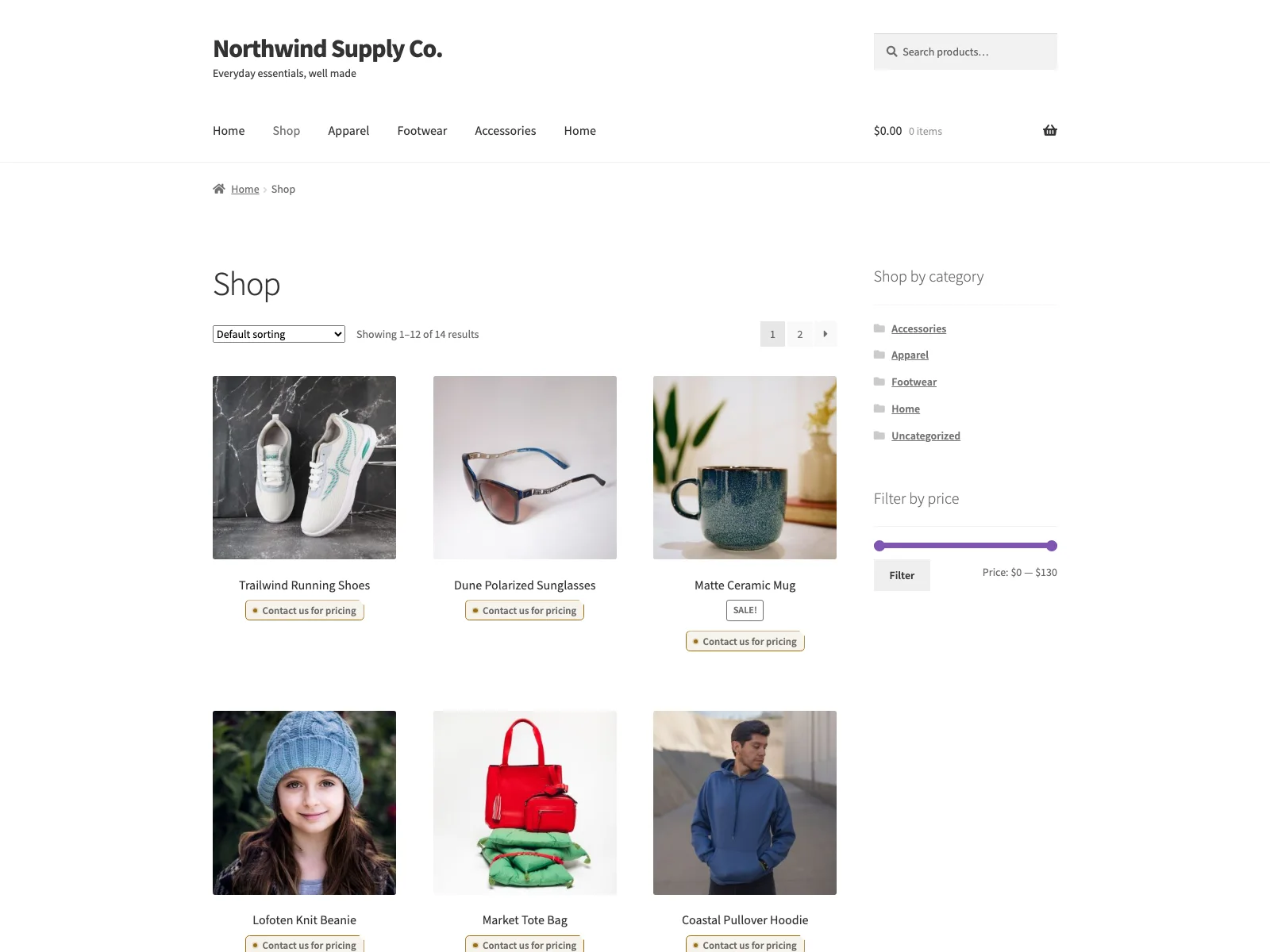 The storefront in catalog mode: the price and add-to-cart button are gone, replaced by a short price notice.
You get three switches for what to hide: hide the price, hide add-to-cart, or both. Hiding the price removes it wherever WooCommerce would normally print it. Hiding add-to-cart removes the button on product pages and listings and, critically, prevents those products from being purchased server-side rather than merely hiding the control.
That server-side enforcement is the part that matters. When add-to-cart is hidden, Catalog marks the affected products non-purchasable, so a guessed ?add-to-cart= URL or a Store API request will not push a hidden product through to checkout. The rule is real, not cosmetic.
For who it applies to, Catalog offers four visitor rules:
- Everyone, the simplest case, for a full showroom or a store-wide quote workflow.
- Only logged-out visitors, so any logged-in customer sees prices and can buy, but guests cannot.
- Only selected roles, where you tick the roles the rule should apply to.
- Everyone except selected roles, the classic B2B setup: hide prices from the public, but tick your wholesale role so it keeps prices and full checkout.
That fourth rule is the one most B2B stores want. Guests browse a catalogue with no prices; your approved trade accounts log in and see a normal, fully working shop.
Tip: For B2B, reach for “Everyone except selected roles” rather than enumerating every public role. New roles you add later inherit the hidden behaviour automatically.
To soften the blank space where a price used to be, Catalog can show an optional price notice in its place, such as “Contact us for pricing.” It is a plain text field, so you can word it to point people toward your quote process or your sales contact.
The rules apply consistently on single product pages and on shop, category and tag listings, so a hidden price or button does not quietly reappear in an archive or a related-products row. The settings screen is built with standard WordPress admin styles, including dark mode, ships with a POT file for translation, and removes its option on uninstall. Catalog declares HPOS and cart/checkout blocks compatibility, so it sits cleanly on a modern WooCommerce install, and it connects to no external services: every decision is made on your own server from the current visitor’s role.
Setting it up
Getting catalog mode live takes a couple of minutes:
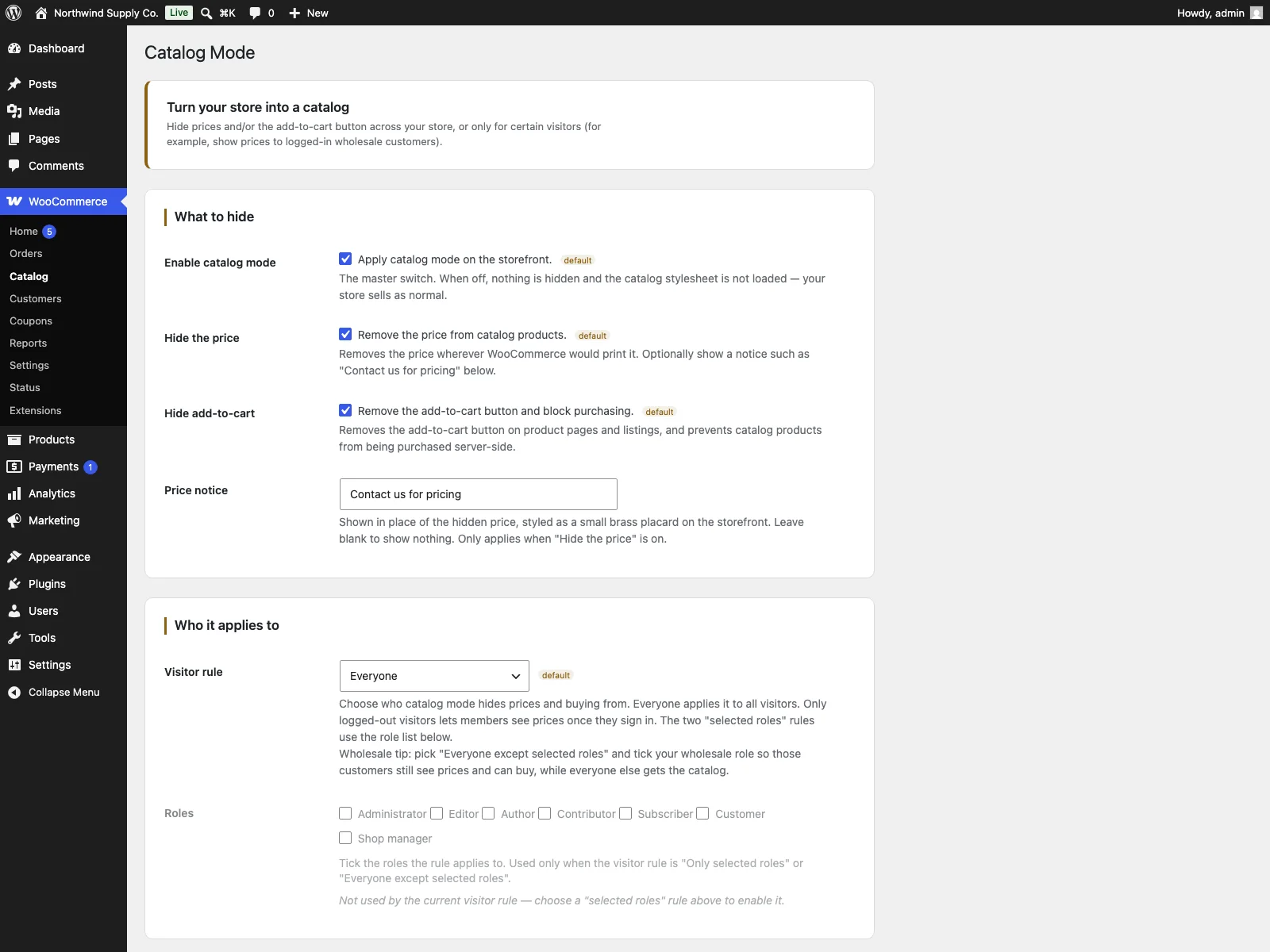 The WooCommerce > Catalog settings screen, where you choose what to hide and which visitors it applies to.
- Install the plugin from Plugins > Add New, or upload it to
/wp-content/plugins/plogins-catalog. WooCommerce must be installed and active. - Activate it.
- Go to WooCommerce > Catalog and turn catalog mode on.
- Choose what to hide: the price, add-to-cart, or both.
- Optionally enter a price notice to show in place of a hidden price.
- Pick the visitor rule. For a wholesale store, choose “Everyone except selected roles” and tick your wholesale role so it keeps prices and checkout. For a showroom, “Everyone” is usually right.
Each field carries inline help on the settings screen, so you are not cross-referencing documentation while you configure it.
Practical tips
A few pointers for getting catalog mode right in practice:
- Test as a guest, not just as admin. You are almost always logged in as a shop manager or administrator. Open the store in a private window, or log in as the role you are targeting, to confirm the price and button really are hidden for the right people.
- Use the “except roles” rule for B2B. It is far easier to reason about “hide from everyone, except my wholesale role” than to enumerate every public role. New roles you add later inherit the hidden behaviour automatically.
- Write the price notice as a call to action. “Contact us for pricing” or “Log in to see wholesale prices” tells the shopper what to do next, instead of leaving a confusing empty space where a number used to be.
- Do not rely on theme CSS to hide buy buttons. That is exactly the gap catalog mode closes. Let the plugin mark products non-purchasable so the rule holds at the cart and API layer too.
- Decide whether checkout should still exist. If you hide add-to-cart store-wide for everyone, your cart and checkout pages become dead ends. That is fine for a pure showroom, but if some roles still buy, make sure those flows are reachable for them.
Catalog versus default WooCommerce
Out of the box, WooCommerce is a transactional shop with no concept of catalog mode. Here is the difference for this specific job:
| Capability | Default WooCommerce | Catalog |
|---|---|---|
| Hide the price | Not built in | Yes, store-wide or by role |
| Hide add-to-cart | Not built in | Yes, store-wide or by role |
| Block direct cart URLs and Store API | No, products stay purchasable | Yes, hidden products marked non-purchasable |
| Show prices only to selected roles | Not built in | Yes, four visitor rules including “except roles” |
| Price notice in place of price | None | Optional custom text |
| Coverage on listings and single pages | n/a | Single, shop, category and tag |
| Cost | Free (no catalog mode) | Free; Pro adds scheduling, quotes and per-role CTAs |
Free versus Pro
The free edition is a complete catalog-mode tool, not a teaser: independent price and add-to-cart controls, four role-based visitor rules, real server-side non-purchasability, an optional price notice, and consistent coverage across product pages and listings are all included. The free plugin also exposes extension filters that Catalog Pro builds on to add scheduled catalog windows, per-role visibility overrides, a built-in request-a-quote form, and role-specific CTA buttons shown in place of add-to-cart. If your needs are “hide prices and buying for the right visitors, and make it stick,” the free plugin already covers that end to end.
The short version
Catalog mode keeps WooCommerce useful when the product should be seen but not bought by every visitor, whether for B2B pricing, quote workflows, members-only pricing or a plain showroom. The trap is hiding only the visible controls, which leaves products purchasable through direct cart URLs and the API. A sound tool hides the price and button, targets the right roles, and enforces non-purchasability on the server. The free Catalog for WooCommerce plugin does all of that, store-wide or by visitor role, with Pro adding scheduling, a quote form and role-specific CTAs when you want them.