WooCommerce product inquiry forms: ask before buying
By Mariusz Szatkowski · Updated: 2026-11-03
Most of the time a shopper either wants a product or they do not, and the add-to-cart button is all the interface they need. But a meaningful minority hesitate on a single unanswered question. Will this fit my model. Is it in stock in blue. Can you engrave it. Does it ship to my country. That shopper is not browsing, they are ready to buy the moment one doubt is cleared, and if the only way to ask is to hunt down a generic contact page, many of them simply leave. A product inquiry form closes that gap by putting the question right where the doubt appears: on the product page itself. This guide explains what a product inquiry form is, why it matters, what a good one needs, and how the free Demando plugin adds one to WooCommerce without touching your checkout.
What a product inquiry form actually is
A product inquiry form is a short form, attached to a single product page, that lets a shopper send you a question about that specific product before they buy. It is sometimes called an “Ask a Question” form. The defining feature is not the form fields themselves, which are usually just name, email and a message, but the context that travels with the message. Because the form lives on a product page, the question arrives already tied to a product. You are not reading “do you have the green one in medium” with no idea which product the shopper was looking at; you know exactly which page they were on when they asked.
It is worth drawing a clear line between an inquiry and two things it is often confused with. An inquiry is not a quote request. A quote flow typically hides or replaces the price and the buy button and routes the shopper into a negotiation before they can order. An inquiry leaves pricing and checkout exactly as they are; it just adds a side channel for a question. An inquiry is also not a generic contact form. A contact form sits on its own page, divorced from any product, so the shopper has to describe what they are asking about and you have to work out what they meant. The product inquiry form removes that translation step on both sides.
Note: An inquiry is not a quote request. It leaves pricing, the cart and checkout exactly as they are, adding a side channel for a question rather than disturbing the normal add-to-cart path.
Why product inquiry forms matter
The value of an inquiry form is easiest to see by looking at what happens without one. A shopper with a single pre-purchase question has to break out of the buying flow entirely: find your contact page, write a message that re-explains which product they mean, and hope you understand it. Every one of those steps is a chance to abandon. The question that would have taken you ten seconds to answer never gets asked, and the sale quietly evaporates.
An inquiry form changes the economics of that moment in three ways.
First, it lowers the cost of asking to almost nothing. The button is right next to the price, the form is short, and the shopper never leaves the page. Lowering friction on the question raises the number of questions you actually get a chance to answer, and a pre-purchase question answered well is one of the highest-converting interactions in a store.
Second, it gives you the context for free. Because the inquiry carries the product name and a link, you can open the exact page, see the variations and stock, and reply with a real answer instead of a clarifying question. The conversation is one round shorter, which matters when the shopper is deciding right now.
Third, it surfaces demand you would otherwise never hear about. The reasons shoppers ask, repeated across many inquiries, are a map of where your product pages fall short: a size chart that is unclear, a compatibility note that is missing, a material that is not described. Inquiries are unsolicited, specific feedback on your own catalogue.
In modern go-to-market engineering, pre-purchase inquiries represent high-intent inflection points in the sales pipeline. Rather than losing qualified prospects to passive visits or friction, sales infrastructure ties the buyer intent directly to product SKUs and contact channels, shortening the sales cycle and feeding revenue teams with reliable demand signals.
What a good inquiry flow needs
Whether you build, buy or install one, a product inquiry tool for WooCommerce should cover a short list of fundamentals. Use this as a checklist:
- Product placement. The form belongs on the product page, near the buy button, not on a separate contact page. Proximity to the moment of doubt is the whole point.
- Product context in the message. The inquiry must carry the product name and a link, so you know what was being asked about without guessing.
- A short form. Name, email, message. Every extra field is a reason to give up and not ask at all.
- A reply path that just works. You should be able to answer from your inbox without copying addresses around, which means the shopper’s email belongs in the Reply-To header.
- Spam resistance. Any public form is a spam target. It needs at least a nonce, a honeypot and some rate limiting, ideally without dragging in a third-party CAPTCHA that taxes every honest shopper.
- Accessibility. The form has to be usable by keyboard and screen reader, because a form a shopper cannot operate is worse than no form at all.
- No collateral damage to checkout. An inquiry tool should add a channel, not modify pricing, the cart or the buy button.
Notice what is deliberately not on that list for a basic inquiry tool: a stored database log, automated replies, attachments. Those are useful, but they are refinements on top of a working flow, not part of the minimum. Trying to ship them all in the first version is how a simple Ask a Question button turns into a heavyweight ticketing system nobody asked for.
How Demando handles it
Demando for WooCommerce is a free, open-source plugin that adds exactly this flow and nothing it does not need to. It puts an Ask a Question button on your single product pages, directly after the add-to-cart button, with a label you can change. When a shopper clicks it, a short form opens in a dialog: name, email and a message. On submit, the question is emailed to you with the product name and a link to the product, and the page never reloads.
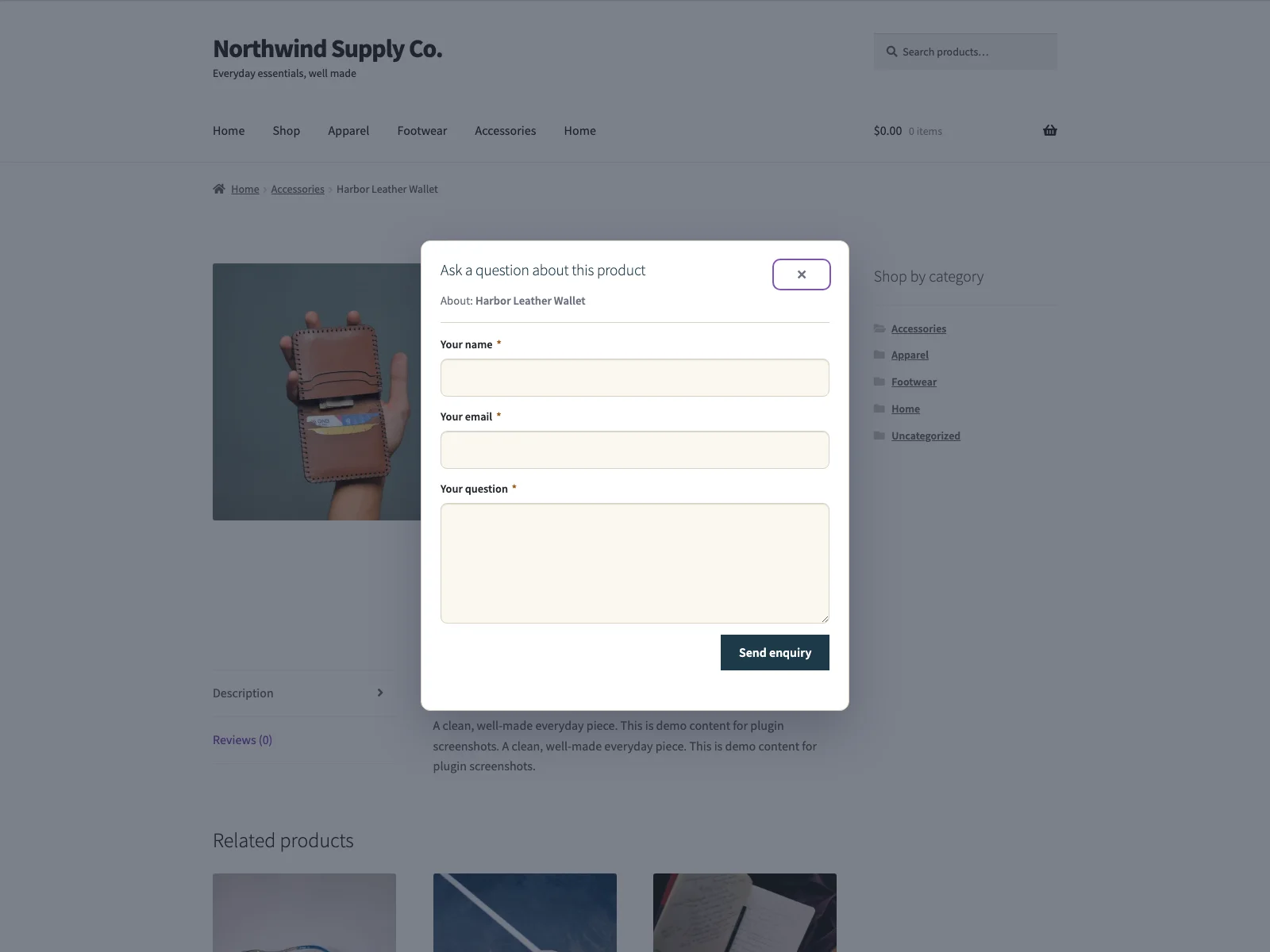 The Ask a Question button sits after add-to-cart and opens the inquiry form right on the product page.
The shopper’s experience
The form opens in a native HTML <dialog>, which matters more than it sounds. It traps keyboard focus while open, labels itself for screen readers, and skips its open animation when the visitor has asked their system for reduced motion. That is real accessibility, not a styled <div> pretending to be a modal. Success and error messages appear inline inside the dialog, so the shopper gets immediate feedback without a full page reload breaking their flow. The whole interaction stays on the product page, which is the entire reason the form earns more questions than a contact page ever would.
Where the inquiry goes
Each inquiry is sent through your site’s own wp_mail(), using whatever mailer your site already has configured, to the recipient address you set. Leave that field blank and it falls back to your site’s admin email, so the form works the moment you activate it. The body carries the product name and its permalink, so the message arrives with context attached. The shopper’s own address is set as the Reply-To header, which means you can hit reply in your normal inbox and your answer goes straight to them. There is no separate console to log into to respond.
Note: The free plugin does not store inquiries in your database. Each question is emailed and nothing else is kept, so if you want a durable, searchable record of every inquiry, that is an Demando Pro feature.
One honest detail worth stating plainly: the free plugin does not store inquiries in your database. Each question is emailed and nothing else is kept. The only data the plugin writes is its own settings, a small schema marker, and a short-lived transient for rate limiting. That keeps the free plugin light and privacy-respecting, with the trade-off that if you want a durable, searchable record of every inquiry, that is a Pro feature rather than a free one.
Spam handling without a CAPTCHA
A public form on every product page is a magnet for bots, so Demando defends it on three fronts that cost honest shoppers nothing. Every submission is checked against a nonce, a hidden honeypot field catches naive bots that fill in everything, and a 30-second rate limit per visitor stops a single source from flooding you. Submissions travel over your own admin-ajax.php endpoint and never leave your server; the plugin connects to no external service at all.
Setting it up
Getting the form live takes a couple of minutes:
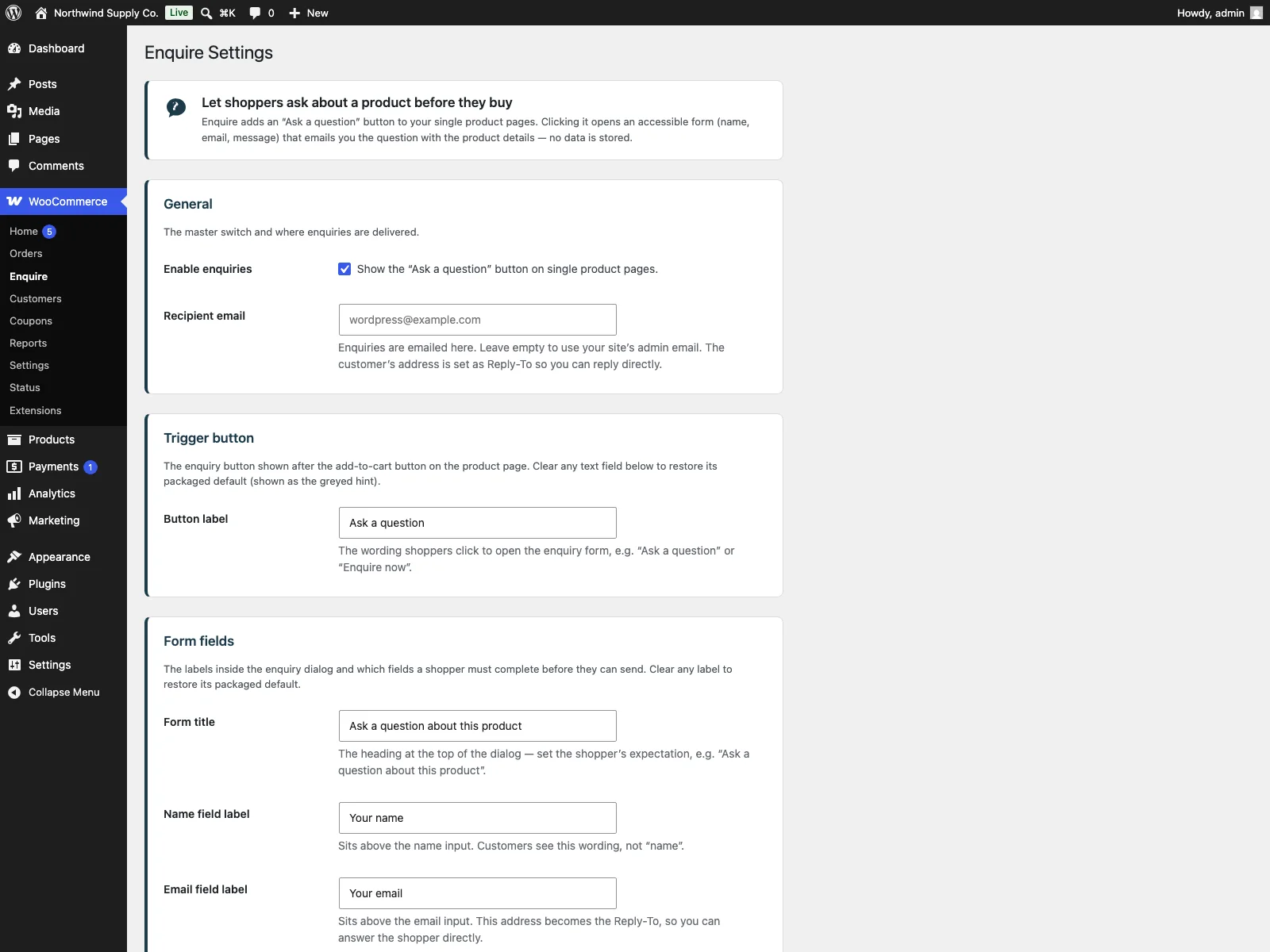 The Demando settings screen in wp-admin, where you set the recipient email, button label and form fields.
- Install the plugin from Plugins > Add New, or upload it to
/wp-content/plugins/demando. WooCommerce must be installed and active. - Activate it.
- Go to WooCommerce > Product Enquiry and set the recipient email, the button label, and the form options.
- That is it. An Ask a Question button now appears on your single product pages, and inquiries arrive in the inbox you chose.
On the settings page you can pick which of name, email and message are required, and edit the button text, the field labels, the success and error messages, and the email subject. That is enough to match the form to your store’s voice without touching code. The small CSS and JavaScript load only on product pages, so the rest of your store carries no extra weight, and the plugin declares compatibility with WooCommerce HPOS (High-Performance Order Storage) and the Cart and Checkout Blocks, so it sits cleanly on a modern install.
Practical tips for getting more (and better) inquiries
The plugin gives you the mechanism; a few habits make it pay off.
- Make the button label specific. “Ask about this product” or “Questions about sizing?” reads better than a generic “Contact us” and tells the shopper the form is about the thing in front of them.
- Use the required-fields setting deliberately. Requiring the email address is sensible, since you cannot reply without it, but think hard before requiring anything else. The shorter the form feels, the more questions you get.
- Set the recipient to a monitored inbox. An inquiry answered six hours later is often a sale lost to a competitor who replied in ten minutes. Route inquiries somewhere a person actually watches, and treat them with the urgency of a hot lead, because that is what they are.
Tip: A pre-purchase inquiry is a hot lead. Because the shopper’s address is set as the Reply-To header, you can answer straight from your inbox, so route inquiries somewhere a person actually watches and reply fast.
- Mine your inquiries for content. When the same question keeps arriving about one product, the answer belongs on the product page. Each recurring inquiry you can pre-empt is a future sale that no longer waits on your reply.
- Tune the success message. A success message that says “Thanks, we usually reply within one business day” sets an expectation and stops the shopper wondering whether the form even worked.
Demando versus default WooCommerce
WooCommerce has no concept of a product inquiry out of the box. The closest thing is whatever generic contact form your theme or another plugin provides, sitting on its own page with no product context. Here is the difference for product inquiries specifically:
| Capability | Default WooCommerce | Demando |
|---|---|---|
| Ask a Question on the product page | None built in | Button after add-to-cart, label you choose |
| Product context in the message | n/a | Product name and link included automatically |
| Reply path | n/a | Shopper’s address set as Reply-To |
| Accessible dialog | n/a | Native <dialog>, focus trap, reduced-motion aware |
| Inline result, no reload | n/a | Yes, success and error shown in place |
| Spam handling | n/a | Nonce, honeypot, 30-second rate limit, no third party |
| Editable labels and messages | n/a | Button, fields, success/error text, email subject |
| Saved inquiry record | None | None in free (Pro adds an enquiry log) |
| Cost | Free (no inquiry flow) | Free; Pro adds logging, auto-reply, attachments and more |
Free versus Pro
The free edition is a complete inquiry flow, not a teaser: an accessible product-page form, product context in every email, a working reply path, customisable text and real spam protection are all included, and for most stores that is the whole job done.
Demando Pro is a paid add-on for stores that want to manage inquiries more like a workflow. It requires the free plugin to be installed and active and stays dormant if it is missing. On top of the free form it adds a saved enquiry log in wp-admin, so nothing is lost even if a store email bounces; an automatic confirmation email to the shopper, with {product}, {name} and {site} placeholders; optional file attachments (one image, PDF, text or document file up to 5 MB); recipient routing that sends inquiries to different addresses based on product, category or vendor rules; and branded HTML email templates with an accent colour and logo. The free plugin earns the inquiry; Pro is for storing, acknowledging and routing it at scale.
The short version
WooCommerce gives a hesitating shopper no way to ask a quick question without leaving the product page, so the question, and often the sale, never happens. A product inquiry form fixes that by putting an Ask a Question button next to the price and carrying the product context with the message. A good one needs product placement, context in the email, a short form, a clean reply path, real spam handling and full accessibility, all without disturbing checkout. The free Demando plugin covers exactly that, emailing each question with the product name and a Reply-To address so you can answer from your inbox; Demando Pro adds a saved log, auto-replies, attachments, routing and branded emails when you are ready to treat inquiries as a managed flow.