WooCommerce product FAQs: answer questions before checkout
By Mariusz Szatkowski · Updated: 2026-10-28
Most lost sales on a product page are not lost to price. They are lost to a small, unanswered doubt. Will this fit a UK size 10? Is it compatible with last year’s model? How long does delivery take to my country? Can I return it if it is wrong? A shopper who cannot find that answer in a few seconds has two options: write to you and wait, or close the tab and buy elsewhere. Most choose the tab. A product FAQ exists to catch exactly those doubts at the moment they occur, on the page where the decision is being made, before the visitor leaves. This guide explains what a product FAQ is, why it earns its place on the page, what a good FAQ tool needs, and how the free Respondo plugin adds a clean, accessible FAQ section to WooCommerce products.
What a product FAQ actually is
A product FAQ is a short list of questions and answers attached to a single product, shown on that product’s page. It is not the same as a site-wide help centre, and it is not the same as the long product description. The description sells the product in your voice; the FAQ answers the buyer’s questions in theirs. Each item is a question a real shopper has asked, or predictably will ask, paired with a direct answer.
The distinction matters because the two formats do different jobs. A description is read top to bottom, or skimmed and abandoned. A FAQ is scanned: the shopper looks for the one question that matches their doubt, reads that answer, and moves on. That scanning behaviour is why FAQs are almost always presented as an accordion, where each question is a heading the visitor can expand to reveal its answer. The shopper sees a tidy list of questions and opens only the one they care about, instead of wading through paragraphs to find a single sentence.
Why product FAQs matter
A good product FAQ pulls in two directions at once, and both are valuable. It lifts conversion, and it lowers support load.
On the conversion side, a FAQ removes friction at the exact point of hesitation. The questions that block a purchase are nearly always the same handful per category: sizing and fit, materials and care, compatibility, delivery times and costs, warranty, and returns. When the answer to a buyer’s specific worry is right there on the page, the worry does not turn into a delay, and a delay is where carts are abandoned. The shopper does not have to leave the page to find out, and leaving the page is the single most expensive thing they can do.
On the support side, a FAQ is the cheapest support agent you will ever hire. Every question you answer once on the page is a question that does not arrive as an email, a chat message or a phone call. Stores tend to field the same five or ten pre-sale questions per product over and over. Answering them in public, once, quietly removes a whole stream of repetitive tickets and frees your time for the questions that genuinely need a human.
Tip: The questions that block a purchase are nearly always the same handful per category: sizing, materials, compatibility, delivery, warranty and returns. If you are unsure which to write, read your last month of pre-sale emails.
There is a third, quieter benefit. Writing the FAQ forces you to confront what is unclear about your own product. If three customers asked whether a cable was included, the honest fix is not just a FAQ entry but also a clearer description and photo.
What a good product FAQ tool needs
A FAQ tool for WooCommerce should cover a short list of fundamentals. Use this as a checklist whether you build it, buy it or install it:
- Per-product authoring. Questions belong to a specific product, edited where you edit that product, not in a disconnected global list.
- A clean place on the page. The FAQ should sit where shoppers expect it, alongside the description and reviews, not buried at the foot of the page or jammed into the description.
- An accordion presentation. Collapsed questions that expand on demand, so the list stays scannable however many entries you add.
- Accessibility. Keyboard operation, correct screen-reader announcements and visible focus are not optional extras; they are the difference between a FAQ everyone can use and one that excludes part of your audience.
- Safe rich text. Answers often need a link or a short list. That should be allowed, but sanitised, so a pasted answer can never inject a script.
- Light performance footprint. The FAQ’s CSS and JavaScript should load only where there are FAQs to show, not on every page of the store.
- Theme fit. The FAQ should inherit your colours and respect light and dark schemes, so it looks native rather than bolted on.
Notice what is not on that list: complexity. A product FAQ is a simple format, and its value comes from being easy to author and easy to scan. A tool that turns FAQ authoring into a project is a tool whose FAQs never get written.
How Respondo handles it
Respondo for WooCommerce is a free, open-source plugin that adds exactly this: a structured, per-product FAQ presented as an accessible accordion. It is deliberately focused. The free plugin’s whole job is to let you author FAQ items against a product and render them cleanly on the product page.
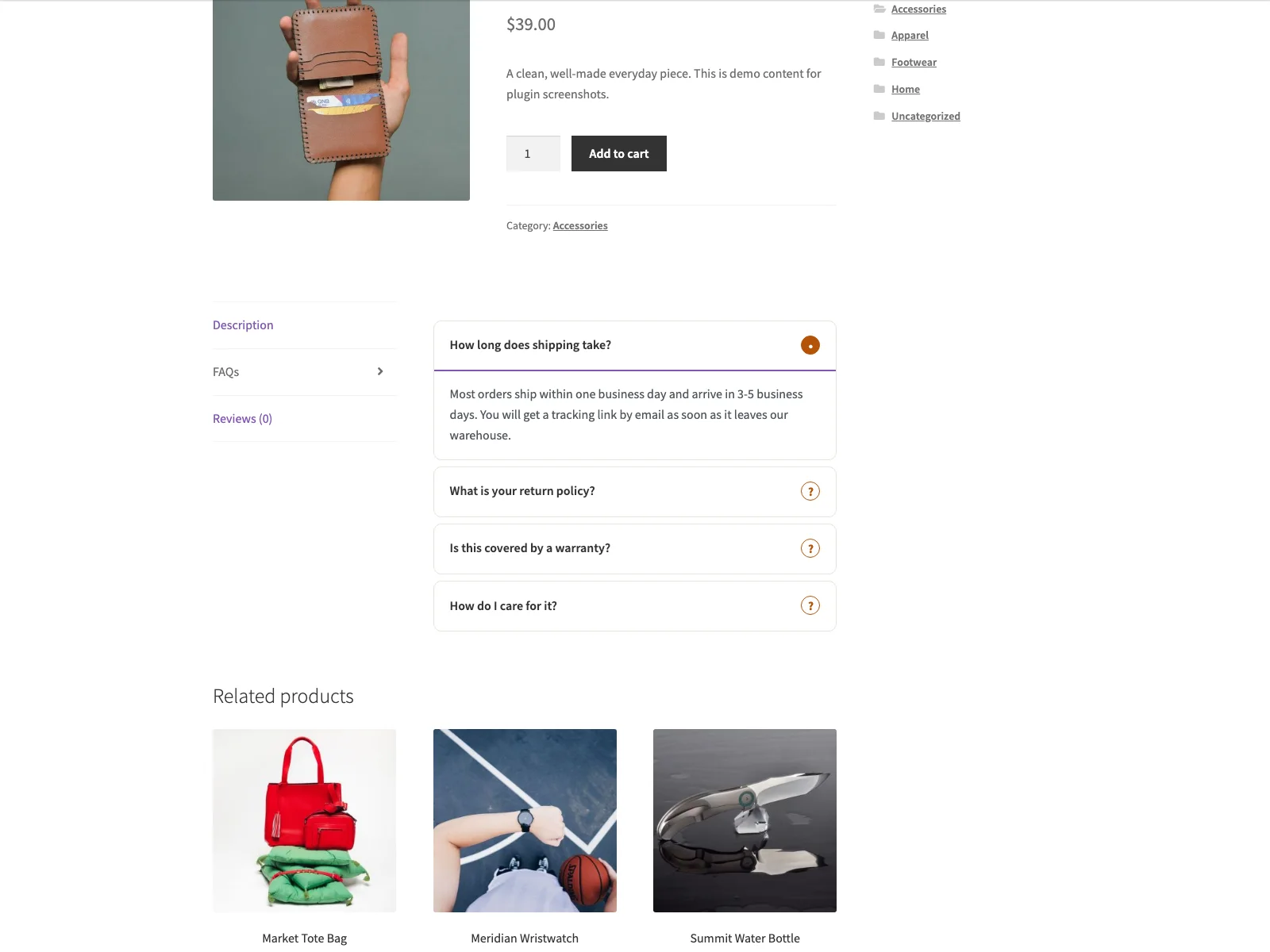 The shopper-facing FAQ tab on the product page, where a buyer expands the one question that matches their doubt.
Authoring the FAQs
You write the FAQs where you already work, inside the product. Open a product for editing and you get a new FAQs tab in the WooCommerce Product data panel, next to General, Inventory and the rest. Inside it is a question and answer repeater: add a row, type the question, type the answer, repeat. There is no separate FAQ post type to manage and no global list to keep in sync. The FAQs live with the product they describe, which is exactly where they belong.
Answers themselves accept basic HTML, so you can include a link, a short list or some emphasis where it helps. That content is sanitised with wp_kses_post when you save it and again when it is output, so anything dangerous, such as a script, is stripped at both ends. You get useful formatting without opening a security hole.
How it looks to the shopper
On the single product page, the FAQs appear in their own FAQs tab, sitting alongside Description and Reviews where shoppers already look for product detail. The tab is an accordion: each question is collapsed by default, and the shopper expands the one they care about.
The accessibility here is built in rather than bolted on. Each question is a real <button>, and its aria-expanded state controls an aria-labelled region holding the answer, so the control is keyboard operable, shows a visible focus ring, and is announced correctly by screen readers. Panels open and close with a height transition that is switched off automatically under prefers-reduced-motion, and because the answer text stays in the page even with JavaScript disabled, the content is never trapped behind a script that failed to load. The styling uses CSS custom properties and ships a dark-scheme palette, so the accordion follows the visitor’s light or dark colour scheme and inherits your theme rather than fighting it.
There is also a performance detail worth calling out: the front-end CSS and JavaScript load only on product pages that actually have at least one FAQ saved. Products without FAQs carry no extra weight, so the feature never taxes pages that do not use it.
Settings and setup
There is very little to configure, which is the point. Under WooCommerce > Respondo you can rename the FAQ tab label if “FAQs” is not the word you want shoppers to see. Getting the whole thing live takes a few minutes:
- Install the plugin from Plugins > Add New, or upload it to
/wp-content/plugins/respondo. WooCommerce must be installed and active. - Activate it.
- Edit a product, open the FAQs tab in the Product data panel, and add your questions and answers.
- Optionally rename the FAQ tab under WooCommerce > Respondo.
Because Respondo declares HPOS and cart and checkout blocks compatibility, it sits cleanly on a modern WooCommerce install. It is translation-ready with a bundled POT file, it connects to no external service and sends no email, and it stores its content entirely on your own site, in the _answers_faqs post meta per product and the answers_settings option. It also removes its options on uninstall, so it leaves nothing behind if you decide it is not for you.
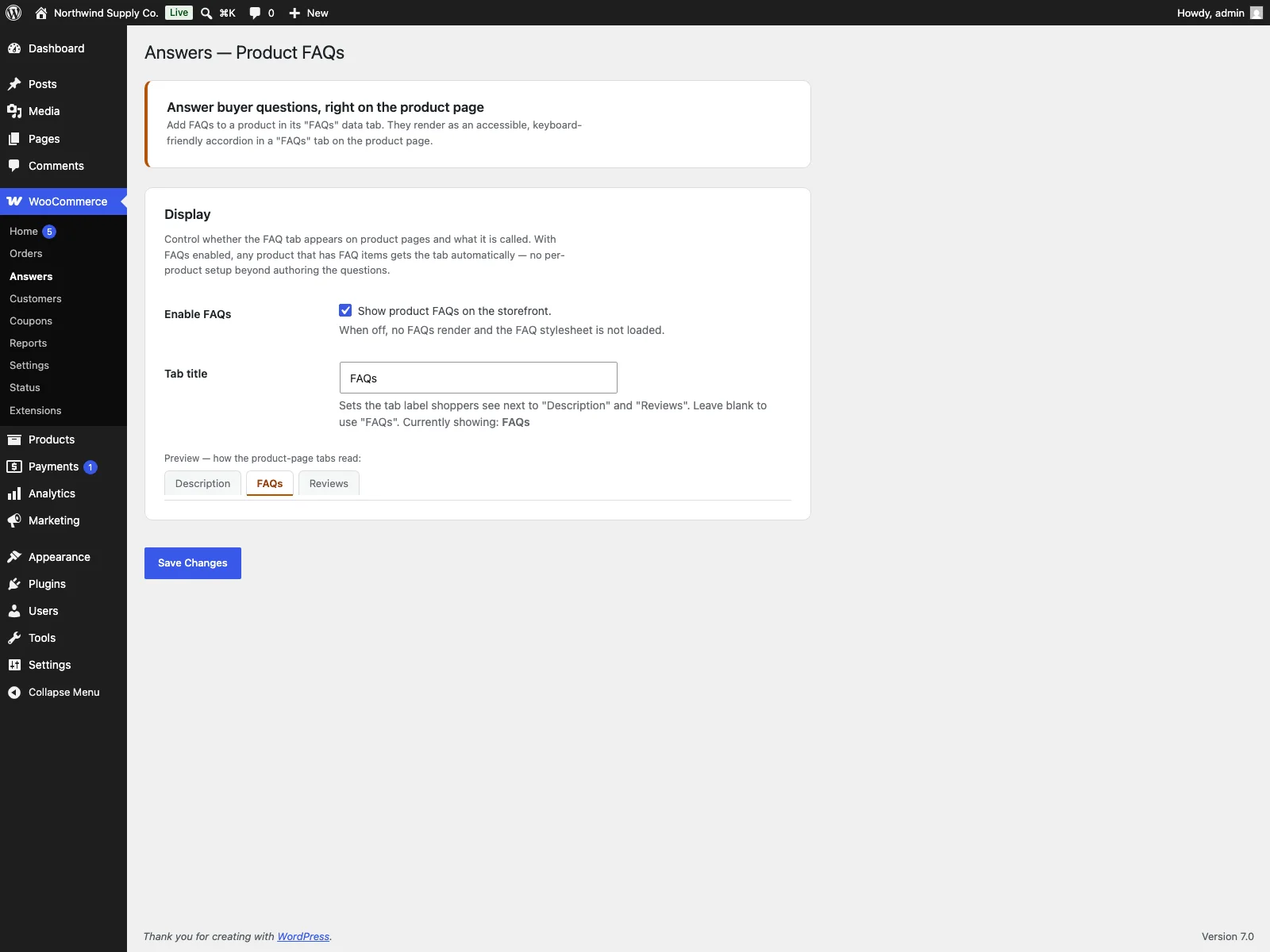 Authoring FAQ items in the FAQs product-data tab, right where you already edit the product.
Practical tips for FAQs that earn their place
The plugin gives you the mechanism. The content is yours, and a few habits make the difference between a FAQ that converts and one that just fills space:
- Answer real blockers, not filler. Skip “Is this a good product?” Write the questions customers actually ask before buying, the ones about fit, compatibility, delivery, materials and returns. If you are unsure which, read your last month of pre-sale emails.
- Keep answers short and specific to the product. A FAQ answer is not a paragraph of marketing. State the fact, link to detail if needed, and stop. The shopper is scanning, not reading.
- Lead with the most common question. The order is the order shoppers read in. Put the question you get asked most at the top so the majority find their answer first.
- Reuse across similar products, but tailor the specifics. A category of products may share most questions, but the sizing or compatibility answer is per product. Generic answers erode trust.
- Update them as the product changes. A FAQ that says “ships in 3 days” when it now ships in 10 is worse than no FAQ. Treat the FAQ as part of the product record, not a one-time task.
Warning: An out-of-date FAQ is worse than none. A line promising “ships in 3 days” when the product now ships in 10 erodes the trust the FAQ was meant to build.
Respondo versus default WooCommerce
WooCommerce gives you product tabs and a long description, but no structured per-product FAQ. Here is the difference for product FAQs specifically:
| Capability | Default WooCommerce | Respondo |
|---|---|---|
| Per-product FAQ items | None built in | Authored in a FAQs product-data tab |
| Where FAQs appear | Description text only | Dedicated FAQs tab beside Description and Reviews |
| Accordion presentation | None | Yes, expand or collapse per question |
| Accessibility | n/a | Button plus aria-labelled region, keyboard, focus, reduced-motion |
| Safe rich text in answers | n/a | Basic HTML sanitised with wp_kses_post |
| Editable tab label | No | Yes, under WooCommerce, Respondo |
| Asset loading | n/a | Only on products that have FAQs |
| Live FAQ search | None | PRO adds search above the accordion |
| Cost | Free (no FAQ feature) | Free; PRO adds search, categories, voting and AI drafting |
Free versus PRO
The free edition is a complete FAQ feature, not a teaser: per-product authoring, the accessible accordion, safe rich text, the editable tab and theme-aware styling are all included, and for many stores that is the whole job done. Respondo Pro is a separate add-on that requires the free plugin and builds on top for larger catalogues. It adds live FAQ search, a search box above the accordion that filters questions and answers as the shopper types, diacritic-insensitive and accessible. It adds FAQ categories, so you can define labels, assign them per product, and let shoppers filter by category pills that combine with the search. It adds helpful and not-helpful voting under each answer, stored per product and deduplicated per browser, so you learn which answers land. And it adds AI FAQ drafting on the product FAQs tab, which uses your own OpenAI-compatible API key to generate draft question and answer pairs that you review and edit before they ever publish. Each PRO feature is toggled under WooCommerce > Respondo Pro.
The short version
WooCommerce lets you describe a product but gives you no structured way to answer the specific questions that block a sale, so those questions arrive as emails or, worse, as abandoned carts. A good product FAQ catches the doubt on the page: per-product, scannable in an accordion, accessible, and safe to format. The free Respondo plugin adds exactly that, authored right inside the product and rendered in its own FAQs tab that inherits your theme and loads nothing on pages without FAQs. When your catalogue grows, Respondo Pro layers on live search, categories, voting and AI-assisted drafting, but the free edition already covers the part that matters most: answering the buyer before they leave.