WooCommerce gift cards: store credit with emailed codes
By Mariusz Szatkowski · Updated: 2026-09-11
Gift cards do two useful jobs for a store. They bring in new customers as presents, because the person buying is rarely the person who ends up shopping with you. And they let existing shoppers hold store credit to spend later, which smooths out refunds, apologies and loyalty rewards into something the customer actually wants to use. The catch is that stock WooCommerce does not sell gift cards at all, so the gap shows up most painfully during gifting seasons, exactly when you can least afford to improvise. This guide explains what a working gift-card flow needs, why a stored balance is the part that matters most, and how the free Gift Cards plugin handles the whole path from sale to redemption.
What gift cards and store credit actually are
It helps to be precise, because “gift card”, “voucher” and “coupon” get used interchangeably and they are not the same thing. A gift card is store credit that a buyer pays for now so that someone can spend it later. The money changes hands up front; the spending happens whenever the holder chooses. For that to work in a shop, three separate things have to happen, and all three have to line up:
- The card has to be sellable. It is a normal product the customer can add to cart and pay for, with a price that becomes the card’s value.
- The recipient has to receive something redeemable. In practice that means a unique code, delivered to them, that proves the credit exists.
- The store has to track the balance. The code has to be worth a known amount, and that amount has to fall as it is spent, so it can be drawn down over time.
Miss any one of these and you do not really have a gift card. A code with no balance behind it is just a coupon. A balance with no delivery never reaches the recipient. A sellable product that issues nothing redeemable is a sale you cannot honour. The whole point is that the three pieces work as one chain: pay, receive, redeem, with a balance that survives between purchases.
A coupon, by contrast, is a fixed discount you create by hand and hand out. Nobody pays for it, it usually expires on a schedule you set, and once used it is gone. That difference matters because it is the reason coupons make a poor substitute for gift cards, however tempting it is to reach for them.
Note: The stored balance is the single feature that separates a gift card from a coupon. A code with no drawn-down balance behind it is just a one-shot discount, not store credit.
Why default WooCommerce falls short
Out of the box, WooCommerce has no gift-card product type, no mechanism to email a redeemable code to a recipient, and no stored balance with partial redemption. Coupons come close on the surface and that is exactly the trap. A coupon is a fixed discount you create in advance, not a paid-for credit that a shopper buys, receives by email, and draws down purchase after purchase.
Running a gifting programme through manual coupons has predictable failure modes. You have to create a coupon by hand for every card you sell, which does not scale past a handful. A coupon does not carry a remaining balance, so if the customer spends less than the face value, the rest simply vanishes rather than staying on the code for next time. And there is no clean record tying a code to the order that paid for it, so reconciling what you have sold against what has been redeemed becomes guesswork. Vouchers issued as PDFs run into the same wall: they look like a gift card but there is no live balance behind them. To sell real gift cards you need purpose-built handling, not a workaround.
Warning: Running a gifting programme on manual coupons means creating one by hand per card, and if the customer spends less than the face value the remainder vanishes rather than staying on the code.
What to look for in a gift-card tool
A gift-card flow worth using should cover the full path from sale to redemption, and you can treat the following as a checklist whether you build, buy or install:
- A simple way to mark a card. Turning an ordinary product into a gift card should be one switch on the product you already have, not a separate product type to learn and maintain.
- An emailed, redeemable code. The recipient needs a unique code by email, and you need control over the message that carries it.
- Checkout redemption. Entering the code should reduce the order total like a discount, with no manual coupon creation per card.
- A real, stored balance. Unused value should carry over between orders, so the card behaves like store credit rather than a single-use coupon.
- A clean record. Each code and its remaining balance should live somewhere you can rely on, tied to the order that issued it.
Notice what keeps coming back: the balance. It is the single feature that separates a gift card from a coupon, and it is the part a quick workaround almost always gets wrong.
How Gift Cards does it
Gift Cards for WooCommerce is a free, open-source plugin that covers that whole path. It is deliberately built around the products and screens you already use rather than bolting on a parallel system.
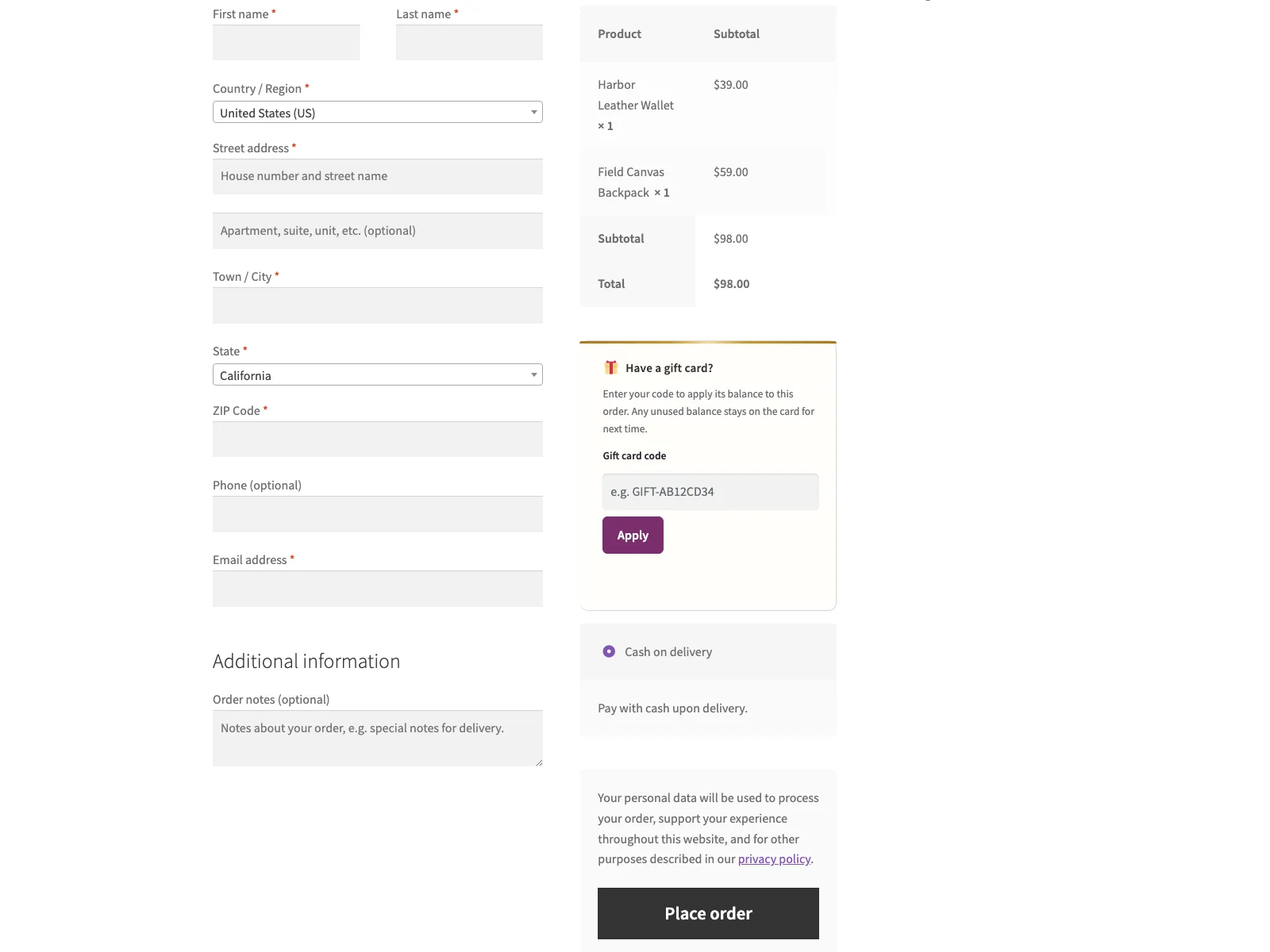 Shoppers buy a gift card and redeem its code at checkout, with the remaining balance carried forward.
- Gift-card product. You mark any product as a gift card by ticking a single Gift card box on the product editor’s General tab. The product’s price becomes the card value, so a $50 card is just a product priced at $50. There is no new product type to manage.
- Emailed code on completion. When the order is marked complete, the plugin generates a unique code and emails it to the order’s billing email address. Tying issuance to order completion, rather than to the moment of checkout, means a code is only created once the payment has actually settled.
- Code visible to the buyer too. Beyond the email, the issued code(s) are listed on the buyer’s order-confirmation page and in their WooCommerce order emails, with a copy button, so the buyer has the code in hand immediately and does not have to wait for or dig out a separate message. This listing is on by default and can be switched off.
- Redeem at checkout. A redeem-code field at checkout lets the shopper enter a code, and its balance is applied to the order total as a discount line. No coupon is created behind the scenes; the plugin looks up the code and applies the balance directly.
- Balance and partial redemption. Each code’s balance is stored in the plugin’s own database table. If a checkout spends only part of the balance, the remainder stays on the same code for a later order, so one card can cover several purchases until it runs out.
- Amount from product price, per unit. The card value comes from the product price and honours quantity. Buying two units of a $50 gift-card product issues two separate $50 codes rather than one $100 code.
Note: In the free edition the code is emailed to the order’s billing address; there is no separate send-to-a-friend field. A buyer gifting a card forwards the code or hands it over themselves.
That is the complete, end-to-end loop in the free edition: sell, issue, deliver, redeem, and carry the remaining balance forward.
Setting it up
Getting the flow live takes a few minutes:
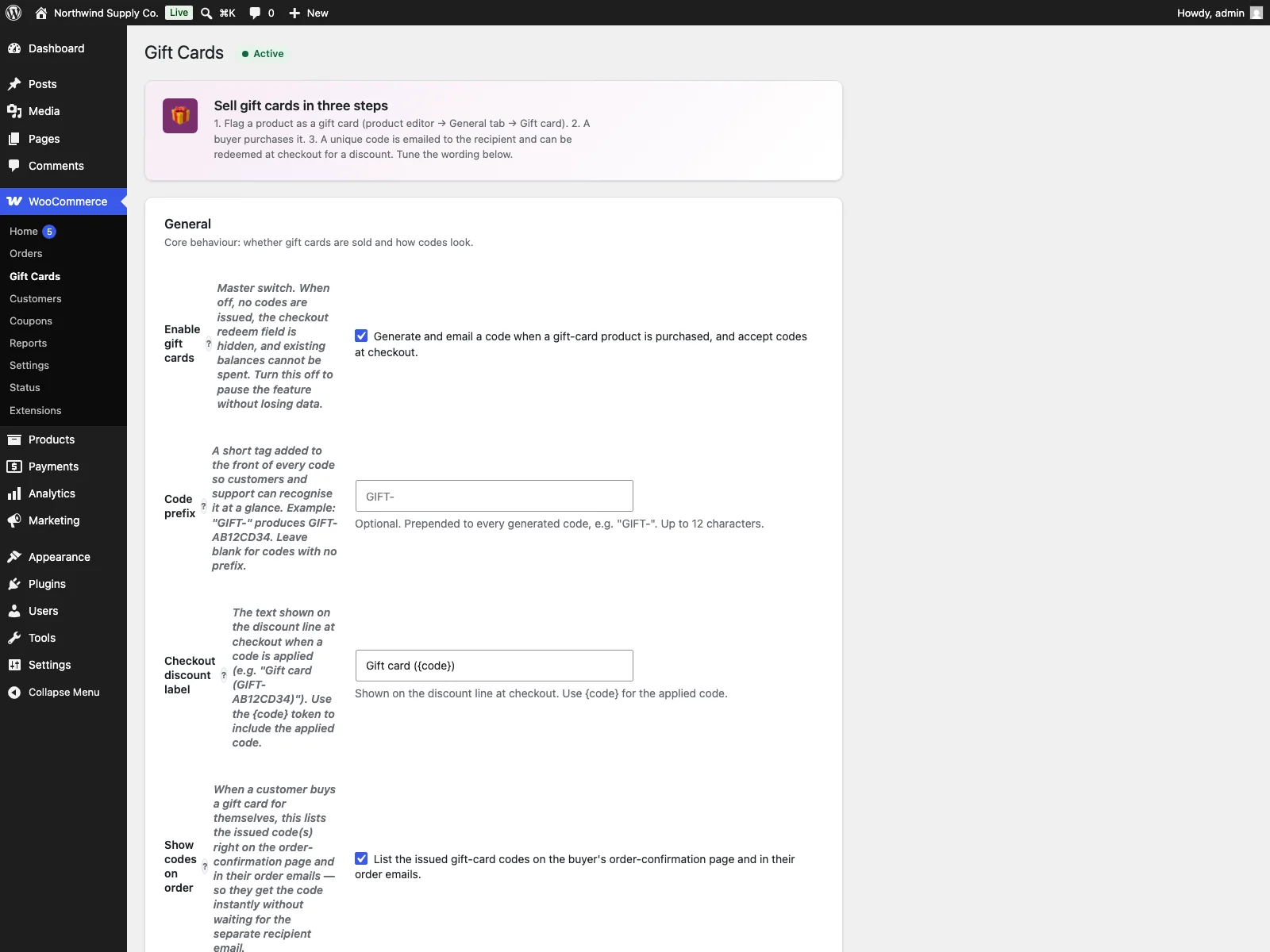 The gift-card settings in wp-admin, where you set the code prefix, checkout label and recipient email.
- Install the plugin from Plugins > Add New, or upload it to
/wp-content/plugins/plogins-giftcards. WooCommerce 8.0 or later must be installed and active, on PHP 8.1 or newer. - Activate it. The plugin creates its gift-card table on activation.
- Edit a product, tick Gift card on the General tab, and set its price to the value of the card. Many stores create several fixed-value cards this way, for example $25, $50 and $100 as separate simple products.
- Go to WooCommerce > Gift Cards and set the code prefix, the checkout discount label, and the recipient email subject and body.
The settings page has been reworked to make this painless: it carries inline help under the fields, click-to-insert tokens for the email, and a live preview of the message so you can see what the recipient will get before you save.
What you can customise
A few specific settings under WooCommerce > Gift Cards are worth calling out, because they are where you make the flow feel like your store rather than a generic add-on:
- Code prefix. A short tag added to the front of every code so customers and support recognise it at a glance. A prefix of
GIFT-produces codes likeGIFT-AB12CD34. Leave it blank for codes with no prefix. - Checkout discount label. The text shown on the discount line when a code is applied at checkout. It accepts a
{code}token, so you can render something like “Gift card (GIFT-AB12CD34)” rather than a bare “Discount”. - Recipient email subject and body. The message that carries the code, with click-to-insert tokens for
{code}and{amount}so the email reads naturally. The default text is translatable, and the values you set are the ones actually sent. - List issued codes on the order. The on-by-default setting that shows the buyer their code(s) on the order-confirmation page and in order emails. Useful when customers buy cards for themselves.
Practical tips for running gift cards
The plugin gives you the mechanism; how you use it is up to you. A few practical pointers:
- Offer a small set of fixed values. Three or four cards (for example $25, $50 and $100) cover most gifting decisions without the buyer having to think. Because each card is just a priced product, you create them the same way you create anything else in your catalogue.
- Write the recipient email like a gift, not a receipt. This is the message the person actually opening the gift will read. Use the
{amount}and{code}tokens, add a warm line of your own, and check the live preview before saving. - Pick a prefix you can support. A recognisable prefix makes it obvious to a customer (and to your support inbox) that a code is a gift card rather than a coupon or order number. Keep it short.
- Remember who receives the email. In this version the code goes to the order’s billing address, and there is no separate send-to-a-friend field. A buyer gifting a card simply forwards the code or hands it over in person, so it is worth saying so on the product page to set expectations.
- Promote cards before peak gifting periods. Gift cards are an impulse and last-minute purchase. Surfacing them in menus, the cart, and around checkout in the run-up to holidays captures the buyers who have left it late and want something that arrives instantly.
Gift Cards versus default WooCommerce
| Capability | Default WooCommerce | Gift Cards (free) |
|---|---|---|
| Sell a gift-card product | None built in | One toggle on any product |
| Emailed redeemable code | None | Unique code emailed when the order completes |
| Code visible to the buyer | n/a | Listed on the order page and order emails, with copy button |
| Redeem at checkout | Manual coupons only | Redeem-code field applies the balance as a discount |
| Stored balance | None | Balance stored in a custom table; partial redemption carries over |
| Amount source | n/a | Product price, honours quantity (one code per unit) |
| Customisable code prefix and labels | n/a | Code prefix, checkout label, email subject and body |
| HPOS and checkout blocks | n/a | Compatible with both |
| Cost | Free (no gift cards) | Free; PRO adds custom amounts, scheduling, designs and more |
Free versus PRO
The free edition is a complete loop, not a teaser. Selling a card, issuing and emailing a unique code, redeeming it at checkout, and carrying the remaining balance forward across orders are all included, and that is genuinely enough to run gift cards end to end. It is also built to sit cleanly on a modern install: it declares compatibility with WooCommerce HPOS and the Cart and Checkout blocks, its storefront styles follow the theme and respect dark mode and reduced-motion preferences with no layout shift at checkout, and the markup is keyboard-accessible with ARIA labels and focus styles. The plugin keeps everything on your own server, with codes and balances in a single custom table and no external service involved.
Gift Cards Pro builds on top for stores that want more control over the gifting experience and the back office. It adds customer-chosen amounts within minimum and maximum bounds, scheduled delivery so a card arrives on the right day, a balance-check shortcode customers can use to see what is left on a code, admin redemption history, custom card email designs, bulk code generation, PDF cards and multi-currency support. None of that is needed to start selling cards; it is there for when you want the programme to do more.
The short version
A real gift card is store credit: it has to be sellable, it has to deliver a redeemable code to the recipient, and it has to keep a balance that carries over between purchases. Default WooCommerce does none of this, and manual coupons are not a substitute because they carry no remaining balance and do not scale. The free Gift Cards for WooCommerce plugin marks any product as a card with one toggle, emails a unique code when the order completes, lets the shopper redeem it at checkout like a discount, and stores the balance with partial redemption so a card can cover several orders. When you need custom amounts, scheduled delivery, designs, bulk codes or multi-currency, that is where Gift Cards Pro picks up.