WooCommerce wishlist: save products for later
By Mariusz Szatkowski · Updated: 2026-09-11
A shopper who is interested but not ready to buy needs somewhere to put a product so they can come back to it. Without that, they have to remember the item or search for it all over again, and many simply never return. A wishlist closes that gap. It is one of the few store features that costs the shopper nothing and signals genuine intent: the things on a wishlist are the things someone has already decided they want. This guide explains what a WooCommerce wishlist is, why it matters, what to look for in one, and how the free Shortlist plugin handles it end to end.
What a wishlist is and why it matters
A wishlist is a simple promise: save this product, find it again later. For considered purchases like electronics, furniture, fashion or gifts, the decision rarely happens on the first visit. The shopper compares, checks their budget, waits for payday, or asks someone’s opinion. A wishlist gives them a low-commitment way to hold onto items between sessions, which is far better for you than them abandoning the browse entirely and forgetting the store exists.
The value lives in returning customers. If a saved list is waiting when a shopper comes back, the path to purchase is already half built: they do not have to re-find anything, they just open their list and add to cart. A wishlist is also a quieter signal than a cart. A cart says “buying now”; a wishlist says “wants this, on the fence.” That second group is large, and it is the group most stores do the least for.
There is a second audience too. Some shoppers use a wishlist as a public or private gift registry, a shortlist to share with a partner, or a way to track price over time. The mechanics are the same in every case: a reliable place to save products and a reliable way to get back to them. The risk is that a wishlist is only useful if the shopper can actually save to it and find it again, which is exactly where the implementation details matter.
What to look for in a WooCommerce wishlist
Not every wishlist plugin treats the basics the same way. A few things are worth checking before you commit, because they are hard to retrofit later:
- Guest support. Many shoppers are not logged in when they browse, and forcing an account before they can save anything is a reliable way to lose them. Look for a list that works for guests and merges into the account on login, so nothing is lost the moment they sign in.
Warning: Forcing an account before a shopper can save anything is a reliable way to lose them. Look for a list that works for guests and merges onto the account on login.
- A light, modern front end. Some wishlist plugins load a heavy script on every page of the store, dragging down pages that have no wishlist on them at all. A vanilla-JavaScript front end with no jQuery dependency, loaded only where it is needed, keeps the rest of the store fast.
- No layout shift. A save button that changes size or position when it flips between “add” and “remove” pushes the page around and hurts Core Web Vitals. The button should reserve its space so toggling never causes a reflow.
- Variation accuracy. On variable products, a wishlist should save the exact variation the shopper chose, not just the parent product, so the saved item matches the size or colour they actually wanted.
- Accessibility. The save control should be a real button, operable by keyboard, with its state exposed to screen readers rather than communicated by colour alone.
- Flexible ways to view the list. A My Account tab, a dedicated page, a shortcode and a block each suit a different store layout. Having all of them means you can put the wishlist wherever your menu and pages need it.
- Clean data ownership. The wishlist data should live in your own database and clean up after itself on uninstall, with no third-party service holding your shoppers’ saved items.
How Shortlist does it
Shortlist for WooCommerce is a free, open-source wishlist built around exactly these basics. It adds an “Add to wishlist” button to your shop loop and product pages, and gives shoppers several reliable ways to get back to what they saved.
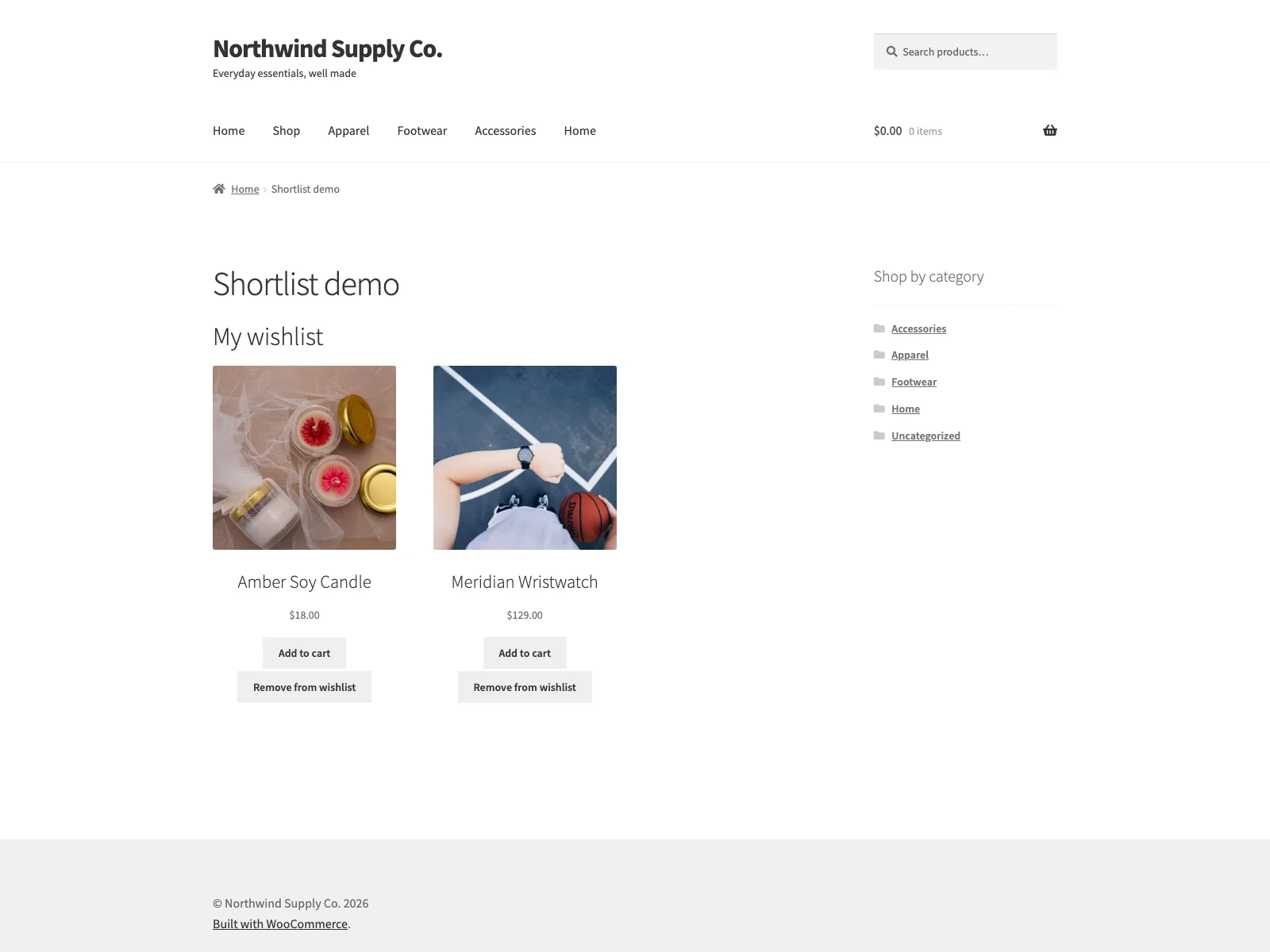 The shopper-facing wishlist, listing saved products with their images, prices and add-to-cart buttons.
The save button is an accessible, real <button> with aria-pressed, so its saved state is exposed to assistive technology rather than implied by an icon colour. When the same product appears more than once on a page, every button for it updates together after a save, and the change is announced to screen readers through a polite live region. The button also reserves its space, so switching between the add and remove states does not reflow the page, which keeps the layout stable and avoids cumulative layout shift. Saving and removing both happen over admin-ajax with no page reload.
Guests are treated as first-class shoppers, if you allow it in settings. A guest’s list lives in a browser cookie, so it survives between pages without an account. The next time that visitor signs in, their saved items move onto their account, so a shopper who saves before logging in does not lose anything at the login step. Logged-in customers’ lists are stored server-side in a custom shortlist_items database table keyed to their user id, which means the list follows the customer across devices once they are signed in.
On variable products the button follows the selected variation, so a customer saves the exact size or colour they chose rather than the parent product. Until they pick their options the button stays disabled, with a hint you can word yourself, so there is no ambiguity about which variation a saved item refers to.
Note: On variable products the save button follows the selected variation, so a shopper saves the exact size or colour they chose rather than the parent product. It stays disabled until options are picked.
Where the button and the list can appear
Shortlist is deliberately flexible about placement, and each placement is a separate switch on the settings screen so you turn on only what your layout needs:
- The single product page, below the add-to-cart area.
- Product cards in the shop, category and tag loops.
- A “Wishlist” tab in WooCommerce My Account, optionally showing a saved-item count like “Wishlist (3)” that updates live.
- A dedicated wishlist page you pick or create from the settings screen, with the
[shortlist]list injected automatically when the page has no shortcode yet. - Any post or page, via the
[shortlist]shortcode. - The block editor, via the server-rendered Shortlist Wishlist block, so the editor preview matches the front end.
Setting it up
Getting the wishlist live takes only a few minutes:
- Upload the plugin to
/wp-content/plugins/plogins-shortlist, or install it from Plugins > Add New. WooCommerce must be installed and active. - Activate it.
- Open the Shortlist menu in wp-admin. It is available to shop managers, not only administrators, because it uses the
manage_woocommercecapability. - Turn the wishlist on, decide whether guests may use it, and choose where the button shows up: single product, shop loop, My Account, and the dedicated page.
- Optionally set your button labels, the variation hint, and shape the list itself: heading, intro and empty-list text, how many columns the grid uses, and which details each saved product shows (image, name, price, add-to-cart and remove button).
Every setting has a “?” next to it that opens a short explanation of what it does, so you are not cross-referencing documentation while you configure it. Because Shortlist only loads its stylesheet and script on the pages where the wishlist actually appears, the rest of your store stays untouched.
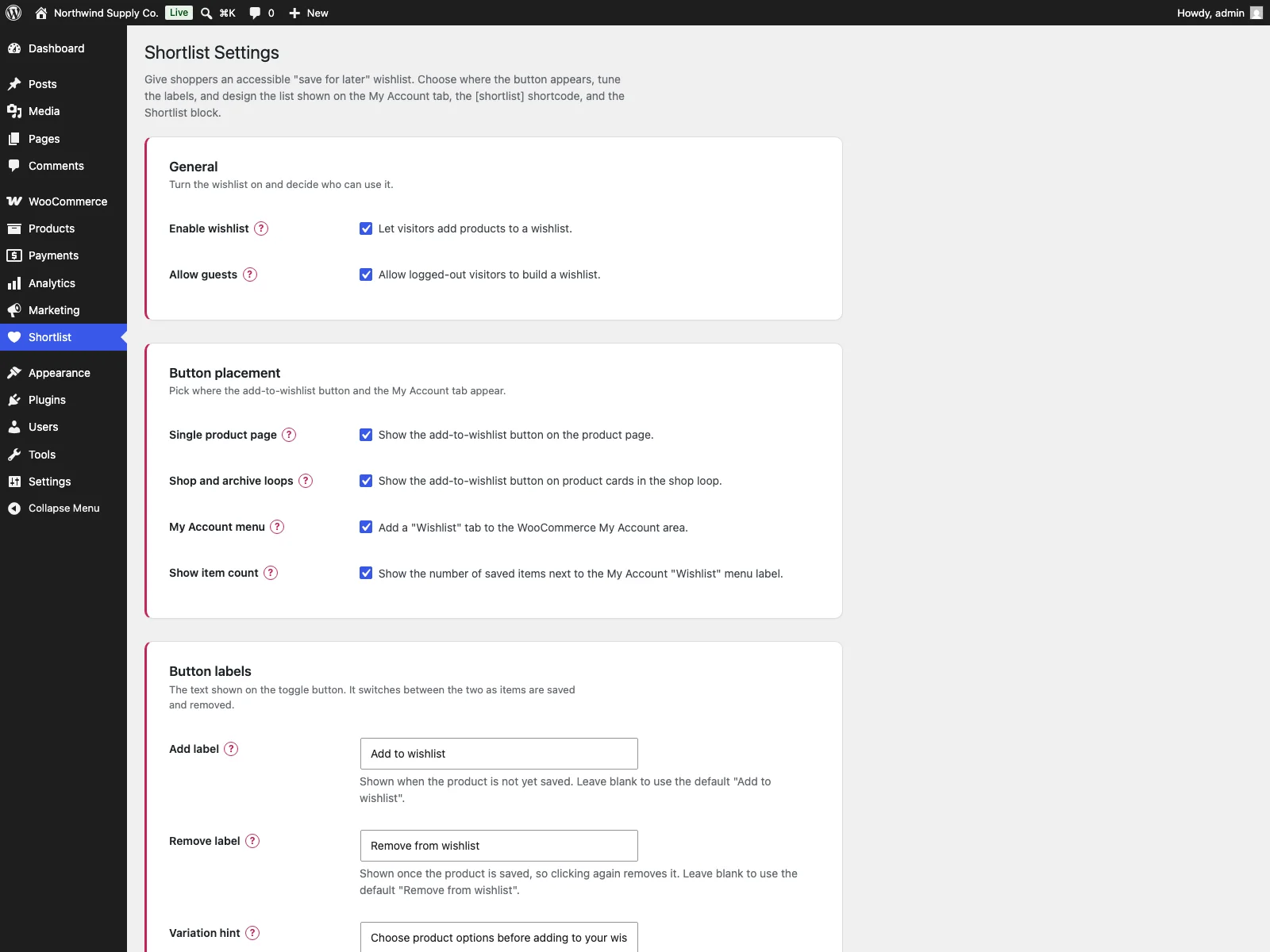 The Shortlist settings screen, where you enable guest support, choose the button placements and shape the list layout.
Where the data lives
Shortlist does not connect to any external service. Saving and removing items happens over your own site’s admin-ajax endpoint, and all wishlist data stays in your WordPress database: logged-in customers’ lists live in the custom shortlist_items table, guest lists live in a cookie on the visitor’s own browser until they log in, and settings are stored in the shortlist_settings option. The plugin sends no email, and loads no third-party fonts, scripts or trackers. On uninstall it removes its table and options, so it does not leave orphaned data behind.
Note: No third-party service holds your shoppers’ saved items, so a wishlist here stays a privacy-clean feature rather than another data processor to account for.
Practical tips for getting more from a wishlist
The plugin gives you the mechanism; a few habits help it earn its keep:
- Show the button where the decision happens. Enabling it on both the shop loop and the product page means a shopper can save without committing to a click into the product, which captures more of the “maybe later” crowd.
Tip: Enable the save button on both the shop loop and the product page so shoppers can save without first clicking into the product, which captures more of the “maybe later” crowd.
- Allow guests. The single biggest driver of an empty wishlist feature is forcing an account first. Letting guests save and merging on login removes the friction at exactly the wrong moment.
- Keep the saved-item count visible. The optional count next to the My Account “Wishlist” label is a small nudge that reminds returning shoppers they have items waiting.
- Word the variation hint clearly. On variable products, a short hint like “Choose a size to save” tells the shopper why the button is disabled, so a disabled state never reads as a bug.
- Pick a list layout that matches your catalogue. A wide column count suits image-led catalogues; a narrower one with price and add-to-cart suits considered purchases where shoppers convert straight from the list.
- Link to the wishlist in your account menu and footer. A saved list only helps if shoppers can find it, so make the dedicated page or My Account tab easy to reach.
Shortlist versus default WooCommerce
WooCommerce has no built-in wishlist at all. Here is the difference for saving products for later specifically:
| Capability | Default WooCommerce | Shortlist (free) |
|---|---|---|
| Save a product for later | None built in | Accessible button on listings and product page |
| Guest wishlist | None | Browser cookie, moved onto the account on login |
| Logged-in storage | n/a | Custom database table keyed to user id |
| View the saved list | n/a | My Account tab, dedicated page, [shortlist] shortcode, or block |
| Variable products | n/a | Button follows the selected variation |
| Add and remove | n/a | admin-ajax, no reload, every button kept in sync |
| Layout stability | n/a | Button reserves its space, no layout shift |
| Front-end weight | n/a | Vanilla JavaScript, no jQuery, loaded only where needed |
| Data ownership | n/a | Stays in your database, clean uninstall, no external service |
| Cost | Free (core has none) | Free; Pro adds multiple lists, sharing, analytics and price alerts |
Free versus Pro
The free edition is one complete wishlist, not a teaser: the accessible button, guest support with login merge, variation-aware saves, the My Account tab, the dedicated page, the shortcode and the block are all included. For stores that want to do more with saved products, Shortlist Pro is a separate add-on that extends the free plugin’s service container. It adds multiple named wishlists (via a [shortlist_lists] shortcode), shareable and emailable list links, a wishlist analytics dashboard with CSV export, and price-drop and back-in-stock email alerts that an hourly cron checks for opted-in logged-in shoppers. Shortlist Pro is distributed through Freemius for licensing, activation and automatic updates, and it requires the free Shortlist plugin to be installed and active. It does not run on its own.
The short version
A WooCommerce wishlist lets shoppers save products for later so they come back instead of losing track, and it captures the large “interested but not ready” audience that a cart never sees. WooCommerce core has no wishlist of its own. The basics that matter are guest support that merges on login, a light front end that does not slow the store or shift the layout, accurate saving of variations, real accessibility, and flexible ways to view the list. Shortlist covers all of these in a free, open-source plugin that keeps your data in your own database, with multiple lists, sharing, analytics and price alerts available in Pro when you are ready to do more.