WooCommerce gift registry: wedding and event wish lists
By Mariusz Szatkowski · Updated: 2026-09-11
A gift registry turns guesswork into a clear list. When someone is getting married, expecting a baby, or moving into a first home, the people around them want to give something useful, but without a list they guess. Two relatives buy the same kettle, nobody buys the thing that was actually needed, and the couple spends the week after the event queuing at a returns desk. A WooCommerce gift registry fixes that by letting the customer build a named list of products from your store and share it, so guests buy what is genuinely wanted and can see at a glance what is already taken. This guide explains what a gift registry is, why purchase tracking is the part that makes or breaks it, what a good registry needs, and how the free Registry plugin adds the whole flow to WooCommerce.
What a gift registry is
A gift registry is a customer-built list tied to an event. The customer picks products they would love to receive, sets how many of each they want, and shares a public link with family and friends. The list is theirs: they decide what goes on it, and they control it from their account. The guests are the second audience. They never log in, never build anything, and never need to understand your store. They open one link, see what is still needed, and buy a gift.
It helps to separate the two roles, because they have opposite needs. The owner needs a private, editable workspace where they can add items, adjust quantities and see progress. The guest needs a read-only page that is dead simple: a list, a clear sense of what is left, and a way to buy without friction. A registry that blurs those roles, by forcing guests to register or by exposing the owner’s controls publicly, fails one audience to serve the other. The good ones keep them cleanly apart.
Why it matters
The reason a registry matters comes down to one word: duplicates. Without a shared list, gift-giving is uncoordinated by default. Each guest acts on their own best guess, and the more guests there are, the more those guesses collide. The hosts end up with three of one thing and none of another, and every duplicate is a small failure for everyone involved: a wasted gift, an awkward return, and a guest who spent money on something unwanted.
A registry removes that, but only if it actually knows what has already been bought. This is the difference between a wish list and a registry. A wish list is a static list of links. A registry is a live list that shrinks as gifts are purchased, so the next guest never sees an item that has already been fulfilled. That live count is the whole point.
Note: The live count is what separates a registry from a wish list. A wish list is a static list of links; a registry shrinks as gifts are purchased, so the next guest never sees an item that has already been fulfilled.
There is a second reason it matters, and it is yours rather than the customer’s. A registry turns one event into a stream of orders from a single shared page. The couple does the merchandising for you: they pick the products, they send the link to dozens of people, and those people arrive at your store ready to buy specific items. It is one of the few features where the customer markets your catalogue on your behalf, to an audience who came specifically to spend money.
What to look for in a registry
Not every registry is built the same way, and a few things decide whether it actually works in practice. Use this as a checklist whether you build, buy or install:
- Purchase tracking from real orders. Remaining counts should come from your actual WooCommerce orders, not a manual checkbox someone has to remember to tick. Manual tracking is tracking that will be wrong by the second weekend.
- A clean, shareable public page. Family and friends should open one read-only link with no account, no login wall and no confusion about what to do.
- Direct buying from the page. Guests should be able to buy a gift without hunting through your catalogue to find the right product and the right variation.
- Per-item quantities. “I want six of these glasses” is a normal request, and the registry should track six wanted against however many have been bought so far.
- Privacy between customers. One customer must never be able to view or edit another’s registry. Ownership has to be checked on every action, not assumed.
- A master switch and a sensible default. You should be able to turn the whole feature on or off, and it should work the moment it is active without a configuration marathon.
Notice what is not on that list: a separate cart, a separate checkout, or a separate order system. A registry should ride on the WooCommerce you already run, not bolt a parallel store onto the side of it.
How Registry handles it
Registry for WooCommerce is a free, open-source plugin that adds gift registries to a WooCommerce store. It depends on WooCommerce and uses your existing catalogue and orders. It does not create its own cart or order system, and it makes no outbound network requests: registries are stored as a gift_registry custom post type with post meta, settings live in your options table, and purchase tracking reads from your own orders. Nothing leaves your site.
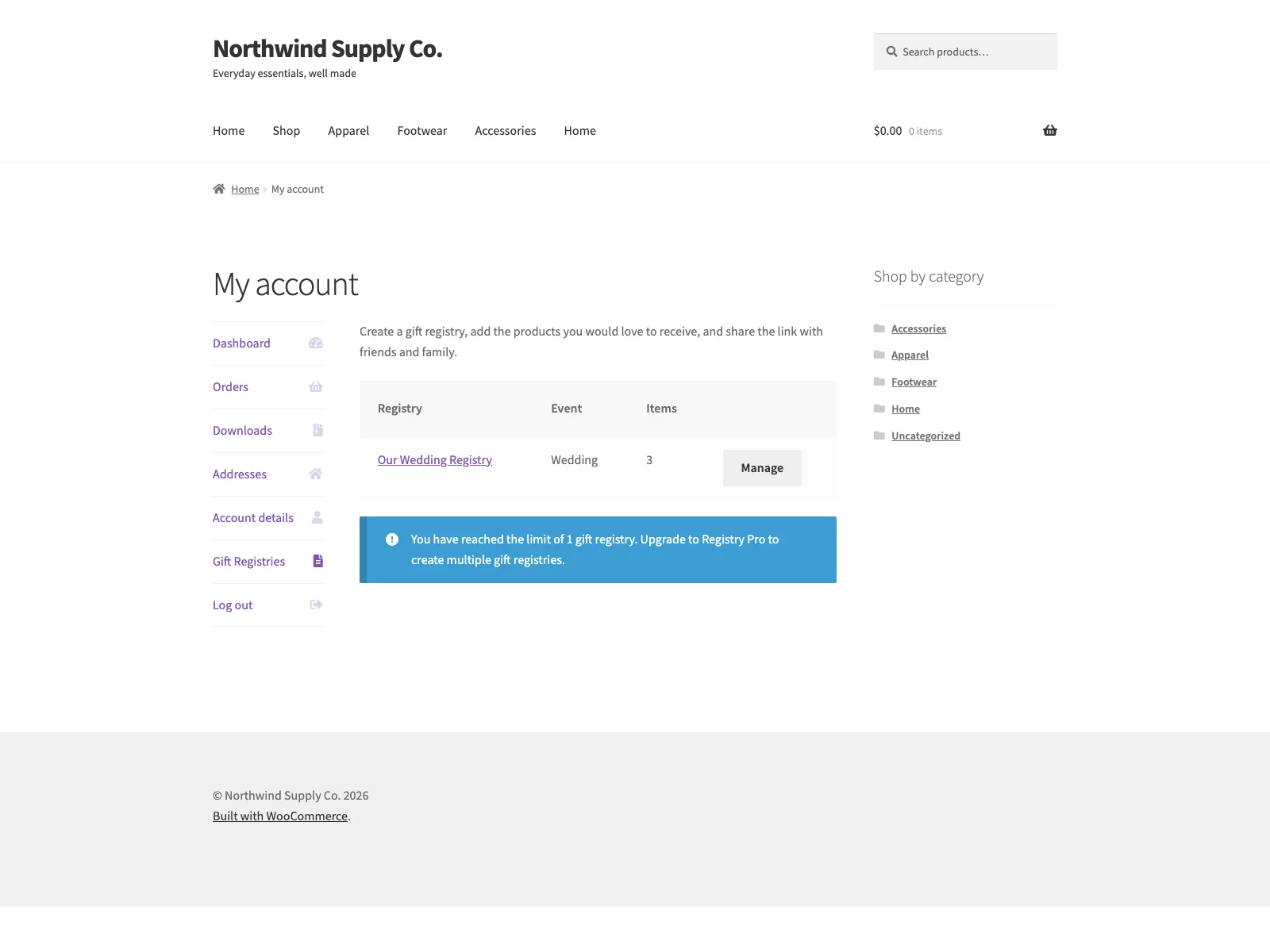 The public registry page is a read-only wish list that guests open and buy from without an account.
The customer side
Logged-in customers create and manage their registries under My Account, Gift Registries, which the plugin adds as its own endpoint in the account menu. Each registry has an event type, chosen from wedding, baby shower, birthday, housewarming or other, and an event date. From there the customer builds the list. An “Add to gift registry” control appears on single product pages, and each item carries a desired quantity, so the list captures not just what is wanted but how many.
The public page
Every registry gets its own public, read-only page on a clean permalink under the gift-registry slug, built for sharing. The owner copies that link and sends it however they like: a message, an email, a card insert. Anyone with the link can open the page without an account and see the items along with their purchase progress, and fulfilled items are marked as such. The page is the one intentional exception to the plugin’s privacy model: it is open to anyone with the link, because that is exactly what a registry is for. It is deliberately kept out of your public archive and search listings, so registries do not show up uninvited in site search.
Purchase tracking
Purchase tracking is the core, and it is the part that makes the list trustworthy. When a gift is bought through a registry, the order line item records which registry it belongs to. Once that order reaches the processing or completed status, the purchased quantity is added to the registry’s count, and the public page subtracts it from what is still needed. Each order is counted only once, so the remaining numbers stay accurate without anyone updating them by hand. Because the count keys off paid order statuses rather than a manual flag, an abandoned cart never marks an item as bought, and a real purchase always does.
Note: Because the count keys off paid order statuses rather than a manual flag, each order is counted only once and the remaining numbers stay accurate without anyone updating them by hand.
Direct purchase
By default, guests can buy a gift directly from the shared page. This is the “Allow direct purchase” setting, on out of the box. With it on, the buy button drops the item into the cart in one step, which is the smoothest path for simple products. With it off, the button sends guests to the product page instead. That is the right behaviour for variable products that need a size, colour or other option chosen before they can be added to the cart, so guests are never dropped into checkout with an under-specified item.
Tip: Leave direct purchase off when much of your range is variable, so guests choose the right size or colour on the product page rather than buying a placeholder variation.
Privacy
Privacy is enforced throughout. Only the logged-in owner can create or edit a registry, and ownership is checked on every action, so nothing leaks between customers and no one can edit a list that is not theirs by guessing an ID. The single public surface is the shared page, which is read-only by design.
Note: Only the logged-in owner can create or edit a registry, and ownership is checked on every action, so no one can view or edit another customer’s list by guessing an ID.
Setting it up
Getting registries live takes a couple of minutes:
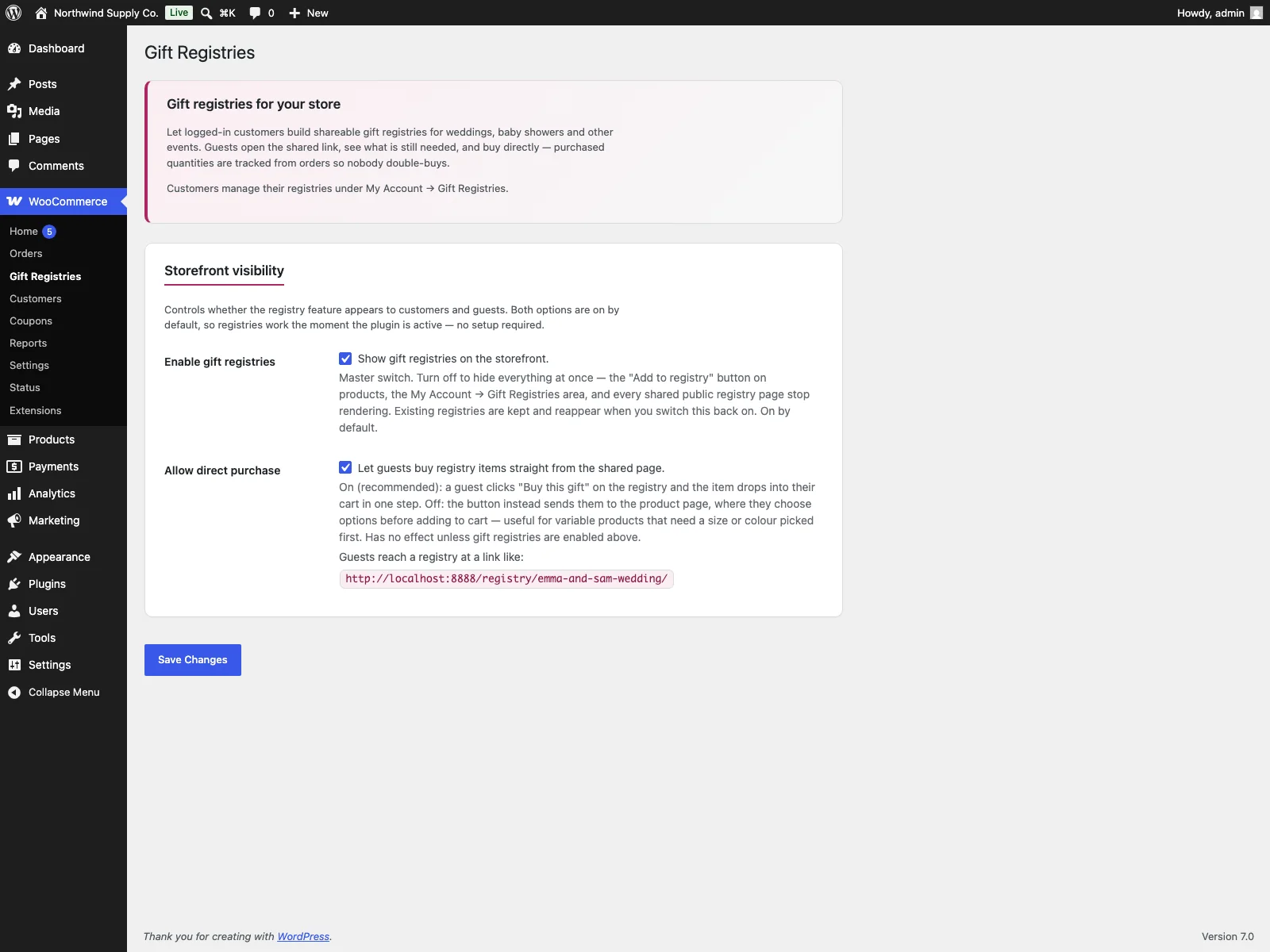 Two switches run the feature: the master toggle and Allow direct purchase.
- Install the plugin from Plugins, Add New, or upload it to
/wp-content/plugins/plogins-registry. WooCommerce must be installed and active. - Activate it. Registries are on by default, so the feature works immediately with no further configuration.
- Visit WooCommerce, Gift Registries if you want to change the defaults. There are two switches: a master toggle to turn the whole feature on or off, and Allow direct purchase to choose whether guests buy straight from the shared page or are sent to the product page first.
That is the entire setup. The admin screen carries inline help under each option, so you are not cross-referencing documentation while you configure it. Turning the master switch off hides everything at once, the product button, the My Account area and every shared page, while keeping existing registries intact so they reappear when you switch it back on. Because the plugin declares HPOS and cart/checkout blocks compatibility, it sits cleanly on a modern WooCommerce install.
Practical tips for running registries
The plugin gives you the mechanism; a few habits make it work better in the real world:
- Tell customers it exists. A registry only helps if people know to create one. A short line on relevant product pages, or a mention in your post-purchase emails around wedding and baby categories, turns a hidden feature into one customers actually use.
- Curate giftable products. Registries shine when your catalogue includes things people give as gifts at a range of price points. A spread from small tokens to centrepiece items lets every guest find something in their budget.
- Mind variations. If much of your range is variable, leaving direct purchase off is often the safer default, so guests choose the right size or colour on the product page rather than buying a placeholder variation.
- Keep the shared page tidy. Encourage owners to set realistic quantities and remove items they no longer want. A focused list of fifteen things converts better than a sprawling list of eighty.
- Lean on real-order tracking. Resist the urge to manually mark things as bought. The count is driven by paid orders for a reason, and trusting it keeps the page honest.
Registry versus default WooCommerce
WooCommerce has no built-in gift registry at all. Here is the difference for registries specifically:
| Capability | Default WooCommerce | Registry |
|---|---|---|
| Customer-built event list | None built in | Registries in My Account, Gift Registries |
| Event type and date | n/a | Yes, per registry |
| Add products to a list | n/a | “Add to gift registry” on the product page, with desired quantity |
| Shareable public page | n/a | Read-only page on a clean permalink |
| Purchase tracking | None | From paid WooCommerce orders, counted once |
| Buy a gift from the page | n/a | Direct purchase, on by default |
| Privacy between customers | n/a | Ownership checked on every action |
| External data | n/a | None; nothing leaves your site |
| Cost | Free (core has no registry) | Free; PRO adds notifications, multiple registries, group gifting, themes, thank-you tracking |
Free versus PRO
The free edition is a complete registry, not a teaser: customer-created lists, event type and date, per-item quantities, a shareable public page, purchase tracking from real orders and ownership checks are all included, and the feature works the moment the plugin is active.
Registry Pro is an add-on for stores that want more. It adds owner email notifications after each purchase, so the host knows when a gift has been bought; multiple registries per customer, for people who want a separate list per event; co-owner group gifting, so a customer can invite other people to co-manage a registry; branded registry themes with a cover image and welcome message, to make the shared page feel personal; and thank-you tracking, to log who gave what and mark thank-you notes as sent. Pro requires the free Registry plugin and is delivered through Freemius.
The short version
A WooCommerce gift registry lets a customer build a named event list, share a clean public link, and let guests buy directly from your store, with purchase tracking from real orders so nobody double-buys. The free Registry for WooCommerce plugin adds all of this, keeps each customer’s list private with ownership checks on every action, and sends no data off your site, while Registry Pro layers on owner notifications, multiple registries, group gifting, branded themes and thank-you tracking when you are ready for more.