WooCommerce Buy Now button: skip cart and go to checkout
By Mariusz Szatkowski · Updated: 2026-09-11
A shopper ready to buy a single product still has to add it to the cart, open the cart, then go to checkout. Each step is another chance to abandon. A Buy Now button removes that detour: one click adds the product and sends the shopper straight to checkout. This guide explains what a Buy Now button is, why it helps, what a clean implementation needs, and how the free Swift plugin adds the feature to WooCommerce without leaving anything behind.
What a Buy Now button is
A Buy Now button is a second action on the product, placed beside the usual Add to Cart. Where Add to Cart drops the product into the basket and leaves the shopper on the page, Buy Now does both jobs at once: it adds the product and immediately moves the shopper forward. The cart page, a needless stop for a single-product purchase, is skipped entirely so the buyer lands at checkout with the item already in hand.
It is worth being precise about what changes. The button does not invent a new checkout or a separate payment path. It uses the same WooCommerce cart and the same checkout the store already has. What it changes is the route: instead of product, then cart, then checkout, the shopper goes from product straight to checkout in a single click. Everything downstream, the payment gateways, the taxes, the shipping rules, behaves exactly as it always did.
Note: A Buy Now button reuses your existing WooCommerce cart and checkout. It only changes the route to checkout, so payment gateways, taxes and shipping rules behave exactly as before.
Why skipping the cart matters
The path to checkout is where stores lose buyers. Stock WooCommerce has no quick Buy Now route, so a shopper who has already decided still has to click Add to Cart, then click through to the cart, review it, and only then proceed to checkout. Each of those screens is a fresh opportunity to get distracted, second-guess the purchase, or simply close the tab.
For some purchases that detour is fine. A shopper assembling a basket of ten items genuinely wants the cart: it is where they review quantities, apply a coupon, and check the running total. But for impulse buys, single-item orders and digital goods, where the decision is already made and there is nothing to assemble, the cart adds friction without adding value. Those are exactly the purchases a Buy Now button is for. Shortening the path to a single click is the point, and the cart stays available, by its normal Add to Cart button, for everyone who still wants it.
Tip: The Buy Now button sits alongside Add to Cart rather than replacing it, so shoppers assembling a larger basket still get the cart while impulse and single-item buyers get the express path.
There is a second, quieter benefit. A Buy Now button changes nothing structural about the store, so it carries almost no risk. It does not replace the cart, rewrite checkout, or migrate any data. It sits alongside the existing flow as an additional choice, which makes it one of the lowest-cost conversion tweaks a store can try.
What a good Buy Now button needs
A Buy Now button is small in scope, and that is its virtue. The danger is a tool that overreaches, changing checkout behaviour you did not ask it to change, or storing data it has no business storing. A few properties separate a clean implementation from a heavy one:
- It skips the cart. The shopper should land at checkout with the chosen product, not back on the cart page, unless you explicitly want the cart instead.
- It controls the redirect target. Some stores want Buy Now to go to checkout; others, especially those that rely on cart-page upsells, want it to go to the cart. The choice should be yours.
- It is configurable in label and placement. You should be able to set the button text and decide where it appears: single product pages, shop and archive loops, or both, and where it sits relative to Add to Cart.
- It respects quantity. If a shopper sets the quantity to three and clicks Buy Now, three units should reach checkout, not one.
- It honours stock and purchasability. The button should not appear for out-of-stock or non-purchasable products, where clicking it would only produce an error.
- It can optionally clear the cart. For a true single-item express buy, emptying the cart first guarantees the shopper checks out with only the product they clicked.
- It is stateless. A button like this needs no database tables of its own. It should run on WooCommerce hooks, store at most its own settings, and leave nothing behind when removed.
Notice what is not on that list: a parallel checkout, stored per-product data, or a phone-home licensing check. A Buy Now button that needs any of those is doing more than the job asks.
How Swift does it
Swift for WooCommerce is a free, open-source plugin that adds exactly this and nothing more. It places a Buy Now button on the product page and optionally on shop and archive loops, adds the chosen product to the cart, and redirects in a single click. By default that redirect goes straight to checkout, skipping the cart, though you can point it at the cart instead.
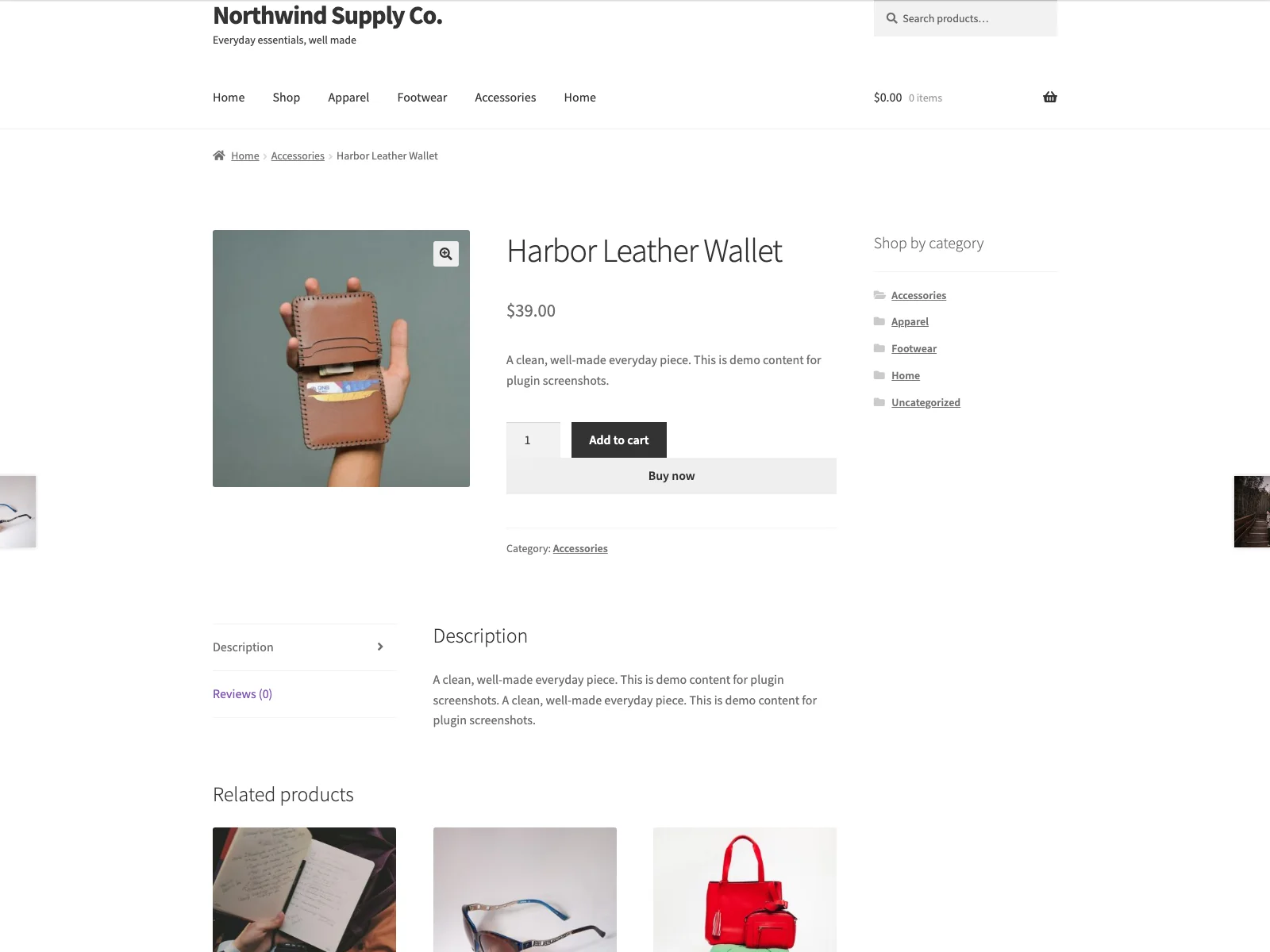 The Buy Now button on the storefront, sitting beside Add to Cart and sending the shopper straight to checkout.
The plugin describes its own job plainly: it handles the button hooks, nonce verification, cart handling and redirect, and nothing else. That narrowness is deliberate, and it is why the feature is safe to bolt onto a live store. The capabilities that matter in practice are all genuine settings:
- Cart skipping. With the redirect target set to checkout, the shopper lands directly at checkout with the chosen product and no stop at the cart page.
- Redirect target. Choose whether Buy Now goes to checkout or to the cart, depending on whether your cart page does useful work like upsells.
- Optional cart clearing. An optional setting empties the cart before adding the selected product, so direct checkout contains only the item the shopper clicked.
- Respect quantity. An optional setting respects the quantity chosen on the single product page for simple products, so the quantity selector and the Buy Now button agree.
- Configurable label and placement. Set your own button text, choose whether the button appears on single product pages, shop loops, or both, and place it before or after the native Add to Cart button on single products.
- Button styling. Pick a style, theme default, solid, or outline, with an optional accent colour scoped to Swift’s own buttons so it never bleeds into the rest of the theme.
- Stock and purchasability handling. The button is hidden for out-of-stock or non-purchasable products, and is not shown for variable products in loops, where a variation must be chosen first.
- A shortcode. Use
[swift_buy_now]to render the button anywhere in a page, post or block; it targets the current product by default, or a specific simple product with[swift_buy_now id="123"]. - No database state. Swift stores only a single settings option and a schema-version marker, creates no custom tables or product meta, and runs statelessly on WooCommerce hooks.
Swift also makes a point of not reaching outside your server. It loads no remote fonts, CDN assets or analytics, runs no licensing check, and sends nothing about the product, cart or shopper anywhere. The Buy Now click adds the product to the visitor’s own WooCommerce cart and redirects within your site. Everything happens on your installation.
Setting it up
Getting the button live takes a couple of minutes:
- Install the plugin from Plugins > Add New, or upload it to
/wp-content/plugins/plogins-swift. WooCommerce must be installed and active. - Activate it.
- Go to WooCommerce > Swift Quick Buy and set the button label, choose where it appears (single product, shop loops, or both), pick the redirect target (checkout to skip the cart, or cart), and decide whether to empty the cart first and whether to respect the selected quantity.
- Optionally choose a button style and accent colour, and place the button before or after Add to Cart on single products.
The settings screen groups its options into cards, shows a live button preview so you can see styling changes as you make them, and carries an accessible help tooltip on every option, so you are not cross-referencing documentation while you configure it. A Live/Off status indicator tells you at a glance whether the button is currently enabled. If you want the button somewhere the standard hooks do not reach, a footer block or a custom landing page, drop in the [swift_buy_now] shortcode instead.
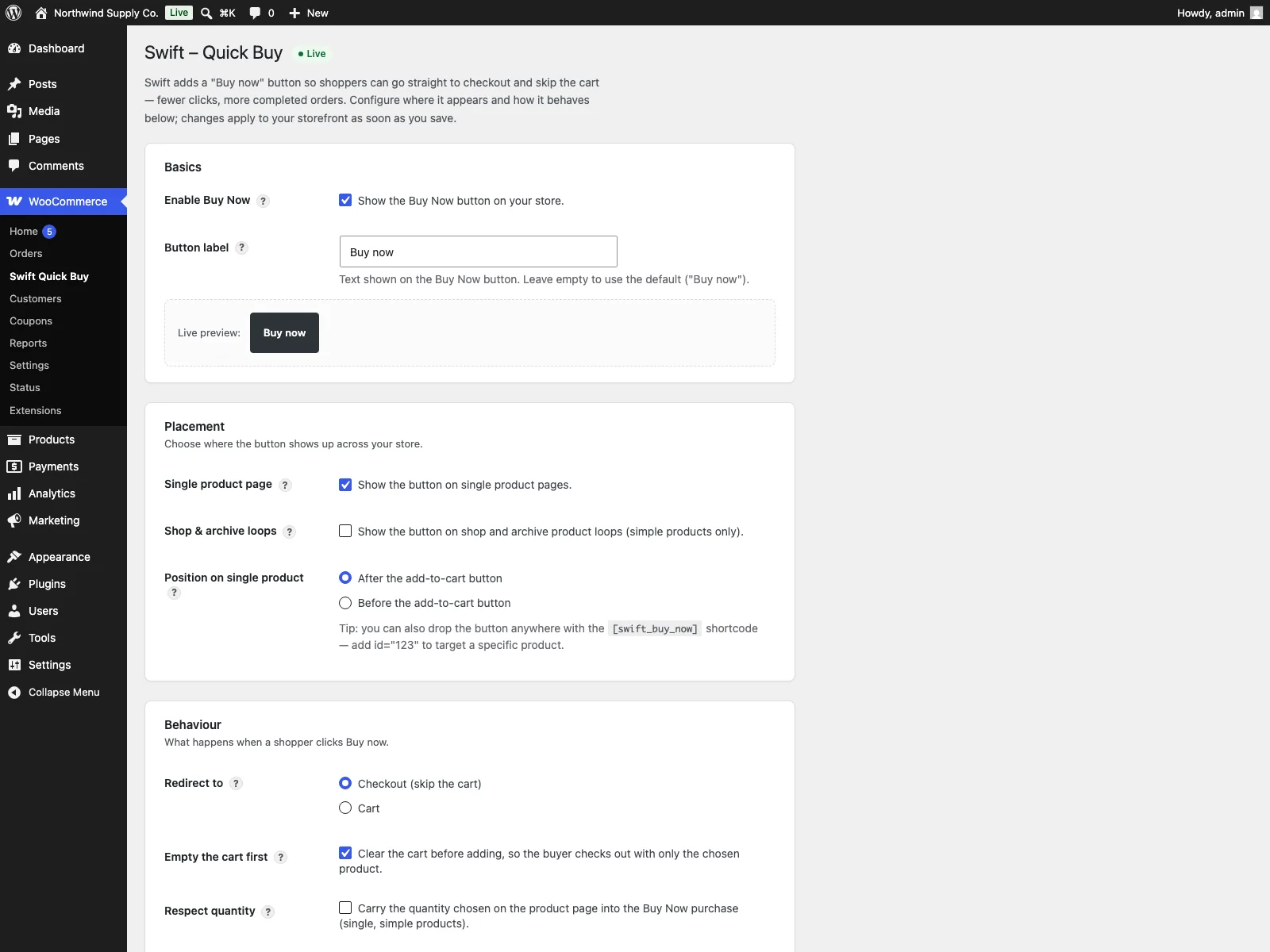 The Swift settings screen, where you set the label, redirect target, placement and button style.
Practical tips
A Buy Now button is a small feature, but a few decisions make it work harder:
- Match the redirect to your cart page. If your cart page does real work, cross-sells, free-shipping nudges, coupon entry, you may want Buy Now to land there rather than at checkout. If the cart is just a waystation, send shoppers straight to checkout and skip it.
- Use cart clearing deliberately. Emptying the cart first turns Buy Now into a true single-item express purchase, which suits digital goods and impulse buys. For stores where shoppers commonly build a basket, leaving the cart intact avoids wiping work they have already done. It is a setting, so pick per store, not per habit.
Warning: Cart clearing empties the cart before adding the clicked product, so on stores where shoppers build a basket over several items it will wipe work they have already done. Enable it only for true single-item express buys.
- Place the button where the eye already is. On the product page, before or after Add to Cart both work; test which reads more naturally with your theme. Adding it to shop loops shortens the path even further for shoppers who buy straight from the listing.
- Keep the label honest. “Buy Now” sets a clear expectation that the next screen is checkout. A vague label invites the same hesitation the button is meant to remove.
- Style it to lead, not to shout. An accent colour that distinguishes Buy Now from the secondary Add to Cart helps shoppers pick the express path without making the page look like two competing primary buttons.
Swift versus default WooCommerce
Stock WooCommerce has no Buy Now path at all. Here is the difference for single-click checkout specifically:
| Capability | Default WooCommerce | Swift |
|---|---|---|
| Buy Now button | None built in | On single product pages and optionally shop loops |
| Path to checkout | Product, then cart, then checkout | Straight to checkout, skipping the cart |
| Redirect target | n/a | Checkout or cart, your choice |
| Clear the cart for a single buy | Manual | Optional setting |
| Respect selected quantity | n/a | Optional, for simple products |
| Button label and placement | Fixed | Configurable text, before/after Add to Cart, single and/or loops |
| Button style | Theme only | Theme, solid or outline with an optional accent colour |
| Shortcode placement | n/a | [swift_buy_now], optionally by product id |
| Stock handling | n/a | Hidden for out-of-stock and non-purchasable products |
| Database tables | n/a | None; stores one settings option, stateless on hooks |
| Variable products | n/a | Simple in free; variable Buy Now support in Swift Pro |
| Cost | Free (no Buy Now exists) | Free |
Free versus Pro
The free Swift plugin is a complete Buy Now button for simple products: cart skipping, redirect control, optional cart clearing, quantity respect, configurable label, placement and styling, stock handling and the shortcode are all included, with no database footprint. Swift Pro adds Buy Now support for variable products, so the shopper chooses a variation before going straight to checkout. If your catalogue is mostly simple products, the free edition covers the job end to end.
The short version
A Buy Now button shortens the path to purchase by adding the product and sending the shopper straight to checkout in one click, skipping the cart, which is where single-product and impulse buys are lost. Prefer a tool that lets you control the redirect target, respects quantity, honours stock, and stays stateless so it leaves nothing behind. Swift does all of that for free on simple products, while Swift Pro adds variable-product Buy Now support.