WooCommerce quick view: AJAX product modal for faster browsing
By Mariusz Szatkowski · Updated: 2026-09-11
Browsing a WooCommerce catalogue often turns into a tiring loop: click a product, wait for the page, scan it, click back, click the next one, wait again. Every loop is a full page load and a context switch, and every loop is a chance for the shopper to lose their place or lose interest. Quick view breaks that loop. It opens the essentials in a modal launched straight from the listing, so shoppers can compare options and buy without the constant back-and-forth. This guide explains what quick view is, why it helps, what a good implementation needs, and how the free Peek plugin adds one to WooCommerce.
What quick view is
Quick view shows a product’s key details in a modal launched from the shop or archive listing, without navigating away to the full product page. The shopper clicks a button on a product card, a dialog opens over the page, they check the product, add it to the cart or close the dialog, and carry on browsing the listing exactly where they left off.
A useful quick view modal carries the details a shopper needs to make the call:
- the product image and gallery thumbnails
- the title and SKU
- the price, including any sale price
- the stock status
- a short description
- the add-to-cart form, including variation selection on variable products
- a link through to the full product page for anything the modal does not show
The point is not to replace the product page. The product page still exists for the shopper who wants the full description, reviews and every detail. Quick view is for the much more common moment earlier in the journey, when the shopper is scanning a category and weighing several products against each other. At that moment, opening a lightweight modal is far faster than committing to a full page load for each candidate.
Why it helps
Quick view removes navigation friction at exactly the point where shoppers compare options, and that has a few concrete effects.
Faster comparison. Checking five products in five modals is quicker and less disruptive than loading and leaving five full pages one at a time. The listing stays on screen the whole time, so the shopper keeps their scroll position and their sense of where they are.
Fewer drop-offs. Every full page load is a moment where attention can wander or a slow connection can frustrate. Keeping the shopper on the listing keeps them in the browsing flow instead of scattering them across pages and tabs.
A shorter path to cart. When add-to-cart lives inside the modal, the shopper can buy without an extra page load at all. They open, choose a size, add, and keep going.
The important catch is that quick view only pays off if the modal can complete the action. A modal that merely displays information, with no add-to-cart or no way to choose a variation, just inserts an extra step before sending the shopper to the full page anyway. That is slower than no quick view at all. The whole value of the pattern depends on the shopper being able to finish what they started inside the dialog.
Warning: A quick view that only displays information, with no add-to-cart or variation choice, just adds a step before the full page and is slower than no quick view at all.
What a good quick view needs
Whether you build, buy or install a quick view, the same fundamentals decide whether it helps or hurts. Use this as a checklist:
- Real add-to-cart with variations. The shopper should be able to pick a size or colour and add the product to the cart without leaving the modal. Anything less is a teaser, not a quick view.
- Loaded on demand. The modal’s content should load only when a shopper actually opens a product, so the listing page stays light for everyone who never opens one. Fetching the content over AJAX, with no jQuery in the plugin’s own code, keeps the footprint small.
- No layout shift. The modal should be hidden until opened and overlay the page rather than push content around, so opening it never reflows the listing. Layout shift is both an annoyance for shoppers and a Core Web Vitals penalty.
- Accessible. Keyboard support and proper focus handling are not optional extras. The dialog should trap focus while open, close on Escape, and return focus to the trigger button on close, with the right ARIA roles so assistive technology announces it as a dialog.
- Configurable contents. Stores differ. You should be able to decide which parts appear in the modal and where the trigger button shows up, rather than accept one fixed layout.
Notice what is not on that list: replacing the product page, or cramming reviews, related products and the full description into the modal. Quick view works because it is focused. Overloading it just recreates the page you were trying to skip.
How Peek handles it
Peek for WooCommerce is a free, open-source plugin that adds exactly this. It puts a quick-view button into your shop and archive product loops, and clicking it opens an accessible AJAX modal where shoppers can preview a product, choose options and add to cart without leaving the listing.
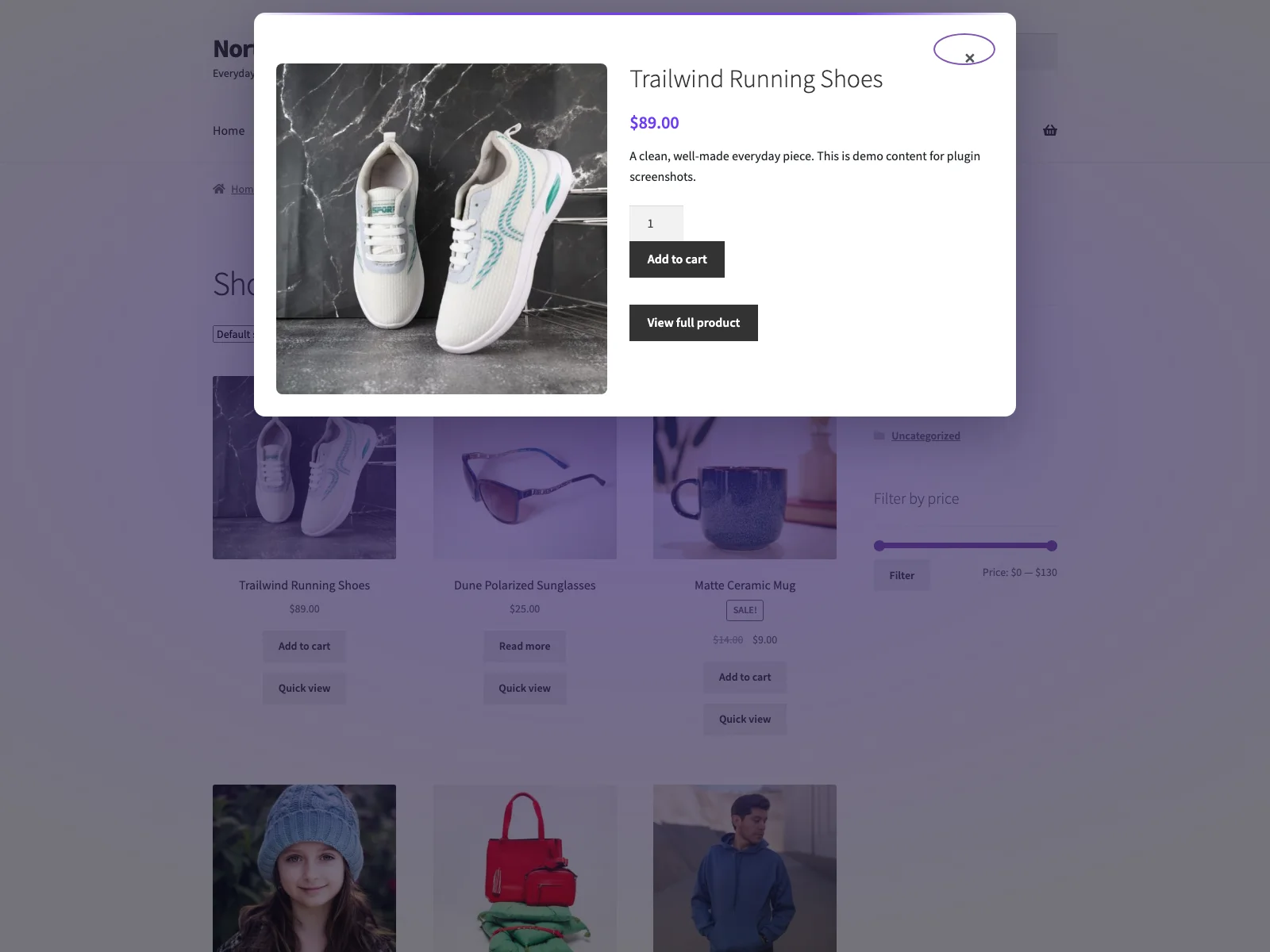 The shopper-facing quick-view modal opens over the listing with the gallery, price and add-to-cart form.
What the modal shows
The modal renders the featured image and gallery thumbnails, the title, SKU, price, stock status and short description, WooCommerce’s native add-to-cart form, and a link to the full product page. Because it uses WooCommerce’s own add-to-cart form, variable products work properly: the modal pulls in WooCommerce’s variation script so the shopper can choose a variation before adding to cart, with quantity handled the same way it is on the product page. Every one of those parts can be toggled from the settings screen, so you can keep the modal as lean or as complete as you want, and the gallery thumbnail count is configurable from zero up to twelve.
Built for speed and accessibility
Peek is deliberately light. Its own front-end script is vanilla JavaScript with no jQuery dependency, deferred and loaded in the footer, so it does not block rendering. The only time WooCommerce’s jQuery-based variation script loads is when a product actually has variations and needs it. The modal content is fetched on demand from your own site over WordPress’s admin-ajax.php, using the plugin’s peek_quick_view action, so the listing stays light until a shopper opens something, and no shopper or product data ever leaves your server.
The modal is hidden until opened and scrolls internally, so opening it overlays the page rather than reflowing it, which means no cumulative layout shift. Accessibility is handled at the same level of care: focus moves into the dialog on open and is trapped while it is open, the dialog closes on Escape or a backdrop click and returns focus to the trigger button on close, and it uses role="dialog" with aria-modal so assistive technology treats it correctly.
Note: The modal content is fetched on demand over your own site’s admin-ajax.php only when a shopper opens a product, so the listing stays light and no shopper or product data ever leaves your server.
Setting it up
Getting quick view live takes a few minutes:
- Install Peek from Plugins > Add New, or upload it to
/wp-content/plugins/plogins-peek. WooCommerce must be installed and active. - Activate it.
- Visit the Peek menu in wp-admin to configure the button and the modal contents.
From the settings page you can enable or disable the quick view, set the trigger button’s label and style (text, an icon, or icon plus text, with the icon-only option keeping an accessible name), and choose where the button appears. By default it shows on the shop page and product archive loops such as categories, tags and taxonomies; you can also extend it to the related and up-sell loops on single product pages. The same screen controls the modal chrome (its title, the close-button label, the loading and error text, the “view product” link text and the SKU label, plus toggles for the modal heading, the close button and backdrop-click close) and lets you pick which parts render inside the modal. Inline settings make it easy to start minimal and add detail later.
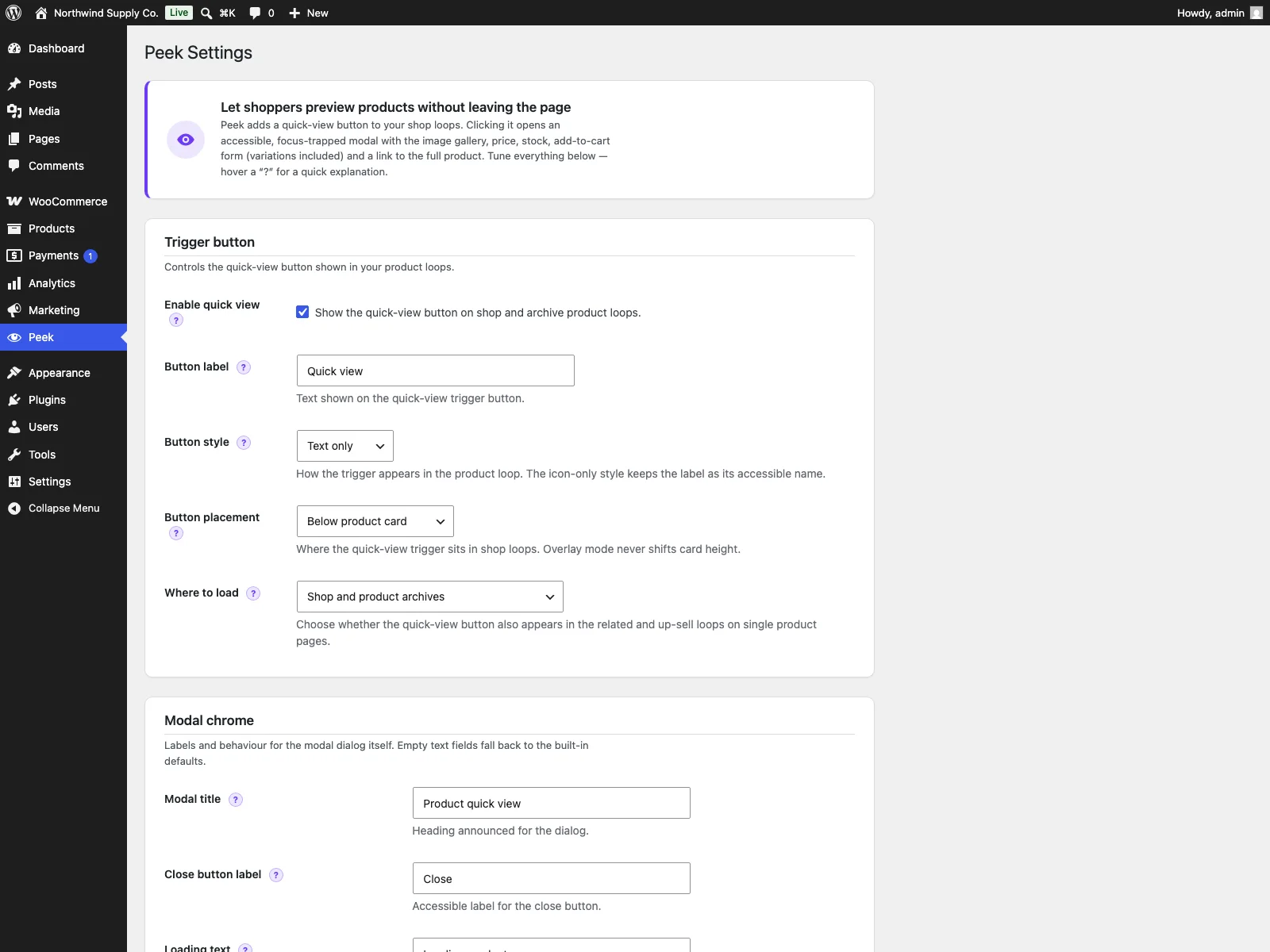 The Peek settings screen in wp-admin, where you configure the trigger button, its placement and the modal contents.
Placing a trigger anywhere
The button is not limited to the automatic loop placement. Peek ships a shortcode so you can drop a quick-view trigger into any layout: [peek_quick_view id="123"], or the shorter [peek id="123"] alias. It takes optional text and style attributes to match the button to its surroundings, and the modal and its assets load automatically wherever the shortcode appears. That is useful for landing pages, custom homepages or a hand-built featured-products block where the standard loop button does not reach.
What it does not do
Peek is focused on the quick-view modal and the settings around it. It does not change single product pages, and it does not connect to any external service: its only stored data is two WordPress options for your configuration, both removed cleanly when the plugin is deleted. Merchandising features that go beyond a single product modal, such as a related-products carousel or variation swatches, live in the PRO edition rather than the free plugin, which is covered below.
Practical tips for a quick view that converts
A plugin gives you the mechanism; how you set it up decides how well it works. A few pointers:
- Always include add-to-cart. It is the single feature that makes quick view worth having. If you toggle off the cart form to “keep the modal clean,” you have built a slower route to the product page. Keep it on.
- Keep the modal focused. Show the gallery, price, stock and the cart form. Resist the urge to pour the entire product description into it. The full page is one click away through the view-product link for anyone who wants more.
Tip: Quick view works because it is focused. Show the gallery, price, stock and cart form, and leave the full description to the product page, which is one click away through the view-product link.
- Match the trigger to your theme. An icon-only button suits a dense, image-led grid; an icon-plus-text button is clearer on a sparse catalogue. Pick the style that reads as a button at a glance, since a quick view nobody notices is a quick view nobody uses.
- Be deliberate about scope. Loading the button only on shop and archive loops keeps things simple. Extending it to the related and up-sell loops on product pages can lift cross-sells, but only turn it on where it genuinely helps the shopper rather than everywhere by reflex.
- Set a sensible gallery thumbnail count. A couple of thumbnails give a sense of the product without making the modal feel like a full gallery. Tune the count to your photography.
Peek versus default WooCommerce
Core WooCommerce has no quick view at all: every product needs a full page load to inspect. Here is the difference for quick view specifically:
| Capability | Default WooCommerce | Peek |
|---|---|---|
| View a product without leaving the listing | No | AJAX modal from the shop and archive loops |
| Gallery, price, SKU, stock, short description in the modal | n/a | Yes, each part toggleable |
| Add to cart in the modal | n/a | Yes, WooCommerce’s native form |
| Variable products in the modal | n/a | Yes, via WooCommerce’s variation script |
| Loads on demand | n/a | Yes (AJAX, no jQuery in the plugin’s code) |
| Layout shift on open | n/a | None; modal is hidden until opened |
| Accessible modal | n/a | Focus trap, Escape, backdrop close, ARIA dialog |
| Manual trigger placement | n/a | [peek_quick_view] / [peek] shortcode |
| Recently viewed, carousel, swatches, analytics | No | Yes (Peek Pro) |
| Cost | Free (core, no quick view) | Free (GPL); Pro adds merchandising and analytics |
Free versus PRO
The free Peek plugin is a complete quick view, not a teaser: the AJAX modal, native add-to-cart with variations, the full settings screen, the shortcode and the accessibility work are all included. Peek Pro is an add-on that requires the free plugin to be installed and active, and it builds on that foundation with in-modal merchandising and measurement for stores that want to push conversion further. It adds recently viewed products (with cookie tracking, a [peek_recently_viewed] shortcode and an auto-insert option), a related-products carousel at the bottom of the modal, variation swatches that replace the variation dropdowns with colour, image or label chips, custom modal sections for content such as shipping info or trust badges before or after the cart, previous and next navigation between products inside the modal, brand-colour styling controls, and quick-view analytics that track modal opens, add-to-cart actions from the modal and checkout conversions per product, with a dashboard and CSV export. Peek Pro is delivered through Freemius rather than the WordPress.org directory.
The short version
Quick view speeds up browsing by bringing the product to the shopper instead of sending the shopper to the product. It only works if the modal can actually finish the job, so the non-negotiables are real add-to-cart with variations, content loaded on demand without jQuery, no layout shift, and a keyboard-accessible dialog. The free Peek plugin covers all of that with an accessible AJAX modal, a full settings screen and a shortcode for manual placement; Peek Pro layers on recently viewed, a related carousel, variation swatches, custom sections, modal navigation and styling, and quick-view analytics when you are ready to merchandise and measure inside the modal.