Product filtering in WooCommerce: faceted search that converts
By Mariusz Szatkowski · Updated: 2026-09-11
A shopper who cannot find the right product leaves. As a catalogue grows past a few dozen items, browsing alone stops working, and the store needs a fast way to narrow the choice. Faceted filtering is that tool. It is the difference between a category page that feels like a wall of products and one that feels like a guided path to the right item. This guide explains what product filtering is, why it lifts conversion, what a good filter has to get right, and how the free Sieve plugin adds faceted search to WooCommerce without trading away page speed.
What faceted filtering is
Faceted filtering lets a visitor narrow a product listing by several attributes at the same time: category, size, colour, price range, brand, availability. Each selection refines the result set rather than replacing it, so the shopper keeps stacking filters until only the relevant products remain. Tick “blue”, then “medium”, then “under 50”, and the listing shrinks at each step to exactly the overlap of those choices.
The difference from a simple search box is that facets are structured. The shopper does not have to guess the right keyword or spell a brand correctly; they pick from the attributes your catalogue already uses, and the listing updates to match. Search and facets are complementary, not rivals: search is how someone finds a starting point when they know what they want, and facets are how they whittle a broad starting point down when they only know roughly what they want.
It helps to separate two ideas that get blurred. A filter is any single control, a checkbox or a price slider. A facet is a filter backed by the structure of your data, so it can show how many products sit behind each option and update those numbers as other choices are made. A pile of disconnected checkboxes is filtering; a set of facets that talk to each other and to the result count is faceted search. The second is what shoppers now expect, because it is what every large retailer trained them on.
Why it converts
Filtering shortens the path from landing on a category to seeing the right product, and that matters because most visitors will not scroll through several pages of results. They form a quick judgement about whether the store “has what I want” and act on it. A good filter pushes that judgement in your favour. Three things drive the conversion gain:
- Speed to the right product. A few clicks beat endless scrolling, especially on a large catalogue. The faster a shopper reaches a short, relevant list, the more likely they are to buy from it.
- Fewer dead ends. When the filters reflect what is actually in stock, the shopper never wastes clicks on combinations that return nothing. A dead-end empty page reads as “they do not have it” even when they do.
- Confidence. Seeing how many products match each option helps the shopper trust they have seen the full relevant set, rather than wondering what is hidden two pages down.
There is a quieter benefit too. Filtered, bookmarkable URLs let a shopper save or share a refined view, and let you link straight to “red dresses under 60” from a campaign or a blog post. That turns a filter from a browsing aid into a marketing surface.
Tip: Filtered URLs are bookmarkable, so you can link straight to a refined view like “red dresses under 60” from a campaign or blog post, turning a filter into a marketing surface.
Instant filters and dependent counts
Two features separate a modern filter from the basic WooCommerce widgets, and they are the ones worth checking for before anything else.
Instant filters update the listing without a full page reload. The shopper ticks an option and the results change in place, which keeps the browsing flow unbroken. A page reload, by contrast, throws away scroll position, blanks the screen for a moment, and makes every refinement feel like a commitment. Instant filtering removes that friction so refining feels like exploring rather than submitting a form.
Dependent counts show, next to each option, how many products it would return given the filters already applied, and remove or disable the options that would return nothing. This is the single feature that prevents the frustrating empty result page. Without it, a shopper can tick a perfectly reasonable-looking combination and land on “no products found”; with it, the impossible combinations simply are not offered.
Note: Dependent counts are the single feature that prevents the empty result page. The impossible combinations are simply not offered, so a shopper cannot tick a reasonable-looking combination and land on “no products found.”
Sieve for WooCommerce provides instant AJAX filters with dependent counts and stable result rendering, so the listing updates in place without jumping around. It keeps the URL in sync with the active filters, which is what makes a filtered view shareable and bookmarkable: reload the page and the same refined result set comes back.
What a good filter needs
A filtering tool for WooCommerce should cover a handful of fundamentals. Use this as a checklist whether you build, buy or install:
- A range of facet types. Checkboxes for multi-select attributes, radio for single-choice, a searchable dropdown for long lists, a range slider for price, and a free-text search box. One control type does not fit every attribute.
- The right data sources. Categories, tags, product attributes, price, stock status and on-sale state are the obvious axes a shopper filters by.
- Instant, in-place updates. AJAX results, not full reloads.
- Dependent counts. Live numbers per option, with impossible combinations hidden.
- Shareable state. The active filters reflected in the URL so a view can be linked or bookmarked.
- Helpers around the facets. Sorting, pagination, a reset control and active-filter chips, so the shopper can see and undo what they have applied.
- A mobile drawer. On phones, filters belong in a panel that slides over the listing, with a way to apply and return to the products.
- Accessibility. Keyboard and screen-reader support, because filters are interactive controls that everyone has to be able to operate.
- Speed at scale. A query approach that stays fast as the catalogue grows into the thousands.
Notice what is not on that list: clever ranking or personalisation. Those are refinements that only matter once the basics above are solid. A filter that is instant, accurate and accessible beats a clever one that reloads the page or offers dead ends.
How Sieve handles it
Sieve is a free, open-source plugin that adds exactly this faceted-search flow to WooCommerce product archives. It is built around a pre-built index for fast filtered queries and an AJAX front end that updates results in place.
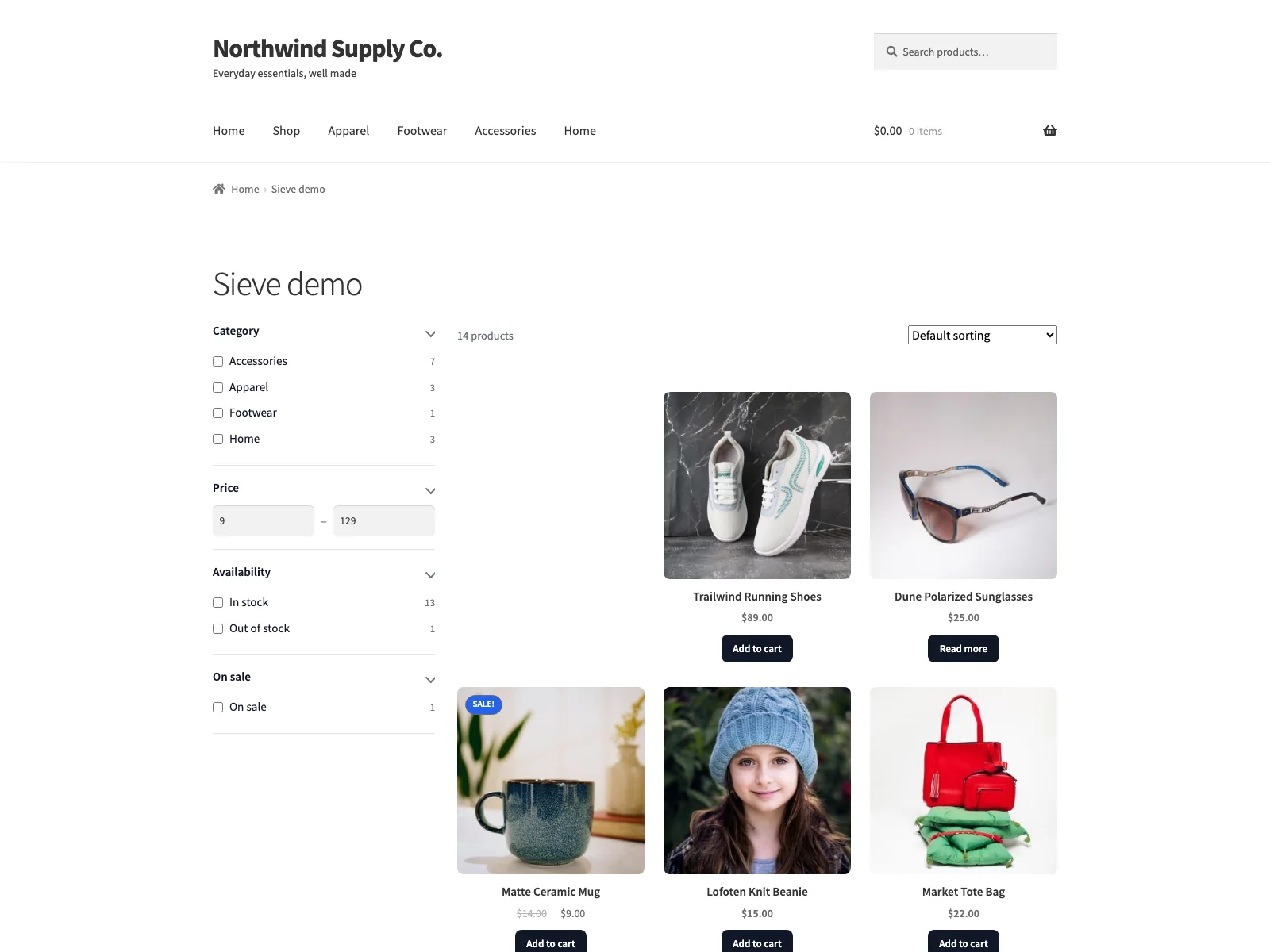 The Sieve filter panel on a storefront category page, refining the product grid in place as shoppers combine facets.
The facets
Sieve offers a full set of facet types so each attribute gets the control that suits it: checkboxes, radio, a searchable dropdown, a range slider, a search box, sort, pagination, a reset control and active-filter chips. The data behind those facets comes straight from WooCommerce: categories, tags, product attributes, price, stock status and on-sale state. So you can build, for example, a category checkbox list, a price range slider, an availability filter and an on-sale toggle on the same panel, each with live dependent counts.
The result rendering is the part that protects performance. Results update without a page reload and without layout shift, so the page does not jump as counts and products change, which keeps the interaction and layout-stability sides of Core Web Vitals intact. Sieve treats stable result rendering as part of the core filtering behaviour, rather than as an afterthought bolted on.
Warning: Badly built filters harm Core Web Vitals by shifting the layout as results load. Results that update in place without layout shift keep the interaction and stability metrics intact.
The mobile experience
On small screens, Sieve moves the facets into a mobile filter drawer with a sticky “Show results” bar. The drawer slides over the listing instead of pushing the products down a long column, and the sticky bar gives the shopper a constant way to apply their choices and get back to browsing. Since most catalogue traffic is now on phones, this is where filtering is usually won or lost.
Accessibility and placement
The facet widgets are built to be keyboard and screen-reader friendly, so the filter is operable without a mouse. To put the filter on a page you have two options: the [sieve] shortcode or the “Sieve Filter” block for the block editor. Both render the facets, the results grid, sorting, active-filter chips and pagination together as one unit, so there is no assembling separate widgets.
Setting it up
Getting faceted filtering live takes a few minutes:
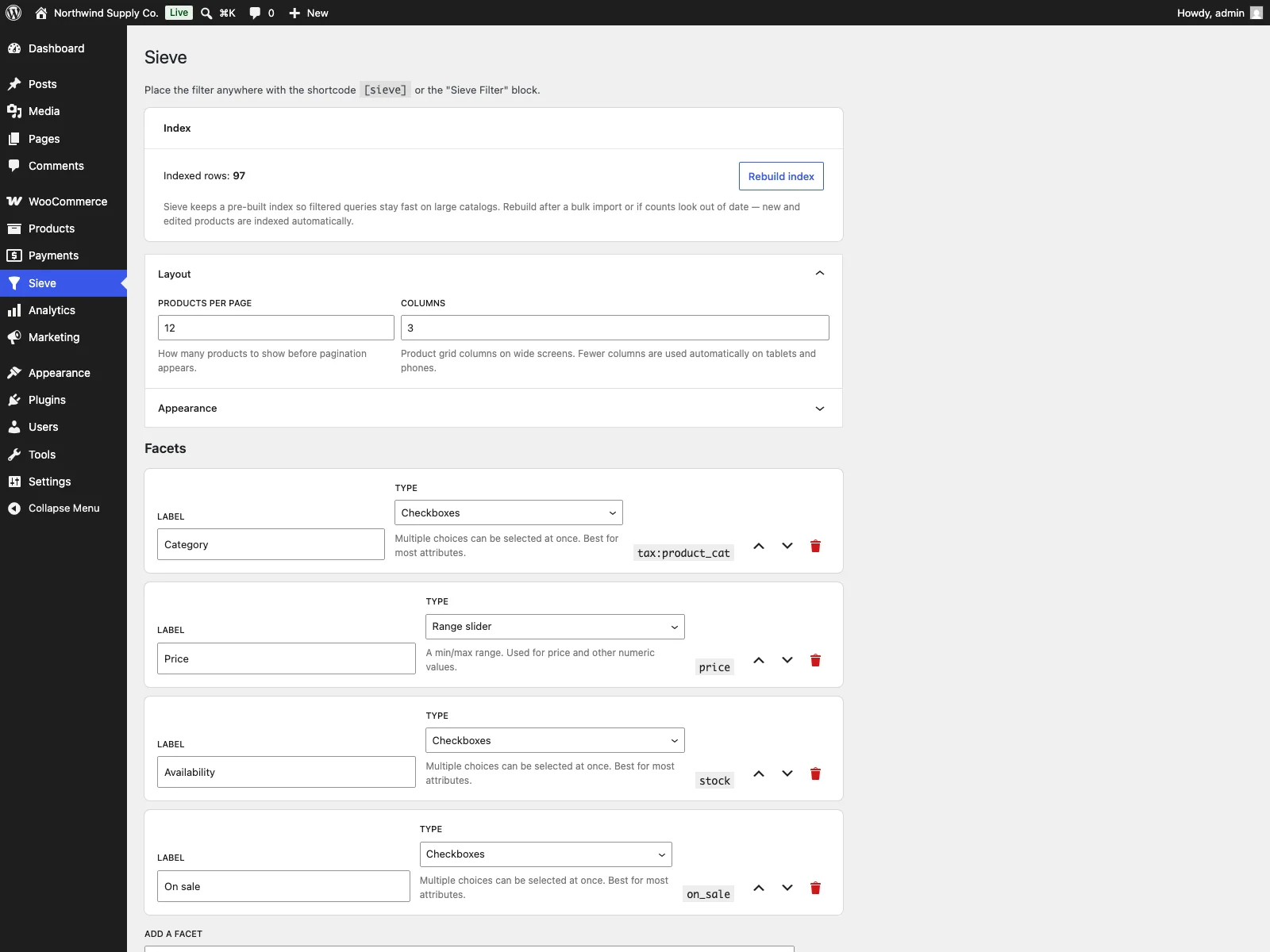 The Sieve settings screen in wp-admin, where you rebuild the index and build the facet panel.
- Install and activate WooCommerce, then install and activate Sieve.
- Open the Sieve menu and rebuild the index. This is the pre-built index that makes filtered queries fast on a large catalogue, so it is worth running before you go live and again after a large catalogue change.
- In the facet builder, add, reorder and retype facets and set the layout, so the panel matches the attributes your shoppers actually filter by. Keep it to the few axes that matter rather than every attribute you have.
- Place the filter on a page with the
[sieve]shortcode or the “Sieve Filter” block.
That is the whole setup. From there, shoppers get instant, combinable facets with dependent counts on the front end, and a filtered URL they can bookmark or share.
The current scope
Sieve is described in its own readme as an early MVP release, so it is honest to treat it as a focused tool that does faceted filtering well rather than a sprawling suite. The full human-readable source for the compiled assets ships inside the plugin alongside the build tooling, and the public source repository is available, so nothing about it is a black box.
Practical tips for filters that convert
A plugin gives you the mechanism; the choices are yours. A few practical pointers:
- Filter on what shoppers decide by, not everything you store. A panel with five meaningful facets beats one with fifteen. Pick the axes people actually use to choose, usually category, price, a key attribute or two, and availability.
- Lead with dependent counts. They are the feature that prevents dead ends, so make sure the facets you expose are ones with real counts behind them rather than near-empty attributes.
- Put price on a slider, long lists on a searchable dropdown. Match the control to the data. A brand list of forty names is a searchable dropdown, not forty checkboxes.
- Keep active-filter chips and a reset visible. Shoppers refine by trial and error. Being able to see and undo a choice in one click keeps them exploring instead of reaching for the back button.
- Test the mobile drawer on a real phone. The sticky apply bar and the drawer behaviour are where most filtering happens now, so that is the experience to check first, not last.
- Re-index after big catalogue changes. The pre-built index is what keeps filtering fast; rebuild it after a bulk import or a large attribute change.
Tip: Rebuild the pre-built index after a bulk import or a large attribute change. It is what keeps filtered queries fast as the catalogue grows into the thousands.
Sieve versus default WooCommerce
Core WooCommerce ships only basic attribute widgets that reload the page. Here is the difference for product filtering specifically:
| Capability | Default WooCommerce | Sieve |
|---|---|---|
| Filter update | Full page reload | Instant, in place (AJAX) |
| Combine multiple filters | Limited | Yes, faceted |
| Facet types | A few widgets | Checkboxes, radio, dropdown, range, search, sort, chips |
| Data sources | Attributes | Categories, tags, attributes, price, stock, on sale |
| Result counts per option | No | Dependent counts |
| Hide options that return nothing | No | Yes |
| Shareable filtered URLs | Limited | Yes, URL kept in sync |
| Mobile experience | Long column | Drawer with sticky apply bar |
| Layout stability | n/a | No layout shift by design |
| Large catalogues | Slows down | Pre-built index |
| Cost | Free (core) | Free (GPL); PRO adds rules, tests and integrations |
Free versus PRO
The free edition is a complete faceted-search flow, not a teaser: instant AJAX filters, the full set of facet types, dependent counts, shareable URLs, the mobile drawer, accessible widgets, the pre-built index and the block-and-shortcode placement are all included. Sieve Pro builds on top for stores that want to tune and extend the filter further. It requires the free Sieve plugin and adds:
- A performance dashboard under Sieve > Performance, with index health, catalogue coverage, a table-size estimate, a full re-index action and a filter-resolve benchmark.
- Conditional facet rules that hide specific facets by category page, customer role or the main shop page.
- A/B layout testing that rotates filter-panel layouts and grid column counts with impression tracking.
- A star-rating facet that shows visual star rows for the average-rating filter instead of plain checkboxes.
- Search integrations that route predictive and in-grid search through SearchWP or Algolia, with the native Sieve search as a fallback.
The short version
Faceted filtering is how a growing WooCommerce catalogue stays shoppable: it gets visitors to the right product in a few clicks, avoids dead-end empty pages with dependent counts, and works on mobile through a drawer. A good filter needs a range of facet types, the right data sources, instant in-place updates, shareable URLs and accessible controls, all staying fast as the catalogue grows. The free Sieve plugin covers that whole flow with AJAX facets, dependent counts, a mobile drawer and a pre-built index, rendered without layout shift; Sieve Pro adds a performance dashboard, conditional rules, A/B layout testing, a star-rating facet and SearchWP or Algolia integrations when you are ready to tune further.