WooCommerce product gallery: zoom, lightbox and video
By Mariusz Szatkowski · Updated: 2026-09-11
For products people buy on how they look, the gallery is the storefront. A shopper judges fit, quality and detail from the images long before they read a word of the description, and a weak gallery quietly costs sales and invites returns. WooCommerce ships a gallery out of the box, and it works, but it is deliberately basic: a thumbnail strip, a simple lightbox and a magnify effect that leans on older scripts. This guide explains what the product gallery actually does for conversion, what a good upgrade needs, and how the free Reel plugin adds zoom, an accessible lightbox and video to the WooCommerce gallery without slowing the page or shifting the layout.
What the product gallery is for
The gallery is the part of the product page that does the work a physical shop does. In a shop a customer picks the item up, turns it over, holds it to the light, checks the seams. Online, the gallery has to stand in for all of that. Its job is to answer the questions a shopper would ask if the item were in their hands: how does the texture look up close, how big is it really, how does it move or sit, what does it look like from the back. When the gallery answers those well, two things happen at once. More shoppers buy, because their questions are resolved before doubt sets in. And fewer of them return the item, because what arrived matched what they expected.
That second effect is easy to undervalue. A return is not just a refund: it is return shipping, restocking, a support thread and a customer who is now less likely to order again. A gallery that lets people inspect detail before they buy is one of the cheapest ways to reduce returns that come from mismatched expectations, because the mismatch never happens.
Note: A gallery that lets shoppers inspect detail before buying does double duty: it lifts conversion and cuts returns caused by mismatched expectations, because the mismatch never happens in the first place.
Why the default gallery leaves money on the table
The core WooCommerce gallery is fine as a baseline. It shows the featured image, a row of thumbnails and a click-to-zoom lightbox, and on most themes the main image magnifies on hover. The trouble is that it stops there, and it carries some weight while doing it.
The hover magnify and the lightbox are built on older front-end scripts, including jQuery and a couple of bundled libraries, which adds to the page’s JavaScript. The lightbox is serviceable but plain, and its keyboard behaviour is not something you can rely on across themes. There is no native support for product video at all, so the single most persuasive piece of media for many products has no home in the gallery. And because the gallery sits at the very top of the product page, anything it does badly, layout shift as images load, a heavy script blocking interaction, lands squarely on your first impression and your Core Web Vitals score.
Warning: The gallery sits at the very top of the product page, so any layout shift as images load or heavy script that blocks interaction lands squarely on your first impression and your Core Web Vitals score.
So the opportunity is not to replace the gallery. It is to upgrade the three things that move the needle, while making the gallery lighter rather than heavier.
The three upgrades that matter
For a visual product, three additions consistently earn their place.
Image zoom. Letting the shopper magnify the image on hover, so they can study texture, stitching, grain or finish, reveals detail a thumbnail hides. For anything where quality is something you can see, this builds buying confidence directly. The key detail is that the zoom should stay inside the gallery frame, not balloon over the rest of the page and shove the layout around.
An accessible lightbox. Opening the images full screen lets a shopper examine them properly rather than squinting at a thumbnail. “Accessible” is the load-bearing word: the lightbox should open and close from the keyboard, keep focus where it belongs while it is open, and return focus cleanly when it closes, so it works for keyboard and screen-reader users, not only people with a mouse.
Note: For a lightbox, “accessible” is the load-bearing word: it should open and close from the keyboard, trap focus while open, and return focus cleanly on close, so it serves keyboard and screen-reader users too.
Product video. A short clip shows scale, motion and real-world use in a way still photos cannot, whether that is fabric draping, a gadget in operation, or a piece of furniture shown next to a person for size. A featured video in the gallery area is one of the highest-impact additions for any considered purchase.
Reel for WooCommerce adds exactly these three: hover zoom, an accessible lightbox and a featured product video.
What a good gallery upgrade needs
Whether you build, buy or install, a gallery tool for WooCommerce should clear a short checklist:
- Enhance, do not replace. It should build on the existing WooCommerce gallery, so your images, thumbnails and theme styling keep working, rather than swapping in a parallel gallery you have to maintain.
- No layout shift. Every piece of media should reserve its space before it loads, so nothing jumps as the page settles. This is the gallery’s single biggest Core Web Vitals risk.
- A light footprint. Modern interaction does not need jQuery. A small, deferred script that loads only where it is used keeps the product page quick.
- Real accessibility. Keyboard operation and proper focus handling for the lightbox, not just a mouse-only overlay.
- Sensible control. Independent on/off switches for each feature, so you can run only what your catalogue needs.
- Clean conduct. Scripts that enqueue only on product pages, settings that are easy to reach, and a clean uninstall that does not leave debris behind.
Notice what is not on that list: a heavy, do-everything slider that reflows your theme. The goal is a sharper version of the gallery you already have, not a second gallery bolted on top.
How Reel handles it
Reel is a free, open-source plugin that enhances the existing WooCommerce single-product gallery rather than replacing it. The markup is built in PHP and progressively enhanced by one vanilla-JavaScript file, deferred and loaded in the footer, with scripts and styles enqueued only on the single product page. There is no jQuery. Each of the three features has its own on/off toggle, so you run only what you need.
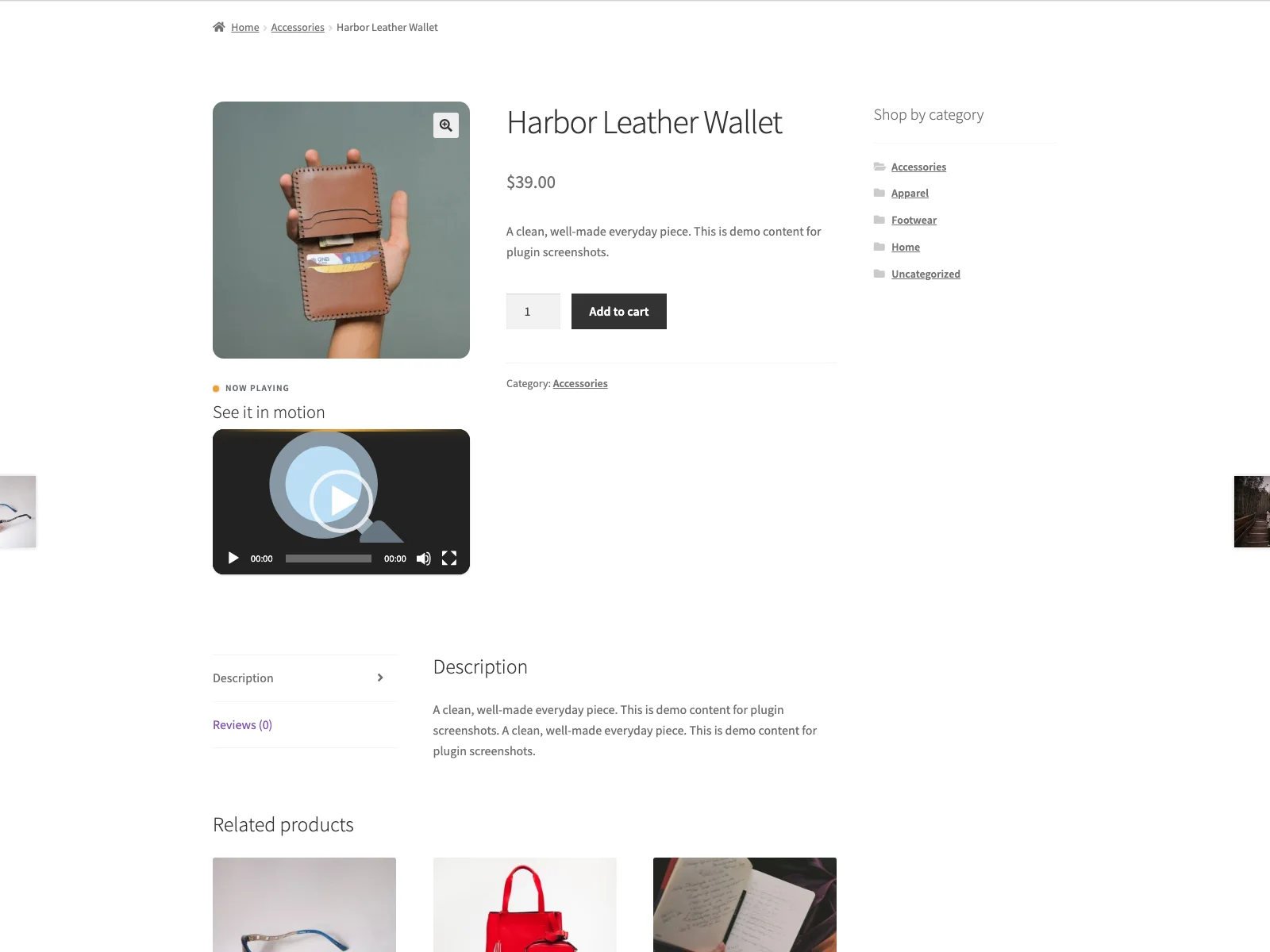 The Reel product gallery on the storefront, with hover zoom and an accessible lightbox in the main product image.
Hover zoom
Gallery images magnify on hover at a zoom scale you choose, anywhere from 1.0x to 3.0x. The transform is clipped to the gallery frame, so magnifying an image never pushes the rest of the page around. Because hover is unreliable on touch screens, there is an option to skip the zoom on touch devices, so phone and tablet shoppers are not left fighting a hover effect that was never meant for them.
The accessible lightbox
Click any gallery image, or press Enter or Space on it, to open it full screen. The lightbox is genuinely keyboard-operable: Tab stays on the close button so focus cannot slip behind the overlay, Escape closes it (as does a backdrop click), and focus returns to the image you opened. It is a fixed overlay that starts hidden, so it reserves no space and adds no layout shift until a shopper actually opens it. You can show a caption drawn from the image’s alt text inside the lightbox, and relabel the open-image control for screen readers so it announces something meaningful.
The featured video
Reel shows a per-product video either after the gallery or before the product summary, your choice. The source can be a self-hosted file (MP4, M4V, WebM or OGV), played with WordPress’s native video player, or any oEmbed URL such as YouTube or Vimeo, which WordPress core embeds automatically. Either way the video sits in a 16:9 frame sized with the CSS aspect-ratio property, so its space is held before it loads and the page does not jump. The per-product video URL lives in the _reel_video_url product meta field, with an optional _reel_video_title for that product’s heading. If you want the video somewhere other than the gallery area, the [reel_video] shortcode (it takes id and title attributes) or the “Reel: Featured video” block will render the current product’s video, in the same 16:9 frame, anywhere in your product content.
By design Reel makes no API calls or analytics requests of its own. The only outbound request is the one WordPress core itself makes through wp_oembed_get() when you point a video at YouTube, Vimeo or another oEmbed provider, and Reel caches that result in a transient to avoid repeat fetches. Self-hosted video makes no external request at all.
Setting it up
Getting Reel live takes a few minutes:
- Install the plugin from Plugins, Add New, or upload it to
/wp-content/plugins/plogins-reel. WooCommerce must be installed and active. - Activate it.
- Open the top-level Reel menu and turn on the features you want. Each of the three has its own switch.
- For hover zoom, set the zoom scale and decide whether to skip it on touch devices. For the lightbox, optionally enable the alt-text caption and adjust the open-image label. For video, choose the position, autoplay, heading and intro text.
- To give a product a video, set its URL in the product’s
_reel_video_urlmeta (PRO adds a friendlier editor field for this, covered below).
The settings screen uses a card layout with toggle switches, inline help tooltips and a live zoom-strength control, so you can see what each option does as you set it. The storefront styling is built on themeable CSS custom properties with fluid sizing, dark-mode support and reduced-motion guards, so the gallery looks at home in your theme without extra work. Reel is HPOS and cart/checkout blocks compatible, translation-ready with a bundled POT file and a Polish translation, and removes its options cleanly on uninstall.
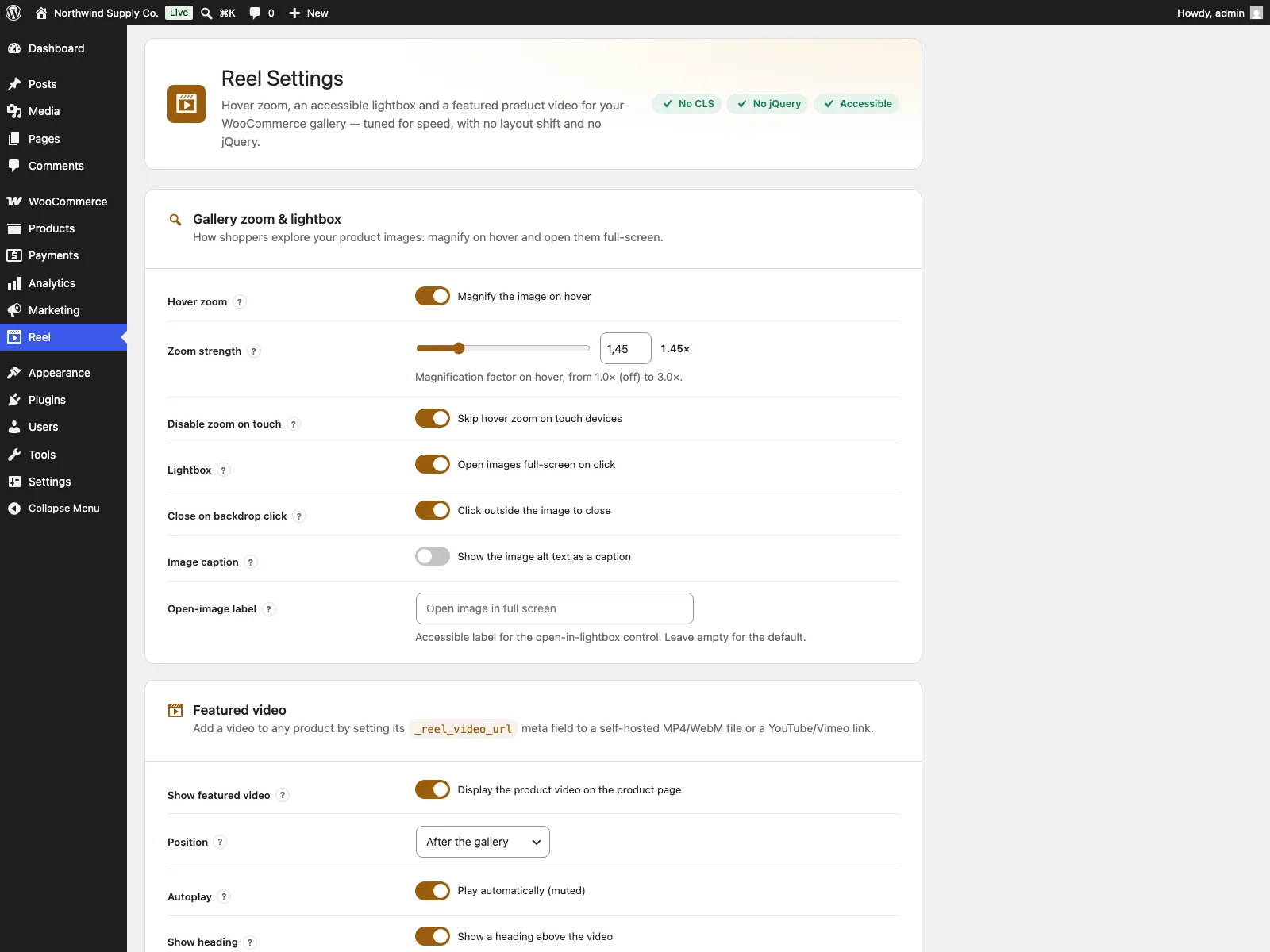 The Reel settings screen in wp-admin, with per-feature toggle switches and a live zoom-strength control.
Practical tips for a gallery that converts
A plugin gives you the mechanism. A few habits make the most of it:
- Shoot for zoom. Hover zoom only helps if the source image is large and sharp enough to reward it. Upload high-resolution images so magnifying reveals real detail rather than soft pixels.
Tip: Hover zoom only pays off if the source image is large and sharp enough to reward it. Upload high-resolution images so magnifying reveals real detail rather than soft pixels.
- Lead with the question the shopper is asking. Order the gallery so the first images answer the biggest doubt, scale, fit, the back of the item, and leave the hero shot to set the tone.
- Keep the video short and useful. A ten to twenty second clip that shows the product in use or in motion beats a two-minute brand film that nobody finishes. Use video where motion or scale actually adds something.
- Mind touch users. Hover zoom belongs to mouse users; the skip-on-touch option exists so phone shoppers get a clean lightbox instead. Leave it on unless you have a reason not to.
- Protect the first paint. Because the gallery sits at the top of the page, keep the featured image well-optimised and let the reserved-space markup do its job, so the page settles without jumping.
Reel versus default WooCommerce
The core gallery is a baseline; Reel sharpens the parts that sell. Here is the difference for the gallery specifically:
| Capability | Default WooCommerce | Reel |
|---|---|---|
| Image zoom | Basic magnify | Hover zoom, scale 1.0x to 3.0x, skippable on touch |
| Lightbox | Basic | Accessible: keyboard open and close, focus trap and return |
| Product video | No native support | Featured video in the gallery, self-hosted or oEmbed |
| Place video anywhere | n/a | [reel_video] shortcode and a block |
| Layout stability | Older scripts | Reserved space, no layout shift |
| Footprint | Relies on jQuery | One deferred vanilla-JS file, no jQuery, product pages only |
| Per-feature control | n/a | Independent on/off toggle for each |
| Per-variation galleries, 360 spin | No | Yes (PRO add-on) |
| Cost | Free (core) | Free (GPL); PRO add-on extends it |
Free versus PRO
The free Reel plugin is a complete upgrade in its own right: hover zoom, an accessible lightbox and a featured product video, all with reserved space and no jQuery. It is not a teaser.
Reel Pro is a separate add-on that requires the free plugin to be installed and active, and is delivered through Freemius rather than the WordPress.org directory. It extends the free plugin for stores with richer media needs. PRO adds a per-product Reel tab on the product editor with a proper video URL field and live “video detected” status, so you set a product’s video without touching meta fields by hand. It adds per-variation galleries, where the gallery’s main image swaps to a variation’s own images the moment a shopper selects it, using a tiny dependency-free script that preloads to avoid a flash and keeps its box to avoid layout shift. It adds 360 degree spin, an ordered sequence of frames a shopper can drag, swipe or arrow-key through in a reserved-aspect-ratio viewer. It adds video autoplay rules that can wait until the video is in view, block autoplay on mobile and respect reduced-motion preferences. And it adds CDN and lazy media, rewriting upload URLs to a CDN origin for spin frames and variation galleries and deferring heavier media until it is in view. The free edition covers zoom, lightbox and video end to end; PRO is for catalogues that need variation media, spin or finer control over how that media loads.
The short version
On visual products the gallery does the selling, so it is worth more than the default baseline. The three upgrades that matter are image zoom, an accessible lightbox and a featured product video, but only if they are added with reserved space and no jQuery, so the page stays fast and stable at the very top where first impressions and Core Web Vitals live. The free Reel plugin enhances the existing WooCommerce gallery with all three, each independently toggleable, with no external calls of its own. Start there, and add the per-variation galleries, 360 spin and autoplay or CDN controls of the PRO add-on as your catalogue calls for them.