WooCommerce shoppable lookbook: shop-the-look hotspots
By Mariusz Szatkowski · Updated: 2026-09-11
A styled photo is the most persuasive thing in a store and the hardest to buy from. A shopper sees an outfit, a furnished room or a plated recipe they want, but cannot tell which products are in the shot or how to add them to the cart. The image creates desire and then leaves it stranded. A shoppable lookbook closes that gap: it turns one image into a shop-the-look gallery where every product is a hotspot you can open and buy. This guide explains what a shoppable lookbook is, why a plain styled photo leaks sales, what a good shop-the-look tool needs, and how the free Lookbook plugin adds the whole flow to WooCommerce.
What a shoppable lookbook is
A shoppable lookbook is a single image with products pinned onto it as hotspots. Instead of a flat picture with a caption full of links, each item in the scene becomes an interactive marker placed over the product it represents. When a shopper activates a hotspot, a small product card appears with the thumbnail, title, current price and an add-to-cart link.
The point is the path from inspiration to cart. A beautiful photo creates the want; the hotspots let the shopper act on it without leaving the image. One scene can sell a whole outfit, a furnished room or a gift set, rather than sending people back to the catalog to find each piece by name. The image stops being a poster and becomes the storefront.
It is built for stores that sell the look rather than a single item at a time: fashion outfits, room sets, gift guides, recipe ingredient shots, anywhere several products live in one picture and belong together.
Why a plain photo does not sell
A styled photo on its own has three predictable problems, and each one quietly costs you a sale that the image had already half made.
- Shoppers cannot tell which products are in the photo. They see the look, not the SKUs. The cushion, the lamp and the throw are all desirable and all anonymous. Without a way to identify each item, the shopper either guesses, searches, or gives up.
- There is no path from inspiration to cart. Even a motivated shopper has to leave the image, open the catalog and hunt down each piece by hand. Every extra step sheds people, and a multi-item look multiplies the steps, so the most inspiring photos convert the worst.
- Manual linking is tedious and goes stale. Listing products under a photo by hand is slow to build, and the links break or show old prices the moment the catalog changes. A photo that was accurate at launch is quietly wrong six months later, sending shoppers to a discontinued variation or a price you no longer charge.
Warning: A tool that copies product details into the lookbook is a maintenance trap. Manual links break or show old prices the moment the catalog changes, so read the title, price and stock live from each product instead.
A shoppable lookbook fixes all three by binding the products to the image itself and reading their data live, so the look is identified, buyable and always current.
What to look for
Not every shop-the-look tool is built the same way, and the differences show up most when the store is busy or the catalog changes. Four things matter.
- Live product data. Hotspots should read the title, price, thumbnail and cart link from the real WooCommerce product, by ID, so nothing goes stale. A tool that copies product details into the lookbook is a maintenance trap; one that reads them live never drifts out of sync.
- Accessibility. Markers should be real buttons that work with the keyboard and carry screen-reader labels, not decorative dots that only a mouse can reach. The motion should respect a shopper’s reduced-motion preference. Shoppable content that only works for sighted mouse users excludes real customers.
- Performance. The gallery should not load its assets across the whole site or shift the layout as it renders. Heavy galleries slow every page they touch and push content around while images settle, which hurts Core Web Vitals and frustrates the shopper mid-tap.
- Graceful failure. If a pinned product is deleted, unpublished or out of stock, its hotspot should disappear quietly rather than break the page or render a card pointing at nothing. The look should still hold together with the products that remain.
How Lookbook does it
Lookbook for WooCommerce is a free, open-source plugin that turns a single image into a shoppable scene. You upload a photo, pin any number of products to it as hotspots, and embed the result anywhere on the site with the [lookbook id="123"] shortcode. The whole thing is built around two surfaces: the Edit Lookbook screen where you build the scene, and the storefront where shoppers buy from it.
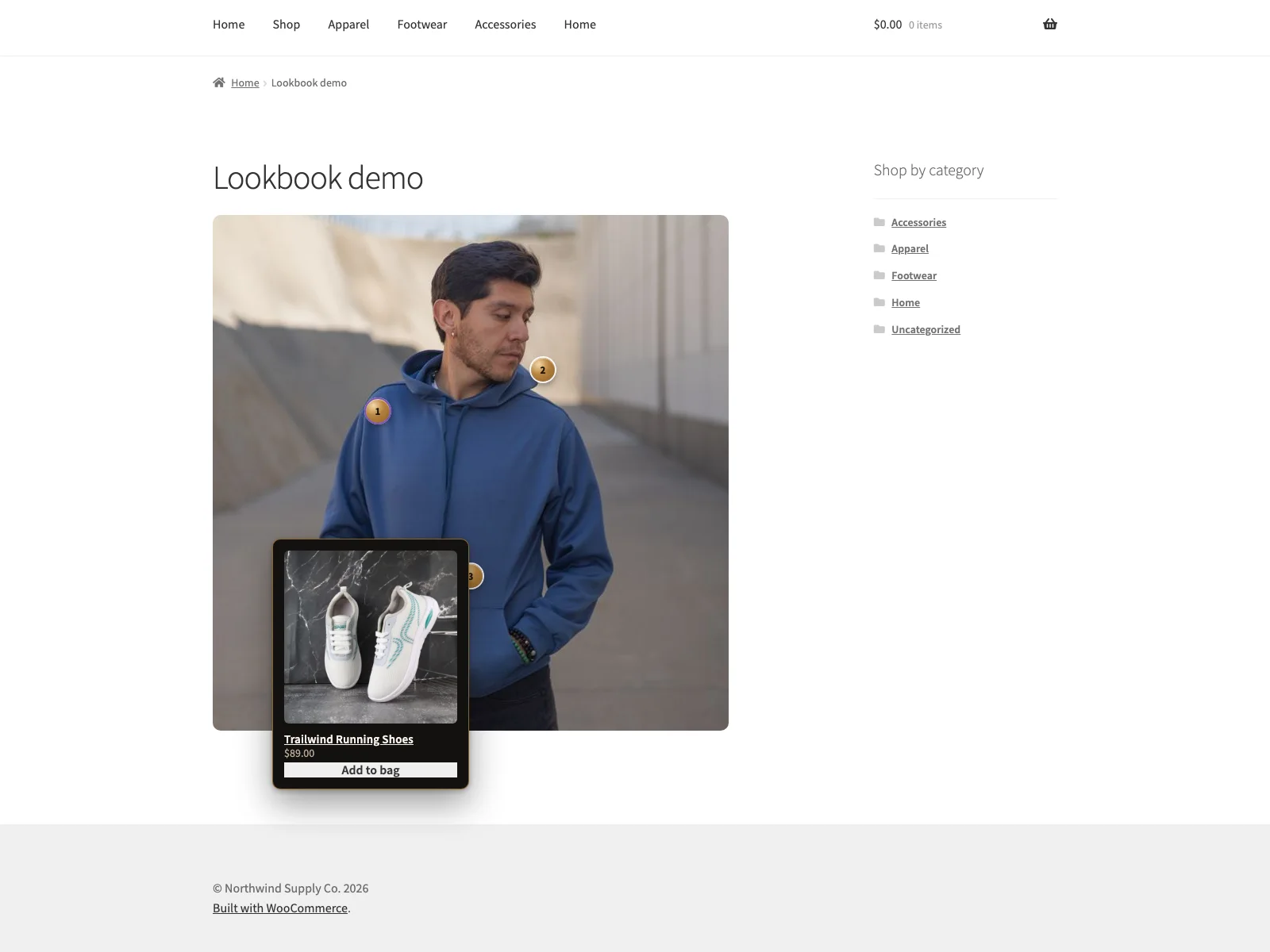 A styled photo turned into a shop-the-look gallery, with a hotspot opening a product card on the storefront.
Each lookbook is its own record. You create one under the Lookbooks menu and set its image with the standard Featured image box, so the canvas is just a normal WordPress media item. Each hotspot is then positioned with a simple X/Y editor: a repeater where each row is an X percentage, a Y percentage and a product ID. Both coordinates run from the top-left of the image in the 0 to 100 range, so a marker at 50 / 50 sits dead centre and you can line every pin up with the item it points to. Markers are real buttons, keyboard operable and labelled for screen readers, not decorative overlays.
When a shopper opens a hotspot, the product-card popover shows the thumbnail, title, live price and an add-to-cart link. All of it is read live from WooCommerce by product ID, so prices and stock are always current and you never re-enter product details into the lookbook. The card always shows the product name and image; whether it also shows the price and the add-to-cart link are global toggles, and you can override the add-to-cart wording for every product at once, for example to read “Shop the look” or “Add to bag”.
Note: Everything on the card is read live from WooCommerce by product ID, so prices and stock stay current and you never re-enter product details into the lookbook.
The front end is built to stay out of the way. The stylesheet and script load only on pages that actually render a lookbook, the script is deferred, the image reserves its space so there is no Cumulative Layout Shift, and the plugin uses no jQuery. The CSS adapts to light and dark colour schemes and honours prefers-reduced-motion. A missing image, a lookbook with no hotspots, or a deleted product all render cleanly: a gone or unpublished product is simply skipped, never drawn as a broken marker, so the rest of the look stays intact. Lookbook connects to no external service, loads no third-party fonts or analytics, and removes its own data on uninstall.
Setting it up
Getting a shoppable image live takes a few minutes:
- Install the plugin from Plugins, Add New, or upload it to
/wp-content/plugins/plogins-lookbook. WooCommerce must be installed and active. - Activate it.
- Create your first lookbook under Lookbooks, Add New. Set the Featured image to the styled photo you want shoppers to buy from.
- In the Shoppable hotspots box, add a row for each product: type its product ID and an X and Y percentage so the marker sits over the item in the photo. Save the lookbook.
- Adjust global presentation under WooCommerce, Lookbook: the master on/off switch, whether the card shows the price and the add-to-cart link, and the add-to-cart label.
- Embed the lookbook with
[lookbook id="123"], replacing123with the ID shown when you edit the lookbook (it is thepost=number in the URL).
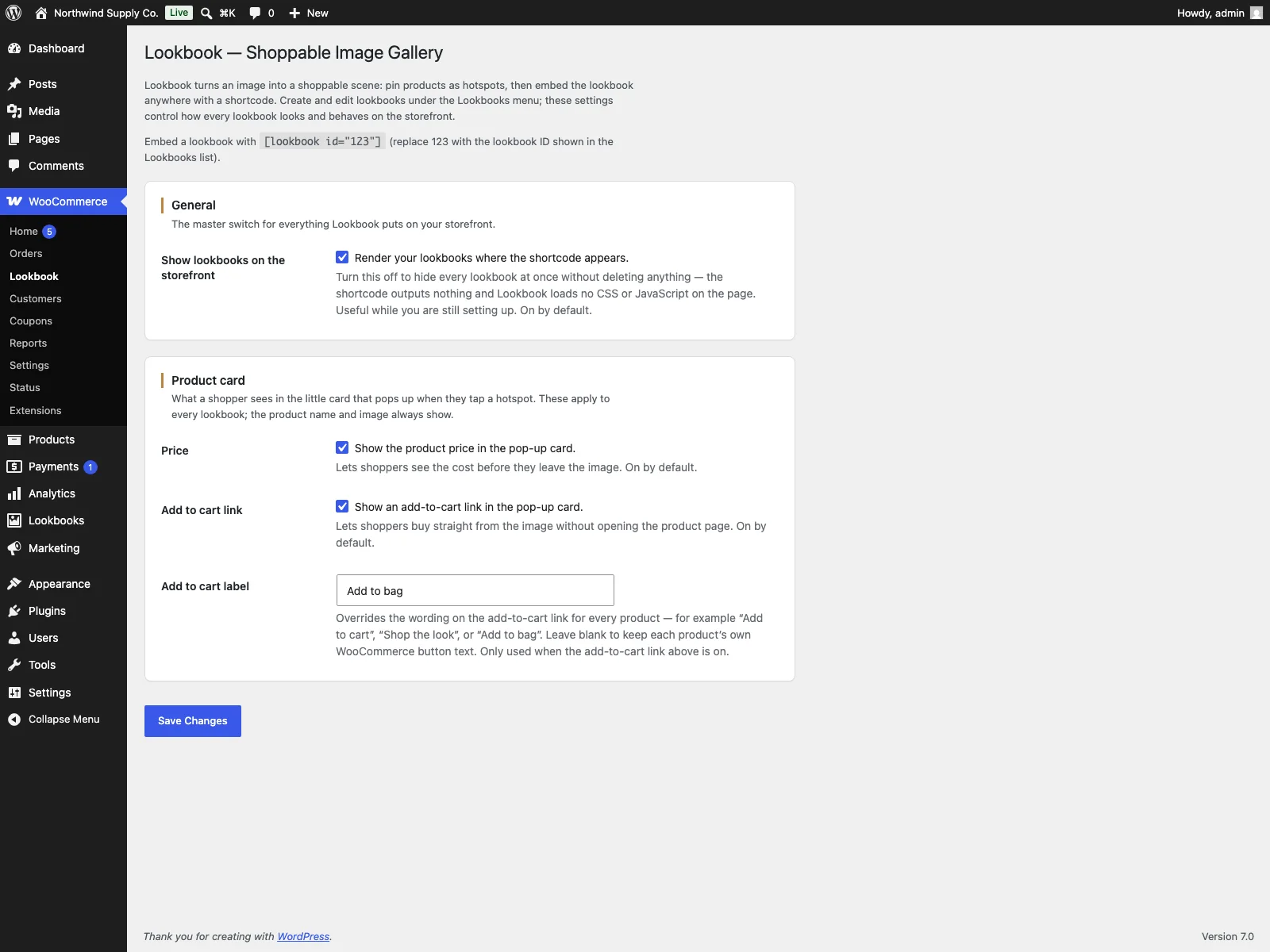 The Edit Lookbook screen, where each hotspot is placed with the X/Y editor and pointed at a product by ID.
The settings screen carries inline help under every field and shows the shortcode example, so you are not cross-referencing documentation while you configure it. Because Lookbook is HPOS-compatible and works with the cart and checkout blocks, it sits cleanly on a modern WooCommerce install.
Practical tips for a lookbook that converts
The plugin gives you the mechanism; a few habits make the scene sell harder.
- Pin every buyable item, but only buyable items. If a product is in the shot and in the catalog, give it a hotspot. Do not pin props you do not sell, which only frustrate the shopper who taps them.
- Place markers on the product, not beside it. A hotspot over the actual lamp reads instantly; one floating nearby makes the shopper guess. Use the percentage coordinates to nudge each pin onto the item itself.
Tip: A hotspot over the actual item reads instantly; one floating nearby makes the shopper guess. Use the X/Y percentage coordinates to nudge each pin onto the product itself.
- Keep the scene legible. A dozen overlapping hotspots on a small image become a cluster of dots no one can tap accurately. If a look is dense, consider fewer, well-spaced markers or a larger image.
Warning: A dozen overlapping hotspots on a small image become a cluster of dots no one can tap accurately. For a dense look, use fewer well-spaced markers or a larger image.
- Use the add-to-cart label deliberately. “Shop the look” or “Add to bag” can match your brand voice better than a generic button, and the label is set once for every product.
- Lean on the live data. Because prices and stock are read live, you can build a seasonal lookbook once and trust it to stay accurate as the catalog changes, rather than rebuilding it each time a price moves.
Shoppable lookbook versus default WooCommerce
WooCommerce has no built-in way to make an image shoppable. Here is the difference for shop-the-look specifically:
| Capability | Default WooCommerce | Lookbook |
|---|---|---|
| Pin products onto an image | None built in | Unlimited hotspots on one image |
| Position the markers | n/a | X/Y editor in percentages (0 to 100) |
| Product card on the image | None | Thumbnail, title, live price, add to cart |
| Live price and stock | n/a | Read live from WooCommerce by product ID |
| Accessible markers | n/a | Real buttons, keyboard, screen-reader labels |
| Embed anywhere | n/a | [lookbook] shortcode |
| Performance | n/a | Assets only where used, deferred, no jQuery, no layout shift |
| Deleted product | n/a | Hotspot skipped, page stays intact |
| Cost | Free (no such feature) | Free; PRO adds accent colour, gallery cards, multiple images, video hotspots, analytics |
Free versus PRO
The free edition is the complete shoppable image, not a teaser: unlimited hotspots, the X/Y editor, accessible marker buttons, the product-card popover with live price and add to cart, the global presentation settings and the [lookbook] shortcode are all included, and the front end stays light and graceful. Lookbook Pro builds on top for stores that want richer scenes: a marker accent colour, the product gallery shown as a slideshow inside hotspot cards, multiple images per lookbook with tab navigation, video hotspots and click analytics. Those are shipped today; extra animation styles beyond the free marker styles are planned. Pro is an add-on to the free plugin, not a replacement, so everything above keeps working exactly as it did.
The short version
A shoppable lookbook turns a styled photo into a shop-the-look gallery by pinning products onto the image as hotspots that open a card with the live price and add to cart, so the look is identified, buyable and always current. A plain photo leaks sales because shoppers cannot tell which products are in it, have no path to the cart, and any manual links go stale. Look for live WooCommerce data, accessible markers, a light front end and graceful failure when a product is removed. Lookbook delivers all of that for free, with Lookbook Pro adding gallery cards, multiple scenes, video hotspots and analytics on top.