WooCommerce pre-orders: sell before stock arrives
By Mariusz Szatkowski · Updated: 2026-09-11
Two things stop a shopper from buying: a product that has not launched yet, and a bestseller that just sold out. In both cases default WooCommerce blocks the sale and the shopper leaves. A pre-order keeps the product purchasable so you can collect the order now and fulfil it when stock arrives. This guide explains what a pre-order is, why core WooCommerce cannot do it, what a good pre-order flow needs, and how the free Preorder plugin adds one.
What a Pre-order Is and Why It Matters
A pre-order is a sale made before the product is available to ship. It fits two common situations.
- Upcoming releases. You announce a product before it exists and let shoppers reserve it ahead of the launch. The order is placed now; the goods follow on release day.
- Sold-out restocks. A popular product is out of stock, and rather than lose the shopper you let them reserve it for when it returns.
The point is to capture demand at the moment of interest instead of asking the shopper to come back later. Interest is perishable. A shopper who arrives ready to buy, hits an “out of stock” wall, and is told to check back next month rarely comes back. The pre-order turns that dead end into a booked sale, and it gives you something valuable in return: a real count of committed demand before you commit your own money to inventory. If forty people pre-order, you know to order forty rather than guessing.
That only works if two conditions hold at the same time. The product has to stay addable to the cart even though it shows no stock, and the shopper has to understand they are reserving, not buying something that ships today. Get the first without the second and you have angry customers asking where their parcel is. A real pre-order flow has to do both.
Warning: Keeping a product purchasable without telling the shopper they are reserving produces angry customers asking where their parcel is. A real pre-order has to do both at once.
Why Default WooCommerce Cannot Do It
Out of the box, WooCommerce treats stock as a hard gate. When a product is out of stock, the add-to-cart button disappears and the sale is blocked. WooCommerce does have a backorder setting, but backorders are a different tool with a different intent: they let an already-stocked product oversell quietly, with no clear shopper-facing “this is a reservation” message and no marking that helps you fulfil it differently. They were never designed to communicate an upcoming launch.
Note: WooCommerce’s backorder setting is a different tool: it lets a stocked product oversell quietly, with no “this is a reservation” message and no marking to help you fulfil it differently.
For pre-orders specifically, core gives you nothing. There is no built-in flag to say “this product is a pre-order”, no way to keep it purchasable on purpose with the right messaging, no custom button to set expectations, and no marking that survives into the cart and the order. So an ordinary in-stock sale and a pre-order would look identical to your fulfilment team, which is exactly the data you need to keep apart. You cannot pack what you cannot tell apart, and you cannot pull a clean list of who is waiting on the next batch.
A pre-order needs four things core does not provide: keep the product purchasable when out of stock, tell the shopper clearly that they are reserving, optionally tell them when it ships, and flag the line all the way through to the order.
What a Good Pre-order Flow Needs
A pre-order tool should cover the whole path from product page to fulfilment. Use this as a checklist whether you build, buy or install.
- A per-product flag. You decide which products are pre-orders, not the whole catalogue at once. Most of your range ships normally; only a few items are upcoming or sold out.
- Purchasable when out of stock. The flagged product stays buyable even with an out-of-stock status, while non-flagged products keep behaving normally.
- A clear shopper signal. A custom add-to-cart label and a reservation note so the shopper knows the item is reserved, not shipping today. The wording is what prevents the “where is my order” support ticket.
- An expected ship date. A simple way to tell shoppers roughly when the item arrives. People will commit to a wait if they know how long it is.
- Line flagging end to end. The pre-order marker should appear in the cart, at checkout and on the order, so fulfilment and packing slips can tell pre-orders apart from in-stock items.
- A global switch. A way to pause every pre-order at once, for example when a launch sells out or slips, without editing each product.
Notice what is not on that list: taking payment in instalments, or sending automated “it’s shipping now” emails. Those are useful refinements, but they are not what makes a pre-order a pre-order. The core job is to keep the sale open, set expectations, and tag the line. Everything else is built on top of that foundation.
How Preorder Does It
Preorder for WooCommerce is a free, open-source plugin that adds pre-orders to WooCommerce. It is built around the path above, and it stays out of the way of every product you do not flag.
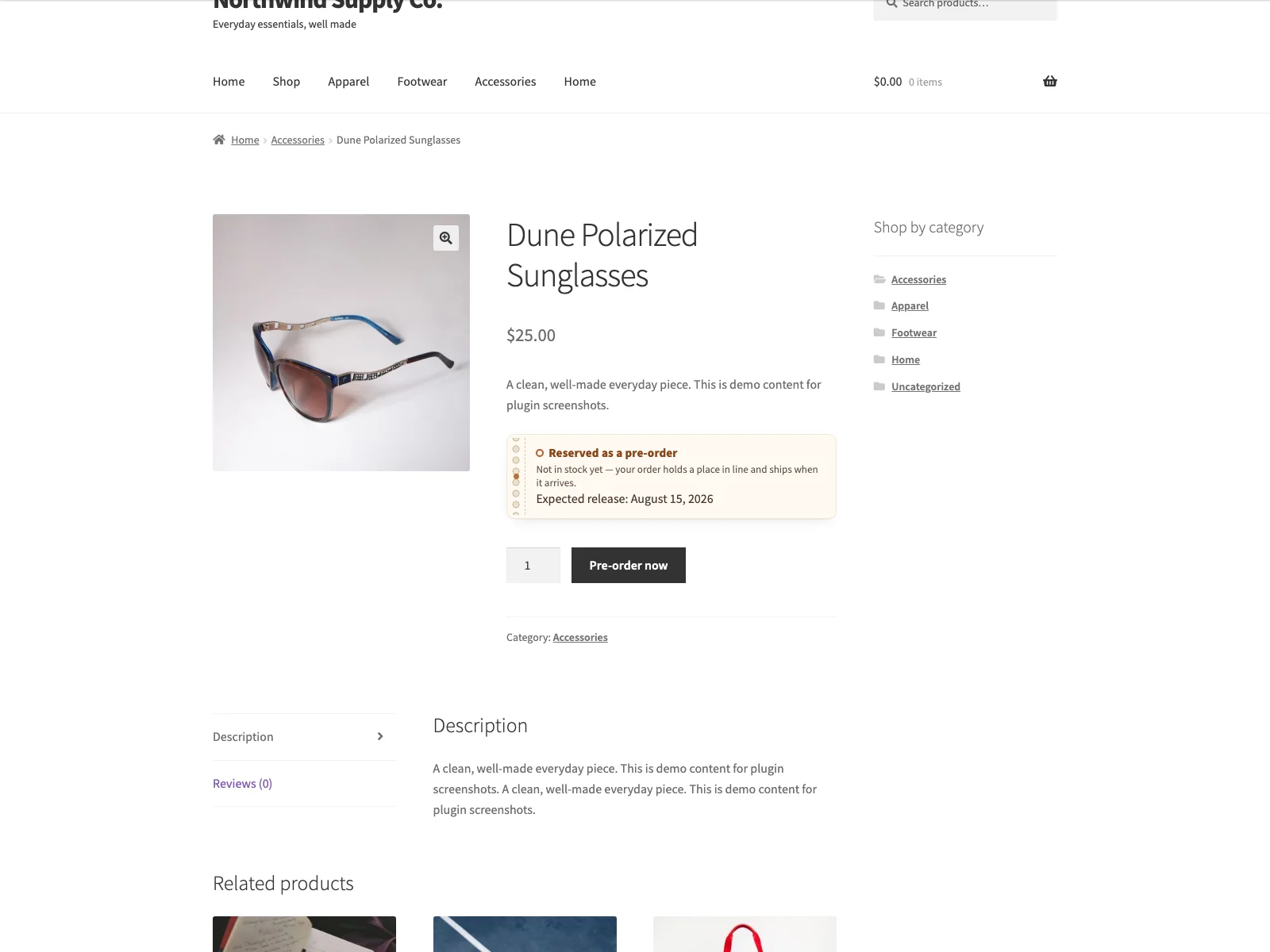 A pre-order product page with the custom button label and the reservation note that tells shoppers the item is reserved, not shipping today.
You mark a product as a pre-order with a checkbox in Product data, General, labelled simply “Pre-order”. The field carries inline help that explains it stays purchasable when out of stock, so there is no guesswork at the point of use. Right below it sits an optional Expected release date field. Once a product is flagged, three things change at once. It stays purchasable even when its stock status is out of stock, the add-to-cart button shows your custom pre-order label instead of the standard text, and a reservation note appears on the product page.
That note is rendered as a small claim-ticket styled block in the product summary. It tells the shopper the item is not in stock yet, that their order holds a place in line, and that it ships when it arrives. If you set an expected release date, the note also shows it, formatted in your site’s own date format rather than a raw value, so it reads naturally to the shopper. The storefront assets for this only load on a single pre-order product page, so the rest of your store carries no extra weight.
Tip: Set an expected release date whenever you can. A concrete “ships around 12 March” converts better than a vague “coming soon,” because people commit to a wait when they know how long it is.
From there the flag follows the item. When a pre-order product is added to the cart, Preorder tags that cart line. The cart and checkout then show a “Pre-order: Yes” row on the line, and the same marker is copied onto the order line item, stored as order item meta. That means the flag shows on the order screen and on packing slips, so your team can pick and fulfil pre-orders separately from in-stock items. There is also a hidden line key on the order item, which exists so the paid add-on and other extensions can query pre-order lines reliably.
Variable products are handled too. A variation inherits the parent’s pre-order flag unless it sets its own, and the per-variation state is exposed to the WooCommerce variations form, so the right button label and reservation note appear when a shopper selects a variation. The free plugin surfaces this state on the storefront; turning per-variation pre-orders into a fully independent setting is part of the paid edition.
Setting it up
Getting the flow live takes a few minutes.
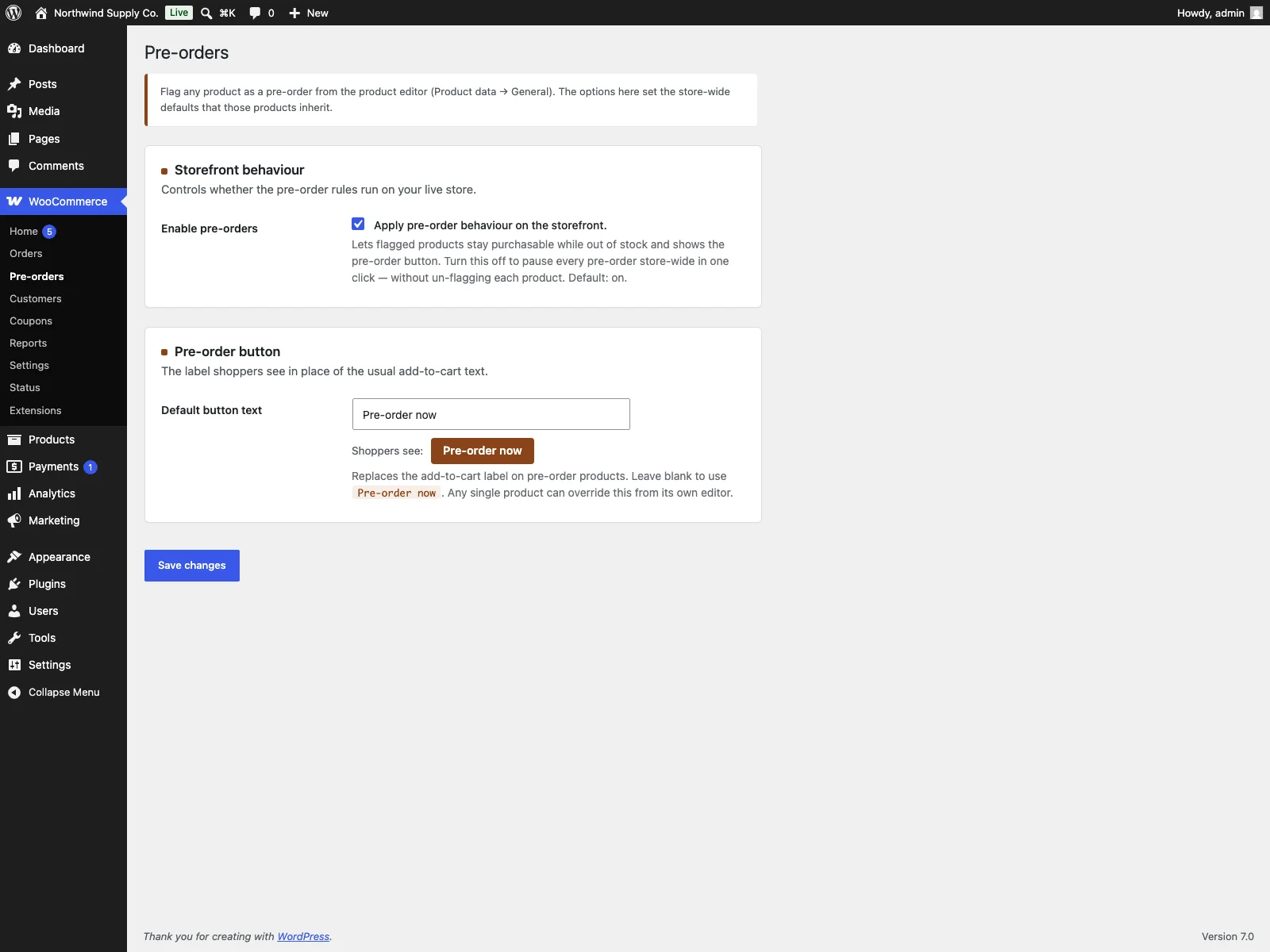 The Pre-orders settings screen in wp-admin, with the global toggle, the button text field and a live preview of the label shoppers will see.
- Install the plugin from Plugins, Add New, or upload it to
/wp-content/plugins/plogins-preorder. WooCommerce must be installed and active. - Activate it.
- Edit a product, open Product data, General, and tick Pre-order. Optionally set an expected release date.
- Set your store-wide defaults under WooCommerce, Pre-orders: the global on/off toggle and the default button text. A live preview shows the exact label shoppers will see as you type it.
The settings screen carries inline help under each field and a worked preview of the button, so you are not cross-referencing documentation while you configure it. Because the plugin declares compatibility with WooCommerce HPOS and the cart and checkout blocks, it sits cleanly on a modern WooCommerce install.
Under the hood, Preorder stores the flag and the release date as product meta, the line marker as order item meta, and the settings as a single WordPress option, with no custom database tables. It makes no outbound HTTP requests and sends no data off your site. Output is escaped, input is sanitised, the settings form is nonce-protected and gated on the manage WooCommerce capability, and a POT file plus a Polish translation are bundled. Removing the plugin deletes its setting, so it leaves a clean install behind.
Practical Tips for Running Pre-orders Well
The plugin gives you the mechanism; how you use it is what shoppers actually feel.
- Set an expected release date whenever you can. A vague “coming soon” converts worse than a concrete “ships around 12 March”. Use the date field even if it is approximate, and pick a date you are confident you can beat rather than miss.
- Write the button label to set expectations. “Pre-order now” is clearer than the default “Add to cart” because it tells the shopper this is a reservation before they click, not after. Keep it short.
- Be honest in your product copy. The reservation note does a lot, but reinforce it in your own description: when it ships, whether the price is final, and what happens if the date slips. Surprises are what generate refunds.
- Use the global toggle as a circuit breaker. If a launch slips badly or a restock falls through, switch pre-orders off store-wide in one click rather than scrambling to un-flag products. Flagged products revert to normal behaviour at once, and you turn it back on when you are ready.
- Pull pre-order lines for planning. Because every pre-order line is marked on the order, you can see at a glance how many of each item are committed, which is your reorder quantity handed to you for free.
- Decide your payment stance. The free flow charges the order in full at checkout, like any WooCommerce sale. If you would rather take a deposit now and the balance at release, that is a deliberate change you opt into with the paid add-on, not something the free flow does silently.
Preorder Versus Default WooCommerce
WooCommerce has no built-in pre-order support, and its backorder setting is a different tool. Here is the difference for pre-orders specifically.
| Capability | Default WooCommerce | Preorder |
|---|---|---|
| Sell a product before it is in stock | Blocked when out of stock | Stays purchasable with the pre-order flag |
| Mark which products are pre-orders | None | Per-product checkbox in Product data, General |
| Custom add-to-cart button text | None | Store-wide label, with a live preview |
| Tell the shopper it is a reservation | None | Reservation note on the product page |
| Show an expected ship date | None | Optional release date, shown in your date format |
| Flag the line for fulfilment | None | Pre-order Yes in cart, checkout and order |
| Variations | n/a | Variation inherits the parent flag, state on the variations form |
| Pause all pre-orders at once | n/a | Global on/off toggle |
| Database footprint | n/a | Product meta, order item meta, one option, no tables |
| Cost | Free (core has no pre-orders) | Free; PRO adds discount, deposits, per-variation, release emails |
Free Versus PRO
The free edition is a complete flow, not a teaser. The per-product flag, out-of-stock purchasability, the custom button, the reservation note, the optional release date, end-to-end line flagging and the global toggle are all included, and the free version on its own runs a real pre-order programme from start to fulfilment.
Preorder Pro is a separate paid add-on that builds on top for stores that want to do more with the back half of the process. It adds an incentive discount applied to pre-order lines, a checkout deposit so shoppers pay part now and the balance at release, fully independent per-variation pre-orders, and automatic release emails that tell waiting customers when their item is shipping. None of that is required to take pre-orders; it is there when you want to sharpen conversion and automate the wait.
The Short Version
A WooCommerce pre-order means a product stays purchasable before it is in stock, with the shopper told they are reserving, ideally told when it ships, and the line flagged all the way to the order. Core WooCommerce blocks out-of-stock sales and offers none of this, and its backorder setting is not the same thing. Preorder is a free, open-source plugin that adds a per-product flag, a custom button, a reservation note, an optional release date and end-to-end line flagging, with a global toggle to pause everything in one click. The paid Pro add-on layers on discounts, deposits, independent per-variation pre-orders and release emails when you are ready to automate further.