Omnibus directive in WooCommerce: the 30-day lowest price
By Mariusz Szatkowski · Updated: 2026-10-11
If your WooCommerce store runs sales, flash discounts, or seasonal promotions for customers in the EU, the Omnibus Directive changes how you are expected to present those price cuts. The rule that store owners feel day to day is narrow and concrete: when you announce a reduction, you must also show the lowest price the product carried in the recent past, so the saving is measured against a real number rather than an inflated one. The hard part is not understanding the rule. It is producing that reference price reliably, for every product, every time a sale starts, without keeping a spreadsheet of price history by hand. This guide explains what the directive requires, what a good solution needs to do, and how the Omnibus module in Polski for WooCommerce records and displays the reference price automatically.
What the Omnibus Directive requires in plain terms
The EU Omnibus Directive tightened consumer protection rules across the bloc, and the part most shops deal with concerns price reductions.
The core rule is simple to state. Whenever you announce a price reduction (a sale, a “was/now” message, a percentage off), you must also display the lowest price you charged for that product during the 30 days before the discount applied. That prior lowest price becomes the reference point against which the saving is measured.
So instead of comparing a sale price to whatever the price happened to be yesterday, or to an inflated “regular” figure, the customer sees the genuine lowest recent price. This stops the practice of quietly raising a price and then “discounting” it back down to look like a deal.
Note: The reference figure is the lowest price you charged for that product during the 30 days before the reduction applied, so the saving is measured against a genuine recent low rather than an inflated “regular” figure.
Who it applies to
The directive applies to traders selling to consumers in the EU, and that scope is broad:
- Polish online shops selling domestically.
- Stores anywhere in the EU running price promotions.
- Businesses based outside the EU that sell to EU consumers.
It does not matter whether your store is large or small. If you advertise a price reduction to EU shoppers, the reference-price obligation generally applies. Member states implemented the directive into national law (in Poland through consumer protection legislation), so the exact wording and enforcement sit at national level while the underlying requirement is shared across the EU.
Why this is hard to do by hand
The obligation sounds like a one-line task, but it has an awkward shape for a store owner. The reference price is not a fixed property of a product. It is the lowest figure the product carried over a rolling window that ends the moment a sale begins, and that window is different for every product depending on when its price last moved.
To produce it manually you would have to log every price change, with a date, for every product and every variation, then go back through the last 30 days at the start of each promotion and pull out the lowest value. On a catalogue of any size, run during a busy sale season, that is not realistic. It is also fragile: a single missed price change makes the reference figure wrong, and a wrong reference figure is worse than none, because it actively misstates the saving.
That is why the practical answer is to record price history continuously and compute the reference price on demand, rather than trying to reconstruct it after the fact.
What a good Omnibus solution needs
A tool that handles the lowest-price obligation for WooCommerce should cover a handful of fundamentals. Use this as a checklist whether you build, buy, or install:
- Automatic price history. It records each product’s price as prices change, so the 30-day window is always backed by real data rather than guesswork.
- Variation-aware recording. Variable products have a price per variation, so history has to be tracked at the variation level too, not just the parent.
- A correct rolling window. It reads back the lowest price over the legally relevant period, with the length configurable rather than hard-coded.
- Clear display next to the offer. The reference price appears where the reduction is announced, in wording the shopper can understand.
- Coverage across surfaces. Modern stores show prices on the product page, in archives, in the cart and checkout, and inside structured data, so the reference figure should reach all of them.
- Sensible defaults. It should work correctly out of the box, so a store that simply switches it on is presenting the right number.
Notice what is not on that list: a guarantee of compliance. A plugin can produce and display the reference price accurately, but whether your overall promotion meets the rules that apply to your business stays a decision for you.
Warning: No plugin can guarantee compliance. The module records and displays the reference price accurately, but confirming that your store meets the rules that apply to it remains your responsibility as the owner.
How the Polski Omnibus module handles it
Polski for WooCommerce is a free, modular plugin for Polish and EU shops, and its Omnibus module is built around exactly this problem. It does two jobs: it records price history in the background, and it displays the lowest 30-day price wherever the offer appears.
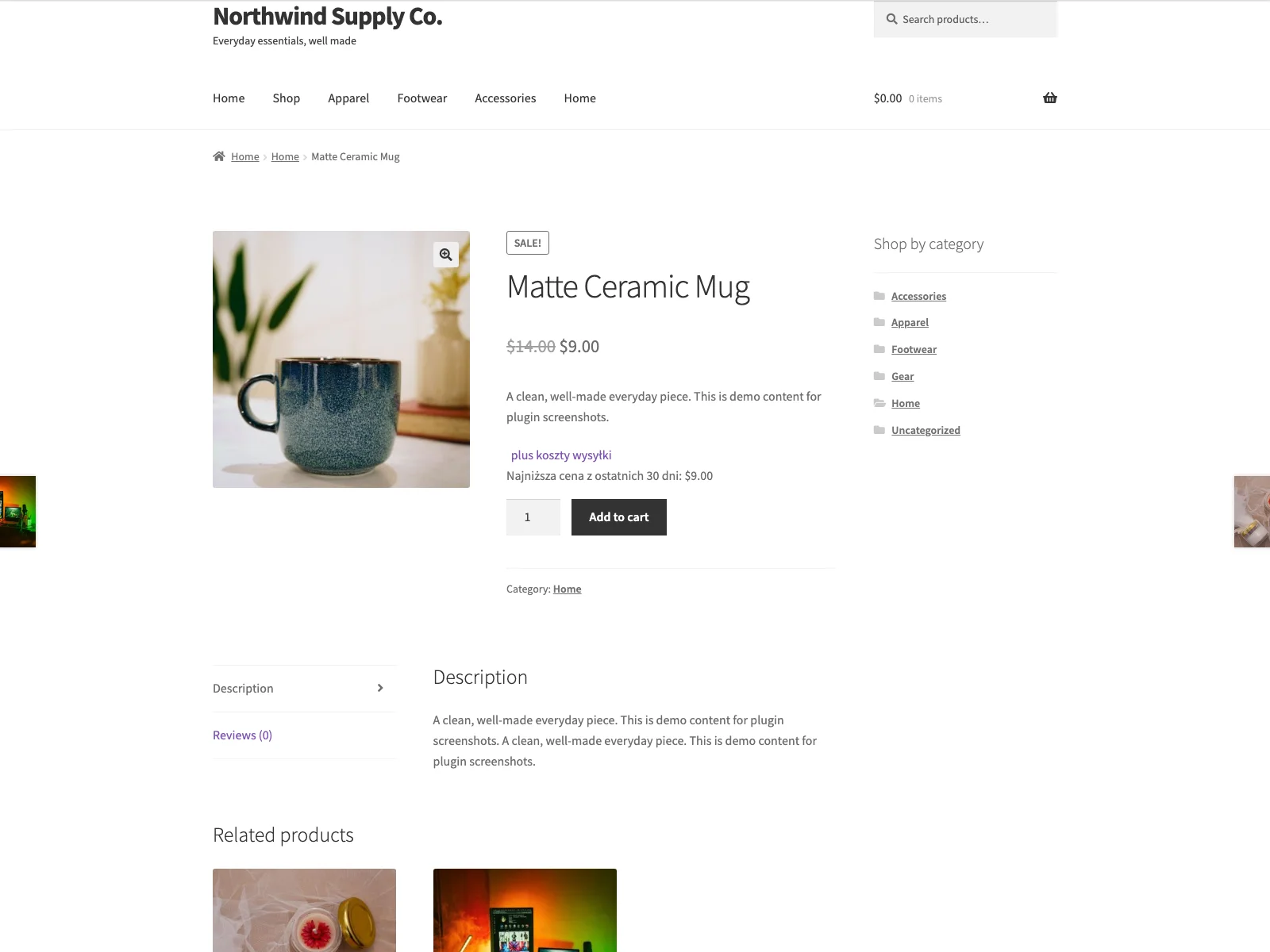 Polski shows the lowest price from the last 30 days beside the reduced price, exactly where the reduction is announced.
How it records price history
The module hooks into WooCommerce’s own save events. Whenever a product is created or updated, or a variation is saved, it writes a price snapshot, capturing the regular price, the sale price if one is set, and the currency, into its own polski_price_history table. Variations are recorded individually, so variable products keep an accurate per-variation history rather than a single blurred figure for the parent.
Note: History is written from WooCommerce save events, so a snapshot is created when you save a product or variation. Prices rewritten outside that flow, for example through a direct database import, may not be recorded.
Two design choices keep this clean. Recording happens at most once per day per product, so repeatedly saving the same product does not flood the table with duplicate rows. And a daily maintenance task prunes old records once they fall outside the retention period, so the history table stays a working dataset rather than growing without limit.
How it displays the reference price
When a product is on sale, the module reads back the lowest effective price recorded in the last 30 days and renders it next to the price. The window length is configurable and defaults to 30 days. If a stored value were ever empty or zero, the module falls back to 30 days rather than collapsing the window to the current price, so a misconfiguration cannot accidentally make the reference figure meaningless.
The displayed wording is a template you control. The default reads along the lines of “Lowest price from the last 30 days: {price}”, with placeholders for the day count and the formatted amount, so you can adjust the phrasing to match how you talk to your customers. By default the notice shows only on products that are on sale, which is exactly when the obligation applies, though that behaviour is a setting.
The reference price is not confined to the single product page. Because Polski supports the block-based cart and checkout as well as the classic templates, the lowest 30-day price appears in the block cart and checkout too. It is also surfaced in the product’s JSON-LD structured data when the product is on sale, so the truthful lowest figure travels with the machine-readable markup, not just the visible page. For block themes, a dedicated Lowest Price (Omnibus) block lets you place the notice in the editor, and there is a matching Elementor widget for Elementor-built product pages.
Under the hood the lookup is cached per product in the WordPress object cache, and on archive pages the module warms the cache for the whole product loop in a single query, so showing the reference price across a category page does not turn into one database query per product.
An optional price-history chart
Alongside the reference-price notice, Polski includes a separate price history chart module. It renders a small inline SVG sparkline on the product page from the same recorded history, showing the price trend over a configurable window with the lowest and highest points labelled. It is drawn as plain SVG with no external JavaScript library, and it only appears once there are at least two distinct recorded prices. This is a transparency extra rather than a strict requirement of the directive, useful for shops that want to show shoppers an honest picture of how a price has moved.
Setting it up
Getting the reference price live takes a few minutes:
- Install Polski for WooCommerce from Plugins, Add New (search for “Polski for WooCommerce”), then activate it. WooCommerce must be installed and active.
- Open the Polski menu and go to Modules, then enable the Omnibus module.
- In the module’s settings, confirm the window (30 days by default) and adjust the display text if you want different wording. Leave “display on sale only” enabled unless you have a reason to change it.
- Optionally enable the price history chart module if you want the sparkline on product pages.
From that point the module records a price snapshot every time you save a product, and any product you put on sale shows its lowest 30-day price automatically. There is no per-product setup: the history builds itself as you work, and the longer the module runs before a sale, the more complete the 30-day window behind that sale will be.
Tip: Enable the module well before your next big sale. It can only report price history it has already recorded, so the earlier it runs, the more complete the 30-day window behind that sale.
Practical tips
A tool gives you the mechanism; a few habits make the result solid:
- Turn it on early. The module can only report price history it has recorded. Enabling it well before your next big sale means the 30-day window behind that sale is backed by real snapshots rather than a short, thin history.
- Be careful with bulk price edits. If you rewrite prices outside the normal product save flow, for example with a direct database import, those changes may not generate a snapshot. Saving through WooCommerce is what records history.
- Keep the wording unambiguous. Phrasing the notice as “lowest price in the last 30 days” leaves no room for a shopper to misread it as the current or the original price.
- Mind progressive discounts. When a discount deepens in stages without the price returning to normal between steps, national guidance often keeps the reference price at the lowest figure from before the promotion began rather than resetting at each stage. Treat the displayed figure as a starting point and verify the local interpretation for staged sales.
- Do not treat it as legal sign-off. The module presents the reference price correctly, but your terms, your promotion mechanics, and your other obligations still need their own review.
Polski Omnibus versus default WooCommerce
WooCommerce can put a product on sale and show a struck-through “was/now” price, but it keeps no history of what the price was over time, so it has nothing to display as the lowest 30-day figure. Here is the difference for the Omnibus obligation specifically:
| Capability | Default WooCommerce | Polski Omnibus module |
|---|---|---|
| Records price history | None | Snapshot on every product or variation save, once per day |
| Variation-level history | None | Yes, per variation |
| Lowest 30-day reference price | Not available | Computed from recorded history, window configurable |
| Display next to the offer | Struck-through price only | Reference-price notice, configurable wording |
| Block cart and checkout | Standard price only | Reference price shown in block cart and checkout |
| Structured data | Standard offer price | Lowest 30-day price added to JSON-LD on sale |
| Price-history chart | None | Optional inline SVG sparkline |
| Old-record cleanup | n/a | Daily pruning of out-of-window snapshots |
| Cost | Free (no reference price) | Free and open source |
Free and open source
There is no separate paid edition to weigh up here. For stores targeting Polish shoppers, Polski for WooCommerce is free and open source under the GPL, and its Omnibus module records and displays the 30-day reference price out of the box.
For international stores selling across multiple EU member states (Germany, France, Spain, Italy), the free Shoplex plugin packages the Omnibus 30-day reference price alongside unit pricing, Button-Lösung checkout adaptations, and GPSR safety fields into a single EU compliance toolkit.
Both plugins are modular, free, and GPL-licensed, allowing you to activate only the Omnibus price history module and leave the remaining features off if you only require lowest-price compliance. To audit your store before a promotional campaign, run our interactive Omnibus Price Readiness Check.
The short version
The Omnibus Directive asks for one specific number whenever you announce a reduction: the lowest price the product carried in the 30 days before the sale. That number is genuinely hard to produce by hand, because it depends on a rolling window of price history per product and per variation. The Polski Omnibus module records that history automatically as you save products, then displays the lowest 30-day price next to the offer, in the block cart and checkout, and in structured data, with the window and wording configurable and sensible defaults out of the box. It is free and open source, and like any tool it presents the figure for you while leaving the final compliance check, as always, to you.