GPSR for WooCommerce: manufacturer and safety information
By Mariusz Szatkowski · Updated: 2026-10-11
The EU General Product Safety Regulation (GPSR) reshapes the baseline safety rules for most consumer products sold in the European Union, and it applies to online sales just as much as to bricks-and-mortar shops. If you run a WooCommerce store that ships to Poland or other EU markets, GPSR affects two things at once: what a shopper can see on your product pages before they buy, and what records you keep behind the scenes. WooCommerce, out of the box, has no field for any of it. There is no place to record a manufacturer, no place for an EU responsible person, no structured way to surface a safety warning where the customer will actually read it. This guide explains what GPSR expects in practice, what a good setup needs, and how the free Polski plugin adds the missing fields and shows them cleanly on the product page.
What GPSR is and what changed
GPSR is a broad product-safety framework covering most non-food consumer products placed on the EU market. It replaced the older general product safety regime and modernised it for e-commerce, marketplaces and cross-border selling.
The headline shift is scope and clarity. The rules now explicitly address online sales, expect clearer information for shoppers before they buy, and put a stronger emphasis on traceability across the supply chain. As currently scheduled, the regulation applies across the EU, but because regulatory timelines and guidance can shift, always verify the current status against the official EU source rather than relying on a fixed date.
Warning: Regulatory timelines and guidance can change. Verify the current status and any deadlines against the official EU source rather than relying on a fixed date.
Practically, GPSR is less about a single new label and more about a chain of responsibility and information that has to be visible and documented. The customer should be able to see who stands behind the product and how to use it safely, and you should be able to identify your supply chain if a safety question ever arises.
Who must comply and the roles involved
GPSR assigns duties along the supply chain, and your obligations depend on the role you play:
- Manufacturers carry the core duties: designing safe products, assessing risks and providing safety information.
- Importers bringing products into the EU take on significant responsibility for verifying that goods meet requirements.
- Distributors, which many WooCommerce retailers are, must act with due care, check that required information is present, and not sell products they know or should presume to be unsafe.
A key point for stores selling goods made outside the EU: there must be a responsible person established in the EU for many products. This is an economic operator inside the Union who can be contacted about the product’s safety and compliance. If you import or dropship from outside the EU, identifying who that responsible person is matters a great deal. Your exact obligations are the store owner’s responsibility to confirm, ideally with qualified advice.
Note: For many products made outside the EU, an EU responsible person must exist before the product is sold. If you import or dropship from outside the EU, confirm who that operator is.
What information your product pages need
GPSR expects shoppers to see certain information clearly before purchase. For online listings, that typically means surfacing:
- Manufacturer identification and contact: name, registered trade name or trademark, and a postal or electronic contact address.
- Importer identification and contact where you bring the goods into the EU yourself.
- Responsible-person identification and contact where the product comes from outside the EU.
- Product identification: details that let a specific product, and a batch or model where relevant, be identified, such as a type, batch or serial reference.
- Safety warnings and instructions where the product warrants them, in a language easily understood by consumers in the target market. For Polish shoppers, that means Polish.
The goal is that a customer can see who stands behind the product and how to use it safely without having to dig. A buried PDF or a line lost in a wall of marketing copy does not meet that bar in spirit.
What a good GPSR setup needs
Whether you build, buy or install, a GPSR tool for WooCommerce should cover a handful of fundamentals. Use this as a checklist:
- Structured fields per product. Manufacturer, importer, responsible person, identifier and the safety text should each be their own field stored against the product, not crammed into the description.
- No empty rows. If you have not filled the importer for a product made in the EU, the page should simply not show an importer line, rather than printing a blank.
- A clear, readable place on the page. The information should sit somewhere predictable and legible, not hidden three tabs deep.
- The right language. Warnings and instructions need to appear in the language of the target market.
- Bulk handling. A catalogue of hundreds of products is not something you want to edit one field at a time, so import and export matter.
- An honest separation of duties. The tool stores and displays your data; it does not pretend to certify that the data is correct or that your store is compliant.
Notice what is not on that list: a compliance guarantee. No plugin can promise that. The job of the tool is to capture the right fields and present them cleanly; the accuracy of the data and the legal responsibility stay with you.
How Polski handles it
Polski for WooCommerce is a free, open-source plugin built around the Polish and EU side of a WooCommerce store, and GPSR is one of its modules. It is modular by design, so you can enable just GPSR if that is all you need, or combine it with Omnibus, GDPR consents, the right of withdrawal and the other modules. The GPSR module gives WooCommerce the product-safety fields it does not have, and shows them on the storefront in a tidy, predictable place.
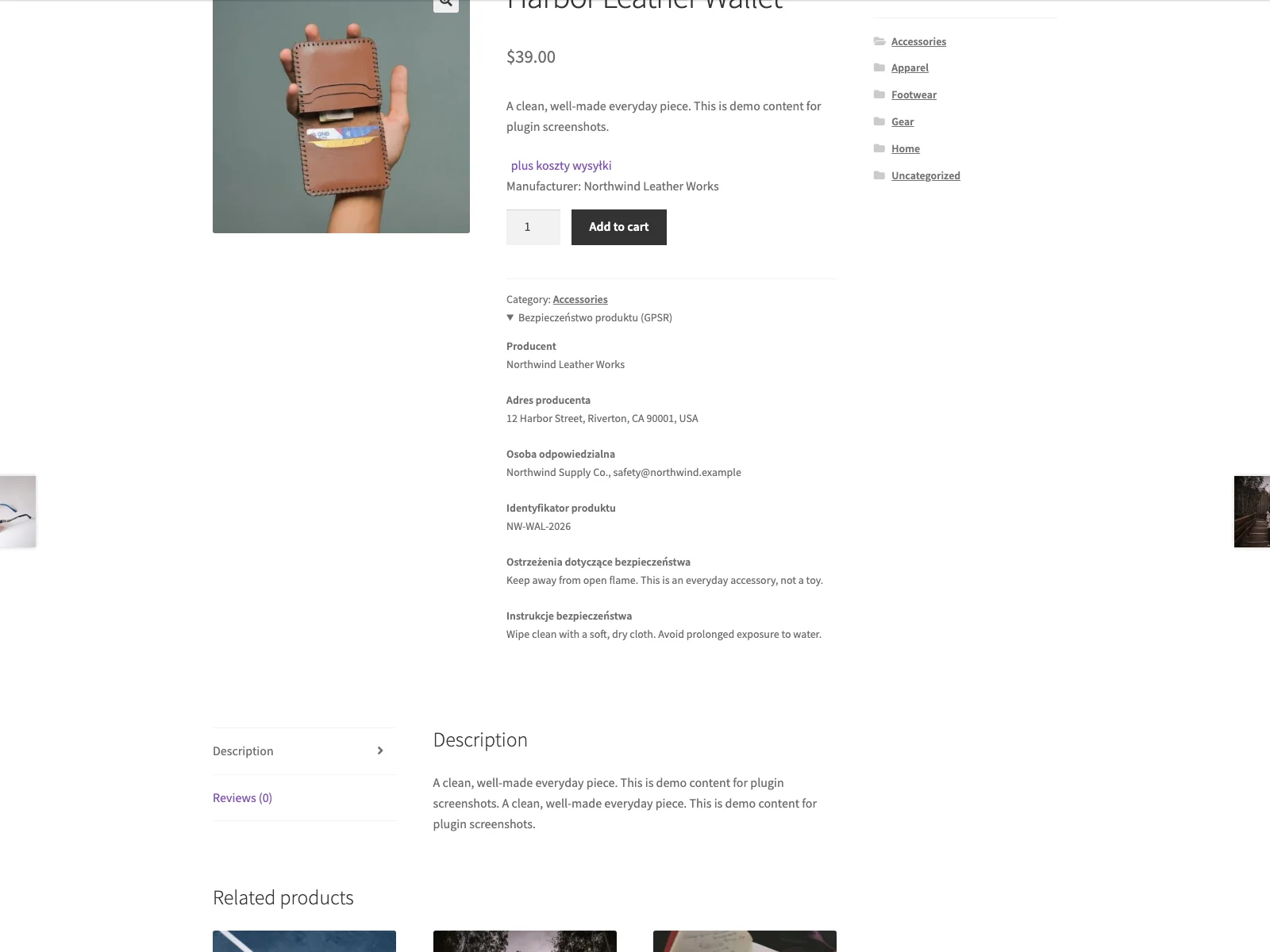 The GPSR safety block on the storefront product page, showing only the fields the merchant filled in.
The eight fields
The module stores eight GPSR fields against each product, each as its own value in the product editor:
- Manufacturer name
- Manufacturer address
- Importer name
- Importer address
- EU responsible person
- Product identifier
- Safety warnings
- Safety instructions
Because they are discrete fields rather than one free-text box, the data stays structured, which is what makes bulk handling, display logic and later edits manageable. You fill them on the Polski tab inside the standard WooCommerce product editor, alongside the rest of the product data, so there is no separate screen to remember.
How it appears on the storefront
On the product page, Polski renders the GPSR data in a collapsible Product safety (GPSR) block, placed in the product meta area below the add-to-cart section. It is a native HTML disclosure block, so it opens and closes without any heavy scripting, and it lists each piece of information as a labelled term and value rather than a run-on paragraph.
The display logic is deliberate: only fields you have filled are shown. If a product is made in the EU and has no importer, the importer lines do not appear at all; there are no empty rows or dangling labels. If you fill only the manufacturer and a safety warning, only those two show. This keeps the block honest and uncluttered, and it means a half-finished product does not advertise its gaps to shoppers.
Note: Only the fields you fill in are shown on the product page. A product made in the EU with no importer simply omits the importer lines, with no empty rows or dangling labels.
For block themes and the editor, the same data is available as a GPSR safety information block, so you can place it precisely on a template if you do not want the default meta-area position. A shortcode is available too for classic page builders. Whichever surface you choose, the block shows nothing outside a real product context, so it cannot leak stray markup onto an unrelated page.
The admin view and bulk handling
Inside wp-admin, the products list gains a column that shows how many of the eight GPSR fields are filled for each product. That gives you an at-a-glance audit of your catalogue: you can see which products are fully populated and which still need work, without opening each one.
For catalogues of any real size, the module extends WooCommerce’s own CSV import and export to include the GPSR fields. You can export your products, fill the manufacturer, importer, responsible person, identifier and safety text in a spreadsheet, and import the lot back, rather than editing hundreds of products by hand.
The AI draft helper, and why it is draft-only
Polski includes an optional helper that can generate a draft of the safety-warnings and instructions text for a product. This is worth understanding precisely, because the design is conservative on purpose. The helper writes to a separate draft field, and it never touches the real, merchant-entered GPSR fields. The generated text is explicitly labelled as a draft for review only and is not a guarantee of compliance. In other words, it can give you a starting point to edit, but the legally meaningful fields stay human-authored. You review, correct and copy across whatever you decide to keep.
Warning: Treat AI-generated safety text as a draft only. It writes to a separate field, never the real GPSR fields; read every line, correct it, and only then move it into the fields shoppers see.
The honest limit
To be clear about what a plugin can and cannot do: Polski helps you store and present the required information, but it does not guarantee or ensure legal compliance. Whether your store actually meets GPSR is determined by the accuracy of your data, the products you sell and your own due diligence. The legal responsibility stays with you as the store owner, and qualified advice is worthwhile where you are unsure.
Setting it up
Getting the GPSR block live takes a few minutes:
- Install Polski for WooCommerce from Plugins > Add New, then activate it. WooCommerce must be installed and active.
- Open the Polski menu, go to Modules, and enable the GPSR module.
- Edit a product, open the Polski tab, and fill the GPSR fields that apply to it. Leave the ones that do not apply empty; they will not be shown.
- View the product on the storefront. The Product safety (GPSR) block appears in the product meta area, listing the fields you filled.
- For a large catalogue, use the CSV export and import to populate the fields in bulk, and use the products-list column to track how many products are fully filled.
Polski is HPOS-compatible and supports both the classic checkout and the WooCommerce cart and checkout blocks, so it sits cleanly on a modern install. It is translation-ready, and the Polish strings are bundled, so the block labels read naturally for Polish shoppers out of the box.
Practical GPSR tips
A plugin gives you the mechanism; the discipline is yours. A few pointers worth following:
- Write warnings and instructions in the target language. For customers in Poland, the safety text should be in Polish. The tool will display whatever you type, so the responsibility for the language is yours.
- Be accurate about the responsible person. For goods made outside the EU, do not leave the responsible-person field as a guess. Confirm who that operator actually is before you publish.
- Use the audit column. Sort or scan the products list for items with few filled GPSR fields and finish them, rather than discovering gaps when an authority or a customer asks.
- Keep the underlying documentation. GPSR also expects you to keep traceability and safety records behind the scenes. The on-page fields are the visible part; retain your supporting documentation so you can respond to a query or a recall.
- Treat AI drafts as drafts. If you use the helper, read every line, correct it, and only then move it into the real fields. Safety text carries legal weight and should not go out unread.
GPSR support versus default WooCommerce
WooCommerce has no GPSR fields at all. Here is the difference for product safety specifically:
| Capability | Default WooCommerce | Polski GPSR module |
|---|---|---|
| Manufacturer and importer fields | None | Stored per product (name and address) |
| EU responsible person | None | Dedicated field |
| Product identifier | None | Dedicated field |
| Safety warnings and instructions | None (only the description) | Two structured fields |
| Product-page display | None | Collapsible “Product safety (GPSR)” block |
| Empty fields | n/a | Hidden automatically; only filled fields show |
| Block-editor placement | None | GPSR block plus a shortcode |
| Catalogue audit | None | Products-list column showing filled fields out of eight |
| Bulk editing | n/a | CSV import and export of the GPSR fields |
| Cost | Free (no GPSR support) | Free, open source |
Free and open source options
Polski for WooCommerce is free and open source, and GPSR is only one of its modules. The same plugin can handle the Omnibus lowest-price history, GDPR consent checkboxes with a consent log, the right of withdrawal from the customer account, VAT ID (NIP) handling and KSeF hooks, DSA report tools, unit prices, food data and a set of storefront modules.
For stores selling across multiple EU countries (Germany, France, Spain, Italy), the free Shoplex plugin delivers dedicated GPSR product safety blocks, EU responsible person fields, manufacturer contact records, and PAngV unit pricing pre-configured for pan-EU cross-border stores. Both plugins are GPL-licensed and free to use. You can also evaluate your product listings using our free GPSR Safety Check.
The short version
GPSR expects most EU consumer-product listings to show who stands behind the product and how to use it safely, and WooCommerce gives you no fields for any of it. A good setup needs structured per-product fields, sensible display logic that hides what you have not filled, the right language for the market and bulk handling for a real catalogue, while being honest that no tool can certify compliance. The free Polski plugin adds exactly that: eight GPSR fields per product, a collapsible safety block that shows only the fields you filled, a block and shortcode for precise placement, a products-list column to audit your catalogue, and CSV import and export for bulk work. The data and the legal responsibility stay with you; the plugin makes presenting it clean and repeatable.