WooCommerce deposit return scheme: Pfand, kaucja and SGR fees
By Mariusz Szatkowski · Updated: 2026-11-06
A deposit return scheme (DRS) makes a shop selling drinks in covered packaging charge a fixed deposit per bottle or can, which the buyer gets back when the empty container is returned. In a WooCommerce store the deposit belongs on its own line instead of inside the product price: a separate cart fee calculated from the container type, the number of containers in the product and the country’s rate. Germany calls it Pfand, Poland kaucja, Romania SGR, Slovakia zaloha, and each scheme has its own rates, container rules and VAT treatment. Below is how a deposit works in an online shop and how the free Botelix plugin charges it for 16 European schemes.
What a deposit return scheme is
A deposit return scheme is a statutory system in which the retailer collects a deposit per covered beverage container at the sale and the deposit is refunded when the container comes back. Because the shopper gets this money back, it is shown and charged apart from the drink.
Schemes differ by country in three ways:
- Which containers are covered. Most schemes cover single-use plastic bottles and metal cans. Some add single-use glass, some add reusable glass, some exclude glass entirely. Poland covers plastic, cans and reusable glass but not single-use glass; Austria, Slovakia, Sweden, the Netherlands, Ireland and Portugal leave glass out.
- How much the deposit is. Rates are set in law or by a scheme operator, in the scheme’s own currency: 0.25 EUR in Germany, 0.50 PLN in Poland, 0.50 RON in Romania, 50 HUF in Hungary, 1.50 DKK for a plastic bottle in Denmark.
- Whether VAT applies. In Germany, § 46 Abs. 1 VerpackDG sets the deposit at least 0.25 EUR including VAT. In Poland, VAT Act Article 29a(11a) keeps the deposit out of the tax base. The same 0.25 can therefore mean a gross amount in one country and an untaxed one in another.
Container size matters too. Several schemes cover 0.1 l to 3.0 l, and some charge more for larger packs: Ireland charges 0.15 EUR up to 0.5 l and 0.25 EUR above, the Netherlands 0.15 EUR for plastic under 1 l and 0.25 EUR from 1 l to 3 l.
Why the deposit needs its own line
A deposit hidden in the product price causes four problems.
First, the shopper cannot see what the drink costs. A crate of water priced with the deposit baked in looks more expensive than a competitor who shows it separately, and the refundable part disappears from view. In Germany, Section 7 PAngV requires the deposit amount next to the total price, so it has to be visible as its own number.
Second, a multi-pack carries several deposits. A six-pack of cans carries six container deposits and a crate of 24 bottles carries 24. A flat surcharge per product gets this wrong as soon as you sell more than single bottles.
Third, VAT treatment differs from the drink’s. Where the deposit sits outside the VAT base, taxing it with the product overcharges VAT. Where it is inside the base, the deposit has to reach the customer as exactly the statutory gross amount, not the amount plus tax on top.
Fourth, a store that ships abroad sells into different schemes. A German customer and an Austrian customer buying the same can are under different rules: the Austrian Einwegpfand covers plastic bottles and cans only, while the German Pfand also covers single-use glass.
What a WooCommerce deposit tool needs
Use this checklist when you compare deposit plugins or plan your own setup:
- Container categories on the product. The merchant tags a product as plastic bottle, can, single-use glass or reusable glass; the scheme decides the rate for each category.
- A container count. A field for how many covered containers one item holds, so packs multiply the deposit.
- A separate cart fee. The deposit appears as its own line in cart, checkout, the order and order emails.
- Per-scheme VAT handling. Gross amounts where the deposit is in the VAT base, untaxed fees where it is not.
- A visible notice. The deposit shown next to the price on the product page and in listings.
- Country matching. The scheme of the delivery country, with a rule for countries that have no scheme.
- Editable rates. Rates change and some depend on container size, so every default has to be a starting point you can change.
A checkout tool cannot run the take-back: collecting returned bottles and paying deposits back happens in the physical return system and in your refund process.
How Botelix handles it
Botelix for WooCommerce is a free, open-source plugin that charges the beverage container deposit as its own WooCommerce cart and checkout fee and shows a deposit notice under the product price. It ships 16 national schemes, Poland, Romania, Austria, Germany, Slovakia, Hungary, Denmark, Sweden, Finland, Estonia, Latvia, the Netherlands, Ireland, Croatia, Malta and Portugal, plus a custom scheme with a rate per container in your store currency.
It works on activation. The deposit is on, the default scheme is Poland, and cross-border matching and the export exemption are both switched on, so nothing has to be saved first.
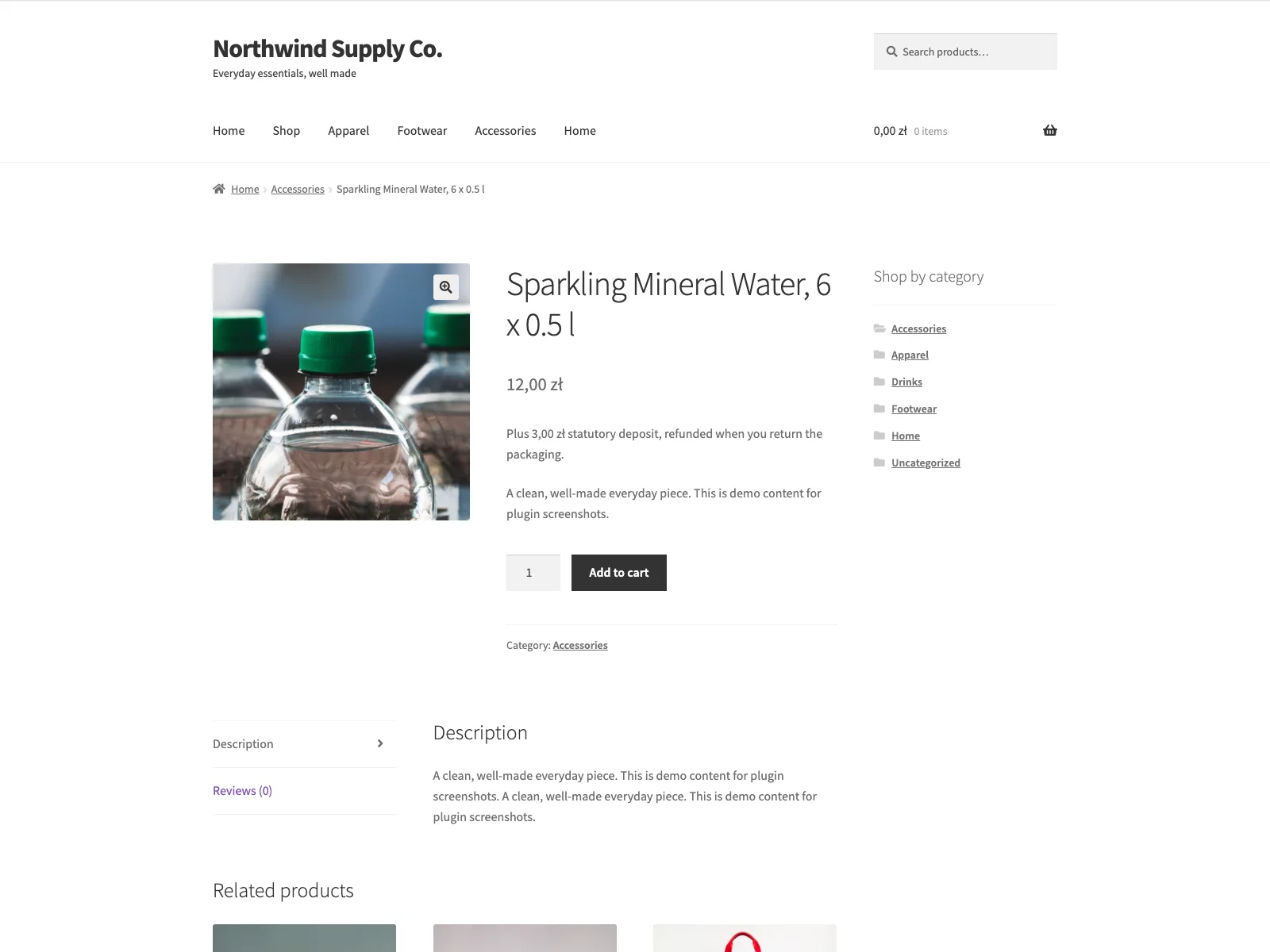 A six-pack of plastic bottles: the deposit notice of 3.00 PLN under the price.
One container category, every scheme
Each beverage product carries one of four container categories: single-use plastic bottle, metal can, single-use glass bottle or reusable glass bottle. You tag the product once, and each scheme sets its own rate for that category or does not cover it and charges nothing. The product editor marks the categories that the product’s scheme does not cover, so you see the gap while you edit.
On the product’s General tab you set:
- Scheme override: the store default scheme, or one fixed scheme for this product.
- Packaging container: none or one of the four categories.
- Container units: how many covered containers one item holds, at least 1.
- Deposit per container: an optional amount that replaces the scheme rate under the product’s own scheme, for example different Mehrweg rates for different reusable bottles.
- Crate / outer packaging deposit: an optional deposit charged on top of the container deposits, for beverage crates and cases such as the German Kastenpfand.
Variations follow the parent’s scheme override, and a variation without its own container takes the container and the units from the parent product.
How the deposit is calculated
Botelix calculates the deposit in six steps:
- Customer scheme. With cross-border matching on, it reads the customer’s shipping country, or the billing country when there is none, and applies that country’s scheme.
- Product override. A product’s scheme override replaces the order scheme for that product.
- Currency. A scheme is charged only when its currency equals the store currency. The custom scheme has no currency and is always charged.
- Container. The scheme’s rate for the product’s container applies, or the product’s own deposit per container under its own scheme.
- Amount. Rate times container units times cart quantity.
- Fee. Deposits are summed into one fee per scheme and tax class through the WooCommerce fees API, in the classic cart and checkout and in the Cart and Checkout blocks.
A cart with one plastic bottle, a six-pack of cans and one reusable glass bottle under the Polish scheme adds 0.50 + 3.00 + 1.00, a single deposit line of 4.50 PLN.
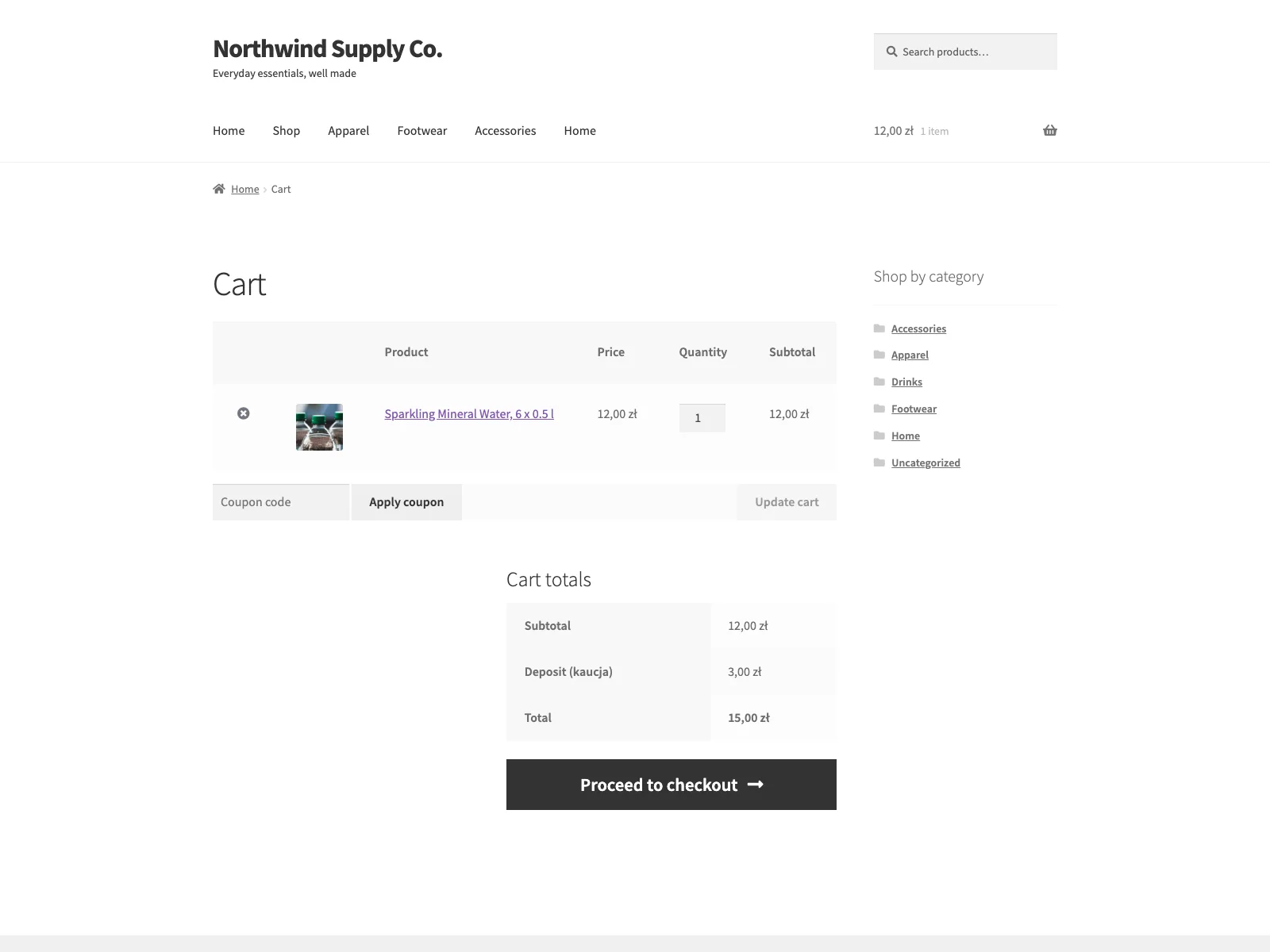 The deposit as its own line in the cart totals.
Where the shopper sees the deposit
Botelix shows the deposit at every step of the purchase:
- Product page. A notice under the price, on classic and block single-product templates, such as “Plus 0,50 zl statutory deposit, refunded when you return the packaging”. You set the sentence per scheme, with
{amount}or%swhere the amount goes. - Listings. Shop, category, search and related-product listings, classic and block, show the deposit next to the price.
- Cart and checkout. Each line shows its own deposit, and the total deposit appears as a separate fee.
- Order. The order stores the deposit per item and prints it on the order page, in the admin and in order emails.
Under the German scheme the price also reads EINWEG for single-use and MEHRWEG for reusable containers, inside the price markup so it has the same font and size, as Section 47 VerpackDG requires for online sales. Section 47 sets exceptions, and Botelix follows your container tag. For custom layouts and page builders, the [botelix_deposit] and [botelix_packaging_type] shortcodes print the notice and the EINWEG or MEHRWEG label anywhere.
VAT per scheme
Each scheme’s tax rule decides the treatment:
- Germany, Denmark, Sweden and Finland put the deposit in the VAT base. Botelix treats the rate as a gross amount and adds the net share as a taxable fee in the product’s tax class, so the customer pays exactly the deposit. With taxes off, a non-taxable product or a VAT-exempt customer, the full amount is added untaxed.
- Poland, Romania, Slovakia, Estonia, Ireland, Malta and Portugal keep the deposit outside the VAT base by statute, and Botelix adds it untaxed.
- Austria, Hungary, the Netherlands, Croatia and Latvia are also added untaxed; for the Netherlands, Croatia and single-use packs in Latvia that rests on tax authority approval or guidance rather than a statute.
The botelix_scheme_taxable filter switches a scheme’s treatment when your tax adviser reads it differently.
Cross-border and currency
Cross-border matching applies the scheme of the customer’s country, for PL, RO, AT, DE, SK, HU, DK, SE, FI, EE, LV, NL, IE, HR, MT and PT. Botelix never converts currencies: a EUR store charges the rate of every euro scheme, while Denmark charges in DKK, Sweden in SEK, Romania in RON, Hungary in HUF and Poland in PLN. A PLN store therefore charges nothing for an order shipped to Germany, and the settings screen lists every scheme your store cannot charge.
With the export exemption on, an order to a country outside the 16 schemes gets no deposit at all. Before an address is entered, the country comes from WooCommerce’s own “Default customer location” setting; Botelix does no geolocation of its own.
Setting it up
- Install and activate Botelix on WordPress 6.5 or newer, PHP 8.1 and WooCommerce 8.0 or newer.
- Open WooCommerce > Deposit Return (DRS) and pick your default scheme.
- Check the rates on the scheme’s card, set the fee label and, if you want, the product notice sentence.
- Edit each beverage product: choose the packaging container and set the container units.
- Add a deposit per container or a crate deposit where a product differs from the scheme rate.
The full settings reference, the rate table and the legal basis for each scheme are in the Botelix documentation.
Default rates for the 16 schemes
Botelix ships these defaults for the two most common containers. Every rate is editable, and the defaults are a starting point to check against the current rules before you sell.
| Scheme | Plastic bottle | Metal can | VAT in Botelix |
|---|---|---|---|
| Poland | 0.50 PLN | 0.50 PLN | untaxed |
| Romania | 0.50 RON | 0.50 RON | untaxed |
| Austria | 0.25 EUR | 0.25 EUR | untaxed |
| Germany | 0.25 EUR | 0.25 EUR | net share plus VAT |
| Slovakia | 0.12 EUR (minimum) | 0.10 EUR (minimum) | untaxed |
| Hungary | 50 HUF | 50 HUF | untaxed |
| Denmark | 1.50 DKK | 1.00 DKK | net share plus VAT |
| Sweden | 2.00 SEK | 2.00 SEK | net share plus VAT |
| Finland | 0.20 EUR | 0.15 EUR | net share plus VAT |
| Estonia | 0.10 EUR | 0.10 EUR | untaxed |
| Latvia | 0.10 EUR | 0.10 EUR | untaxed |
| Netherlands | 0.15 EUR | 0.15 EUR | untaxed |
| Ireland | 0.15 EUR | 0.15 EUR | untaxed |
| Croatia | 0.10 EUR | 0.10 EUR | untaxed |
| Malta | 0.10 EUR | 0.10 EUR | untaxed |
| Portugal | 0.10 EUR | 0.10 EUR | untaxed |
Where the amount depends on container size (Denmark, Sweden, Finland, the Netherlands, Ireland), the settings ship the common size and the rate label names the other amounts, which you enter in the product’s deposit per container. In Slovakia the scheme administrator sets the actual rate above the statutory minimum, and in Sweden the defaults are the operator’s consumer rates because the ordinance sets no amount.
Practical tips for charging deposits
- Tag every beverage product. A product with no container charges nothing, so an untagged six-pack is a deposit you owe but never collected.
- Set units on packs and crates. Container units multiply the deposit; a crate of 24 bottles needs 24, and the crate itself takes the crate deposit.
- Enter size-dependent rates on the product. A 1.5 l bottle in Ireland or the Netherlands carries 0.25 EUR, not the 0.15 EUR default.
- Match the store currency to your market. Cross-border matching only charges schemes in your store currency.
- Keep refunds in your normal process. Botelix charges the deposit; paying it back for returned packaging goes through a WooCommerce refund.
Botelix versus default WooCommerce
WooCommerce has no deposit feature. Without a plugin the usual workarounds are a higher product price or a manual fee, neither of which multiplies by container count or follows VAT rules per country.
| Capability | Default WooCommerce | Botelix |
|---|---|---|
| Deposit as its own cart fee | None | Yes, native WooCommerce fee |
| National schemes | None | 16 schemes plus a custom scheme |
| Container categories | None | Four, rated per scheme |
| Multi-pack units | None | Rate times container units |
| Crate deposit | None | Optional, on top of container deposits |
| VAT per scheme | Manual | Net share where taxable, untaxed elsewhere |
| Deposit notice and listings | None | Under the price and next to listing prices |
| EINWEG and MEHRWEG | None | Inside the price under the German scheme |
| Delivery country matching | None | Optional, same-currency schemes |
| Blocks and HPOS | n/a | Compatible with both |
| Cost | Free (no deposit feature) | Free, no paid edition |
What Botelix does not do
Botelix is a free plugin with no PRO edition and has three limits:
- No currency conversion. A scheme in another currency charges nothing.
- No return tracking or refunds. Returned packaging and deposit payback stay with your take-back process and the WooCommerce refund.
- No geolocation. The country is the one WooCommerce holds for the customer, shipping first, then billing.
Deleting the plugin removes its settings, on every site of a multisite network; product meta stays.
The short version
A deposit return scheme makes a drinks seller charge a refundable deposit per covered bottle or can, at a rate, container scope and VAT treatment set by each country. In WooCommerce the deposit belongs on its own line, multiplied by the containers in each product and visible from the product page to the order email. The free Botelix for WooCommerce plugin does that for 16 European schemes plus a custom one: one container category per product, container units for packs, a crate deposit, a notice under the price and in listings, EINWEG and MEHRWEG under the German scheme, per-scheme VAT and delivery country matching within your store currency.