WordPress backup and migration: move or restore a whole site
By Mariusz Szatkowski · Updated: 2026-09-11
Two moments decide whether a WordPress site survives a bad day. The first is when something breaks, a botched update, a bad plugin, a hacked file, and you need to put the site back the way it was. The second is when you move the site to a new host or a new domain and need everything to arrive intact at the other end. Both depend on the same two things: a backup that is genuinely complete, and a migration that does not quietly corrupt the database on the way. This guide explains what a real WordPress backup includes, why migration is the hard part, what a good tool needs to handle, and how the free Migrator for WordPress plugin does it without an external account.
What a complete backup includes
A WordPress site is two separate things that have to be backed up together, or not at all.
- The database holds posts, pages, products, settings, users and most configuration. For a WooCommerce store it also holds orders, customers and the bulk of your shop’s state.
- The files hold your uploads (the media library), your themes and your plugins, everything under
wp-content.
Restore only one half and you get a broken site: a database that points at images that are not there, or a folder of files with no content behind them. A complete backup captures both, and ideally lands them in a single archive that is easy to store off-site and easy to move. Scattering a database dump in one place and a zip of files in another is how half a backup goes missing exactly when you need it.
Why migration is the hard part
Backing up is the easy half. The genuinely hard part is migration, because a WordPress site records its own URL and file paths all through the database. The home URL, the site URL, links inside post content, image paths, widget settings, theme options, plugin configuration: move to a new domain and every one of those references has to change to the new address, or the site arrives broken.
The trap is that a lot of this data is serialized. WordPress stores PHP arrays and objects as text, and that format writes the length of each string into the data itself. So a value like s:19:"https://oldsite.com" records that the string is nineteen bytes long. Do a plain find-and-replace of the old domain for a new one of a different length and the text changes but the recorded count does not, which silently breaks the value. The data still looks like text, but PHP can no longer unserialize it. Widgets vanish, theme settings reset, plugin options come back empty. It is one of the most common ways a hand-rolled migration fails, and the damage is not obvious until you go looking for it.
A correct migration uses serialization-safe URL rewriting: it walks the actual data structures rather than treating the database as a blob of text, updates each occurrence of the old URL and recalculates the string lengths so the serialized data stays valid. This is the single most important capability in any migration tool, and the easiest one to get wrong by hand.
Warning: A plain find-and-replace of the old domain silently breaks serialized values, because the recorded string lengths no longer match. Widgets vanish and plugin options come back empty, and the damage is not obvious until you go looking for it.
What a good backup and migration tool needs
Whether you build, buy or install, a backup and migration tool for WordPress should cover a handful of fundamentals. Use this as a checklist.
- Both halves in one archive. Database and files together, in a single file you can download and store off-site.
- Serialization-safe rewriting. URLs and paths updated correctly on restore to a new address, including inside serialized data.
- Restore in place and migrate. The same archive should roll a site back after a problem, or move it to a fresh install on a new host.
- Self-hosted, no account. The job runs on your own server and your data never passes through a third party you have to trust.
- Integrity checks. A way to detect a truncated or corrupted archive before it is restored over a live site, not after.
- A safety net on restore. Restoring overwrites the destination, so a snapshot taken before the import, with automatic rollback on failure, turns a risky operation into a recoverable one.
- A path for large sites. A browser request times out; a big site needs a command-line route that does not.
- Selective backups. The ability to leave out what you do not need (caches, revisions, spam) to keep the archive small.
Notice what sits underneath all of this: control. A backup is only useful if you can actually reach it, trust where it lives, and restore it without a subscription standing between you and your own data.
How Migrator handles it
Migrator for WordPress is a free, open-source plugin built around exactly that checklist. It packs your database and everything in wp-content into a single file you can download, keep as a backup, and restore, either on the same site or on a brand-new install somewhere else. When you restore onto a different address, it rewrites the old URLs and file paths to the new ones for you, so the site just works. Everything happens on your own server: there is no account to create, no file-size limit sold back to you, and nothing is ever sent to a third-party service.
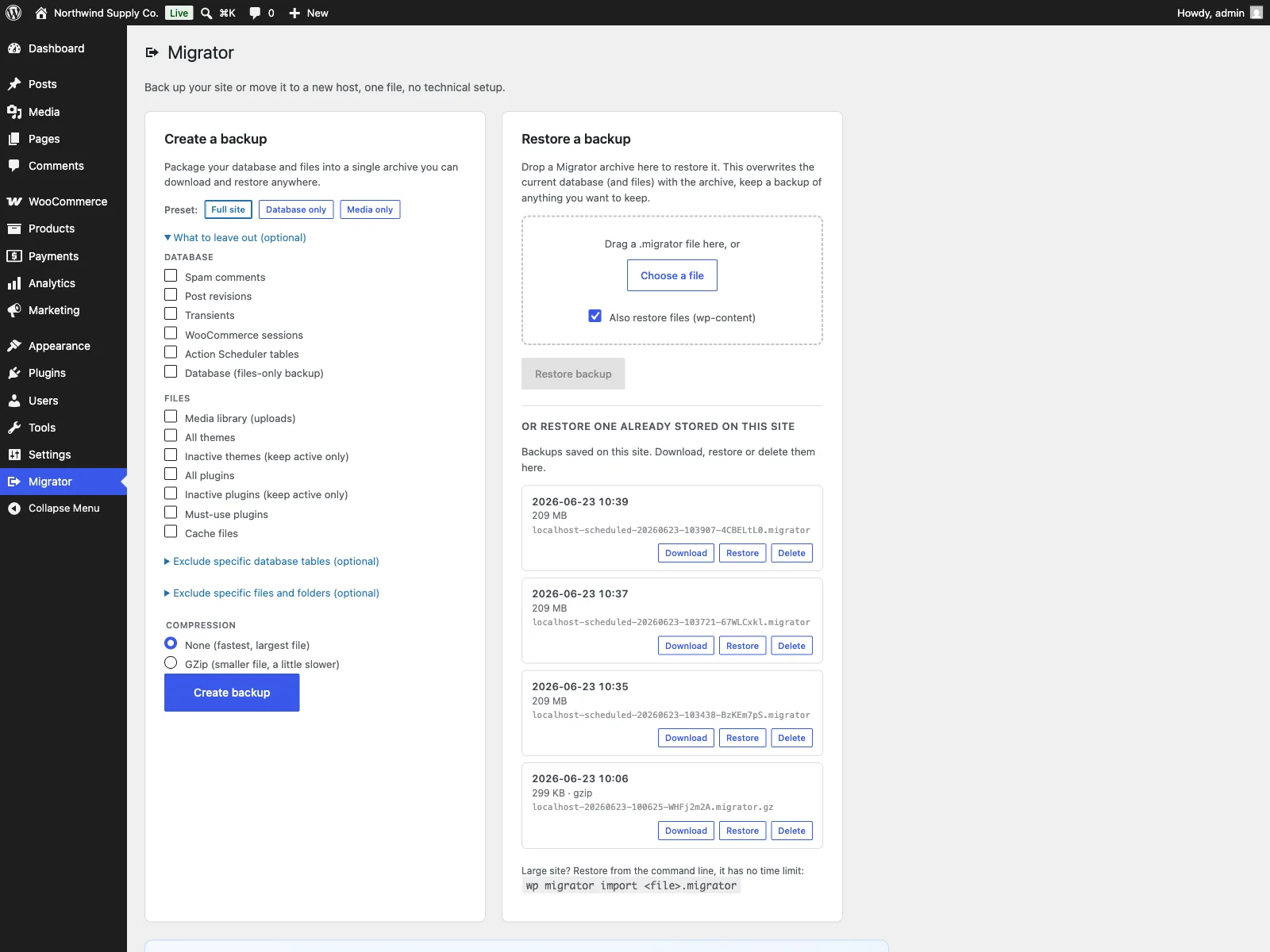 The Migrator screen in wp-admin, where you create a full backup and restore an archive.
The backup
On the site you want to copy, you create a backup from the Migrator screen in the admin menu. Migrator writes your database to a portable SQL dump (tables, views, triggers and stored routines) and streams every file in wp-content into one archive alongside it. The in-browser export runs with a progress bar and a direct download, and it is resumable, so a large site finishes across multiple steps instead of failing on a single long request.
You decide what goes in. One-click presets, Full site, Database only and Media only, set sensible exclusions for you, and you can go further by hand: leave out media, themes, plugins, cache, spam comments, post revisions, transients, WooCommerce sessions or Action Scheduler tables. A built-in file-size explorer scans wp-content and shows each folder’s size and file count, so you can tick the large folders you do not need to carry and keep the archive lean.
Tip: Use the file-size explorer to drop caches, revisions and transients before you export. A smaller archive is faster to build, download and restore.
The restore and the migration
On the destination, the same site to roll back, or a fresh WordPress install to move to, you restore the archive with drag-and-drop. Migrator imports the database, puts the files back, and rewrites the source site’s web address and paths to the destination’s. That rewrite is safe for serialized data: Migrator walks the real data structures rather than doing a blind text replace, so the byte-length counts PHP stores inside serialized options and meta stay correct and nothing breaks.
A restore overwrites the destination database and files, that is the point of a restore, so it asks for confirmation and is limited to administrators. Two safeguards sit around it. Migrator takes a safety snapshot of your database before every restore and rolls it back automatically if anything fails, so a broken import does not leave you worse off than you started. And every item inside an archive carries a checksum, so a truncated or corrupted backup is caught before it is ever written over a live site. Migrator also refuses to import across a mismatched table prefix, and it never overwrites its own plugin folder mid-restore, so it cannot pull the rug out from under itself.
Note: A restore overwrites the destination, so the pre-import snapshot with automatic rollback is what turns a risky operation into a recoverable one if the import fails.
Where backups live, and large sites
Backups are written to wp-content/migrator-backups, a folder that denies direct web access, and the in-browser download is served only to logged-in administrators through an authenticated handler. The files are never exposed at a guessable URL. A Your backups section lists every backup stored on the site with its date and size, so you can download, restore or delete any of them in one click without leaving the screen.
For sites too large for a browser request, every job also runs from WP-CLI, which has no request time limit:
wp migrator export
wp migrator import path/to/backup.migrator
Tip: If the browser export stalls on a large site, run the job from WP-CLI instead. The command line has no request time limit and will finish where the browser gives up.
Setting it up
Getting Migrator working takes a couple of minutes:
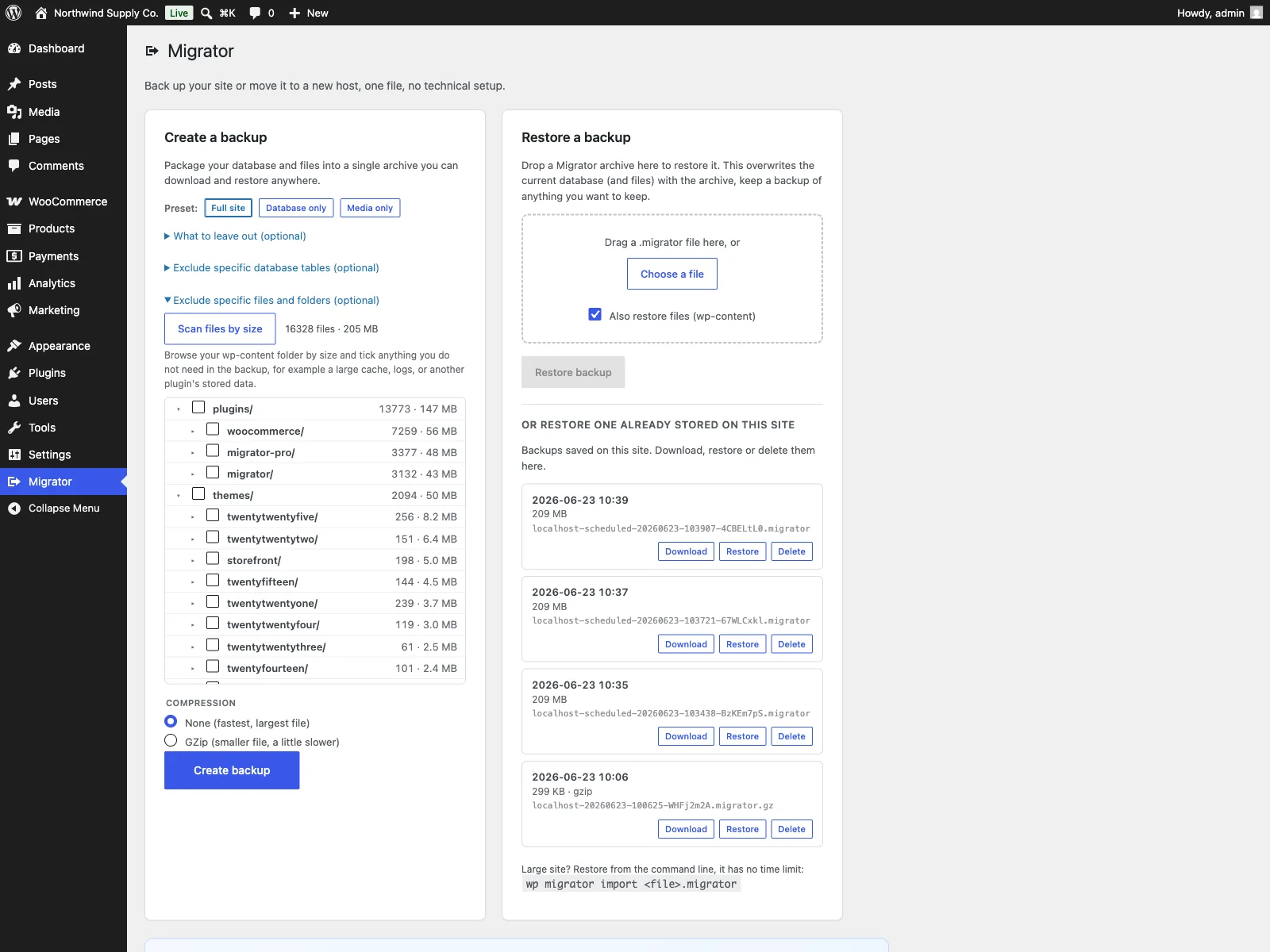 The built-in file-size explorer, where you exclude large folders before exporting.
- Install the plugin from Plugins > Add New, or upload it to
/wp-content/plugins/plogins-migrator. There are no required dependencies. - Activate it.
- Open Migrator in the admin menu, pick a preset (Full site is the safe default), adjust exclusions if you want, and create your first backup. On a large site, run
wp migrator exportinstead. - To migrate, download the archive, then on the destination install Migrator and drag the file onto the restore card. The URLs and paths are rewritten for you.
Practical tips
A tool gives you the mechanism; a sensible routine gives you the safety. A few pointers:
- Test the restore, not just the backup. A backup you have never restored is a guess. Periodically restore a recent archive onto a throwaway install and confirm the site comes up.
- Keep backups off the server. A backup that lives only on the same machine as the site disappears with the machine. Download archives and store them somewhere else.
- Trim what you do not need. Use the file-size explorer and exclusions to drop caches, revisions and transients. A smaller archive is faster to build, download and restore.
- Back up before risky changes. A fresh archive before a major update, a theme switch or a plugin you are unsure about turns a potential disaster into a one-click rollback.
- Use WP-CLI for anything large. If the browser export stalls, the command line has no timeout and will finish the job.
Migrator versus default WordPress
WordPress has no built-in backup or migration at all. Here is the difference for backup and migration specifically.
| Capability | Default WordPress | Migrator |
|---|---|---|
| Whole-site backup | None built in | One file: database + all of wp-content |
| Migrate to a new domain | Manual, error-prone | Serialization-safe URL and path rewriting |
| Restore in place after a problem | None | Yes, from the same archive |
| Selective backup | n/a | Exclude media, themes, plugins, cache, revisions and more |
| Integrity check | n/a | Per-item checksums catch a corrupt archive |
| Safety net on restore | n/a | Pre-import snapshot with automatic rollback |
| Large-site route | n/a | WP-CLI export and import, no timeout |
| External account required | n/a | No, fully self-hosted |
| WooCommerce-aware | n/a | Yes (handles session and Action Scheduler tables) |
| Cost | Free (core has none) | Free; Pro adds scheduling, cloud and multisite |
Free versus Pro
The free Migrator plugin is a complete backup, restore and migration tool, not a teaser. Whole-site archives, serialization-safe migration, selective backups, checksums, the pre-import safety snapshot and the WP-CLI commands are all included, with no artificial file-size limit.
Migrator Pro is an add-on that requires the free plugin to be installed and active, and it is for stores that want to automate the routine and push backups off the server. It adds scheduled and incremental backups so backups run on their own, cloud storage destinations (Amazon S3, Dropbox and Google Drive) to push copies off the server, multisite export and import, server-to-server transfer, and encrypted backups. The free edition stays a genuinely complete tool; Pro is about automating it and getting copies off-site.
Migrator vs Duplicator vs All-in-One WP Migration
Three plugins dominate WordPress backup and migration. The practical difference shows up in the free tier and in what each one charges to remove its main limit.
| Capability | Migrator | Duplicator | All-in-One WP Migration |
|---|---|---|---|
| Full backup and migration in free | Yes | Yes | Yes (with import limit) |
| Artificial size limit | None | None | 512MB in free |
| Self-hosted, no account | Yes | Yes | Yes |
| Serialization-safe URL rewrite | Yes | Yes | Yes |
| Scheduled and incremental backups | Pro | Pro (higher tiers) | Add-on / Pro |
| Cloud storage (S3, Dropbox, Google Drive) | Pro | Pro | Separate paid extensions |
| Multisite | Pro | Pro | Paid extension |
| Server-to-server transfer | Pro | Pro | No |
| Encrypted backups | Pro | Pro | No |
| Open source (GPLv2) | Yes | Core GPL | Core GPL |
The clearest gap is the import size limit: All-in-One WP Migration caps free imports at 512MB and charges to lift it, while Migrator imposes no artificial size limit in the free edition. Competitor data and pricing are as of June 2026; check the vendors’ sites for current details.
The short version
A WordPress backup must cover the database and the files together, and a migration must rewrite URLs serialization-safely or it will corrupt the site in ways you will not notice until later. Prefer a tool that is self-hosted, produces one file you control, checks its own integrity, snapshots before it restores, and handles both restore-in-place and move-to-a-new-host. The free Migrator plugin does all of that with no account and no size limit, including for a WooCommerce store; Pro adds scheduling, off-site cloud destinations, encryption and multisite when you want the routine to run itself.