WooCommerce store locator: pickup points and retailers
By Mariusz Szatkowski · Updated: 2026-09-11
If your WooCommerce store has any physical presence at all, customers will eventually need to find it. They want to know which branch is nearest, where a pickup point sits, which shops stock your brand, or where a service centre is located. WooCommerce, out of the box, has no answer to that question. It is built to sell and ship products, and it has no concept of a physical place, let alone a page that lists one. So the locations end up scattered: a hardcoded address in the footer, a paragraph on the About page, a PDF a customer has to download. This guide explains what a store locator actually is, why a fast searchable list is often the right tool, what a good locator needs, and how the free Locator plugin adds one to WooCommerce without a map key or any external service.
What a store locator actually is
A store locator is a page that lists the physical places connected to your store and helps a shopper pick the right one. The “places” vary by business. For a brand sold through resellers, they are stockists. For a chain, they are branches. For a store that offers collection, they are pickup points. For equipment that needs servicing, they are service centres. The common thread is that each location is a small, structured record: a name, an address, a way to get in touch, and the hours it is open.
The job of the locator is to take that set of records and present it so a customer can scan it, narrow it to their area, and act. “Act” usually means one of three things: read the address so they can travel there, check the opening hours so they do not arrive to a locked door, or tap the phone number to call ahead. A locator that delivers those three reliably has done its job, whether or not it draws a map.
Why a searchable list is often enough
The instinct, when you hear “store locator,” is to picture an interactive map covered in pins. Maps are useful when geography is genuinely the decision: when a customer is standing somewhere and needs the closest branch out of fifty. But for a great many stores, the list is the better tool, and it comes without the baggage a map carries.
An embedded map almost always means a third-party service. That service wants an API key, an account, and increasingly a billing relationship that charges per map load. It loads external scripts and tiles, which slow the page and add tracking the visitor never asked for. And it tends to fail in exactly the situations where a customer most needs the address, such as on a flaky mobile connection. A plain list of locations, rendered straight into the page, has none of those failure modes: it loads with the page, works without JavaScript, and shows the address whether or not a map ever paints.
Note: The free Locator plugin needs no Google Maps API key and no external service. Every location is rendered straight into the page HTML, so the directory works even with JavaScript turned off.
For most catalogues of locations, a customer does not need pins on a map to choose. They need to find their city in a list and read the details, and a search box that filters that list as they type gets them there faster than panning a map ever would. The map becomes worth its cost only when the list grows long enough that scanning it is tedious, or when the buying decision really does hinge on relative distance.
What a good store locator needs
Whether you build, buy or install, a store locator for WooCommerce should cover a handful of fundamentals:
- Easy location management. Each store is added once, in the admin, with structured fields. No editing template files to add a shop.
- The right fields per location. Name, full address, phone, email and opening hours cover what a customer needs to travel, call or plan a visit.
- Search the shopper understands. Filtering by city, postcode or store name, using the words a customer actually types.
- Control over what shows. Not every store wants to publish a phone number or hours on every card, so display should be a choice.
- Solid front-end behaviour. The directory should load fast, render without layout jumps, and stay usable for keyboard and screen-reader users.
- Privacy by default. A locator should not quietly ship visitor data to a third-party map provider just to print an address.
Notice what is deliberately optional on that list: the map itself. A map is a presentation choice you make on top of good location data, not a prerequisite for having a locator at all.
How Locator handles it
Locator for WooCommerce is a free, open-source plugin that adds exactly this kind of directory. The whole thing is built around two ideas: each store is a record you manage in wp-admin, and the [locator] shortcode prints those records as a searchable list anywhere you want them.
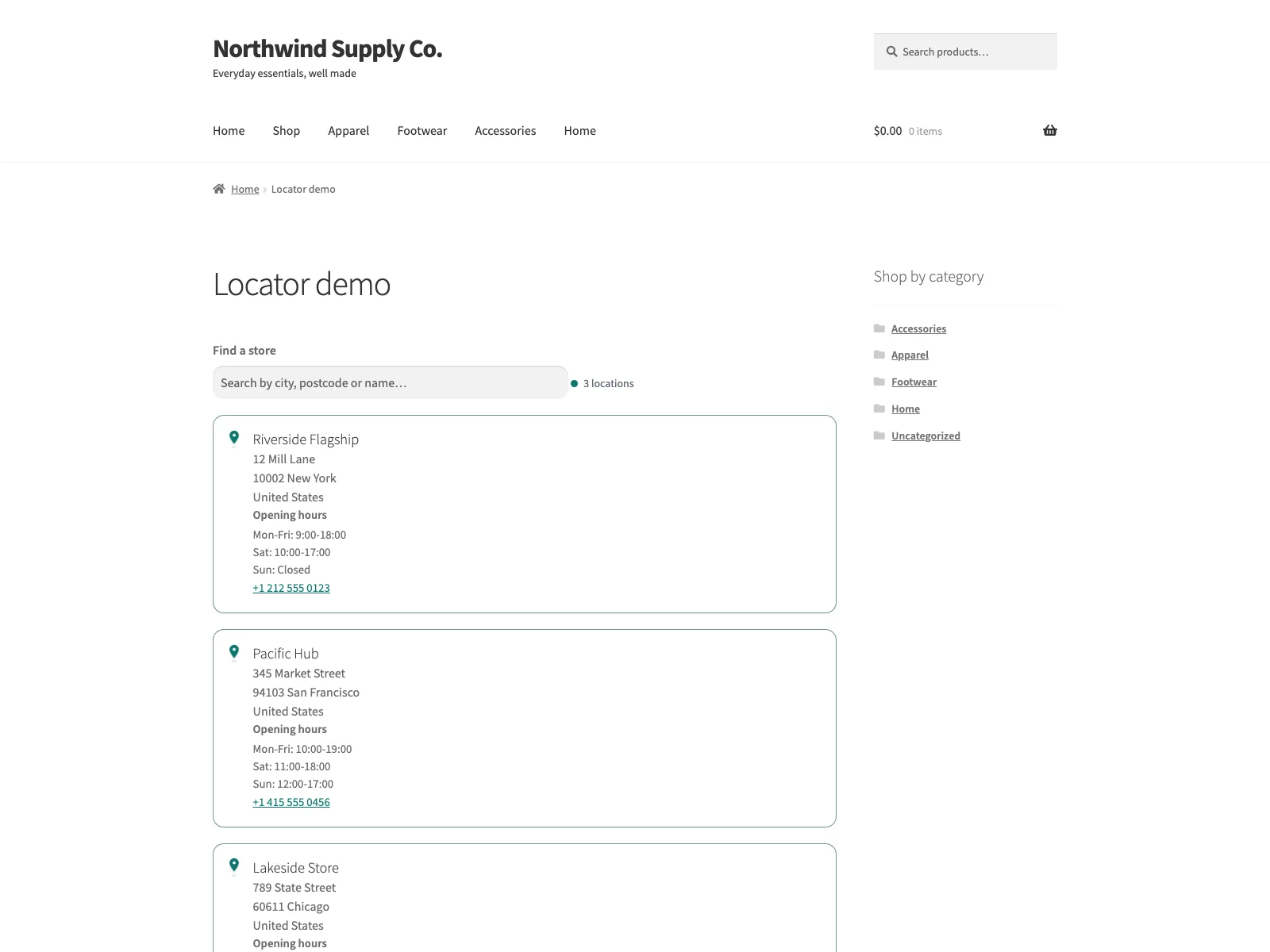 The searchable store directory on the storefront, no map key or external service required.
The store records
Locator registers store locations as their own post type, which appears under the WooCommerce menu as Store Locations. Each location keeps the fields a customer needs: name, a description, the street address, city, postcode and country, a phone number, an email address and opening hours. Locator also stores an optional latitude and longitude per location, typed in by hand, which the free plugin does not draw but an add-on can use for a map. Because every location is an ordinary WordPress post, you create, edit, reorder and delete them with tools you already know, with no custom code anywhere.
The storefront directory
You place the directory with one shortcode. Drop [locator] onto any page and Locator renders every store as a card in a list. The store name always shows; beneath it, the card prints the address block, opening hours and phone number for any store that has those values. The phone number is rendered as a click-to-call link, so tapping it on a phone dials the store directly.
Crucially, every location is printed in the page HTML. The directory is fully visible even with JavaScript turned off, which is what keeps it reliable on poor connections and friendly to search engines. There is no map, no Google Maps key, no API call and no third-party script. As the plugin’s own description puts it, your store data never leaves your site.
The search box
When JavaScript does run, Locator adds the search behaviour. The search box sits above the results, and as the visitor types, the plugin hides and shows cards to match, filtering against each store’s name, address, city, postcode and country. All of that happens in the browser, so no request is sent while the shopper types and nothing about their search is transmitted anywhere. If you only list a couple of shops, you can switch the search box off entirely and just show the cards.
Tip: Fill in city and postcode consistently on every location. Those are the fields the search box matches, so a store with a blank city cannot be found by a shopper typing their city.
The settings
Under WooCommerce > Store Locator you control two things. First, whether the search box appears above the results, which you would leave on for any list long enough to scroll and off for a handful of stores. Second, which detail fields appear on each card: address, opening hours and phone are each a toggle, and each one is only rendered when that particular store actually has a value, so you never get an empty “Phone:” label on a store that has none. The settings page carries inline help under each option and even shows an example card that updates to reflect the fields you have ticked, so you can see the result before you visit the live page.
The front-end quality
A few things make the directory feel finished rather than bolted on. The result count is announced through an ARIA live region as the list filters, the search field is fully keyboard-operable, and cards carry focus-visible outlines, so the locator works for assistive technology, not just a mouse. The stylesheet and script load only on pages where the shortcode actually rendered, rather than site-wide, and the markup is built to avoid layout shift as cards appear and filter. The storefront styles follow the visitor’s light or dark preference and honour the reduced-motion setting. It is translation-ready and ships a POT file.
Setting it up
Getting a directory live takes a few minutes:
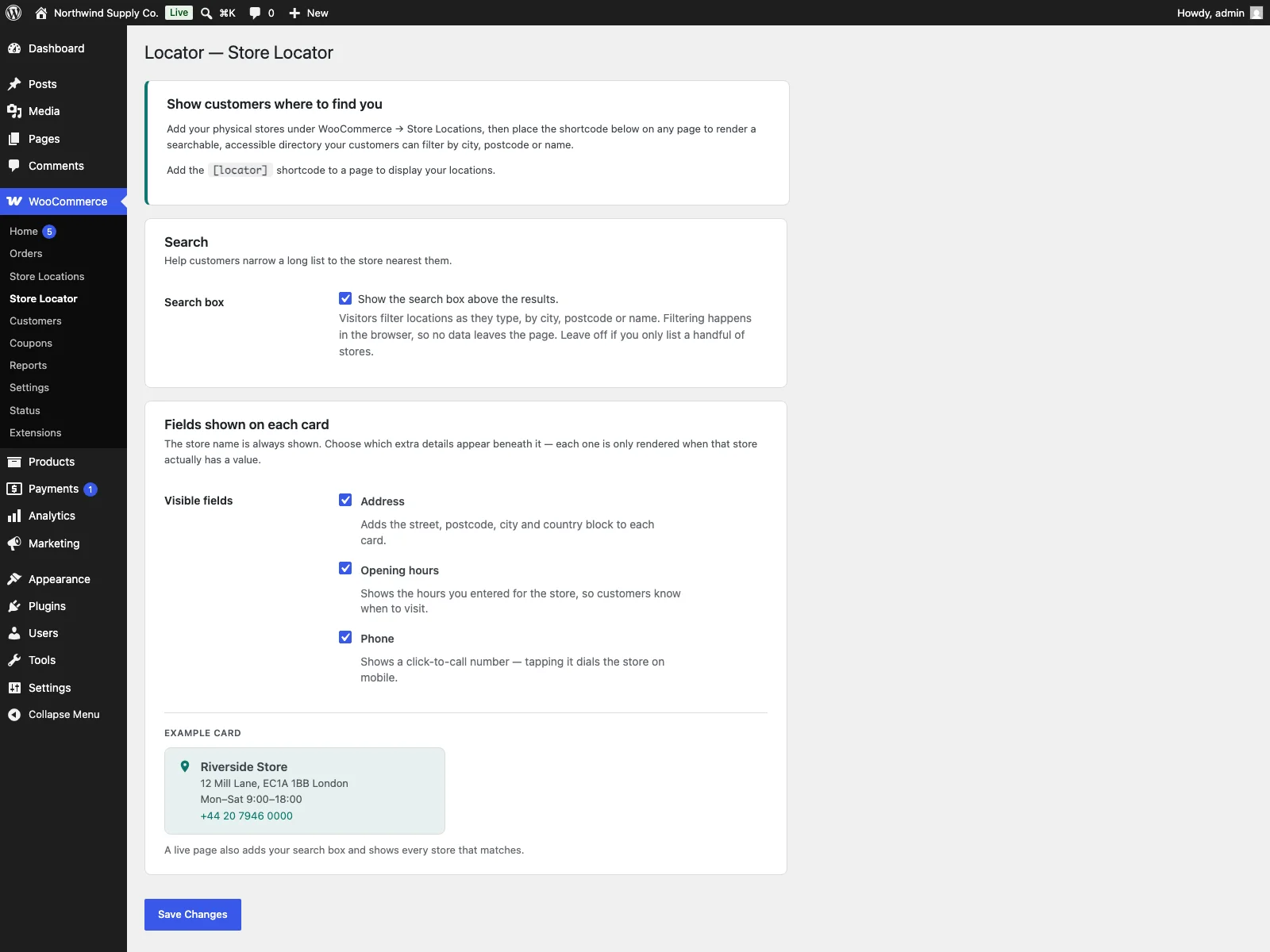 Each location is a record you manage in wp-admin, with address, hours and contact details.
- Install the plugin from Plugins > Add New, or upload it to
/wp-content/plugins/plogins-locator. WooCommerce must be installed and active. - Activate it.
- Go to WooCommerce > Store Locations and add your stores, filling in the address, phone, hours and any other details you want to show.
- Open WooCommerce > Store Locator and choose whether the search box shows and which fields appear on each card.
- Add the
[locator]shortcode to any page, such as a “Where to buy” or “Find a store” page, and publish.
That is the whole flow. From then on, adding a shop is a matter of adding one more location record; the page updates itself.
Practical tips for a useful locator
The plugin gives you the mechanism. A few habits make the directory genuinely useful:
- Write addresses the way customers search. Fill in city and postcode consistently, because those are the fields the search box matches. A store with a blank city cannot be found by someone typing their city.
- Keep opening hours current. The most frustrating locator is one that sends a customer to a shop that turns out to be closed. If hours change seasonally, update the record rather than leaving stale times on the card.
- Decide what to publish per card. A network of dealer locations might show address and hours but not a phone number; your own branches might show all three. Use the field toggles to match the directory to the kind of locations you list.
- Give the page a findable name. “Find a store,” “Where to buy,” or “Pickup points” are the phrases customers look for. Link to it from the footer and the checkout so it is easy to reach.
- Reach for a map only when the list earns it. If your directory grows past the point where scanning is comfortable, or distance is the deciding factor, that is the moment a map starts to pay for itself.
Note: A map is a presentation choice layered on top of good location data, not a prerequisite for a locator. It earns its cost only once the list is long enough that scanning is tedious, or distance is genuinely the deciding factor.
Locator versus default WooCommerce
WooCommerce has no store locator of any kind. Here is the difference for physical locations specifically:
| Capability | Default WooCommerce | Locator |
|---|---|---|
| Manage physical locations | None | A Store Locations post type under WooCommerce |
| Fields per location | n/a | Name, address, city, postcode, country, phone, email, hours, coordinates |
| Storefront directory | None | [locator] shortcode prints a searchable card list |
| Customer search | None | Client-side filter by name, address, city, postcode, country |
| Click-to-call phone | n/a | Yes, on cards where phone is shown |
| Works without JavaScript | n/a | Yes, every location is in the page HTML |
| External map service | n/a | None in free; data never leaves the site |
| Accessibility | n/a | ARIA live count, keyboard search, focus-visible cards |
| Map view | None | Add-on ([locator_map] in Locator Pro) |
| Cost | Free (no locator) | Free; Pro adds map, regions and CSV import |
Free versus Pro
The free edition is a complete directory, not a teaser: managed location records, the searchable card list, the field toggles and the accessible front end are all included, and the free plugin alone is enough for most stores. Locator Pro is a separate add-on, distributed through Freemius, that requires the free plugin to be installed and active and extends it rather than replacing it. Pro adds three things. An interactive map: the [locator_map] shortcode renders every geocoded location on a map built with Leaflet and OpenStreetMap tiles, with no API key, no account and no per-load billing, and it degrades to a server-rendered list when JavaScript is unavailable. Region grouping: the [locator] list can be grouped by a Region field on each store, with stores that have no region falling back to their country. And bulk CSV import: a dedicated import screen creates or updates locations from a CSV file, which matters once you are managing dozens of stores rather than a handful. Pro is feature-complete at those three; there are no further premium wedges planned.
The short version
WooCommerce can sell and ship but has no idea where your physical locations are, so they end up scattered across your site in places customers cannot search. A store locator turns those locations into structured records and presents them so a shopper can find the nearest one, read its hours and call ahead. For most stores a fast, searchable list beats an embedded map: it loads with the page, works without JavaScript, and never hands visitor data to a third-party service. The free Locator plugin delivers exactly that, with managed locations, a [locator] shortcode, client-side search and an accessible front end. Add Locator Pro only when you genuinely need an interactive map, region grouping or CSV import on top.