WooCommerce social proof: real recent-sale notifications
By Mariusz Szatkowski · Updated: 2026-07-05
A first-time visitor cannot tell whether anyone actually buys from your store. The product photos look fine, the price is reasonable, the checkout works, and yet there is no sign that real people have trusted this shop with their money. Social proof closes that gap by showing recent purchases as they happen, turning an empty-feeling page into one that is visibly active. The trap is that the most common way stores add social proof is also the most damaging: invented counters, fake popups and heavy plugins that slow the page and shove content around. This guide explains what a social proof sales notification really is, why it works, what an honest implementation has to get right, and how the free Proof plugin does it without faking anything or hurting performance.
What social proof is and why it matters
Social proof is the simple human signal that other people are doing the thing you are considering. In a physical shop you read it without thinking: a queue at the till, other customers carrying baskets, a shelf that is half empty because the product sells. Online, every one of those cues disappears. A new shopper lands on a product page with no idea whether the store ships a hundred orders a day or has never sold a single unit. That uncertainty is friction, and friction at the moment of decision is where carts get abandoned.
A recent-sale notification puts one of those missing cues back. A small popup that reads “Alex from Berlin bought Hoodie 2 hours ago” tells a first-time visitor, in a glance, that the shop is real and active and that other people have already committed. It is not a hard sell. It is ambient evidence, the online equivalent of seeing someone else walk out with the same bag you are holding.
The reason this matters so much is that trust is the scarcest thing a small or unfamiliar store has. Big marketplaces borrow trust from their brand; an independent WooCommerce store has to earn it on the page. Genuine recent activity is one of the few signals that earns it cheaply and immediately, without a discount or a guarantee.
Why fake social proof backfires
Here is the problem with how social proof is usually bolted on. A large category of plugins will happily generate popups from invented data: random names, random cities, a counter that ticks up whether or not anything sold. The moment a shopper suspects the activity is fake, and shoppers are very good at spotting it, the effect inverts. Instead of building trust you have demonstrated that the store is willing to lie to you, and that doubt spreads to the price, the reviews and the refund policy. Fabricated social proof is worse than none.
Warning: The moment a shopper suspects the activity is fake, the effect inverts and the doubt spreads to the price, the reviews and the refund policy. Fabricated social proof is worse than none.
The second problem is performance. Many social-proof plugins ship a heavy JavaScript bundle, often dragging jQuery and a tracking script along with it, and they frequently inject the popup in a way that pushes the rest of the page around as it loads. That movement is Cumulative Layout Shift, one of the Core Web Vitals that affects both the shopper’s experience and how search engines judge the page. A notification that makes the buy button jump under the shopper’s cursor is doing active harm.
So the bar for doing this well is high and specific. The data must be genuine, the personal information must be minimal, and the whole thing must be invisible from a performance and layout point of view.
What a good social proof notification needs
Before looking at any plugin, it helps to have a checklist. A trustworthy recent-sale notification has a handful of non-negotiable properties.
- Real data only. Every popup should come from an actual order, never a counter or demo data. If there is nothing genuine to show, nothing should appear. Silence is honest; a fabricated number is not.
- Privacy-safe fields. A first name and a city are enough to feel personal and credible. Surnames, email addresses, full postal addresses and order numbers have no business being pushed into a public page where anyone can read the source.
- A graceful fallback. Not every order has a first name. The notification needs a neutral substitute so it never shows a blank or, worse, leaks another field to fill the gap.
- No performance cost. A small script with no dependencies, data that is cached rather than re-queried on every view, and a popup pinned to a fixed corner so it never reflows the page.
- Accessibility. Screen-reader users should have each notification announced without losing their place, and keyboard users should be able to dismiss it. Motion-sensitive users should not be subjected to animation they did not ask for.
- Control over presentation. You should decide which corner the popup uses and how often it appears, so it fits the store rather than fighting it.
Notice what is not on that list: aggressive, attention-grabbing behaviour. Social proof works precisely because it is ambient. A popup that demands a click or covers the content it is supposed to support has misunderstood the job.
How Proof does it
Proof for WooCommerce is a free, open-source plugin (GPLv2 or later) that builds notifications from real orders and nothing else. It is deliberately narrow: it does the recent-sale popup well, and it does not try to be a marketing suite.
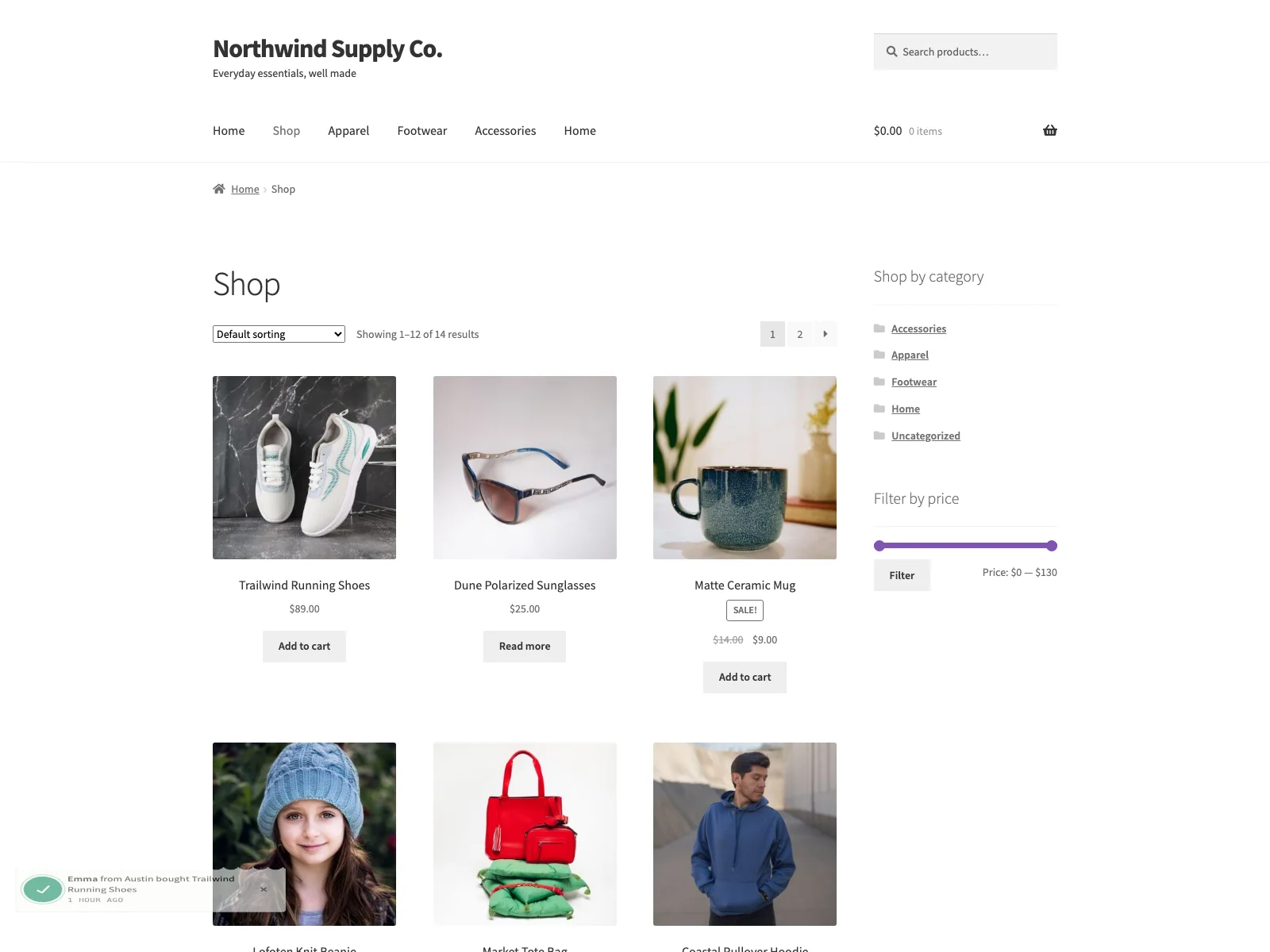 A recent-sale notification built from a real order, pinned to the corner of the storefront.
Every popup comes from a real WooCommerce order with the status completed or processing. There is no invented data, no demo mode, no fake counter. Proof looks at up to the 40 most recent qualifying orders from roughly the last 30 days, and from each one it takes only the first product name plus the buyer’s first name and city. If there are no completed or processing orders in that window, Proof loads nothing at all: no popup, no script, no empty widget. A new store with no sales yet stays clean rather than advertising its emptiness with fabricated activity.
It is privacy-safe by design. Each popup carries exactly two pieces of customer data, the billing first name and the billing city. Surnames, emails, full addresses and order numbers never leave the server and are never sent to the page. When an order has no first name, Proof substitutes a neutral word you choose, with “Someone” as the default, so the popup stays personal without leaking anything.
Note: Each popup carries exactly two pieces of customer data, the billing first name and city. Surnames, emails, full addresses and order numbers never leave the server.
Performance and layout are handled the way the checklist demands. The front-end script is plain JavaScript with no dependencies, so there is no jQuery to load. It is loaded with defer in the footer, and the popup sits in a fixed corner, so it never reflows content or adds to Cumulative Layout Shift. The order query is the kind of thing that could be expensive on a busy store, so Proof runs it at most once every five minutes and stores the result in a transient. A storefront under load does not re-query orders on every page view; it reads the cached feed.
Accessibility is built in rather than bolted on. The popup is a role="status" region with aria-live="polite", so a screen reader announces each notification without grabbing focus from whatever the user is doing. The dismiss control is a real button with a visible focus ring, focus is never trapped, and the styling respects prefers-reduced-motion so animation is dropped for users who have asked for less of it, and prefers-color-scheme: dark so the popup looks right in a dark theme.
Proof declares compatibility with WooCommerce High-Performance Order Storage (HPOS) and with the Cart and Checkout blocks, so it sits cleanly on a modern WooCommerce install. It contacts no external service: the popups are built from your own orders and the data stays on your site.
Setting it up
Getting Proof live takes only a few minutes:
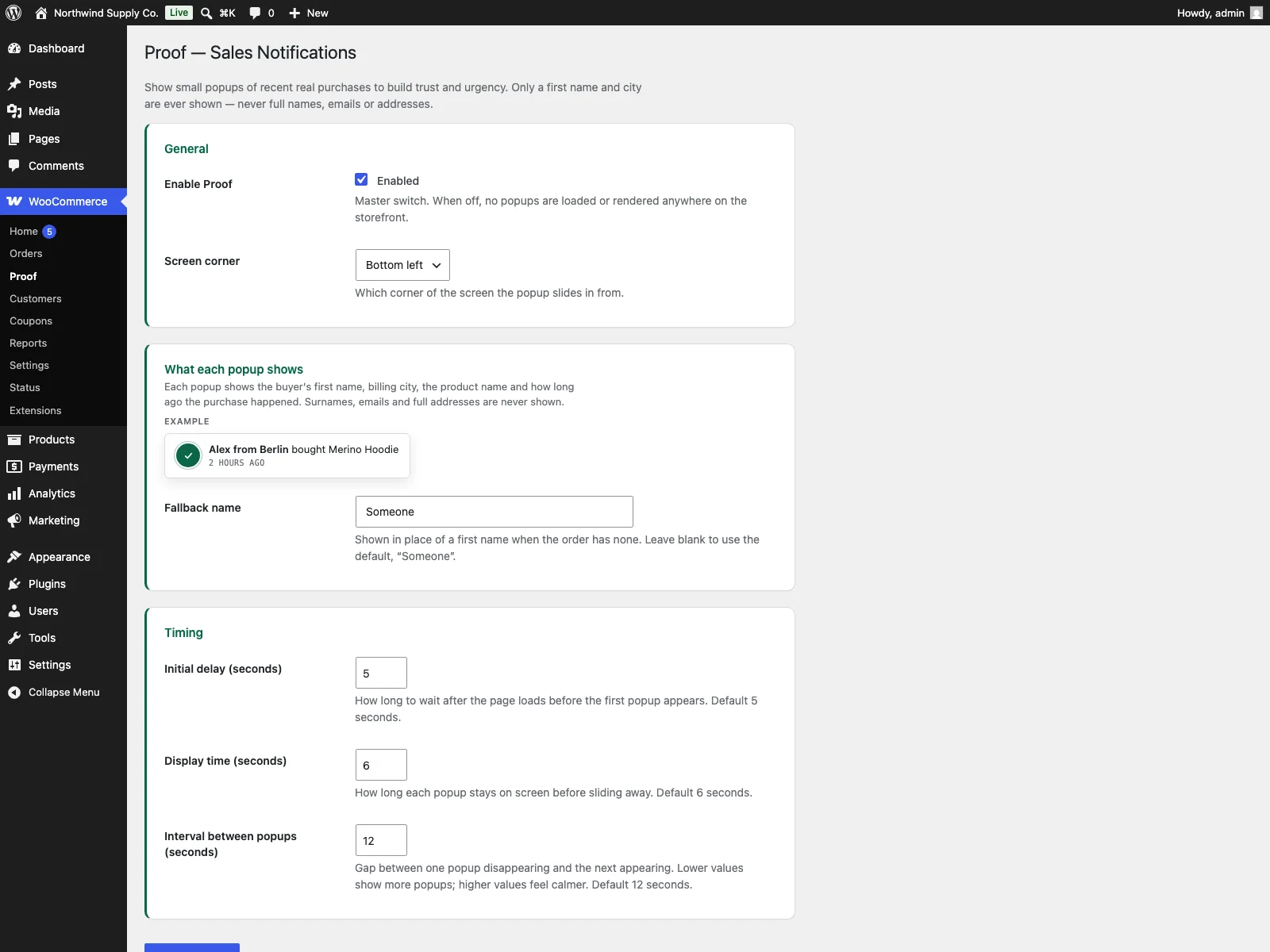 The Proof settings screen under WooCommerce, with corner, fallback word and timing controls.
- Install and activate WooCommerce, then upload the
prooffolder to/wp-content/plugins/or install the zip from Plugins -> Add New -> Upload Plugin, and activate Proof. - Open WooCommerce -> Proof. Here you have a master on/off switch, a choice of which of the four corners the popup appears in, the fallback word used when an order has no first name, and the timing controls: the initial delay before the first popup, how long each popup stays on screen, and the gap between popups.
- Leave the defaults if you like. They are reasonable, so most stores need no tuning.
- Once you have completed or processing orders from the last 30 days, open the storefront and confirm a popup appears in your chosen corner.
That is the whole configuration surface. There is no account to create, no script tag to paste, and no external dashboard.
Practical tips for using social proof well
The plugin gives you the mechanism; how you use it is what makes it effective rather than annoying.
- Tune the timing to your traffic, not your enthusiasm. A long-ish initial delay lets the shopper start reading before anything appears, and a generous gap between popups keeps the store feeling active without feeling like it is nagging. If popups stack up too quickly, they read as desperate.
- Pick a corner that does not fight your layout. A bottom corner usually stays out of the way of the header, the main navigation and the buy button. Whichever corner you choose, glance at it on mobile as well as desktop, because the corner that is empty on a wide screen may overlap content on a narrow one.
Tip: Glance at your chosen corner on mobile as well as desktop. A corner that sits empty on a wide screen may overlap content on a narrow one.
- Let an empty store stay empty. If you have just launched and have no qualifying orders, Proof shows nothing, and that is correct. Resist the urge to fake activity to fill the gap. Come back once real orders exist.
- Keep the fallback word neutral. “Someone” works because it is plausible and unremarkable. Avoid anything that reads as a placeholder or draws attention to the fact that a name was missing.
- Treat it as one trust signal among several. Recent-sale popups pair well with genuine product reviews, clear shipping and returns information, and visible contact details. Social proof reinforces trust; it does not replace the other things that earn it.
Reviews as social proof: a PRO feature
Recent-sale popups are the free feature, and for many stores they are all that is needed. If you also want recent, approved product reviews mixed into the same rotation, for example “Maria reviewed Hoodie ★★★★★”, that is the paid Proof Pro add-on. It blends recent approved reviews with recent sales in one rotation and gives you a minimum-rating filter so only reviews of a chosen number of stars or more appear, plus a configurable maximum review count and maximum review age so the rotation stays current. Like the free plugin, it is built entirely on real WooCommerce review data and fabricates nothing; if there are no matching reviews, it invents none. It shows only the reviewer’s first name and the product name, never the review text or email, and it caches its feed in a transient just as the free plugin does. Proof Pro requires the free Proof plugin and is configured under WooCommerce -> Proof Pro.
Proof versus default WooCommerce
WooCommerce has no built-in social proof notifications at all. Here is the difference for social proof specifically:
| Capability | Default WooCommerce | Proof |
|---|---|---|
| Recent-sale popups | None built in | Yes, from real orders |
| Data source | n/a | Completed or processing orders only |
| Order window | n/a | Up to 40 orders from the last ~30 days |
| Personal data shown | n/a | First name and city only |
| Missing first name | n/a | Neutral fallback word you choose |
| Corner and timing control | n/a | Four corners, configurable delay, display time and interval |
| Performance | n/a | Vanilla JS, deferred, cached in a transient, no layout shift |
| Accessibility | n/a | role=status, aria-live, keyboard dismiss, motion-safe, dark-aware |
| External calls | n/a | None; data stays on your site |
| Product-review popups | n/a | PRO add-on |
| Cost | Free (core has none) | Free; PRO adds review popups |
Free versus PRO
The free Proof plugin is a complete tool, not a teaser. Recent-sale popups from real orders, privacy-safe fields with a chosen fallback, four-corner placement, full timing control, the cached feed, the accessible markup and HPOS and blocks compatibility are all included, and the plugin removes its two options and the cached feed cleanly on uninstall. Proof Pro adds one focused capability on top: recent, approved product-review popups mixed into the same rotation, with a minimum-rating filter and limits on review count and age. The add-on is intentionally complete at that, with no further paid wedges planned, so the decision is simple: install the free plugin for recent-sale social proof, and add Pro only if you also want reviews in the rotation.
The short version
Social proof works only when it is real. Show recent purchases from actual orders, keep the visible fields to a first name and a city with a neutral fallback, and use a lightweight widget that does not slow the store or shift the layout. Fake counters and heavy popups do the opposite of what they promise: they erode trust and harm performance. The free Proof for WooCommerce plugin does the honest version, building corner popups from genuine completed and processing orders, caching the data, staying accessible and contacting no external service, and the Proof Pro add-on mixes in approved product reviews if you want more.