WooCommerce product add-ons: extra fields and paid options
By Mariusz Szatkowski · Updated: 2026-09-11
Most products are sold exactly as listed, but plenty are not. A mug gets a name printed on it, a bouquet carries a gift message, a laptop ships with an extended warranty, a cake comes in the colour the customer asks for. In each case the shopper is supplying information or choosing an extra before they buy, and that choice has to travel all the way to whoever fulfils the order. WooCommerce handles fixed product variations well, but it gives you no simple way to add a free-text field, a paid checkbox or an extra select to a product. This guide explains what product add-ons are, how they differ from variations, what a good add-on tool needs, and how the free Add-Ons plugin adds that capability to WooCommerce.
What product add-ons actually are
A product add-on is an extra field shown on the product page, above the Add to cart button, that lets the customer customise what they are buying. The common shapes are a text field (an engraving message, a name, a date), a checkbox (gift wrapping, an extended warranty, “yes, add a card”) and a select drop-down (a finish, a colour, a service tier). Some add-ons are free and exist only to collect information; others carry a price that is added to the cart line when the customer picks them.
It is worth separating add-ons from variations, because the two are often confused and they solve different problems. A variation is a fixed, pre-defined combination of attributes: a t-shirt in red, size large, with its own SKU and its own stock count. You build every variation in advance, and the customer picks one off the shelf. An add-on is open-ended input that the customer supplies at purchase time. You cannot pre-build a variation for every possible name someone might want engraved, or every gift message they might write. Add-ons fill that gap: they capture the part of the order that you genuinely cannot enumerate ahead of time, plus the simple yes/no and pick-one extras that would clutter your variation matrix if you tried to model them as attributes.
Why add-ons matter
Add-ons do two jobs at once, and both affect the bottom line. The first is revenue. Gift wrapping, priority handling, an engraving fee, an extended warranty: these are small paid extras that a shopper will happily accept at the moment of purchase but would never come back for later. Surfacing them on the product page, priced clearly, turns them into incremental order value without any extra marketing.
The second job is accuracy. When a customer needs to tell you something about their order, the worst outcome is that they tell you in a channel you do not control. If there is no field for the engraving text, it arrives as an order note, an email after checkout, or a reply to the confirmation, and now fulfilment has to chase it. A proper add-on captures that information on the product page, validates it, and attaches it to the order line, so the warehouse sees the name to engrave or the message to print without anyone having to ask. The cost of a missing or mishandled customisation is a remake, a refund or an unhappy customer, which is far more expensive than the field would have been to set up.
Note: Add-ons differ from variations: a variation is a fixed, pre-built combination with its own SKU and stock, while an add-on is open-ended input the customer supplies at purchase time, such as a name to engrave.
What a good add-on tool needs
Whether you build, buy or install, a product add-on tool for WooCommerce should cover a handful of fundamentals. Use this as a checklist:
- A small set of useful field types. Text, checkbox and select cover the large majority of real-world add-ons. More exotic inputs matter for some stores, but the basics carry most of the weight.
- Free and paid options. Some add-ons collect information for free; others should add a fixed amount to the cart line. The tool needs both, and the price needs to flow into the WooCommerce totals automatically.
- Required-field validation. If an engraving message is mandatory, the product should not be addable to the cart until the field is filled. Validation has to happen on the server, not only in the browser, so it cannot be bypassed.
Warning: Required-field and length validation must run on the server, not only in the browser. Client-side checks alone can be bypassed, letting an empty or over-length value through to the order.
- Sensible input limits. A text field that prints onto a physical product has a real character limit. The tool should let you set minimum and maximum lengths and enforce them.
- End-to-end persistence. The choice must appear in the cart, at checkout and on the final order. If fulfilment cannot see it, the add-on has failed at its main job.
- A light front end. Add-on scripts and styles should not load on pages that have no add-ons, and the storefront should inherit your theme rather than fighting it.
- Clean data handling. No sprawling custom tables for simple field definitions, and a tidy uninstall that does not leave debris behind.
Notice what is deliberately modest on that list. A basic add-on tool does not need conditional logic or file uploads to be useful; the majority of stores need text, a checkbox and a select, priced correctly and saved to the order. Keeping the core small is a feature, not a limitation.
How Add-Ons handles it
Add-Ons for WooCommerce is a free, open-source plugin that adds exactly this capability. You define a list of add-ons per product in the WooCommerce product editor, the customer fills them in on the product page, and their choices follow the cart item all the way to the order. Add-on definitions are stored as standard product meta, with no custom database tables, so the plugin stays small and fast.
 Text, checkbox and select add-on fields on the storefront product page, right above Add to cart.
The field types
Each add-on has a label, a field type, an optional required flag and an optional price. Three field types are included in the free version:
- Text, for free-form input such as an engraving message or a name. Text fields can carry minimum and maximum character limits, and the storefront shows a live counter while the server validates the same limits before add to cart, so an over-length message cannot slip through.
- Checkbox, for a simple yes/no extra such as gift wrapping or an add-on service.
- Select drop-down, for a pick-one choice such as a finish or a tier, where each individual option can carry its own price.
Pricing and required fields
Any add-on can be free or paid. Give the row a price, or give individual select options their own prices, and Add-Ons adds that amount to the WooCommerce cart line automatically. Leave the price at zero for options that exist only to collect information, like a personalised message. Tick the Required flag on an add-on and the product cannot be added to the cart until the shopper completes it, which is the right behaviour for anything fulfilment genuinely needs.
Cart, checkout and order display
The whole point of an add-on is that fulfilment can see it, so the customer’s choices appear in the cart, at checkout, and on the finished order. There is no separate step to copy the engraving text onto the order; the selection travels with the line item.
The display settings
Settings live under WooCommerce > Add-Ons, and they control how the option group looks on the product page. You can set the group heading shown above the fields, show or hide option prices, toggle the required-field asterisk, and wrap the options in an optional bordered card so they stand out from the rest of the product page. These are presentation choices, applied across your products, so the add-on block matches the look you want without touching templates.
The honest scope
The free plugin focuses on fast text, checkbox and select options. File uploads and conditional logic are not part of it; those are PRO features, covered below. For a store that needs an engraving field, a gift-wrap checkbox and a finish selector, priced and saved to the order, the free edition is the complete tool.
Setting it up
Getting add-ons live takes a few minutes:
- Install the plugin from Plugins > Add New, or upload it to
/wp-content/plugins/plogins-addons. WooCommerce must be installed and active. - Activate it.
- Edit a product, open the Add-Ons tab in the Product data panel, and add your options: a label, a field type, the required flag if you need it, and a price if the option is paid.
- Optionally visit WooCommerce > Add-Ons to set the group heading and the display options.
That is it. The options now appear on the product page just above Add to cart, and each customer’s choices flow through the cart and checkout onto the order. Because definitions are stored as product meta, removing the plugin cleans up only its own options while keeping your per-product definitions, so re-installing restores them. The plugin loads no remote scripts, fonts or trackers; its CSS and JS are served from your own server.
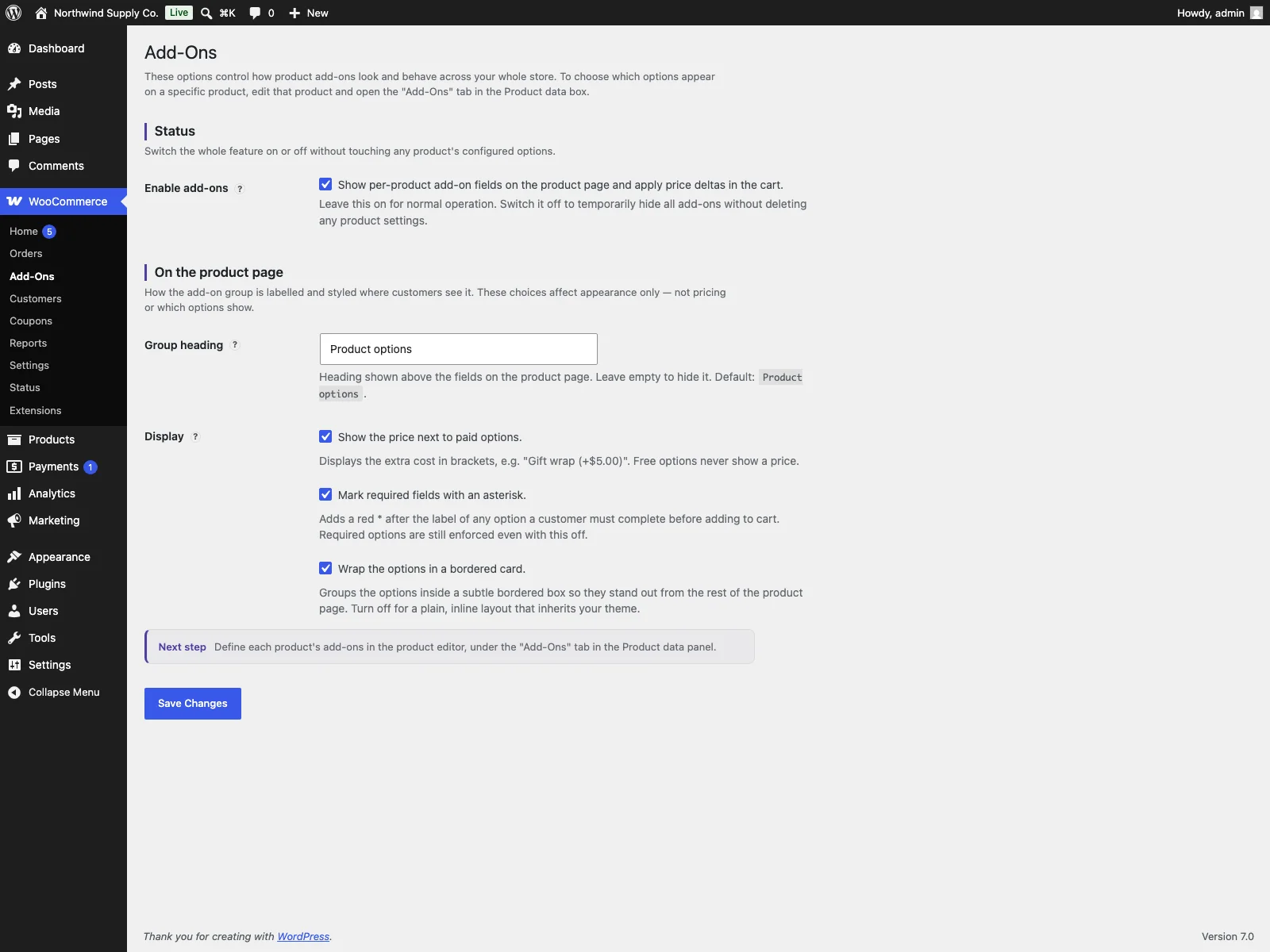 The Add-Ons settings screen under WooCommerce, where you set the group heading and display options.
Practical tips for product add-ons
A tool gives you the mechanism; how you use it decides whether add-ons help or annoy. A few pointers:
- Keep the field count low. Every extra field on a product page is friction. Ask only for what fulfilment genuinely needs. One engraving field beats three optional ones the customer skips.
- Set realistic text limits. If a name engraves onto 20 characters of metal, set the maximum to 20. The live counter then tells the customer before they over-type, rather than you telling them after they have paid.
Tip: Match text-field character limits to the physical product. A live counter warns the customer before they over-type, rather than you catching it after they have paid.
- Make the truly required fields required. If you cannot fulfil without the gift message, mark it required so the order cannot complete without it. Reserve free, optional fields for nice-to-have context.
- Price extras transparently. Show option prices when the add-on costs money so the customer is not surprised at checkout, and consider hiding prices for free informational fields to keep the block clean.
- Write clear labels. “Message to engrave (max 20 characters)” beats “Text”. The label is your only chance to set expectations before the customer types.
Add-Ons versus default WooCommerce
WooCommerce gives you variations, but no general way to add an extra field to a product. Here is the difference for product add-ons specifically:
| Capability | Default WooCommerce | Add-Ons |
|---|---|---|
| Free-text input on a product | None built in | Text fields with min/max length |
| Simple paid extra (checkbox) | None | Yes, free or paid |
| Pick-one option with its own price | Variations only | Select with per-option pricing |
| Price added to the cart line | Variation price only | Yes, per field or per select option |
| Required-field validation | n/a | Yes, server-side before add to cart |
| Choice shown in cart, checkout and order | n/a | Yes, end to end |
| Storage | n/a | Product meta, no custom tables |
| Display controls (heading, prices, card) | n/a | Yes, from the settings page |
| Cost | Free (no add-on fields) | Free; PRO adds logic, uploads and more |
Free versus PRO
The free edition is a complete tool for everyday customisation: text, checkbox and select fields, free or paid, with required validation, text-length limits and end-to-end order display. Add-Ons Pro builds on that foundation for stores that need more, and it requires the free plugin to be installed and active. PRO adds conditional logic (show or hide add-ons based on the customer’s other choices), file uploads (let customers attach artwork, a proof or a brief, with per-field size and extension rules), quantity-based options (multiply an add-on’s price by a customer-entered quantity), image and colour swatches for select options, per-option inventory that tracks stock per row and hides sold-out choices, and per-character text pricing for personalisation charged by the typed character. It is delivered through Freemius for licensing and automatic updates.
The short version
Use product add-ons when the customer needs to supply something that is not a full WooCommerce variation: an engraving message, a gift-wrap checkbox, a paid select choice. A good add-on tool needs a few useful field types, free and paid pricing, required-field and length validation, and choices that follow the order through to fulfilment. The free Add-Ons plugin covers all of that with text, checkbox and select fields stored cleanly as product meta; Add-Ons Pro adds conditional logic, file uploads, quantity pricing, swatches, option inventory and per-character text pricing when your products need more.