Digital product passport (DPP) in WooCommerce: what a shop shows
By Mariusz Szatkowski · Updated: 2026-11-06
A digital product passport (DPP) is a set of data about one specific product that the customer reaches electronically, through a data carrier such as a code or a link. Under Regulation (EU) 2024/1781, the Ecodesign for Sustainable Products Regulation (ESPR), a product needs one only where the delegated act for its product group requires it. The passport itself comes from the manufacturer or importer. An online shop’s part is narrower: as a dealer, it has to make the passport easily accessible for customers and potential customers, including in distance selling. WooCommerce has no field and no place on the product page for that. The free Pasporto plugin gives the passport link a fixed place on the WooCommerce product page.
What a digital product passport is
ESPR defines a digital product passport in Article 2, point 28 as “a set of data specific to a product that includes the information specified in the applicable delegated act adopted pursuant to Article 4 and that is accessible via electronic means through a data carrier”. Three parts of that definition matter for a shop:
- Specific to a product. A passport describes a product, not a product category. Each product carries its own identifier and its own record.
- Content set by a delegated act. The regulation does not fix what every passport holds. Which data a passport contains is set in the delegated acts (Article 9(2), point (a)).
- Reached through a data carrier. A data carrier is a linear barcode symbol, a two-dimensional symbol or another medium read by a device (Article 2, point 29). It belongs on the product, its packaging or accompanying documentation, as the delegated act specifies (Article 10(1), point (b)).
The manufacturer or importer provides that record. The shop leads the customer to it before the purchase.
Which products need a passport, and from when
Under ESPR, a product needs a passport only where the delegated act for its product group requires one. Article 9(1) states that the information requirements “shall provide that products can only be placed on the market or put into service if a digital product passport is available in accordance with the applicable delegated acts”. The regulation does not name the product groups or the dates. Each delegated act does that for its own group, so the answer for a given product sits in the delegated act covering it.
Batteries follow a separate regulation with a fixed date. Regulation (EU) 2023/1542, Article 77(1), requires a battery passport from 18 February 2027 for three types of battery placed on the market or put into service:
- Each LMT battery (batteries for light means of transport).
- Each industrial battery with a capacity greater than 2 kWh.
- Each electric vehicle battery.
For batteries, the economic operator placing the battery on the market ensures that the passport information is accurate, complete and up to date (Regulation (EU) 2023/1542, Article 77(4)).
Warning: Do not assume a passport duty from the product type alone. Under ESPR, the duty starts with the delegated act for the product group; check that act, or ask the manufacturer or importer, before you plan the work.
Who does what: manufacturer, importer and shop
ESPR splits the passport between the operator who places the product on the market and the dealer who sells it:
- Manufacturers ensure that a passport is available (Article 27(1), point (c)).
- Importers ensure that a passport is available (Article 29(2), point (c)).
- Dealers ensure that customers can easily access it (Article 31(2)). A dealer includes a shop selling at a distance (Article 2, point 55).
Article 31(2) reads: “Dealers shall ensure that the digital product passport is easily accessible for customers and potential customers, including in the event of distance selling, as set out in Article 9(2), point (e), and specified in the applicable delegated acts adopted pursuant to Article 4.” Because a potential customer has not bought yet, the product page, before the order, is the natural place for the passport link.
Where the passport link comes from
The shop gets the identifier or link from the operator placing the product on the market. ESPR Article 10(3) requires that operator to:
- Provide dealers and providers of online marketplaces with a digital copy of the data carrier or the unique product identifier, so they can make it accessible to potential customers who cannot physically access the product (point (a)).
- Provide that digital copy or a webpage link free of charge, promptly and in any event within five working days of receiving a request (point (b)).
For a WooCommerce shop that means the passport address is a supplier input, like an EAN or a safety sheet. If a supplier has not sent it, the shop can ask, and the regulation gives that request a five-working-day answer time.
Tip: Add the passport URL and the unique product identifier to the product data you request from suppliers, next to the GTIN and the declaration of conformity, so new products arrive with it.
What a good passport display needs
A passport display on a product page needs five properties:
- Visible before purchase. The link sits on the product page, where potential customers look.
- One click to the passport. A clear button opens the passport, preferably in a new tab so the shopper keeps the product page.
- The identifier next to it. The unique product identifier lets a customer or an authority match the page to the physical product.
- Accurate per product. Each product shows its own identifier and link, never a value copied from another product.
- Machine-readable. The same data in the Product structured data the page already prints, so search engines read one product with its passport, not two separate products.
How Pasporto handles it
Pasporto adds a Digital Product Passport (DPP) section to WooCommerce product pages: a button that opens the product’s passport, its unique product identifier and the sustainability data you enter for each product. The same data is added to the Product structured data WooCommerce already prints. It is a free plugin under the GPL, with no PRO edition, no account and no external service. It requires WordPress 6.5, PHP 8.1 and WooCommerce 8.0 or newer.
Seven product fields
Pasporto adds seven fields to the General tab of the classic product editor, under the heading “Digital Product Passport (DPP)”:
| Field | What goes in it |
|---|---|
| Unique Product ID (UPI / GTIN) | GS1 Digital Link, GTIN, EPC or another passport identifier |
| Passport URL | The passport address supplied by the manufacturer or importer |
| Primary Material | For example “Organic cotton 80%, recycled polyester 20%” |
| Recycled Content (%) | A number from 0 to 100; values outside the range are clamped |
| Carbon Footprint (kg CO2e) | A number, 0 or more, per unit |
| Circularity class (manufacturer-declared) | Not specified, A, B, C, D or E, only if the manufacturer states a class |
| Declaration of Conformity (URL) | A link to the EU declaration of conformity |
Pasporto does not calculate the circularity class. The field exists for a class the manufacturer states, and the storefront labels it as manufacturer-declared.
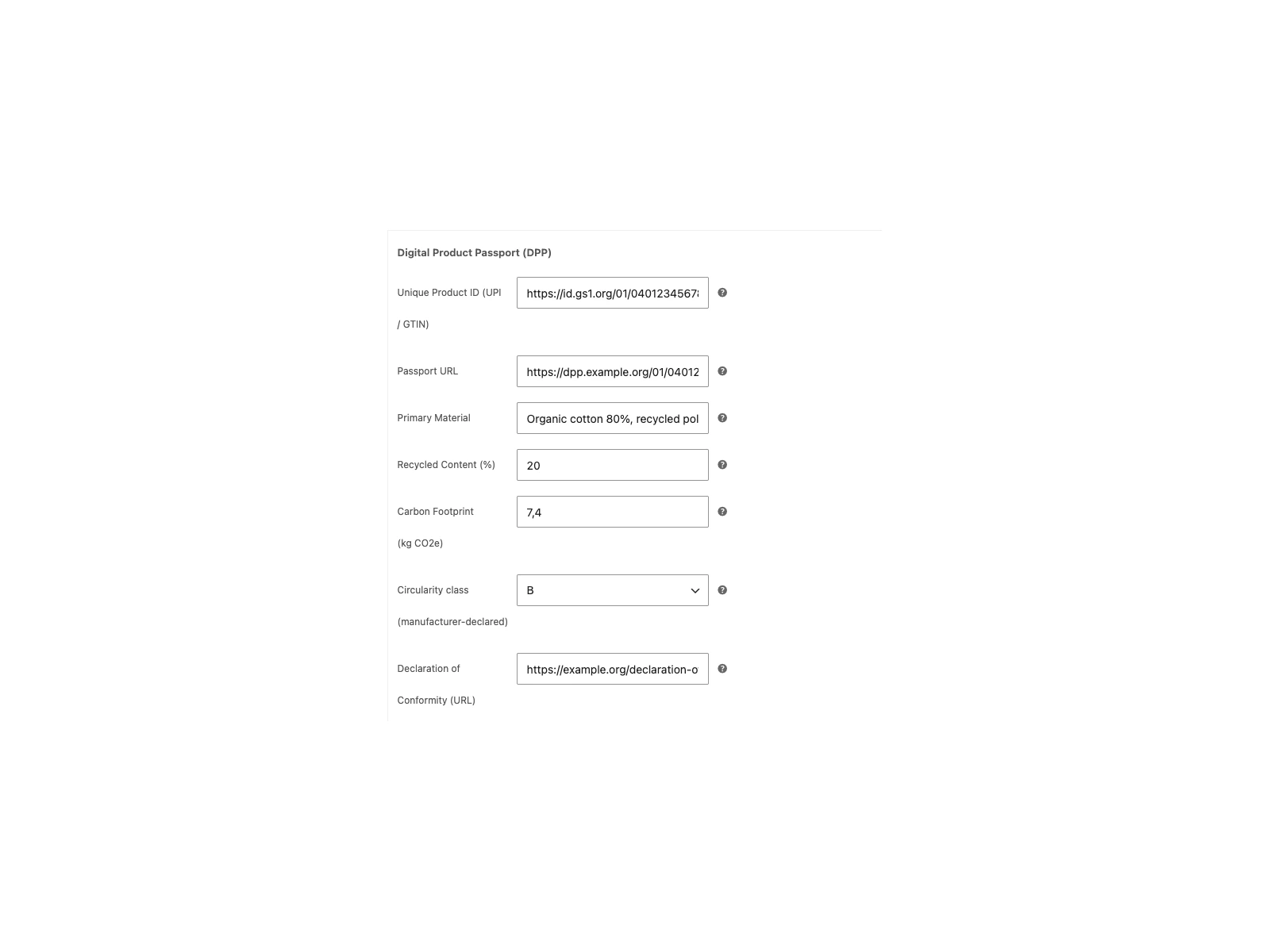 The seven passport fields in the General tab of the product data box.
What the customer sees
The passport section appears only on products with at least one filled field. A product with no passport data gets no tab and no section. By default the section has its own “Digital Product Passport (DPP)” tab after the WooCommerce tabs. In the settings you can move it under the product summary, just above the add to cart form.
The section shows a table with each filled field and an Open the product passport button when a passport URL is set. The button and the declaration of conformity link both open in a new tab. The section shows on the single product page only, not in shop or category listings. Pasporto loads no scripts and makes no external requests.
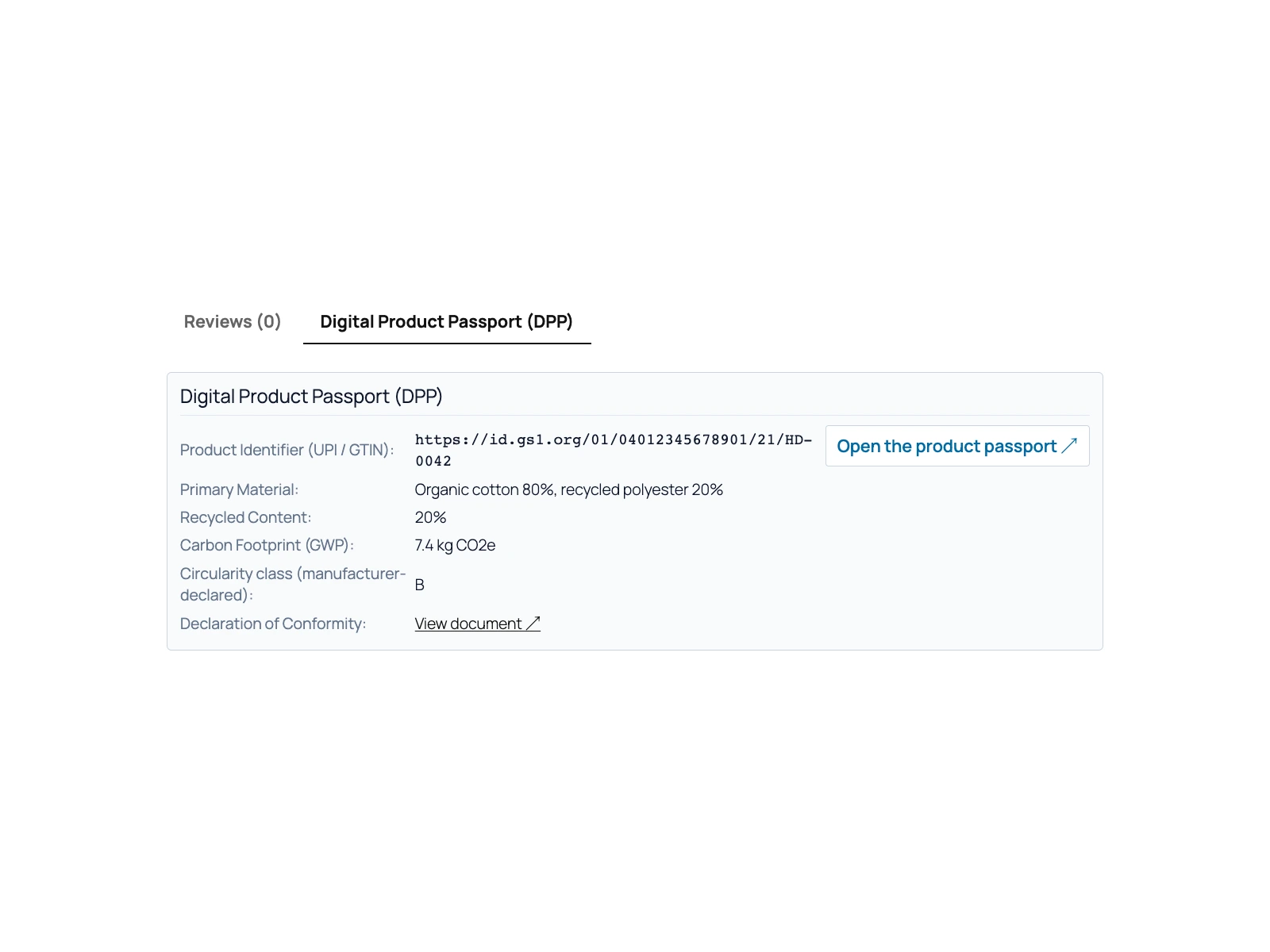 The Digital Product Passport (DPP) tab on a product page.
Structured data without a second Product
Pasporto extends WooCommerce’s own Product markup through the woocommerce_structured_data_product filter instead of printing a second Product. The unique product identifier goes into identifier when WooCommerce has not set one. Each other filled field is appended to additionalProperty as a PropertyValue: digitalProductPassport, primaryMaterial, recycledContentPercentage, carbonFootprint, circularityClass and declarationOfConformity.
Duplicating a product
A duplicated product keeps the material and sustainability data, but its unique product identifier and passport URL are cleared, because they belong to the original product.
Setting it up
- Install and activate Pasporto. The passport section is on right away and uses its own product tab; nothing has to be saved first.
- Edit a product and fill in the Digital Product Passport (DPP) fields in the General tab.
- Optional: open WooCommerce > Product Passport (DPP) to move the section under the product summary or switch it off. The screen is available to users with the
manage_woocommercecapability, so shop managers can use it too.
Switching the display off hides both the section and the structured data, while the product fields stay editable. Deleting the plugin removes its settings on every site of a multisite network; product data stays. The Pasporto documentation lists every setting, field and limit.
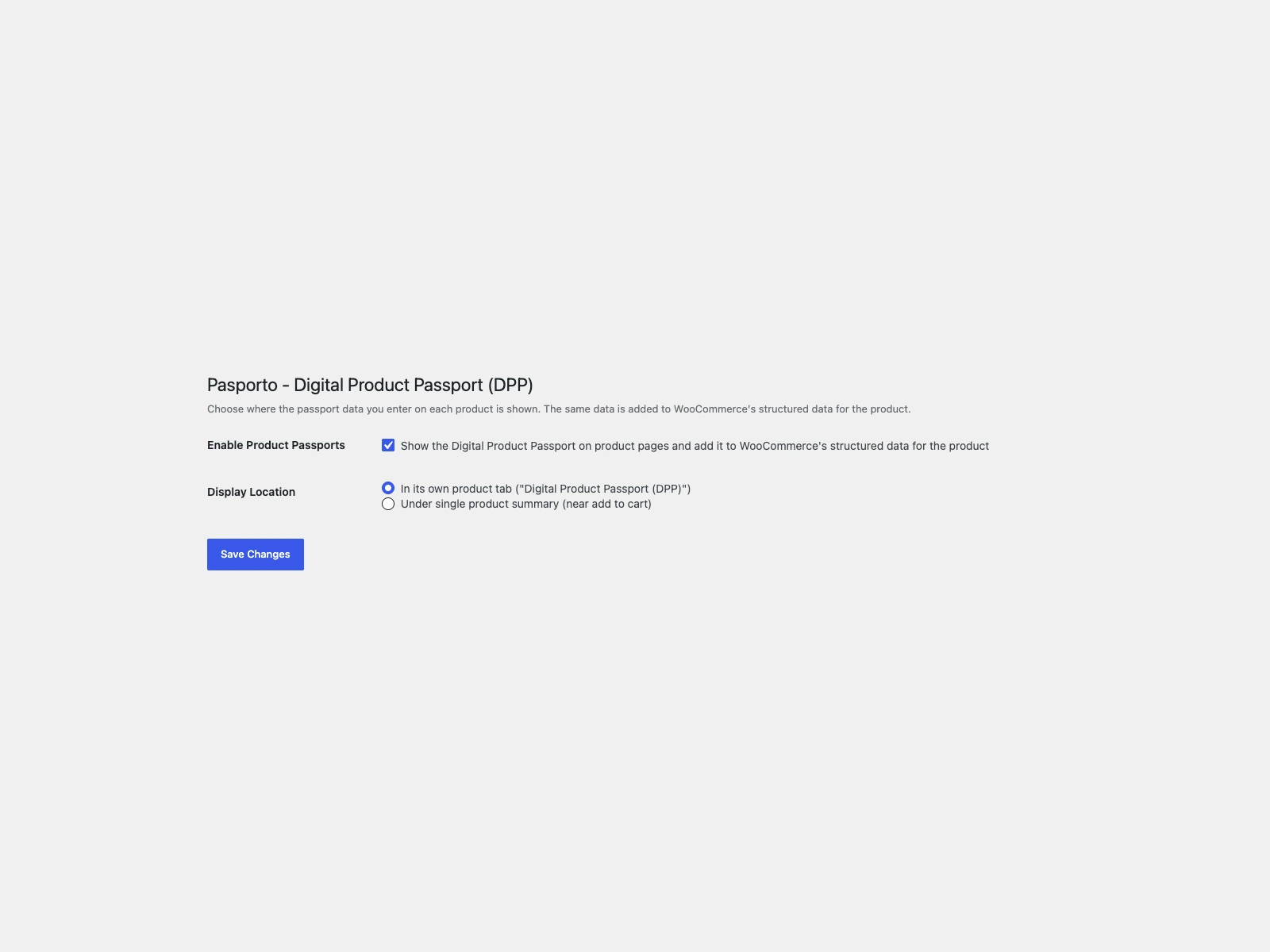 The settings screen: display on or off, and tab or product summary placement.
What Pasporto does not do
Pasporto shows the link and data you enter; it is not a passport system. Its limits:
- No QR code or other data carrier. It shows a link and the identifier. The data carrier belongs on the product, its packaging or documentation.
- No passport creation or hosting. The passport lives where the manufacturer or importer publishes it.
- No legal check. It does not check your data against any delegated act and does not decide whether a product needs a passport.
- No per-variation fields. One set of data per product, shown for all its variations.
- Classic product editor only. The block-based product editor is not supported.
- Single product page only. The section does not appear in shop or category listings.
Practical tips
- Fill in only what the supplier gives you. Material, recycled content, carbon footprint and circularity class are manufacturer data. An empty field is hidden; a guessed value is shown as fact.
- Check the passport URL opens.
- Re-check identifiers after duplicating. Pasporto clears them on the copy; enter the copy’s own identifier and passport URL before publishing.
- Keep variations in mind. If variations need different passports, one parent-level set of data does not cover them.
- Treat the passport as part of product safety data. Shops that already collect manufacturer and safety details for the GPSR for WooCommerce: manufacturer and safety information guide can request the passport data in the same supplier workflow.
Pasporto versus default WooCommerce
| Capability | Default WooCommerce | Pasporto |
|---|---|---|
| Passport URL field | None | Yes, per product |
| Unique product identifier for the passport | None for the passport | GTIN, GS1 Digital Link, EPC or other |
| Passport section on the product page | None | Own tab or under the product summary |
| Button that opens the passport | None | Yes, in a new tab |
| Material, recycled content, carbon footprint | Custom attributes at best | Dedicated fields |
| Structured data | Product markup | Same Product, plus identifier and additionalProperty |
| Duplicate keeps old passport link | n/a | No, identifier and URL are cleared |
| QR code or data carrier | None | None |
| Cost | Free | Free, no PRO edition |
The short version
A digital product passport is a product-specific data set reached through a data carrier, defined in ESPR Article 2, point 28. Under ESPR, a product needs one only where the delegated act for its product group requires it; for LMT batteries, industrial batteries above 2 kWh and electric vehicle batteries, Regulation (EU) 2023/1542 requires a battery passport from 18 February 2027. Manufacturers and importers make the passport available, and a shop selling at a distance ensures that customers and potential customers can easily access it. Pasporto gives that link a fixed place on the WooCommerce product page, with the identifier, the supplier’s sustainability data and matching structured data. It does not create the passport, draw a data carrier or make the legal assessment.